Customer Ratings & Reviews


- Model:
- SM-R630NZAAXAR
- SKU:
- 12558964
Rating by feature
- Sound Quality
Rating 4.8 out of 5 stars
- Battery Life
Rating 4.6 out of 5 stars
- Connectivity
Rating 4.8 out of 5 stars
Customers are saying
Customers regard the sound quality as the standout feature of this product, with many users also praising its comfortable fit and impressive battery life. While the design, connectivity, and overall feature set receive positive feedback, some users have expressed minor concerns regarding the sensitivity of the touch controls and the maximum volume levels. Overall, the product is highly regarded for its performance and user experience.
This summary was generated by AI based on customer reviews.
The sound is horrible after a while
||Posted . Owned for 1 month when reviewed.This reviewer received promo considerations or sweepstakes entry for writing a review.The sound is horrible after a while. Does not recommend
No, I would not recommend this to a friendBrand response from Samsung
Posted .Hello KATTYM, thanks for taking the time to reach out and share your feedback with us regarding your experience using the Samsung Galaxy Buds3 Pro. If your Galaxy Buds3 Pro earbuds have no or low volume and poor sound quality on one or both buds, there may be a couple reasons why. You might be wearing the earbuds incorrectly, or the buds could have accumulated dust or debris. Additionally, the audio quality could be affected by outdated software, a low battery, and several other things. Check out, "No, low, or poor audio quality on Samsung earbuds" and "How to wear your Samsung Galaxy Buds3, Buds3 Pro, or Buds3 FE" to help resolve what you may be experiencing with your device. Please feel free to reach out to Support afterward if you have any questions for us or if you would like further assistance. Thank you for being a valued Samsung customer. - Debra

- Pros mentioned:Fit
No bass and not loud. They just sit on your ear.
||Posted . Owned for 1 month when reviewed.This reviewer received promo considerations or sweepstakes entry for writing a review.No bass what so ever, very flat sound. Buds pro2 blows this away. Buds fit tight into ears. These just sit on your ears. I love alot of bass and this is flat on all accounts. don't know about battery because I returned them 15 minutes after I bought them.
No, I would not recommend this to a friend Battery life sucks
||Posted .This reviewer received promo considerations or sweepstakes entry for writing a review.The battery life is garbage. The intelligent part of the ear buds are cool but man 2 hour battery life is terrible.
No, I would not recommend this to a friendBrand response from Samsung
Posted .Hey Moonfamily2k11, thank you for finding the time to share your sentiments with us about your Samsung Galaxy Buds3 Pro. Your feedback is invaluable to us as we strive to provide the best products with superior functionality on the market to our customers. Samsung provides a 12-month warranty on our products for manufacturing defects in materials and workmanship. While all of Samsung's earbuds are built to last the entire day, the buds' battery life and charging times may differ depending on the model you have and how you use them. The Buds3 Pro provide up to 26 hours of play time per charge, which can be extended to up to 30 hours with a fully charged case. If you're experiencing less than optimal battery life on your Galaxy Buds3 Pro, check out "All about your Samsung earbuds’ battery life" to help resolve what you may be experiencing with your device. If you have any questions or if you would like any further assistance, please do not hesitate to reach out to Support. Thank you for being a trustworthy Samsung customer. - Debra
Could be better
||Posted . Owned for 1 month when reviewed.This reviewer received promo considerations or sweepstakes entry for writing a review.Battery not so great. They take a bit to get used to
I would recommend this to a friendBrand response from Samsung
Posted .Aloha ChrisH, thank you for finding the opportunity to share your sentiments with us about your Samsung Galaxy Buds3 Pro. We value your feedback as we strive to improve the design and functionality of our product line. Samsung provides a 12-month warranty for manufacturing defects in materials and workmanship. While all of Samsung's earbuds are built to last the entire day, the buds' battery life and charging times may differ depending on the model you have and how you use them. The Buds3 Pro provide up to 26 hours of play time per charge, which can be extended to up to 30 hours with a fully charged case. Feel free to check out, "All about your Samsung earbuds’ battery life" if you would like to learn more. Feel free to reach out to Support if you would like to share any other feedback with us by contacting Support. Thank you for being a staunch Samsung customer. - Debra
Decent Headphones - Horrible Warranty
||Posted .This reviewer received promo considerations or sweepstakes entry for writing a review.I would not recommend. As a Samsung user, I'm disappointed in the warranty coverage. I experienced my earbuds beeping every 3-5 seconds, a similar issue I experienced with my Google Pixel Buds. Google replaced my Buds with the warranty coverage no issue. Samsung advised me that there's water damage to the charging case/cradle, therefore my warranty is voided and my earbuds can't be replaced. I've never had an issue with the charging case/cradle since I've purchased the earbuds. I feel Samsung is using a technicality in the situation. I would suggest the Google Pixel Buds which not only have a comparable sound quality, but you'll receive better warranty coverage and support as well.
No, I would not recommend this to a friendBrand response from Samsung
Posted .Aloha Kent, thank you for finding the opportunity to share your sentiments with us about your Samsung Galaxy Buds3 Pro. We value your feedback as we strive to improve the design and functionality of our product line. As you know, Samsung provides a 12-month warranty for manufacturing defects in materials and workmanship. We also offer extended warranty options on eligible devices where certified technicians will take care of accidental drops and spills, as well as screen repairs and mechanical breakdowns. We would be more than happy to assist you with what you may be experiencing, however, without being able to ask you any follow up questions, I recommend reaching out to Support for further assistance with troubleshooting your device. Thank you for being a steadfast Samsung customer. - Debra
Poor quality
||Posted . Owned for 3 months when reviewed.This reviewer received promo considerations or sweepstakes entry for writing a review.After using these earbuds for a couple of weeks , the battery only lasts maybe an hour on one of them. Do not purchase these. It’s a waste.
No, I would not recommend this to a friendBrand response from Samsung
Posted .Aloha WayneG, thank you for finding the opportunity to share your sentiments with us about your Samsung Galaxy Buds3 Pro. We value your feedback as we strive to improve the design and functionality of our product line. As you know, Samsung provides a 12-month warranty on our products for manufacturing defects in materials and workmanship. The Galaxy Buds3 Pro can provide up to 26 hours of play time per charge, which can be extended to up to 30 hours with a fully charged case. Feel free to check out, "The battery life of your Samsung earbuds" if you would like to learn more. If your Galaxy Buds3 Pro case isn't charging the earbuds, here's a few things you can so right away to help resolve what you may be experiencing with your device:
1. Check for debris on the charging contacts inside the case and on the earbuds.
2. Ensure that your case is charging correctly.
3. Clean the contacts with a soft, dry cloth. Dust, wax, or other debris can build up on the charging contacts, preventing proper contact and charging.
Let us know if you have any questions or if you would like any further assistance afterward by contacting Support. Thank you for being a staunch Samsung customer. - Debra
Don't do it
||Posted .This reviewer received promo considerations or sweepstakes entry for writing a review.Stopped working after a couple of uses. Do NOT recommend.
No, I would not recommend this to a friendBrand response from Samsung
Posted .Hey KodiH, thank you for taking the opportunity to reach out to share your feedback with us regarding your experience using the Samsung Galaxy Buds3 Pro. We value your candor as we continue to improve our product line based on our consumer feedback. Samsung offers a 12-month warranty on your device for manufacturing defects in materials and workmanship. We would be more than happy to assist you with whatever you may be experiencing with your Galaxy Buds3 Pros but without having any details available regarding what you may be experiencing and without being able to ask you any follow up questions to probe further, I recommend contacting Support for further assistance. Thank you for choosing Samsung! - Debra
Do not buy preowned, reburbished etc
||Posted . Owned for 1 month when reviewed.This reviewer received promo considerations or sweepstakes entry for writing a review.Bought a month ago open box excellent condtion one side is already not charging
No, I would not recommend this to a friendFail
||Posted . Owned for 3 weeks when reviewed.This reviewer received promo considerations or sweepstakes entry for writing a review.Let me begin with these things have no battery life. A few hours and they're dead. Second after only two weeks the right side bud will no longer charge. The return window on them is only two weeks so now im stuck with a very expensive failed product at the mercy of samsungs warranty process.
No, I would not recommend this to a friendBrand response from Samsung
Posted .Hey BKenney. We see that you reached out to share your thoughts on the Galaxy Buds3 Pro. Galaxy Buds3 Pro provides up to 26 hours of playtime per charge, which can be extended to up to 30 hours with a fully charged case. To conserve battery power on your earbuds, follow these tips: When not in use, keep the earbuds in the charged charging case with the cover closed. Additionally, adjust the notification settings using the Galaxy Wearable app if you're using an Android phone, or adjust the notification settings in the Galaxy Buds app if you're using an iOS device. We also noted that you are having challenges connecting the right bud. Please check out our article called "No, low, or poor audio quality on Samsung earbuds" for options to help troubleshoot. Samsung products are covered by a 12-month limited warranty against manufacturing defects in material and workmanship. You also have the option to purchase additional coverage with Samsung Care+ for eligible devices, which provides extended protection and extra support. If this persists after doing so, please reach out to us at Support so that we can further assist you. -Kelvin
Meh
||Posted . Owned for 2 months when reviewed.This reviewer received promo considerations or sweepstakes entry for writing a review.Nothing special. Sounds about same as buds 2 pro. Skip on it or wait for it to go on sale
No, I would not recommend this to a friendBrand response from Samsung
Posted .Hello there MsMiku, thank you for finding the available time out of your day to share your sentiments with us about your Samsung Galaxy Buds3 Pro. We value your feedback as it allows us the opportunity to improve the functionality and design of our products as we strive to be innovative. If you would like to share additional feedback with us regarding the performance, functionality, or durability of your Galaxy Buds3 Pro or if you would like any further assistance, please feel free to contact us again at your earliest convenience. Thank you for being a steadfast Samsung customer. - Debra
- Pros mentioned:Battery life
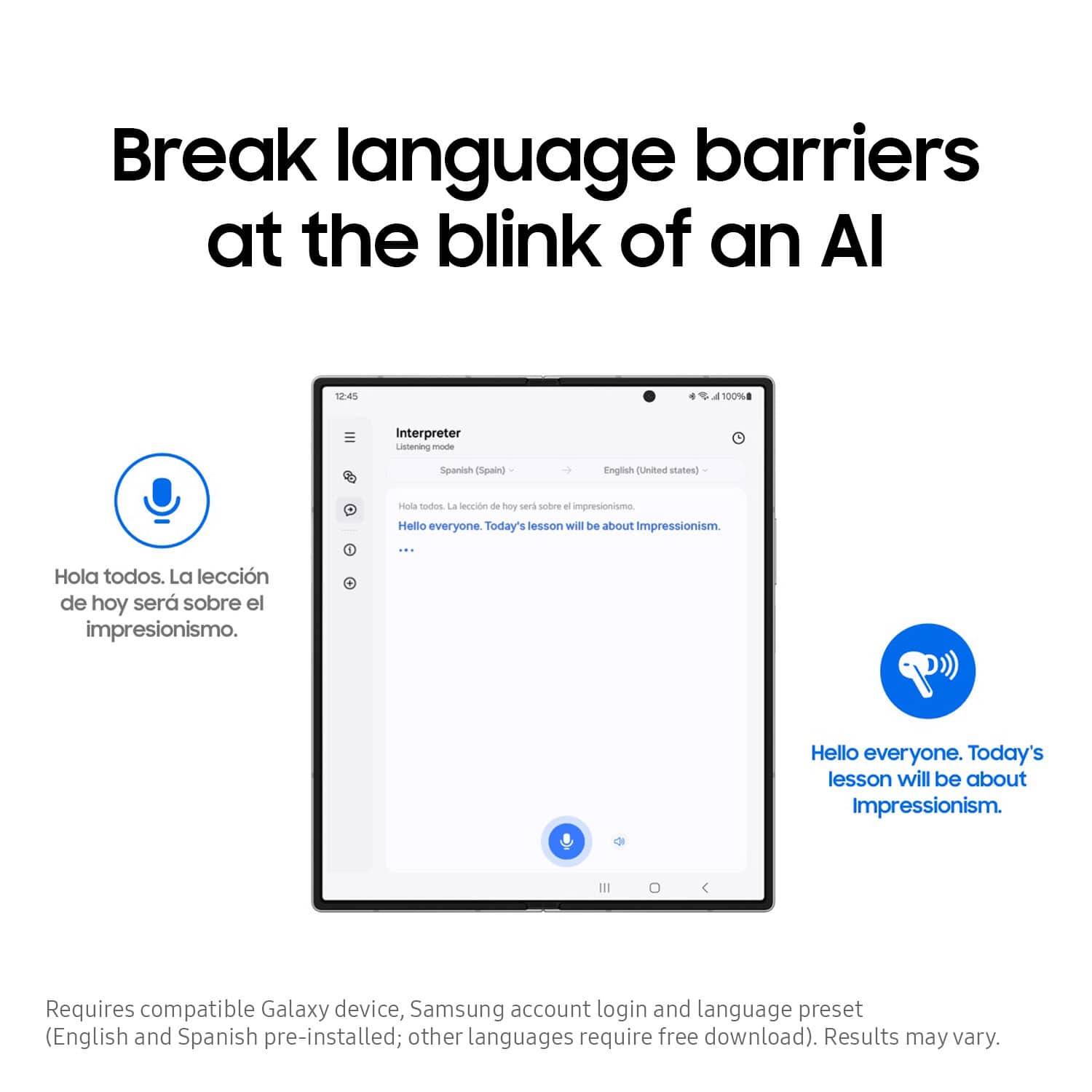
Translation Feature is a complete JOKE!!!!!
||Posted . Owned for 3 months when reviewed.This reviewer received promo considerations or sweepstakes entry for writing a review.Bought these in the hopes of being able to use the translation feature at work and per usual with Samsung products lately, I was sadly disappointed. They sound just ok, which for a flagship product is a joke. Do have to say the battery life is extremely good.
No, I would not recommend this to a friendBrand response from Samsung
Posted .Aloha k2board2003, thanks for taking the time out of your busy day to share your thoughts with us about your Samsung Galaxy Buds3 Pro. As we strive to be innovative and make improvements on the design and functionality of our product line, your feedback is invaluable. The Galaxy Buds3 Pro require a compatible Samsung Galaxy phone in order to utilize select Galaxy AI features like Real-Time Interpreter. Without knowing more details regarding what you may be experiencing with your Galaxy Buds3 Pro and without being able to ask you any clarifying questions, I recommend reaching out to Support if you would like any further assistance and/or help with troubleshooting your device. Thank you for being a steadfast Samsung customer. - Debra
Worst galaxy buds ive ever had.
||Posted . Owned for 1 month when reviewed.This reviewer received promo considerations or sweepstakes entry for writing a review.Ive had several galaxy buds since the originals. These are bad build quality, tons of connection and charging issues. Would not recomend
No, I would not recommend this to a friendBrand response from Samsung
Posted .Hi GregS, thank you for taking the opportunity to share your thoughts with us your experience using the Samsung Galaxy Buds3 Pro. We appreciate your feedback as we improve the functionality and performance of our product line. Samsung provides a 12-month warranty on your device for manufacturing defects in materials and workmanship. We would love nothing more than to be able to assist you with whatever you may be experiencing with your device but we need more details regarding what may be occurring before we can do so. Please feel free to contact Support at your leisure for further assistance with troubleshooting your device. Thank you for being a devoted Samsung customer. - Debra
Samsung earbuds price match
||Posted . Owned for 1 week when reviewed.This reviewer received promo considerations or sweepstakes entry for writing a review.So 2 weeks ago i bought my ear buds i love them and everything and then i saw them on sale for 30 dollars cheaper so i called and then said they cant price match bc different sku but it was same part number and color that i got and keep in mind i dont really like shopping here and made the experience for me not wanna buy from here i rather just buy from Amazon or micro center
No, I would not recommend this to a friendFragile
||Posted . Owned for 2 weeks when reviewed.This reviewer received promo considerations or sweepstakes entry for writing a review.Puppy slapped me causing it to fall for the first time. At this point its been one day after purchasing them. Heard a loud noise that apparently came from the headphned. Didnt work until it died completely and was charged again. Then the right ride while listening to music falling asleep started to play a high pitch noise. They feel cheap, light and they are fragile. Only got these because they didnt have bose...
No, I would not recommend this to a friendBrand response from Samsung
Posted .Good day ANUBIS, thanks for sharing your thoughts with us about your experience using the Samsung Galaxy Buds3 Pro. WE value your feedback as we continue to improve the functionality and durability of our product line. Samsung provides a 12-month warranty on your device for manufacturing defects in materials and workmanship. If your Galaxy earbuds have no or low volume and poor sound quality on one or both buds, there may be a couple reasons why. You might be wearing the earbuds incorrectly, or the buds could have accumulated dust or debris. Additionally, the audio quality could be affected by outdated software, a low battery, and several other things. Let us know if you would like any further assistance afterward by reaching out to Support. Thanks for being a valued Samsung customer. - Debra
Let down for Samsung
||Posted .This reviewer received promo considerations or sweepstakes entry for writing a review.After reading reviews and being a fan of Samsung I purchased the buds3 pro. Upon receipt they never fit my ears well. Using the noise reduction, I was able to hear a lot of outside sounds when compared to the buds2 pro. Additionally, after a month of having them, the case would magically quit charging and would only blink red when I tried. Read comments it said check the charging point for dust or moisture. They got returned.
No, I would not recommend this to a friendBrand response from Samsung
Posted .Salutations CrvRadio, thanks for taking the opportunity to review your Samsung Galaxy Buds3 Pro. Your feedback allows us to remain committed to constant innovation as we strive to improve the design and functionality of our product line. It's important to wear your earbuds properly for many reasons. You'll get better sound quality from them, they'll fit more comfortably, and they'll stay in your ears. Wearing them improperly can cause discomfort, sound leaks, and makes them more likely to fall out. The Galaxy Buds3 Pro come with different sized ear tips. The first thing you want to do is make sure they have the right size tips for your ears. You want them to fit so that there isn't a gap between your ear and the ear tip. This helps to avoid sound leaks and ensure optimal audio. Once you have the right tips on your buds: 1. Check the bottom of the earbuds for directional marks. You will see an L and an R. 2. Insert the R bud into your right ear with the R facing you. 3. Insert the L bud into your left ear with the L facing you. 4. Angle the blade slightly so that the microphone on the bottom is pointing towards your mouth rather than straight down. 5. You can adjust the buds by rotating them forwards and backwards until the fit feels right. You can also run an earbud fit test in the Galaxy Wearable app to ensure you have the proper fit. To run an Earbud fit test, 1. Open the Galaxy Wearable app on your connected phone. 2. From the Buds3 Pro screen, tap Sound quality and effects. 3. Tap Earbud fit test. 4. The screen will display either In ear or Not in ear. Make sure both buds are in your ears, and then tap Start. 5. The buds will chime for a few seconds, and then the app will display your results. It may say Poor fit or Good fit. If the fit is poor, make small adjustments and then tap Try again. 6. Continue running the fit test and making adjustments until you get a good fit result for both buds. If you would like more information regarding fit, feel free to review "How to wear your Samsung Galaxy Buds3 and 3 Pro." Also check out, "Use Active noise canceling on your Samsung earbuds" and "Use Ambient sound on your Samsung earbuds" to help resolve what you have described to be experiencing with your feature. If your Galaxy Buds3 Pro are not charging properly, I have included a few steps that may help resolve what you may be experiencing with your charging. 1. Use the included charging cable and connect to a USB charger, 2. Check to be sure the case is charging correctly, 3. Verify there is no debris in the charging cradle pin connectors., 4. Check to be sure there is no debris in the charging connect on the Galaxy Buds. 5. Check the Wear app to determine if one bud is not charging and check the bud is fully inside the charging case. If you have any questions for us or if you would like any further assistance, please do not hesitate to contact Support. Thank you for being a dedicated Samsung customer. - Debra
Meh
||Posted . Owned for 1 month when reviewed.This reviewer received promo considerations or sweepstakes entry for writing a review.loses connection on s24 ultra. Why get Samsung if connection is worse than old sonny's
No, I would not recommend this to a friendBrand response from Samsung
Posted .Thanks for sharing your feedback on the Galaxy Buds3 with us, Luis. We always look forward hearing from our valued customers. We see that you reached out regarding your Galaxy Buds3 Pro. If your Galaxy Buds3 Pro disconnects from your phone often, it may be due to a poor Bluetooth connection or because you are wearing the earbuds incorrectly. You should check that the earbuds are properly inserted into your ears, that your Bluetooth connection is secure, and that your earbuds' software is up-to-date. Check that you're wearing your earbuds properly. A correct fit is required for normal operation. Make sure to use the earbuds and your device within 30 feet of each other. The distance may vary depending on the environment and your phone model. Avoid using the device near obstructions that can block the Bluetooth signal, such as walls, routers, electrical equipment, or electromagnetic waves. Make sure to use the earbuds and your device within 30 feet of each other. The distance may vary depending on the environment and your phone model. Avoid using the device near obstructions that can block the Bluetooth signal, such as walls, routers, electrical equipment, or electromagnetic waves. If this persists, please reach out to us at Support so that we can further assist you with this. -Kelvin
Do not buy
||Posted . Owned for 1 month when reviewed.This reviewer received promo considerations or sweepstakes entry for writing a review.Doesn’t work as well as cheap prepared for my standpoint
No, I would not recommend this to a friendBrand response from Samsung
Posted .Good day VictorT, thank you for finding the free time out of your busy day to share your thoughts with us about your Samsung Galaxy Buds3 Pro. We appreciate your candor as we make every effort to improve the design and functionality of our product line. Samsung provides a 12-month warranty on our products for manufacturing defects in materials and workmanship. We would be more than happy to assist you with whatever you may be experiencing with your Buds3 Pro, however, we need more details regarding what may be occurring with your device before we can do so. Please feel free to reach out to Support if you would like further assistance with troubleshooting your device. Thank you for being an unwavering Samsung customer. - Debra
Bad value
||Posted . Owned for 2 weeks when reviewed.This reviewer received promo considerations or sweepstakes entry for writing a review.Too expensive for what you're getting. Find better.
No, I would not recommend this to a friendBrand response from Samsung
Posted .Aloha VicM, thanks for taking the time out of your busy day to share your thoughts with us about your Samsung Galaxy Buds3 Pro. As we strive to be innovative and make improvements on the design and functionality of our product line, your feedback is invaluable. If you would like to provide feedback with us regarding the performance, functionality, or durability of your Galaxy Buds3 Pro or if you would like any further assistance, please feel free to contact Support at your leisure. We're always happy to hear from you! Thank you for being a steadfast Samsung customer. - Debra
Wont charge
||Posted . Owned for 2 months when reviewed.This reviewer received promo considerations or sweepstakes entry for writing a review.Great earbuds when they will charge but they are so hard to get to charge that they are not worth buying
No, I would not recommend this to a friendBrand response from Samsung
Posted .Greetings DavidJ, thank you for finding the opportunity to share your sentiments with us about your Samsung Galaxy Buds3 Pro. We appreciate your feedback as it provides us the opportunity to remain innovative while improving the functionality of our product line. Samsung provides a 12-month warranty on our products for manufacturing defects in materials and workmanship. If your Galaxy Buds3 Pro are not charging properly, I have included a few steps that may help resolve what you may be experiencing with your charging. 1. Use the included charging cable and connect to a USB charger, 2. Check to be sure the case is charging correctly, 3. Verify there is no debris in the charging cradle pin connectors., 4. Check to be sure there is no debris in the charging connect on the Galaxy Buds. 5. Check the Wear app to determine if one bud is not charging and check the bud is fully inside the charging case. If you would like any further assistance or if you have any questions for us, please do not hesitate to contact Support at your leisure. Thank you for being a trustworthy Samsung customer. - Debra
Dont expect any help if broke
||Posted . Owned for 2 weeks when reviewed.This reviewer received promo considerations or sweepstakes entry for writing a review.The product itself is phenomenal... when it works. The right side earbud charges about 60% of the time. I tried the usual clean the contacts and earbuds fix, but nothing. Took it in after a couple weeks to see what could be done and was told there was nothing they could do except offer me a refund with a generous $50 deduction from the total refund. Decided to just keep them and use one ear bud.
I would recommend this to a friendBrand response from Samsung
Posted .Greetings BradyP, thank you for finding the opportunity to share your sentiments with us about your experience using the Samsung Galaxy Buds3 Pro. We appreciate your feedback as it provides us the opportunity to remain innovative while improving the functionality of our product line. Samsung provides a 12-month warranty on our products for manufacturing defects in materials and workmanship. If your Galaxy Buds3 Pro are not charging properly, I have included a few steps that may help resolve what you may be experiencing with your charging. 1. Use the included charging cable and connect to a USB charger, 2. Check to be sure the case is charging correctly, 3. Verify there is no debris in the charging cradle pin connectors., 4. Check to be sure there is no debris in the charging connect on the Galaxy Buds. 5. Check the Wear app to determine if one bud is not charging and check the bud is fully inside the charging case. If you have any questions for us or if you would like any further assistance, please do not hesitate to contact Support at your earliest convenience. Thank you for being a trustworthy Samsung customer. - Debra