Customer Ratings & Reviews



- Model:
- SM-R630NZAAXAR
- SKU:
- 12558964
Rating by feature
- Sound Quality
Rating 4.8 out of 5 stars
- Battery Life
Rating 4.6 out of 5 stars
- Connectivity
Rating 4.8 out of 5 stars
Customers are saying
Customers regard the sound quality as the standout feature of this product, with many users also praising its comfortable fit and impressive battery life. While the design, connectivity, and overall feature set receive positive feedback, some users have expressed minor concerns regarding the sensitivity of the touch controls and the maximum volume levels. Overall, the product is highly regarded for its performance and user experience.
This summary was generated by AI based on customer reviews.
They were great first but...
||Posted . Owned for 2 months when reviewed.This reviewer received promo considerations or sweepstakes entry for writing a review.I enjoyed them for the first few days and then they started making a loud hissing noise, I sent them to samsung to see what the issue was and they claimed it had water damage, mind you I never wet them or used them out, to repair they wanted to charge me the full price of a brand new product... Would not recommend, currently looking for another pair of earbuds to use
No, I would not recommend this to a friendBrand response from Samsung
Posted .Greetings Creativo, thank you for taking the time to share your feedback with us about your experience using the Samsung Galaxy Buds3 Pro. We appreciate your thoughts as we strive to improve the functionality and performance of our product line. As you know, Samsung offers a 12-month warranty on your device for manufacturing defects in materials and workmanship. If your Galaxy Buds earbuds have no or low volume and poor sound quality on one or both buds, there may be a couple reasons why. You might be wearing the earbuds incorrectly, or the buds could have accumulated dust or debris. Additionally, the audio quality could be affected by outdated software, a low battery, and several other things. Please feel free to review, "No, low, or poor audio quality on Samsung earbuds" to help resolve what you have described to be experiencing with your Galaxy Buds3 Pro. If you would like any further assistance afterward, please feel free to contact Support. Thanks for being a valued Samsung customer. - Debra

Disappointed
||Posted . Owned for 3 weeks when reviewed.This reviewer received promo considerations or sweepstakes entry for writing a review.Really wanted to like these earbuds, had the galaxy buds pro 2 for years, until they died. Which in turn i was lile the 2's were good, so why not get the 3's. I bought them used them twice, upon the second use while running one ear bud started to get static and high pitched sound from it. Tried drying off the sweat and everything and still not working correctly. Was really disappointed, these were supposed to be better than the previous generation. Overall would not recommend.
No, I would not recommend this to a friendBrand response from Samsung
Posted .Hello there Phillip, thank you for taking the time out of your day to share your thoughts with us about your Samsung Galaxy Buds3 Pro. We value your feedback as we strive to be innovation while improving the functionality of our product line. Samsung provides a 12-month warranty on your device for manufacturing defects in materials and workmanship. Please check out, "No, low, or poor audio quality on Samsung earbuds" to help resolve what you may be experiencing with your audio quality. Let us know if you have any questions for us afterward or if you would like any further assistance, please feel free to contact Support. Thank you for being a loyal Samsung customer. - Debra
- Pros mentioned:Sound quality
not the product for me
||Posted . Owned for 2 months when reviewed.This reviewer received promo considerations or sweepstakes entry for writing a review.they have great sound but for me they will not stay in my ears. I would be talking or bending over and they would just fall out. So for a product thats is this expensive you would want the highest security for them to stay in ear.
No, I would not recommend this to a friendBrand response from Samsung
Posted .Hi Brent, thanks for taking the time out of your day to share your thoughts with us about your Samsung Galaxy Buds3 Pro. As we strive to be innovative and make improvements on the design and functionality of our products, your feedback is invaluable. Our goal is for our customers to feel like they are having the most incredible experiences while using our products. It's important to wear your earbuds properly for many reasons. You'll get better sound quality from them, they'll fit more comfortably, and they'll stay in your ears. Wearing them improperly can cause discomfort, sound leaks, and makes them more likely to fall out. As you know, the Galaxy Buds3 Pro come with different sized ear tips. The first thing you want to do is make sure they have the right size tips for your ears. You want them to fit so that there isn't a gap between your ear and the ear tip. This helps to avoid sound leaks and ensure optimal audio. Once you have the right tips on your buds: 1. Check the bottom of the earbuds for directional marks. You will see an L and an R. 2. Insert the R bud into your right ear with the R facing you. 3. Insert the L bud into your left ear with the L facing you. 4. Angle the blade slightly so that the microphone on the bottom is pointing towards your mouth rather than straight down. 5. You can adjust the buds by rotating them forwards and backwards until the fit feels right. You can also run an earbud fit test in the Galaxy Wearable app to ensure you have the proper fit. To run an Earbud fit test, 1. Open the Galaxy Wearable app on your connected phone. 2. From the Buds3 Pro screen, tap Sound quality and effects. 3. Tap Earbud fit test. 4. The screen will display either In ear or Not in ear. Make sure both buds are in your ears, and then tap Start. 5. The buds will chime for a few seconds, and then the app will display your results. It may say Poor fit or Good fit. If the fit is poor, make small adjustments and then tap Try again. 6. Continue running the fit test and making adjustments until you get a good fit result for both buds. If you would like more information regarding fit, feel free to check out "How to wear your Samsung Galaxy Buds3 and 3 Pro." If you would like any further assistance after reviewing the resource shared, please do not hesitate to contact Samsung Support at your leisure. Thank you for being a cherished Samsung customer. - Debra
Not as expected
||Posted . Owned for 3 weeks when reviewed.This reviewer received promo considerations or sweepstakes entry for writing a review.I expected the ear tops with it and it didn't come with it , I been looking to buy the original ear tips and no where to be found onlnne
No, I would not recommend this to a friendBrand response from Samsung
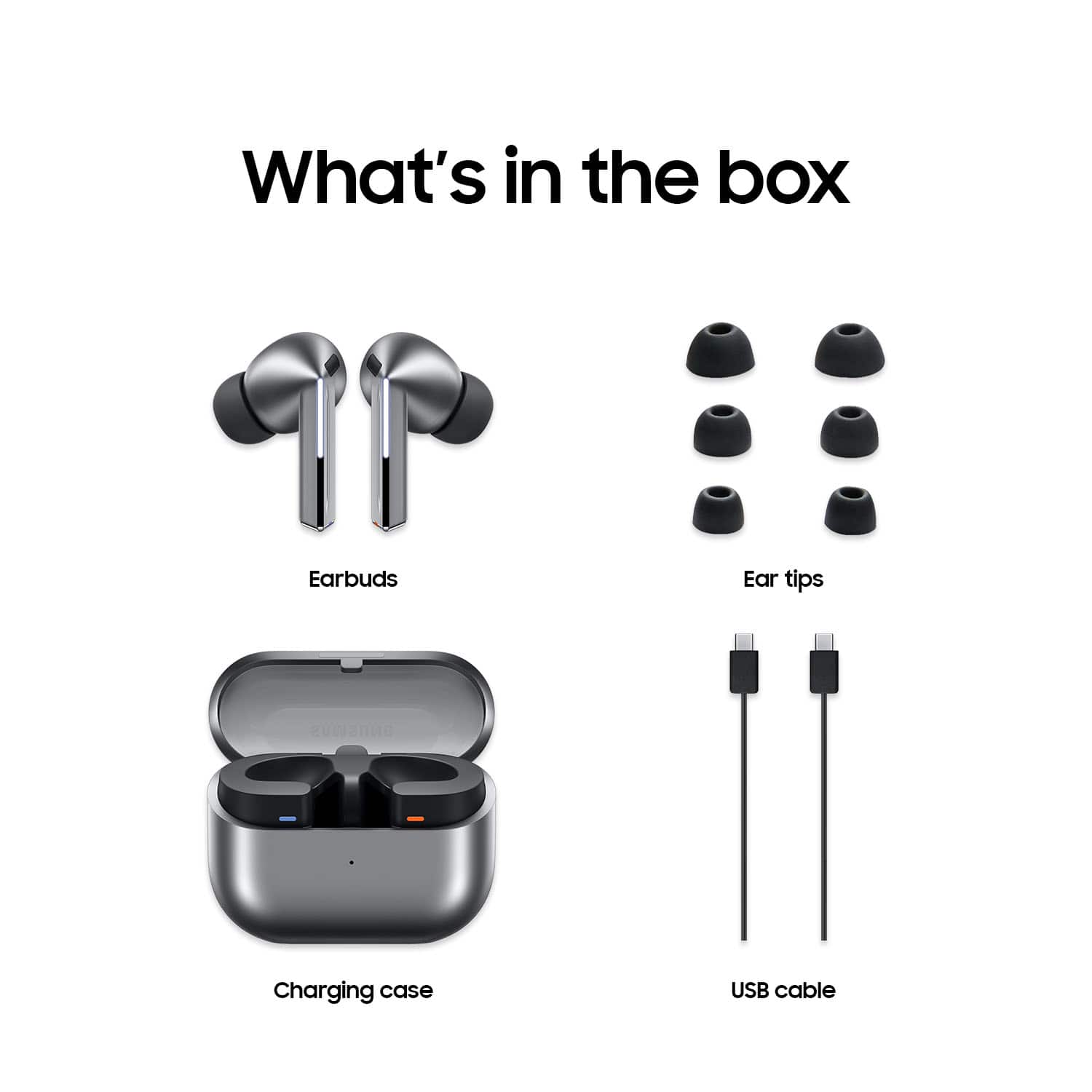
Posted .Hey there, thank you for finding the time to share your thoughts with us about your experience using the Samsung Galaxy Buds3 Pro. We appreciate your feedback as we strive to be innovative while improving the design and functionality of our product line. Samsung provides a 12-month warranty on our products for manufacturing defects in materials and workmanship. When changing the ear tips on your Galaxy Buds3 Pro, make sure to choose the tips that fit your ears, and change them properly using the steps below. Be careful when handling the tips, and avoid using your fingernails when pulling off the tips as they may tear. Check out, "How to change the tips on your Galaxy Buds3 Pro or Buds3 FE" to learn how to safely swap out your ear tips. If you have any questions for us or if you would like any further assistance, please feel free to contact Support at your earliest convenience. Thank you for being a valued Samsung customer. - Debra
- Pros mentioned:Battery life, Comfort, Design
Premium Look with Impressive Sound
Posted .This reviewer received promo considerations or sweepstakes entry for writing a review.Really impressed with these earbuds. The sound quality is clear and punchy with good bass, and calls come through crisp. The design looks premium, and the earbuds fit comfortably even for long listening sessions. Battery life is solid, and the charging case is compact and convenient. Great value for the price and a reliable daily-use option.
I would recommend this to a friend Not yhe best
||Posted . Owned for 2 months when reviewed.This reviewer received promo considerations or sweepstakes entry for writing a review.Kinda works, but battery doesn't last 4 hours. Would be nice if they lasted atleast an 8 hour day.
No, I would not recommend this to a friendBrand response from Samsung
Posted .Salutations RyanT, thanks for taking the time to share your experience with using your Samsung Galaxy Buds3 Pro. We appreciate your candor as we make every effort to improve the design and functionality of our product line. Samsung provides a 12-month warranty on our products for manufacturing defects in materials and workmanship. The Galaxy Buds3 Pro can provide up to 26 hours of play. Please take a moment to review, "The battery life of your Samsung earbuds" if you would like to learn more about battery expectations. If your Galaxy Buds3 Pro case isn't charging the earbuds, here's a few things you can so right away to help resolve what you may be experiencing with your device:
1. Check for debris on the charging contacts inside the case and on the earbuds.
2. Ensure that your case is charging correctly.
3. Clean the contacts with a soft, dry cloth. Dust, wax, or other debris can build up on the charging contacts, preventing proper contact and charging.
If you would like further assistance after reviewing the resource shared, do not hesitate to reach out to Support. We're happy to assist you further! Thank you for being a faithful Samsung customer. - Debra
Not a great fit
||Posted . Owned for 3 months when reviewed.This reviewer received promo considerations or sweepstakes entry for writing a review.I have a problem with the fit. No matter which size tip I use I can not get a good fit. I have even bought after market tips and still hot get a good fit. My pro 2 fit better than these.
No, I would not recommend this to a friendBrand response from Samsung
Posted .Hi there Zeke, thanks for taking the time to review your Samsung Galaxy Buds3 Pro. Your feedback is appreciated as we strive to be innovative while improving the design and functionality of our product line. Wearing your earbuds properly is important for many reasons. You'll get better sound quality from them, they'll fit more comfortably, and they'll stay in your ears. Wearing them improperly can cause discomfort, sound leaks, and makes them more likely to fall out. As you know, the Galaxy Buds3 Pro come with different sized ear tips. The first thing you want to do is make sure they have the right size tips for your ears. You want them to fit so that there isn't a gap between your ear and the ear tip. This helps to avoid sound leaks and ensure optimal audio. Once you have the right tips on your buds: 1. Check the bottom of the earbuds for directional marks. You will see an L and an R. 2. Insert the R bud into your right ear with the R facing you. 3. Insert the L bud into your left ear with the L facing you. 4. Angle the blade slightly so that the microphone on the bottom is pointing towards your mouth rather than straight down. 5. You can adjust the buds by rotating them forwards and backwards until the fit feels right. You can also run an earbud fit test in the Galaxy Wearable app to ensure you have the proper fit. To run an Earbud fit test, 1. Open the Galaxy Wearable app on your connected phone. 2. From the Buds3 Pro screen, tap Sound quality and effects. 3. Tap Earbud fit test. 4. The screen will display either In ear or Not in ear. Make sure both buds are in your ears, and then tap Start. 5. The buds will chime for a few seconds, and then the app will display your results. It may say Poor fit or Good fit. If the fit is poor, make small adjustments and then tap Try again. 6. Continue running the fit test and making adjustments until you get a good fit result for both buds. If you would like more information regarding fit, feel free to check out "How to wear your Samsung Galaxy Buds3 and 3 Pro." Let us know if you have any questions after reviewing the resource provided by contacting Support. Thank you for being a loyal Samsung customer. - Debra
- Pros mentioned:Sound quality
Not so great
||Posted . Owned for 3 weeks when reviewed.This reviewer received promo considerations or sweepstakes entry for writing a review.The pods fall out of both of my ears. I had high hopes because I loved the older models of the pods. The new design is terrible. Sound quality is the best.
No, I would not recommend this to a friendBrand response from Samsung
Posted .Hi AustinB, thanks for taking the time out of your day to share your thoughts with us about your Samsung Galaxy Buds3 Pro. As we strive to be innovative and make improvements on the design and functionality of our products, your feedback is invaluable. Our goal is for our customers to feel like they are having the most incredible experiences while using our products. Wearing your earbuds properly is very important for many reasons. You'll get better sound quality from them, they'll fit more comfortably, and they'll stay in your ears. Wearing them improperly can cause discomfort, sound leaks, and makes them more likely to fall out. As you know, the Galaxy Buds3 Pro come with different sized ear tips. The first thing you want to do is make sure they have the right size tips for your ears. You want them to fit so that there isn't a gap between your ear and the ear tip. This helps to avoid sound leaks and ensure optimal audio. Once you have the right tips on your buds: 1. Check the bottom of the earbuds for directional marks. You will see an L and an R. 2. Insert the R bud into your right ear with the R facing you. 3. Insert the L bud into your left ear with the L facing you. 4. Angle the blade slightly so that the microphone on the bottom is pointing towards your mouth rather than straight down. 5. You can adjust the buds by rotating them forwards and backwards until the fit feels right. You can also run an earbud fit test in the Galaxy Wearable app to ensure you have the proper fit. To run an Earbud fit test, 1. Open the Galaxy Wearable app on your connected phone. 2. From the Buds3 Pro screen, tap Sound quality and effects. 3. Tap Earbud fit test. 4. The screen will display either In ear or Not in ear. Make sure both buds are in your ears, and then tap Start. 5. The buds will chime for a few seconds, and then the app will display your results. It may say Poor fit or Good fit. If the fit is poor, make small adjustments and then tap Try again. 6. Continue running the fit test and making adjustments until you get a good fit result for both buds. If you would like more information regarding fit, feel free to check out "How to wear your Samsung Galaxy Buds3 and 3 Pro." If you have any questions for us after reviewing this resource, feel free to reach out to Support. We're always happy to help! Thank you for being a cherished Samsung customer. - Debra
Gift item
||Posted . Owned for 2 weeks when reviewed.This reviewer received promo considerations or sweepstakes entry for writing a review.It was a gift so I am not sure how good the item is
No, I would not recommend this to a friendBuds review
||Posted . Owned for 3 weeks when reviewed.This reviewer received promo considerations or sweepstakes entry for writing a review.They sound good, however they whistle a high pitch sound at times when holding them or adjusting the in my ears.
No, I would not recommend this to a friendBrand response from Samsung
Posted .Hi there DavidB, thank you for taking the time to share your feedback with us about your experience using the Samsung Galaxy Buds3 Pro. We value your candor as we continue to improve the design and functionality of our product line. Samsung offers a 12-month warranty for manufacturing defects in materials and workmanship. Check out, "No, low, or poor audio quality on Samsung earbuds" to help resolve what you may be experiencing with your audio quality. If you have any questions for us afterward or if you would like any further assistance, please let us know by contacting Support at your leisure. Thanks for being a devoted Samsung customer. - Debra
Samsung
||Posted . Owned for 9 months when reviewed.This reviewer received promo considerations or sweepstakes entry for writing a review.Im so sorry but Samsung did make a good product on these! First time ever! Ive been with Samsung since the Samsung S 3 and the reception and the sound was horrible! No matter how many times i adjusted it people couldn't hear me talk on them so very sorry! It was the only time Samsung failed me and we have been through some things in life together promises Robert Dwayne Porter still wont leave Samsung over an expensive mistake actually looking at a new Samsung smart phone...
No, I would not recommend this to a friendBrand response from Samsung
Posted .Hey there RobertP, thank you for taking the time to share your feedback with us about your experience with using the Samsung Galaxy Buds3 Pro. We appreciate your candor as we improve the design and functionality of our product line. Samsung provides a 12-month warranty for manufacturing defects in materials and workmanship. Please take a moment to review, "No, low, or poor audio quality on Samsung earbuds" to help resolve what you've described to be experiencing with your audio quality. If you have any questions for us afterward or if you would like any further assistance, do not hesitate to reach out to Support. Thanks for being a faithful Samsung customer. - Debra
- Pros mentioned:Comfort, Design, Sound quality

Tons of Tech, in your Ear
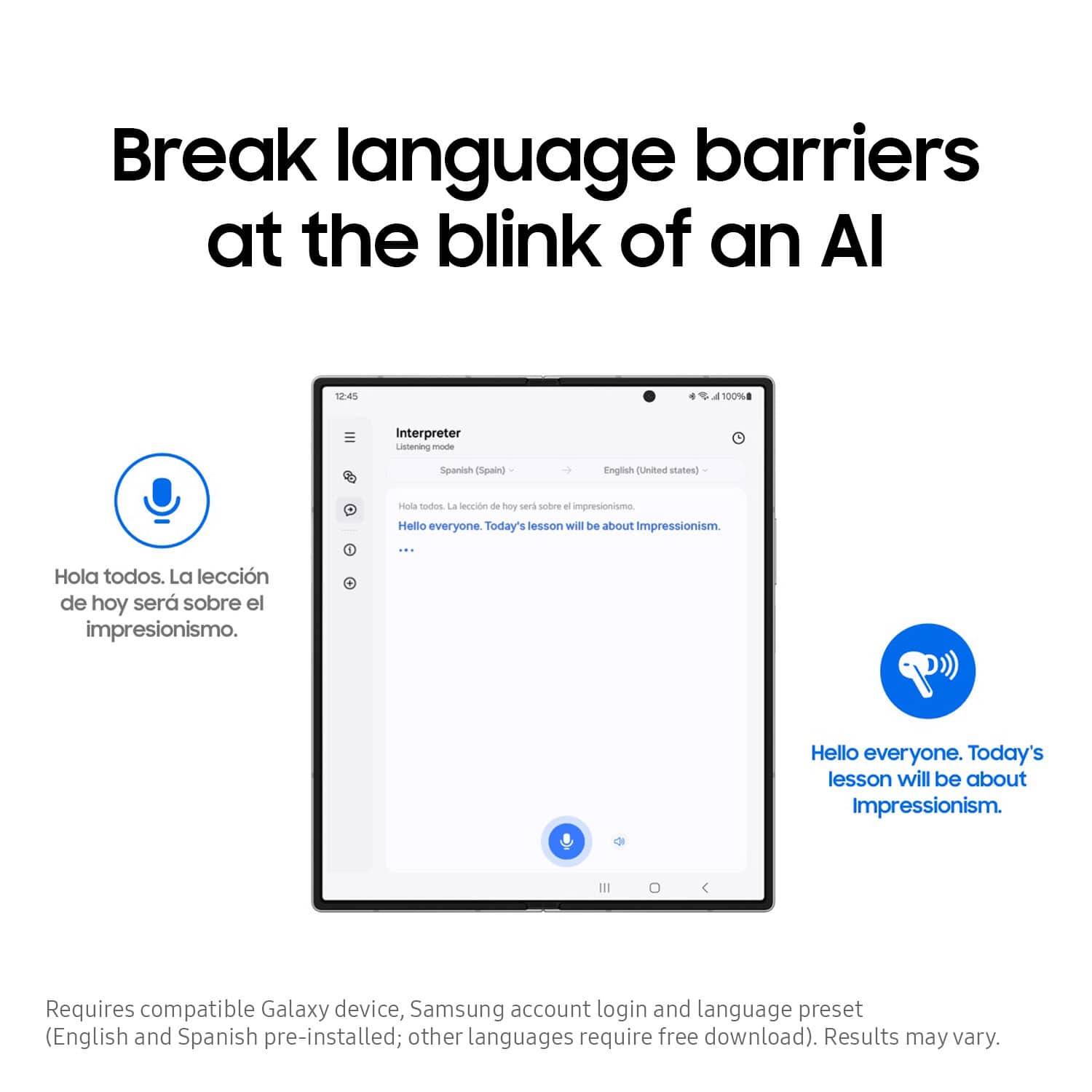
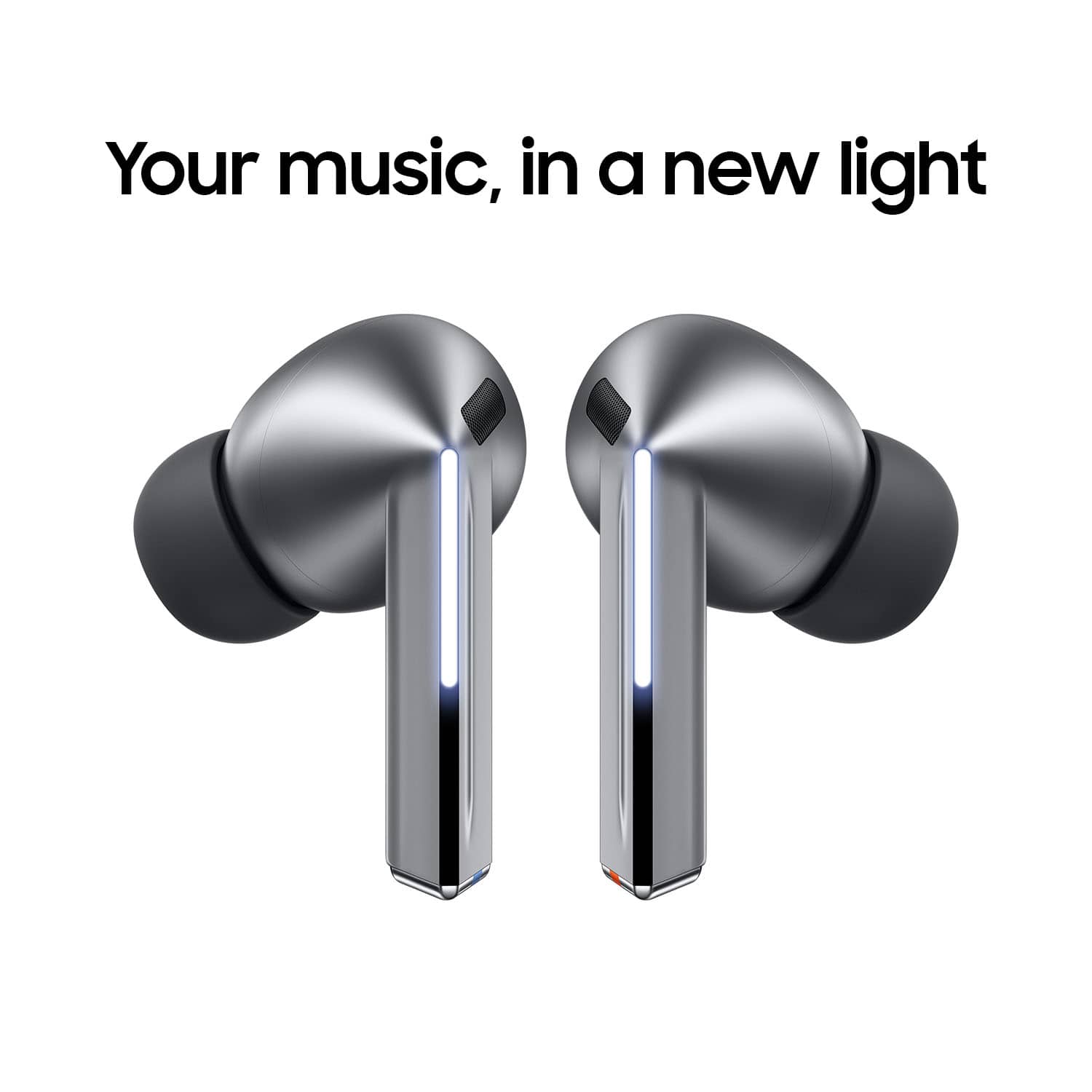
|Posted .This reviewer received promo considerations or sweepstakes entry for writing a review.The Samsung Galaxy buds3 pro have an immense amount of impressive features, and some impressive sound. They also look about as good as any earbuds can, and are comfortable, even when wearing glasses. Let me first say that these are incredibly comfortable and secure. I typically like an earbud that has an over ear piece to help hold it in place, especially when doing things like playing golf. These stayed secure and comfortable exercising or hitting golf balls. The sound is excellent, it doesn't sound fuzzy or metallic on deep bass, and produces higher and lighter sounds very crisply. I also love the touch controls, I have very sensitive ears, and using physical buttons on most headsets and especially earbuds was very uncomfortable for me. Touch controls alleviate that. The coolest feature of these is the interpreter feature, allowing you to wear these headphones and speak with someone who utilizes another language, and be able to understand what they are saying. It's truly amazing, and feels like the future.
I would recommend this to a friend not for small ears
||Posted . Owned for 1 month when reviewed.This reviewer received promo considerations or sweepstakes entry for writing a review.These look cool but avoid if you have small ears.
No, I would not recommend this to a friendBrand response from Samsung
Posted .Howdy Julia, thanks for taking the time out of your hectic day to share your thoughts with us about your Samsung Galaxy Buds3 Pro. We appreciate your feedback as we strive in providing the best products with superior functionality on the market for our customers while staying committed to constant innovation. Wearing your earbuds properly is important for many reasons. You'll get better sound quality from them, they'll fit more comfortably, and they'll stay in your ears. Wearing them improperly can cause discomfort, sound leaks, and makes them more likely to fall out. As you know, the Galaxy Buds3 Pro come with different sized ear tips. The first thing you want to do is make sure they have the right size tips for your ears. You want them to fit so that there isn't a gap between your ear and the ear tip. This helps to avoid sound leaks and ensure optimal audio. Once you have the right tips on your buds: 1. Check the bottom of the earbuds for directional marks. You will see an L and an R. 2. Insert the R bud into your right ear with the R facing you. 3. Insert the L bud into your left ear with the L facing you. 4. Angle the blade slightly so that the microphone on the bottom is pointing towards your mouth rather than straight down. 5. You can adjust the buds by rotating them forwards and backwards until the fit feels right. You can also run an earbud fit test in the Galaxy Wearable app to ensure you have the proper fit. To run an Earbud fit test, 1. Open the Galaxy Wearable app on your connected phone. 2. From the Buds3 Pro screen, tap Sound quality and effects. 3. Tap Earbud fit test. 4. The screen will display either In ear or Not in ear. Make sure both buds are in your ears, and then tap Start. 5. The buds will chime for a few seconds, and then the app will display your results. It may say Poor fit or Good fit. If the fit is poor, make small adjustments and then tap Try again. 6. Continue running the fit test and making adjustments until you get a good fit result for both buds. If you would like more information regarding fit, feel free to take a look at "How to wear your Samsung Galaxy Buds3 and 3 Pro." Let us know if you would like any further assistance after reviewing the resource provided by reaching out to Support. Thank you for being a devoted Samsung customer. - Debra
Not worth the price paid.
||Posted .This reviewer received promo considerations or sweepstakes entry for writing a review.Not worth the price. We have a $23 pair that sounds just as good and the battery last much longer
No, I would not recommend this to a friendBrand response from Samsung
Posted .Howdy JosephS, thanks for taking the time to share your thoughts with us about your experience using the Samsung Galaxy Buds3 Pro. We appreciate your candor as we make every effort to improve the design and functionality of our product line. Samsung provides a 12-month warranty on our products for manufacturing defects in materials and workmanship. While all of Samsung's earbuds are built to last the entire day, the buds' battery life and charging times may differ depending on the model you have and how you use them. The Buds3 Pro provide up to 26 hours of play time per charge, which can be extended to up to 30 hours with a fully charged case. Please feel free to review, "All about the Galaxy Buds3 and Buds3 Pro earbuds", "All about your Samsung earbuds’ battery life," and "No, low, or poor audio quality on Samsung earbuds" to help resolve what you've described to be experiencing. If you would like further assistance afterward, please feel free to reach out to Support. Thank you for being a valued Samsung customer. - Debra
Need better replacement
||Posted . Owned for 1 month when reviewed.This reviewer received promo considerations or sweepstakes entry for writing a review.Right ear blow out ,not hearing anything when people call u
No, I would not recommend this to a friendBrand response from Samsung
Posted .Salutations LIONELN, thank you for taking the time to share your candor with us regarding your experience using the Samsung Galaxy Buds3 Pro. Your feedback allows us to make improvements on our product line to suit the needs of our customers. Samsung provides a 12-month warranty on your device for manufacturing defects in materials and workmanship. Please take a moment to review, "No, low, or poor audio quality on Samsung earbuds" to help resolve what you've described. If you would like further assistance afterward, please feel free to reach out to Support. Thank you for being a faithful Samsung customer. - Debra
Not for me but definitely give them a try
||Posted . Owned for 1 month when reviewed.This reviewer received promo considerations or sweepstakes entry for writing a review.The fitment did not work for me. Although i gelt they were comfortable, the built in fitment sound sensor kept indicating a poor fit. Ultimately returned product to search for something else
I would recommend this to a friendBrand response from Samsung
Posted .Howdy TerryD, thanks for taking the available time out of your day to share your thoughts with us about your Samsung Galaxy Buds3 Pro. We appreciate your candor as we make every effort to improve the design and functionality of our product line. Wearing your earbuds properly is very important for many reasons. You'll get better sound quality from them, they'll fit more comfortably, and they'll stay in your ears. Wearing them improperly can cause discomfort, sound leaks, and makes them more likely to fall out. As you know, the Galaxy Buds3 Pro come with different sized ear tips. The first thing you want to do is make sure they have the right size tips for your ears. You want them to fit so that there isn't a gap between your ear and the ear tip. This helps to avoid sound leaks and ensure optimal audio. Once you have the right tips on your buds: 1. Check the bottom of the earbuds for directional marks. You will see an L and an R. 2. Insert the R bud into your right ear with the R facing you. 3. Insert the L bud into your left ear with the L facing you. 4. Angle the blade slightly so that the microphone on the bottom is pointing towards your mouth rather than straight down. 5. You can adjust the buds by rotating them forwards and backwards until the fit feels right. You can also run an earbud fit test in the Galaxy Wearable app to ensure you have the proper fit. To run an Earbud fit test, 1. Open the Galaxy Wearable app on your connected phone. 2. From the Buds3 Pro screen, tap Sound quality and effects. 3. Tap Earbud fit test. 4. The screen will display either In ear or Not in ear. Make sure both buds are in your ears, and then tap Start. 5. The buds will chime for a few seconds, and then the app will display your results. It may say Poor fit or Good fit. If the fit is poor, make small adjustments and then tap Try again. 6. Continue running the fit test and making adjustments until you get a good fit result for both buds. If you would like more information regarding fit, feel free to check out "How to wear your Samsung Galaxy Buds3 and 3 Pro." If you have any questions or if you would like any further assistance, do not hesitate to contact Support at your leisure. Thank you for being a valued Samsung customer. - Debra
- Pros mentioned:Sound quality
I'm allergic to these
||Posted .This reviewer received promo considerations or sweepstakes entry for writing a review.They sound great but they caused me to have an ear infection and horribly clogged sinuses.
No, I would not recommend this to a friendBrand response from Samsung
Posted .Howdy, thank you for sharing your sentiments with us about your experience using the Samsung Galaxy Buds3 Pro. We value your thoughts as we strive to make improvements on the functionality and design of our product line. When you wear canal-type earphones for a long time, the humidity increases inside your ears and it may cause skin irritation or contact dermatitis such as inflammation of the outer ear. It can also occur when using other manufacturers’ canal-type products. If you feel ear pain or skin irritation occurs while using the earbuds, please immediately stop using the device and visit your doctor for consultation. We recommend removing the earbuds periodically from your ears so that the humidity inside the ears can be lowered when using the device for a long time. After prolonged wear, please dry your ears and clean the earbuds and ear tips regularly to prevent any problems. Feel free to review, "How to clean your Samsung earbuds" to learn more tips and tricks. If you would like to share any other feedback with us or if you would like any further assistance, please feel free to contact Support. Thanks for being a faithful Samsung customer. - Debra
Broken after only 5 months. Won't charge.
||Posted .This reviewer received promo considerations or sweepstakes entry for writing a review.Broke after only 5 months of using. Left side won't charge. Cleaned it. No luck. Poor quality. Don't waste your money.
No, I would not recommend this to a friendBrand response from Samsung
Posted .Aloha Dopey, thanks for taking the time out of your busy day to share your thoughts with us about your Samsung Galaxy Buds3 Pro. As we strive to be innovative and make improvements on the design and functionality of our product line, your feedback is invaluable. Samsung provides a 12-month warranty for manufacturing defects in materials and workmanship. If your Galaxy Buds3 Pro are not charging properly, I have included a few steps that may help resolve what you may be experiencing with your charging. 1. Use the included charging cable and connect to a USB charger, 2. Check to be sure the case is charging correctly, 3. Verify there is no debris in the charging cradle pin connectors., 4. Check to be sure there is no debris in the charging connect on the Galaxy Buds. 5. Check the Wear app to determine if one bud is not charging and check the bud is fully inside the charging case. If you have any questions for us or if you would like any further assistance, please do not hesitate to contact Support at your earliest convenience. Thank you for being a steadfast Samsung customer. - Debra
Samsung earbuds 3
||Posted .This reviewer received promo considerations or sweepstakes entry for writing a review.My earbuds disconnect from my phone rio often Battery life poor
No, I would not recommend this to a friendBrand response from Samsung
Posted .Greetings Yvonne, thank you for finding the time to share your sentiments with us about your experience using the Samsung Galaxy Buds3 Pro. Your feedback is appreciated as we strive to be innovative and improve the design and functionality of our products. Samsung provides a 12-month warranty on our products for manufacturing defects in materials and workmanship. If your phone cannot connect to your Galaxy Buds series earbuds, getting them to connect again will only take a couple of steps. Performing a restart on the earbuds, resetting the Bluetooth connection, or updating the Galaxy Wearable app will normally fix the issue. However, if you would like to conduct some troubleshooting to help resolve what you have described to be experiencing with your Buds3 Pro, take a look at "Connection issues with Samsung earbuds" when you have the opportunity available. While all of Samsung's earbuds are built to last the entire day, the buds' battery life and charging times may differ depending on the model you have and how you use them. The Buds3 Pro provide up to 26 hours of play time per charge, which can be extended to up to 30 hours with a fully charged case. If you would like to share any other feedback with us regarding your recent purchase or if you would like any further assistance, please do not hesitate to reach out to Support. Thank you for being a dedicated Samsung customer. - Debra
Junk Product Ap[parently
||Posted .This reviewer received promo considerations or sweepstakes entry for writing a review.Died after several days use. I tried to get these to pair with my desktop computer. I made multiple attempts, and then they just died and couldn't pair. I later learned that this is a known problem with this product. I am hoping to get a replacement but I"m really angry.
No, I would not recommend this to a friendBrand response from Samsung
Posted .Hello CharlesK, thank you for taking the time to share your experience with using the Samsung Galaxy Buds3 Pro. Your constructive feedback allows us to make improvements on our devices. Samsung provides a 12-month warranty on your device for manufacturing defects in materials and workmanship. Please take a moment to review, "How to connect your Samsung Galaxy earbuds" to help resolve what you've described to be experiencing with your device. Let us know afterward if you have any questions for us or if you would like further assistance by reaching out to Support at your earliest convenience. Thank you for being a faithful Samsung customer. - Debra