Customer Ratings & Reviews


- Model:
- SM-R630NZAAXAR
- SKU:
- 12558964
Rating by feature
- Sound Quality
Rating 4.8 out of 5 stars
- Battery Life
Rating 4.6 out of 5 stars
- Connectivity
Rating 4.8 out of 5 stars
Customers are saying
Customers regard the sound quality as the standout feature of this product, with many users also praising its comfortable fit and impressive battery life. While the design, connectivity, and overall feature set receive positive feedback, some users have expressed minor concerns regarding the sensitivity of the touch controls and the maximum volume levels. Overall, the product is highly regarded for its performance and user experience.
This summary was generated by AI based on customer reviews.
High price tag for what you get
||Posted . Owned for 3 weeks when reviewed.This reviewer received promo considerations or sweepstakes entry for writing a review.I mean they are ok headphones but for the price i was expecting more i have a pair of jbl buds that are 50 bucks and out perform these.
No, I would not recommend this to a friendBrand response from Samsung
Posted .Hey there TonyM, thank you for finding the free time out of your busy day to share your thoughts with us about your Samsung Galaxy Buds3 Pro. We appreciate your feedback as we strive to be innovative and improve the design and functionality of our product line. If you would care to provide feedback with us regarding the performance, durability, or functionality of your Galaxy Buds3 Pro, please feel free to reach out to Support. We'd love to hear more from you! Thank you for being a valued Samsung customer. - Debra

- Pros mentioned:Sound quality
Good headphones Bad Customer Service
||Posted . Owned for 1 month when reviewed.This reviewer received promo considerations or sweepstakes entry for writing a review.Great product works fine. Best Buy is just a snake of a company. I order these head phones and it said it came with a free case and I had proof of it in my order but they refused to give them to me.
I would recommend this to a friend The right earbud stops charging. Google it.
||Posted . Owned for 11 months when reviewed.This reviewer received promo considerations or sweepstakes entry for writing a review.The right earbud stopped working after 10 months. I tried cleaning the charging contacts and it worked for 2 weeks. Its not working again. I googled it and there are a TON of people with the same right earbud not charging in less than a year problem.
No, I would not recommend this to a friendBrand response from Samsung
Posted .Hey there MisterPhilberto, thank you for finding the opportunity to share your sentiments with us about your experience using the Samsung Galaxy Buds3 Pro. We value your feedback as we strive to improve the design and functionality of our product line. Samsung provides a 12-month warranty on our products for manufacturing defects in materials and workmanship. The Galaxy Buds3 Pro can provide up to 26 hours of play time per charge, which can be extended to up to 30 hours with a fully charged case. Feel free to check out, "The battery life of your Samsung earbuds" if you would like to learn more. If your Galaxy Buds3 Pro case isn't charging the earbuds, here's a few things you can so right away to help resolve what you may be experiencing with your device:
1. Check for debris on the charging contacts inside the case and on the earbuds.
2. Ensure that your case is charging correctly.
3. Clean the contacts with a soft, dry cloth. Dust, wax, or other debris can build up on the charging contacts, preventing proper contact and charging.
Let us know if you have any questions or if you would like any further assistance afterward by contacting Samsung Support. Thank you for being a staunch Samsung customer. - Debra

Don't do it
|Posted . Owned for 1 week when reviewed.This reviewer received promo considerations or sweepstakes entry for writing a review.[Employee of bestbuy] Poor quality one of the tips ripped already and the loud squelch is awful
No, I would not recommend this to a friendBrand response from Samsung
Posted .Hello Mick916, thank you for finding the time out of your lively day to share your sentiments with us about your Samsung Galaxy Buds3 Pro. We appreciate your feedback as it allows us to improve the design and functionality of our product line while we remain committed to constant innovation. Our goal is for our customers to feel like they are having the most marvelous experiences when using our products. Samsung provides a 12-month warranty on our products for manufacturing defects in materials and workmanship. Feel free to check out, "How to change the tips on your Galaxy Buds3 Pro" if you would like more information regarding changing out your ear tips. Let us know if you would like any further assistance by contacting Samsung Support. Thank you for being a treasured Samsung customer. - Debra
Headphones
||Posted . Owned for 2 weeks when reviewed.This reviewer received promo considerations or sweepstakes entry for writing a review.I love the style and the new lights on them but they disconnect and have volume control issues and this was with me exhanging my first pair for a second and same problems with the second pair and i never had one issue ever with my buds pro 2
No, I would not recommend this to a friendBrand response from Samsung
Posted .Hello ColinA, thanks for reaching out to share your thoughts with us regarding your experience using the Samsung Galaxy Buds3 Pro. Your critiques provide valuable insights that will assist us with improving our product line. Samsung offers a 12-month warranty on your device for manufacturing defects in materials and workmanship. If your Galaxy Buds Pros disconnect from your phone often, it may be due to a poor Bluetooth connection or because you are wearing the earbuds incorrectly. You should check that the earbuds are properly inserted into your ears, that your Bluetooth connection is secure, and that your earbuds' software is up-to-date. Feel free to check out, "Galaxy Buds won't stay connected to phone" to help resolve what you've described. When it come to your volume control, we'd love to be able to assist you with whatever you're experiencing but we need more information regarding what may be occurring before we can do so. Please feel free to reach out to Support for further assistance. Thank you for being a staunch Samsung customer. - Debra
Not a good buy for me
||Posted .This reviewer received promo considerations or sweepstakes entry for writing a review.Bought these because im a samsung guy, but right off the shelf the same problems being reported by thousands of others, buds not connecting, wasnt going to keep trying. I think it cpuld be a great product if the bugs are worked out
No, I would not recommend this to a friendBrand response from Samsung
Posted .Hello KevinP, thank you for taking the time to share your feedback with using the Samsung Galaxy Buds3 Pro. Samsung provides a 12-month warranty on your device for manufacturing defects in materials and workmanship. If your phone cannot connect to your Galaxy Bud series earbuds, getting them to connect again will only take a couple of steps. Performing a restart on the earbuds, resetting the Bluetooth connection, or updating the Galaxy Wearable app will normally fix the issue. Check out, "Connection issues with Samsung earbuds" to help resolve what you may be experiencing with your device. If you have any questions for us afterward or if you would like any further assistance, please feel free to reach out to Support at your earliest convenience. Thanks for being a steadfast Samsung customer. - Debra
Issue
||Posted . Owned for 3 months when reviewed.This reviewer received promo considerations or sweepstakes entry for writing a review.My box charge doesn't wor. It shows battery life stop charging
No, I would not recommend this to a friendBrand response from Samsung
Posted .Howdy JosealejandroM, Thank you for taking the opportunity to share your recent experience with using the Samsung Galaxy Buds3 Pro. We value your feedback as it allows us the opportunity to improve the functionality and design of our product line. Samsung provides a 12-month warranty for manufacturing defects in materials and workmanship. If your Galaxy Buds3 Pro are not charging properly, I have included a few steps that may help resolve what you may be experiencing with your charging. 1. Use the included charging cable and connect to a USB charger, 2. Check to be sure the case is charging correctly, 3. Verify there is no debris in the charging cradle pin connectors., 4. Check to be sure there is no debris in the charging connect on the Galaxy Buds. 5. Check the Wear app to determine if one bud is not charging and check the bud is fully inside the charging case. If you have any questions for us or if you would like any further assistance, please do not hesitate to contact Support at your leisure. Thank you for choosing Samsung! - Debra
Poor Design and Functionality
||Posted .This reviewer received promo considerations or sweepstakes entry for writing a review.The ear cushions don't stay attached to the ear bud for comfortable wear. They easily fall out the ear and if it stays in the ear you can't touch it or it will fall off and often the cushions will get stuck in the ear and the ear bud is too heavy to stay attached. totally not worth the money for the benefits it is suppose to offer.
No, I would not recommend this to a friendBrand response from Samsung
Posted .Hey there JosesettaJ, we are grateful for your feedback on your Samsung Galaxy Buds3 Pro. We know how vital the ideal fit of your earbuds is to you for prolonged usage and immersive listening. We have some articles available to help you with the fit of your earbuds, and the attachment of the tips to the device itself. These articles are titled "How to wear your Samsung Galaxy Buds3 and 3 Pro" and "Replacing the ear tips on your Galaxy Buds3 Pro for a perfect fit". We also have our team of experts available if you believe your device is not functioning as intended. We appreciate you being a Samsung customer. -Elizabeth
Headphones not charging
||Posted .This reviewer received promo considerations or sweepstakes entry for writing a review.Most of the times the ear headphones wont charge.
No, I would not recommend this to a friendBrand response from Samsung
Posted .Hi there TommyG,thank you for taking the opportunity to share your recent experience with using the Samsung Galaxy Buds3 Pro. We value your feedback as it allows us the opportunity to improve the functionality and design of our product line. Samsung provides a warranty on our products for manufacturing defects in materials and workmanship. If your Galaxy Buds3 Pro are not charging properly, I have included a few steps that may help resolve what you may be experiencing with your charging. 1. Use the included charging cable and connect to a USB charger, 2. Check to be sure the case is charging correctly, 3. Verify there is no debris in the charging cradle pin connectors., 4. Check to be sure there is no debris in the charging connect on the Galaxy Buds. 5. Check the Wear app to determine if one bud is not charging and check the bud is fully inside the charging case. If you have any questions for us afterward or if you would like any further assistance, please let us know by reaching out to Support at your leisure. - Debra
Poorly Shaped
||Posted .This reviewer received promo considerations or sweepstakes entry for writing a review.The shape of them don’t really fit my ear well enough to the point that they make my ears bleed if I keep them in too long.
I would recommend this to a friendBrand response from Samsung
Posted .Howdy Poor, thanks for taking the available time out of your day to share your thoughts with us about your Samsung Galaxy Buds3 Pro. We appreciate your candor as we make every effort to improve the design and functionality of our product line. Samsung provides a 12-month warranty for manufacturing defects in materials and workmanship. It's important to wear your earbuds properly for many reasons. You'll get better sound quality from them, they'll fit more comfortably, and they'll stay in your ears. Wearing them improperly can cause discomfort, sound leaks, and makes them more likely to fall out. As you know, the Galaxy Buds3 Pro come with different sized ear tips. The first thing you want to do is make sure they have the right size tips for your ears. You want them to fit so that there isn't a gap between your ear and the ear tip. This helps to avoid sound leaks and ensure optimal audio. Once you have the right tips on your buds: 1. Check the bottom of the earbuds for directional marks. You will see an L and an R. 2. Insert the R bud into your right ear with the R facing you. 3. Insert the L bud into your left ear with the L facing you. 4. Angle the blade slightly so that the microphone on the bottom is pointing towards your mouth rather than straight down. 5. You can adjust the buds by rotating them forwards and backwards until the fit feels right. You can also run an earbud fit test in the Galaxy Wearable app to ensure you have the proper fit. To run an Earbud fit test, 1. Open the Galaxy Wearable app on your connected phone. 2. From the Buds3 Pro screen, tap Sound quality and effects. 3. Tap Earbud fit test. 4. The screen will display either In ear or Not in ear. Make sure both buds are in your ears, and then tap Start. 5. The buds will chime for a few seconds, and then the app will display your results. It may say Poor fit or Good fit. If the fit is poor, make small adjustments and then tap Try again. 6. Continue running the fit test and making adjustments until you get a good fit result for both buds. If you would like more information regarding fit, feel free to check out "How to wear your Samsung Galaxy Buds3 and 3 Pro." Feel free to contact Support if you would like to share any other feedback with us or if you would like any further assistance. Thank you for being a valued Samsung customer. - Debra
They fail very quickly.
||Posted . Owned for 3 weeks when reviewed.This reviewer received promo considerations or sweepstakes entry for writing a review.They only worked for me for just over two weeks.And one of the headphones started to sound lower than the other.
No, I would not recommend this to a friendBrand response from Samsung
Posted .Hello there JoseG, thank you for finding the available time out of your day to share your sentiments with us about your Samsung Galaxy Buds3 Pro. We value your feedback as we strive to be innovative while improving the design and functionality of our product line. Samsung provides a 12-month warranty for manufacturing defects in materials and workmanship. Please take a moment to review, "No, low, or poor audio quality on Samsung earbuds" to help resolve what you may be experiencing with your device. Let us know if you have any questions afterward or if you would like any further assistance, please feel free to reach out to Support. Thank you for being a steadfast Samsung customer. - Debra
Issues
||Posted . Owned for 3 weeks when reviewed.This reviewer received promo considerations or sweepstakes entry for writing a review.Stops charging or only charges one side. Tells you moisture or inside needs cleaning. You should be able to sweat with these, silly really. My old ones from the first set they put out still work great. Samsung needs to fix this issue.
No, I would not recommend this to a friendBrand response from Samsung
Posted .Hey there TashiaC, thank you for taking the opportunity to share your recent experience with using the Samsung Galaxy Buds3 Pro. We value your feedback as it allows us the opportunity to improve the functionality and design of our product line. Samsung provides a 12-month warranty for manufacturing defects in materials and workmanship. If your Galaxy Buds3 Pro are not charging properly, I have included a few steps that may help resolve what you may be experiencing with your charging. 1. Use the included charging cable and connect to a USB charger, 2. Check to be sure the case is charging correctly, 3. Verify there is no debris in the charging cradle pin connectors., 4. Check to be sure there is no debris in the charging connect on the Galaxy Buds. 5. Check the Wear app to determine if one bud is not charging and check the bud is fully inside the charging case. If you have any questions for us or if you would like any further assistance, please do not hesitate to contact Support at your earliest convenience. Thank you for being a faithful Samsung customer. - Debra
ya dont need em
||Posted . Owned for 2 weeks when reviewed.This reviewer received promo considerations or sweepstakes entry for writing a review.Major connection issues, slow pausing and playing as compared to the buds2 pro, and cheap ear tips. I wish I would not have upgraded for this price.
No, I would not recommend this to a friendBrand response from Samsung
Posted .Hi there ForestK, thanks for taking the time to review your Samsung Galaxy Buds3 Pro. We appreciate your honesty as we strive to provide the best products with superior functionality on the market to our customers. Samsung provides a 12-month warranty on our products for manufacturing defects in materials and workmanship. If your phone cannot connect to your Galaxy earbuds, getting them to connect again will only take a couple of steps. Performing a restart on the earbuds, resetting the Bluetooth connection, or updating the Galaxy Wearable app will normally fix the issue. Feel free to check out, "Connection issues with Samsung earbuds" to help resolve what you may be experiencing with your Buds3 Pro. If you’re having an issue with your Galaxy device or an app on your device afterward, you can send an error report to Samsung. This can be done through the Samsung Members app or by using the desired app on your device. Please feel free to take a moment to review, "How to submit an error report for your Galaxy device or app." If you would like any further assistance or if you have any questions for us, let us know by reaching out to Samsung Support at your leisure. Thank you for being a loyal Samsung customer. - Debra
- Pros mentioned:Battery life, Comfort, Sound quality

Six Out of Five Stars
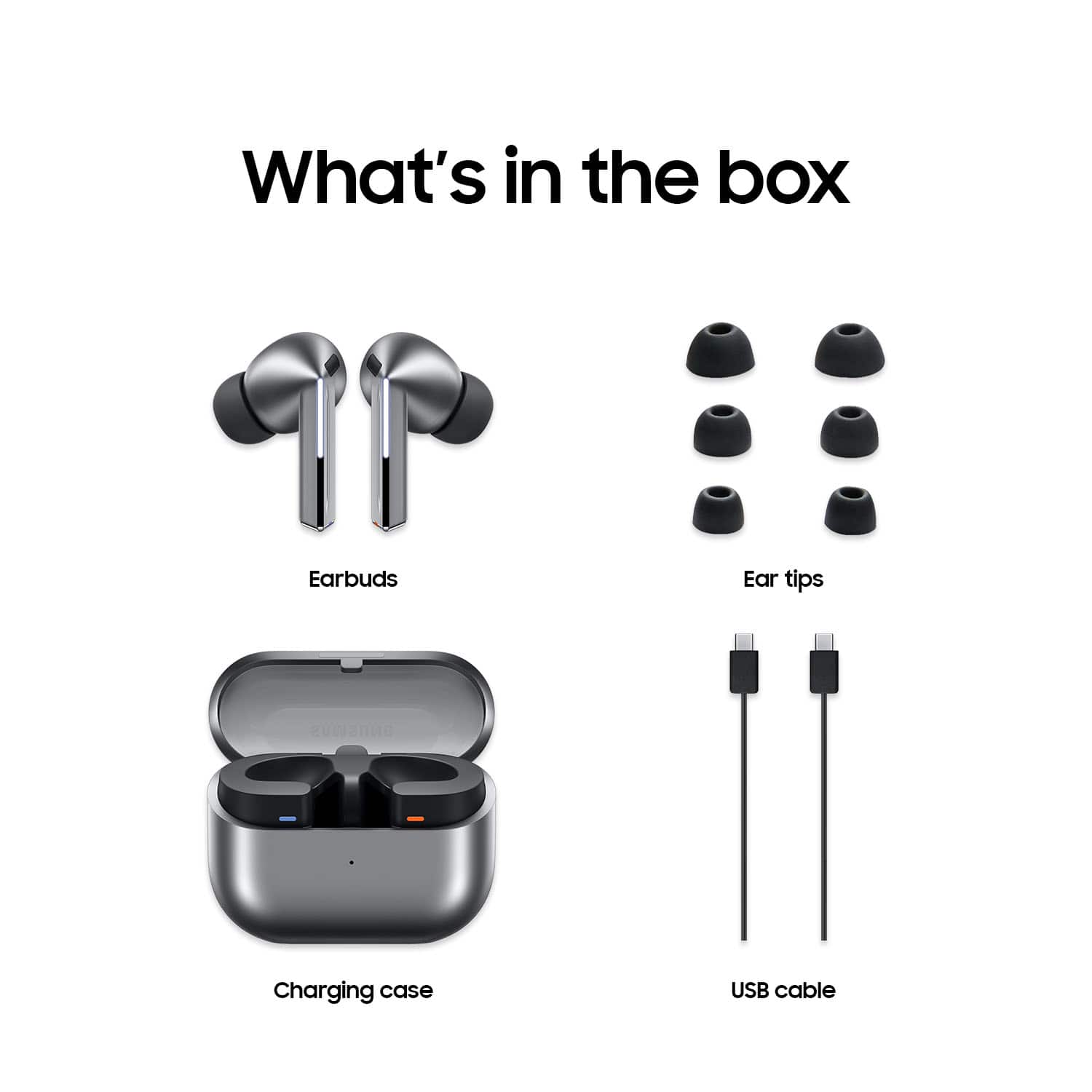
|Posted .This reviewer received promo considerations or sweepstakes entry for writing a review.As the title says, these are some of the best earbuds you can find, especially at this price point. There really isn’t anything negative I can say about them. I wish I could give them more than five stars, and I rarely say that. Sound Quality: These earbuds have excellent sound quality, especially for ones at this price point. The sound is very clear, with excellent highs. The bass is very good, but of course not as good as over the ear headphones. That is to be expected for earbuds. Compared with other ones I have heard; these are definitely up there on sound quality. The volume is where you need it to be. Battery: The battery lasts around 6.5 hours. This was tested listening to some jazz music at around half volume. This can change based on music type and volume. The case’s battery was enough to charge the earbuds 3 times. The case comes with a standard USB-C connector to charge it. Case: The case is very small compared with other cases and can easily fit in your pocket. There is a hinge on the case to open it which is better than other means of opening and closing the lid I have seen. There is an LED which stays on while charging it, so you always know if the earbuds and/or case are charging or if they are done. Many other earbuds have an indicator which goes on when you start charging it but then immediately goes off. You have no idea when they are done charging in this case. Not these! They fit perfectly in the case, and I had no problems placing them in it right away. Comfort: They are some of the most comfortable earbuds. You can hardly even tell they are on, and they remain very secure and don’t feel at all like they are going to fall out. Strangely, the guide that comes with it mentions that there are different size caps to fit different size ears that come with it but mine only came with the ones attached. Luckly, the ones that came with it fit perfectly. Pairing: I did have some trouble pairing them with my phone. The info with it describes pairing them the normal way you would pair any Bluetooth device through the phone’s Bluetooth settings. This did not work even after trying it several times. I downloaded the app for them hoping that would help, and it did. I ran the app, and it walked me through pairing them and I was successful doing this. This is something important to know if you can’t get them to pair. The other strange part was that you have to place the earbuds in the case, close the case, open the case, and press the pairing button on the case. If you don’t do all these steps exactly while trying to pair them through the app, it won’t work. The paper directions and the app doesn’t make this clear. Noise Canceling: The noise canceling is very good in these. It blocks out background noise very well and even blocks out some background talking, something that some other noise canceling systems can’t do. I had the setting in the app set to maximum. Software: The app that comes with it is basic but has all the things that you would need in it. I had no problems installing it or getting them to work with the earbuds. As mentioned before, I needed it to pair the earbuds with the phone. The software has a basic EQ with a few presets, which works well but I found the best sound quality with the flat response. These is a good amount of change you can make for each band. I suppose that is a matter of taste and it is good to have this as an option. You can select ambient sound, but I preferred to just use the noise canceling option. You can adjust the level at which the noise canceling works. I just kept this set at full which worked best for me. As is typical, you can update the firmware through the app. I did this without any problems. Finally, you can run a fit test to determine which ear caps fit the best. Since my earbuds strangely only came with one pair, having this option had no real value to me. I do wonder why it didn’t come with others. Maybe a manufacturing problem? Who knows. Overall: I definitely can’t recommend these enough, and there really isn’t anything negative I can say about them. You get a very quality pair of earbuds for the price point, and they compete with even more expensive ones. Now go and treat yourself to them.
I would recommend this to a friend Great sounding product, but...
||Posted . Owned for 2 weeks when reviewed.This reviewer received promo considerations or sweepstakes entry for writing a review.Awesome until I left my charging case on an Uber. I tried using the find my earbud option, but it doesn't track the case, only the buds. Im a best buy total member, but i guess lost or stolen goods aren't covered. I've had this product for less than a week, and now i can't even use them. I'm probably sticking with headsets from now on.
No, I would not recommend this to a friendBrand response from Samsung
Posted .Hello there Jordan, thank you for sharing your thoughts with us about your experience with using the Samsung Galaxy Buds3 Pro. We value your feedback as we strive to improve the design and functionality of our product line. As you know, the Galaxy Buds3 Pro case does not have built-in GPS to allow for the Find My feature to be available on this device. We suggest reaching out to your Uber driver in hopes of having your case returned. If you have any questions or if you would like any further assistance, please do not hesitate to contact Support. Thanks for being a valued Samsung customer. - Debra
Poor quality
||Posted .This reviewer received promo considerations or sweepstakes entry for writing a review.I can't recommend these to anyone. I don't know why I keep trying Samsung. I guess I'm hoping for something better with each new offering. Not very comfortable to wear and I constantly have to push them back in my ear. Left ear buds has a rattle that developed after the return period.
No, I would not recommend this to a friendBrand response from Samsung
Posted .Good day TrevorB, thanks for taking the time to review your Samsung Galaxy Buds3 Pro. Your feedback is appreciated as we strive to be innovative while improving the design and functionality of our product line. Wearing your earbuds properly is important for many reasons. You'll get better sound quality from them, they'll fit more comfortably, and they'll stay in your ears. Wearing them improperly can cause discomfort, sound leaks, and makes them more likely to fall out. As you know, the Galaxy Buds3 Pro come with different sized ear tips. The first thing you want to do is make sure they have the right size tips for your ears. You want them to fit so that there isn't a gap between your ear and the ear tip. This helps to avoid sound leaks and ensure optimal audio. Once you have the right tips on your buds: 1. Check the bottom of the earbuds for directional marks. You will see an L and an R. 2. Insert the R bud into your right ear with the R facing you. 3. Insert the L bud into your left ear with the L facing you. 4. Angle the blade slightly so that the microphone on the bottom is pointing towards your mouth rather than straight down. 5. You can adjust the buds by rotating them forwards and backwards until the fit feels right. You can also run an earbud fit test in the Galaxy Wearable app to ensure you have the proper fit. To run an Earbud fit test, 1. Open the Galaxy Wearable app on your connected phone. 2. From the Buds3 Pro screen, tap Sound quality and effects. 3. Tap Earbud fit test. 4. The screen will display either In ear or Not in ear. Make sure both buds are in your ears, and then tap Start. 5. The buds will chime for a few seconds, and then the app will display your results. It may say Poor fit or Good fit. If the fit is poor, make small adjustments and then tap Try again. 6. Continue running the fit test and making adjustments until you get a good fit result for both buds. If you would like more information regarding fit, feel free to check out "How to wear your Samsung Galaxy Buds3 and 3 Pro." Also check out, "Samsung earbud has a static noise" to help resolve what you've described to be experiencing. Feel free to reach out to Support afterward if you have any questions or if you would like any further assistance. Thank you for being a faithful Samsung customer. - Debra
Horrible experience
||Posted . Owned for 1 month when reviewed.This reviewer received promo considerations or sweepstakes entry for writing a review.I bought a pair of this at launch and had to send them in to be repaired within the first 10 days. I was without them for 3 weeks. When I got them back they were okay for a while m, but eventually the right one stopped charging and then they both were having a ton of static. I sent them back to be fixed and it took another 3 weeks to get them back. They are truly terrible and I love Samsung products.
No, I would not recommend this to a friendBrand response from Samsung
Posted .Hey Carlos, thank you for finding the time out of your day to share your sentiments with us about your Samsung Galaxy Buds3 Pro. Your feedback is invaluable to us as we strive to provide the best products with superior functionality on the market to our customers. As you know, Samsung provides a 12-month warranty on our products for manufacturing defects in materials and workmanship. We also offer extended warranty options on eligible devices where certified technicians will take care of accidental drops and spills, as well as screen repairs and mechanical breakdowns. If your Galaxy Buds3 Pro case isn't charging the earbuds, here's a few things you can so right away to help resolve what you may be experiencing with your device:
1. Check for debris on the charging contacts inside the case and on the earbuds.
2. Ensure that your case is charging correctly.
3. Clean the contacts with a soft, dry cloth. Dust, wax, or other debris can build up on the charging contacts, preventing proper contact and charging.
Feel free to check out, "No, low, or poor audio quality on Samsung earbuds" and "Samsung earbud has a static noise" to help resolve what you may be experiencing with your audio quality. Please reach out to Support afterward if you have any questions or if you would like any further assistance. Thank you for being a trustworthy Samsung customer. - Debra
Uncomfortables
||Posted . Owned for 1 month when reviewed.This reviewer received promo considerations or sweepstakes entry for writing a review.The earbuds easily fall and their sound quality wasn't that well either.
No, I would not recommend this to a friendBrand response from Samsung
Posted .Hi FAUSTOT, thanks for taking the time out of your day to share your thoughts with us about your Samsung Galaxy Buds3 Pro. As we strive to be innovative and make improvements on the design and functionality of our products, your feedback is invaluable. Samsung provides a 12-month warranty on our products for manufacturing defects in materials and workmanship. It's important to wear your earbuds properly for many reasons. You'll get better sound quality from them, they'll fit more comfortably, and they'll stay in your ears. Wearing them improperly can cause discomfort, sound leaks, and makes them more likely to fall out. As you know, the Galaxy Buds3 Pro come with different sized ear tips. The first thing you want to do is make sure they have the right size tips for your ears. You want them to fit so that there isn't a gap between your ear and the ear tip. This helps to avoid sound leaks and ensure optimal audio. Once you have the right tips on your buds: 1. Check the bottom of the earbuds for directional marks. You will see an L and an R. 2. Insert the R bud into your right ear with the R facing you. 3. Insert the L bud into your left ear with the L facing you. 4. Angle the blade slightly so that the microphone on the bottom is pointing towards your mouth rather than straight down. 5. You can adjust the buds by rotating them forwards and backwards until the fit feels right. You can also run an earbud fit test in the Galaxy Wearable app to ensure you have the proper fit. To run an Earbud fit test, 1. Open the Galaxy Wearable app on your connected phone. 2. From the Buds3 Pro screen, tap Sound quality and effects. 3. Tap Earbud fit test. 4. The screen will display either In ear or Not in ear. Make sure both buds are in your ears, and then tap Start. 5. The buds will chime for a few seconds, and then the app will display your results. It may say Poor fit or Good fit. If the fit is poor, make small adjustments and then tap Try again. 6. Continue running the fit test and making adjustments until you get a good fit result for both buds. If you would like more information regarding fit, feel free to check out "How to wear your Samsung Galaxy Buds3 and 3 Pro." Also check out, "No, low, or poor audio quality on Samsung earbuds" to help resolve what you may be experiencing with your device. Feel free to contact Support afterward if you have any questions or if you would like any further assistance. Thank you for being a cherished Samsung customer. - Debra
I'm SHOCKED...
||Posted . Owned for less than 1 week when reviewed.This reviewer received promo considerations or sweepstakes entry for writing a review.Im a samsung fan i have home appliances and all and the Z Fold phones i got these buds refurbished great price and oeple sat they sound good then it sounds like a robot so i went and got a brand new pair $250.and guess what the person im talking to says they also sound like a robot i want to like them so badly but thats a deal breaker..Samsung..im disappointed looks like they are loosing it..Sad....
No, I would not recommend this to a friendThey were not what I expected
||Posted . Owned for 1 month when reviewed.This reviewer received promo considerations or sweepstakes entry for writing a review.I expected more from these headphones, if I talk on the phone, it only lasts 4 hours and I have to place them in the base to charge them, if I am not listening to anything, I hear a noise inside the headset every time I take a step, they are not very friendly to the ears, I feel discomfort after using them for a few minutes
No, I would not recommend this to a friendBrand response from Samsung
Posted .It's great to hear from you, Emerson. We see that you reached out to share your feedback on the Galaxy Buds3 Pro. Galaxy Buds3 Pro provides up to 26 hours of playtime per charge, which can be extended to up to 30 hours with a fully charged case. The Buds3 Pro features a refreshed design and offers revolutionary sound. Created for true audio enthusiasts, their new shape and enhanced hardware deliver the high-resolution audio experience you’ve been seeking. To help conserve battery power, make sure to keep the earbuds in the charging case with the cover closed when not in use, and adjust the notification settings via the Galaxy Wearable app on your connected phone, or through the Galaxy Buds app if you’re using iOS. These adjustments can ensure that your earbuds last when you need them most. We also noted your concerns about the fit of the buds. It's important to wear your earbuds properly for many reasons. You'll get better sound quality from them, they'll fit more comfortably, and they'll stay in your ears. Wearing them improperly can cause discomfort, and sound leaks, and makes them more likely to fall out. Since you have the Buds3 Pro, you can run a fit test. To run a fit test for your Buds3 Pro, open the Galaxy Wearable app on your connected phone and navigate to the Buds3 Pro screen. Tap on "Sound quality and effects," then select "Earbud fit test." The screen will indicate whether the earbuds are "In ear" or "Not in ear." Ensure both earbuds are properly inserted in your ears and tap "Start." The buds will chime for a few seconds, after which the app will display your results, indicating either "Poor fit" or "Good fit." If the fit is poor, make small adjustments to the earbuds and tap "Try again." Continue this process until you achieve a "Good fit" result for both earbuds. We hope that these tips help you have a better experience with your Buds3 Pro. For any further concerns or questions, please reach out to us at Support. -Kelvin