Customer Ratings & Reviews
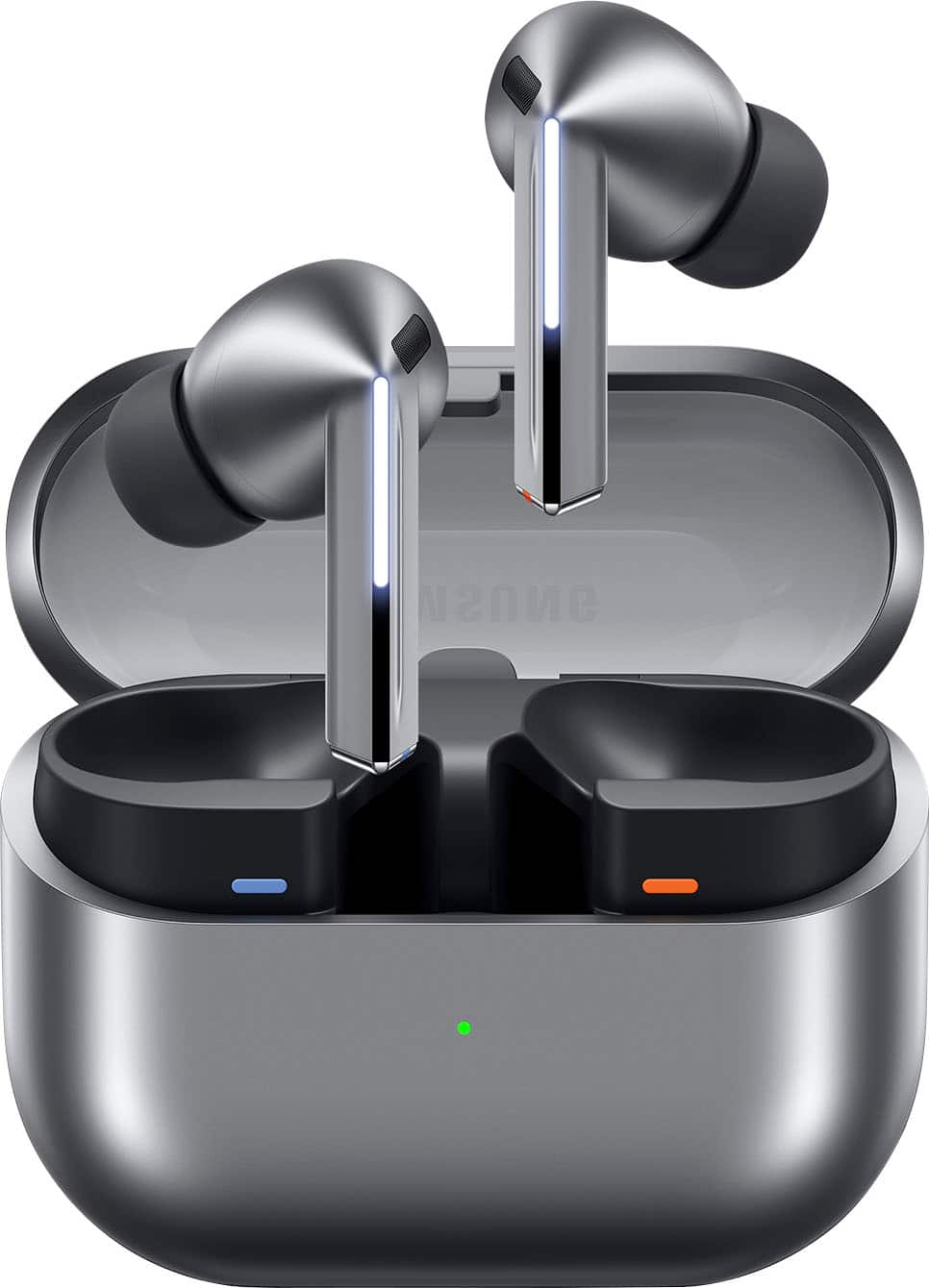




- Model:
- SM-R630NZAAXAR
- SKU:
- 12558964
Rating by feature
- Sound Quality
Rating 4.8 out of 5 stars
- Battery Life
Rating 4.6 out of 5 stars
- Connectivity
Rating 4.8 out of 5 stars
Customers are saying
Customers regard the sound quality as the standout feature of this product, with many users also praising its comfortable fit and impressive battery life. While the design, connectivity, and overall feature set receive positive feedback, some users have expressed minor concerns regarding the sensitivity of the touch controls and the maximum volume levels. Overall, the product is highly regarded for its performance and user experience.
This summary was generated by AI based on customer reviews.
Dont fit well
||Posted . Owned for 1 week when reviewed.This reviewer received promo considerations or sweepstakes entry for writing a review.Dont fit in ear when working out. Dont recommend for the gym.
No, I would not recommend this to a friendBrand response from Samsung
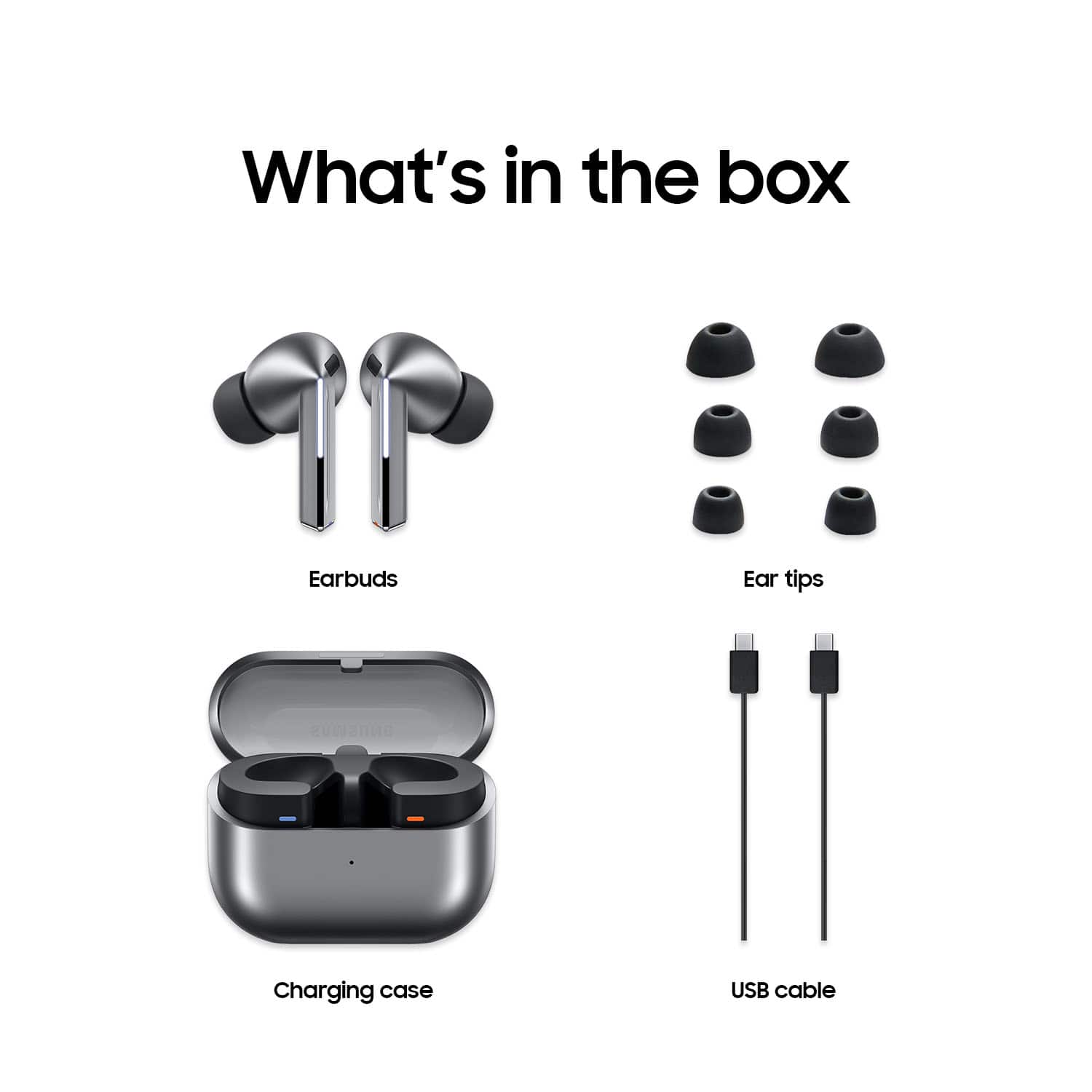
Posted .Thanks for reaching out to share your thoughts with us, Duke. Your feedback is invaluable as we continue to make improvements. We see you reached out to share your thoughts about the Galaxy Buds3 Pro. Galaxy Buds3 Pro comes with different-sized ear tips. The first thing you want to do is make sure they have the right size tips for your ears. You want them to fit so that there isn't a gap between your ear and the ear tip. This helps to avoid sound leaks and ensure optimal audio. If you need instructions for changing the tips, check out our guide for the Buds3 Pro tips in our article called "How to change the tips on your Galaxy Buds3 Pro". If you have any further questions or concerns, please do not hesitate to reach out to us at Support. -Kelvin

Terrible product
||Posted . Owned for 1 month when reviewed.This reviewer received promo considerations or sweepstakes entry for writing a review.Waste of money and time. Does not work as intended.
No, I would not recommend this to a friendBrand response from Samsung
Posted .Howdy NAtoBA, thank you for taking the time to share your feedback with us about your experience using the Samsung Galaxy Buds3 Pro. Your insights provide valuable critiques that will assist us with improving our product line. Samsung provides a 12-month warranty on your device for manufacturing defects in materials and workmanship. Without having any details available regarding what you may be experiencing with your device and without being able to ask you any follow up questions to probe further, I recommend contacting Support if you would like assistance with troubleshooting your device. Thank you for choosing Samsung! - Debra
High hopes and disappointment
||Posted . Owned for 3 weeks when reviewed.This reviewer received promo considerations or sweepstakes entry for writing a review.Ran into quality issue. Attempted to change out the ear cusions and ripped. Unfortunately im still paying on them due tonbest buy wacky return policy for trade in.
No, I would not recommend this to a friendBrand response from Samsung
Posted .Hello Mr601613, thank you for finding the time out of your lively day to share your sentiments with us about your Samsung Galaxy Buds3 Pro. We appreciate your feedback as it allows us to improve the design and functionality of our product line while we remain committed to constant innovation. Samsung provides a 12-month warranty on our products for manufacturing defects in materials and workmanship. When changing the ear tips on your Galaxy Buds3 Pro, make sure to choose the tips that fit your ears, and change them properly using our guidelines. Be careful when handling the tips and avoid using your fingernails when pulling off the tips, as they may tear. Please take a moment to review, "How to change the tips on your Galaxy Buds3 Pro" and check out the video titled, "Replacing the ear tips on your Galaxy Buds3 Pro for a perfect fit" to help resolve what you have described to be experiencing with your ear tips. If you would like further assistance, feel free to reach out to us. Thank you for being a treasured Samsung customer. - Debra
Waste of money
||Posted .This reviewer received promo considerations or sweepstakes entry for writing a review.Stopped working after 3 months couldnt even return it or exchange it . Difficultly with calls ended up not being able to use it for talking
No, I would not recommend this to a friendBrand response from Samsung
Posted .Aloha Priscilla07, thank you for sharing your feedback with us about your experience using the Samsung Galaxy Buds3 Pro. We strive to provide our customers with exceptional experiences and quality products. Samsung provides a 12-month warranty on your device for manufacturing defects in materials and workmanship. Without having any details available regarding what may be occurring with your device and without being able to ask you any follow up questions to probe further, I recommend reaching out to Support at your earliest convenience for assistance with troubleshooting your device. Thank you for being a dedicated Samsung customer. - Debra
Uncomfortable
||Posted .This reviewer received promo considerations or sweepstakes entry for writing a review.Feeling uncomfortable when using.. ears was like blocking with something heavy stuff
I would recommend this to a friendBrand response from Samsung
Posted .Howdy SharminA, thanks for taking the time out of your hectic day to share your thoughts with us about your Samsung Galaxy Buds3 Pro. We appreciate your feedback as we strive in providing the best products with superior functionality on the market. It's important to wear your earbuds properly for many reasons. You'll get better sound quality from them, they'll fit more comfortably, and they'll stay in your ears. Wearing them improperly can cause discomfort, sound leaks, and makes them more likely to fall out. As you know, the Galaxy Buds3 Pro come with different sized ear tips. The first thing you want to do is make sure they have the right size tips for your ears. You want them to fit so that there isn't a gap between your ear and the ear tip. This helps to avoid sound leaks and ensure optimal audio. Once you have the right tips on your buds: 1. Check the bottom of the earbuds for directional marks. You will see an L and an R. 2. Insert the R bud into your right ear with the R facing you. 3. Insert the L bud into your left ear with the L facing you. 4. Angle the blade slightly so that the microphone on the bottom is pointing towards your mouth rather than straight down. 5. You can adjust the buds by rotating them forwards and backwards until the fit feels right. You can also run an earbud fit test in the Galaxy Wearable app to ensure you have the proper fit. To run an Earbud fit test, 1. Open the Galaxy Wearable app on your connected phone. 2. From the Buds3 Pro screen, tap Sound quality and effects. 3. Tap Earbud fit test. 4. The screen will display either In ear or Not in ear. Make sure both buds are in your ears, and then tap Start. 5. The buds will chime for a few seconds, and then the app will display your results. It may say Poor fit or Good fit. If the fit is poor, make small adjustments and then tap Try again. 6. Continue running the fit test and making adjustments until you get a good fit result for both buds. If you would like more information regarding fit, feel free to check out "How to wear your Samsung Galaxy Buds3 and 3 Pro." If you would like any further assistance after reviewing the resource that has been shared, do not hesitate to contact Samsung Support at your earliest convenience. Thank you for being a devoted Samsung customer. - Debra
Not good!
||Posted .This reviewer received promo considerations or sweepstakes entry for writing a review.Wouldn't stay in my ear. The squeeze the stem feature is horrible. I had to exchange them for the Skull Candy Method 360 ANC, much better and chair as well.
No, I would not recommend this to a friendBrand response from Samsung
Posted .Hello there KEG101, thank you for sharing your feedback with us about your experience using the Samsung Galaxy Buds3 Pro. It's important to wear your earbuds properly for many reasons. You'll get better sound quality from them, they'll fit more comfortably, and they'll stay in your ears. Wearing them improperly can cause discomfort, sound leaks, and makes them more likely to fall out. The Galaxy Buds3 Pro come with different sized ear tips. The first thing you want to do is make sure they have the right size tips for your ears. You want them to fit so that there isn't a gap between your ear and the ear tip. This helps to avoid sound leaks and ensure optimal audio. Once you have the right tips on your buds: 1. Check the bottom of the earbuds for directional marks. You will see an L and an R. 2. Insert the R bud into your right ear with the R facing you. 3. Insert the L bud into your left ear with the L facing you. 4. Angle the blade slightly so that the microphone on the bottom is pointing towards your mouth rather than straight down. 5. You can adjust the buds by rotating them forwards and backwards until the fit feels right. You can also run an earbud fit test in the Galaxy Wearable app to ensure you have the proper fit. To run an Earbud fit test, 1. Open the Galaxy Wearable app on your connected phone. 2. From the Buds3 Pro screen, tap Sound quality and effects. 3. Tap Earbud fit test. 4. The screen will display either In ear or Not in ear. Make sure both buds are in your ears, and then tap Start. 5. The buds will chime for a few seconds, and then the app will display your results. It may say Poor fit or Good fit. If the fit is poor, make small adjustments and then tap Try again. 6. Continue running the fit test and making adjustments until you get a good fit result for both buds. If you would like more information regarding achieving the perfect fit, please check out "How to wear your Samsung Galaxy Buds3 and 3 Pro." If you would like any further assistance afterward, please do not hesitate to contact Support at your earliest convenience. Thanks for being a dedicated Samsung customer. - Debra
not good
||Posted . Owned for 3 weeks when reviewed.This reviewer received promo considerations or sweepstakes entry for writing a review.the ambient sound is not good, and you can still hear fans and tvs in the background, even when the ambientsound is all the way up.. the galaxy bud 3 were far superior. they dont fit well in the ears. no wings, had to buy my own. they fall out easily. sound is much lower than the older model. The Adaptive noise cancellation keeps picking up my breathing so it will hollow out the sound while listening to music even though nobody is talking
No, I would not recommend this to a friendBrand response from Samsung
Posted .Salutations Sammie, thanks for taking the opportunity to review your Samsung Galaxy Buds3 Pro. Your feedback allows us to remain committed to constant innovation as we strive to improve the design and functionality of our product line. Samsung provides a 12-month warranty on our products for manufacturing defects in materials and workmanship. The "ambient" feature on your Galaxy Buds3 Pro allows you to hear your surroundings clearly by letting in external sounds, while the "noise cancelling" actively blocks out background noise, letting you focus on your audio without distractions. Wearing your earbuds properly is important for many reasons. You'll get better sound quality from them, they'll fit more comfortably, and they'll stay in your ears. Wearing them improperly can cause discomfort, sound leaks, and makes them more likely to fall out. When changing the ear tips on your Galaxy Buds3 Pro, make sure to choose the tips that fit your ears and change them properly. Be careful when handling the tips and avoid using your fingernails when pulling off the tips, as they may tear. The first thing you want to do is make sure they have the right size tips for your ears. You want them to fit so that there isn't a gap between your ear and the ear tip. This helps to avoid sound leaks and ensure optimal audio. Once you have the right tips on your buds: 1. Check the bottom of the earbuds for directional marks. You will see an L and an R. 2. Insert the R bud into your right ear with the R facing you. 3. Insert the L bud into your left ear with the L facing you. 4. Angle the blade slightly so that the microphone on the bottom is pointing towards your mouth rather than straight down. 5. You can adjust the buds by rotating them forwards and backwards until the fit feels right. You can also run an earbud fit test in the Galaxy Wearable app to ensure you have the proper fit. To run an Earbud fit test, 1. Open the Galaxy Wearable app on your connected phone. 2. From the Buds3 Pro screen, tap Sound quality and effects. 3. Tap Earbud fit test. 4. The screen will display either In ear or Not in ear. Make sure both buds are in your ears, and then tap Start. 5. The buds will chime for a few seconds, and then the app will display your results. It may say Poor fit or Good fit. If the fit is poor, make small adjustments and then tap Try again. 6. Continue running the fit test and making adjustments until you get a good fit result for both buds. If you would like more information regarding your Buds3 Pro fit, feel free to check out "How to wear your Samsung Galaxy Buds3 and 3 Pro." If you have any questions for us after reviewing the resource provided, do not hesitate to contact Samsung Support. Thank you for being a dedicated Samsung customer. - Debra
Dont buy
||Posted . Owned for 1 month when reviewed.This reviewer received promo considerations or sweepstakes entry for writing a review.Wouldnt connect with phone, replaced and next set also couldnt conenct properly. Refunded multiple times and gave up cause they are such trash
No, I would not recommend this to a friendGakaxy pro earbuds
||Posted . Owned for 3 weeks when reviewed.This reviewer received promo considerations or sweepstakes entry for writing a review.Am returning them. They do not fit comfortably or securely in the ear. Sound isn't great either.
No, I would not recommend this to a friendBrand response from Samsung
Posted .Hi ScottP, thank you for taking the time to share your experience with using the Samsung Galaxy Buds3 Pro. Your critiques provide valuable insights that will assist us with improving our product line. Wearing your earbuds properly is important for many reasons. You'll get better sound quality from them, they'll fit more comfortably, and they'll stay in your ears. Wearing them improperly can cause discomfort, sound leaks, and makes them more likely to fall out. The Galaxy Buds3 Pro come with different sized ear tips. The first thing you want to do is make sure they have the right size tips for your ears. You want them to fit so that there isn't a gap between your ear and the ear tip. This helps to avoid sound leaks and ensure optimal audio. Once you have the right tips on your buds: 1. Check the bottom of the earbuds for directional marks. You will see an L and an R. 2. Insert the R bud into your right ear with the R facing you. 3. Insert the L bud into your left ear with the L facing you. 4. Angle the blade slightly so that the microphone on the bottom is pointing towards your mouth rather than straight down. 5. You can adjust the buds by rotating them forwards and backwards until the fit feels right. You can also run an earbud fit test in the Galaxy Wearable app to ensure you have the proper fit. To run an Earbud fit test, 1. Open the Galaxy Wearable app on your connected phone. 2. From the Buds3 Pro screen, tap Sound quality and effects. 3. Tap Earbud fit test. 4. The screen will display either In ear or Not in ear. Make sure both buds are in your ears, and then tap Start. 5. The buds will chime for a few seconds, and then the app will display your results. It may say Poor fit or Good fit. If the fit is poor, make small adjustments and then tap Try again. 6. Continue running the fit test and making adjustments until you get a good fit result for both buds. If you would like more information regarding fit, feel free to review "How to wear your Samsung Galaxy Buds3 and 3 Pro." If you would like any further assistance afterward, please feel free to reach out to Support. Thanks for being a loyal Samsung customer. - Debra
Not comparable in small ears.
||Posted . Owned for 2 weeks when reviewed.This reviewer received promo considerations or sweepstakes entry for writing a review.Device did not fit. Even the smallest ear insert continuously loosen and fall out of the ear
No, I would not recommend this to a friendBrand response from Samsung
Posted .Greetings SharonS, thank you for finding the time to share your thoughts with us about your experience using the Samsung Galaxy Buds3 Pro. We value your feedback as it allows us the opportunity to improve the functionality and design of our product line. Samsung provides a 12-month warranty on our products for manufacturing defects in materials and workmanship. Wearing your earbuds properly is important for many reasons. You'll get better sound quality from them, they'll fit more comfortably, and they'll stay in your ears. Wearing them improperly can cause discomfort, sound leaks, and makes them more likely to fall out. As you know, the Galaxy Buds3 Pro come with different sized ear tips. The first thing you want to do is make sure they have the right size tips for your ears. You want them to fit so that there isn't a gap between your ear and the ear tip. This helps to avoid sound leaks and ensure optimal audio. Once you have the right tips on your buds: 1. Check the bottom of the earbuds for directional marks. You will see an L and an R. 2. Insert the R bud into your right ear with the R facing you. 3. Insert the L bud into your left ear with the L facing you. 4. Angle the blade slightly so that the microphone on the bottom is pointing towards your mouth rather than straight down. 5. You can adjust the buds by rotating them forwards and backwards until the fit feels right. You can also run an earbud fit test in the Galaxy Wearable app to ensure you have the proper fit. To run an Earbud fit test, 1. Open the Galaxy Wearable app on your connected phone. 2. From the Buds3 Pro screen, tap Sound quality and effects. 3. Tap Earbud fit test. 4. The screen will display either In ear or Not in ear. Make sure both buds are in your ears, and then tap Start. 5. The buds will chime for a few seconds, and then the app will display your results. It may say Poor fit or Good fit. If the fit is poor, make small adjustments and then tap Try again. 6. Continue running the fit test and making adjustments until you get a good fit result for both buds. If you would like more information regarding your Buds3 Pro fit, feel free to check out "How to wear your Samsung Galaxy Buds3 and 3 Pro." If you would like any further assistance afterward or if you would like to share additional feedback with us, do not hesitate to reach out to Support at your earliest convenience. Thank you for being a steadfast Samsung customer. - Debra
Don't buy from Best Buy
||Posted .This reviewer received promo considerations or sweepstakes entry for writing a review.Price dropped and the 12 day return window has closed so Best Buy won't honor price guarantee. Best Buy isn't the same buy your electronics from somewhere else.
I would recommend this to a friendYou wanted a review
||Posted .This reviewer received promo considerations or sweepstakes entry for writing a review.Flimsy and fragile. Not enough earpieces included for proper fit. No larger earpieces listed by manufacturer. Store staff completely unhelpful on this issue. Item returned for refund. Better quality and better fitting earbuds purchased from competitor. Best Buy has become a joke.
No, I would not recommend this to a friendBrand response from Samsung
Posted .Aloha JohnP, thank you for finding the opportunity to share your sentiments with us about your Samsung Galaxy Buds3 Pro. We value your feedback as we are committed to constant innovation as we strive to improve the design and functionality of our product line. Samsung provides a 12-month warranty on our products for manufacturing defects in materials and workmanship. It's important to wear your earbuds properly for many reasons. You'll get better sound quality from them, they'll fit more comfortably, and they'll stay in your ears. Wearing them improperly can cause discomfort, sound leaks, and makes them more likely to fall out. As you know, the Galaxy Buds3 Pro come with different sized ear tips. The first thing you want to do is make sure they have the right size tips for your ears. You want them to fit so that there isn't a gap between your ear and the ear tip. This helps to avoid sound leaks and ensure optimal audio. Once you have the right tips on your buds: 1. Check the bottom of the earbuds for directional marks. You will see an L and an R. 2. Insert the R bud into your right ear with the R facing you. 3. Insert the L bud into your left ear with the L facing you. 4. Angle the blade slightly so that the microphone on the bottom is pointing towards your mouth rather than straight down. 5. You can adjust the buds by rotating them forwards and backwards until the fit feels right. You can also run an earbud fit test in the Galaxy Wearable app to ensure you have the proper fit. To run an Earbud fit test, 1. Open the Galaxy Wearable app on your connected phone. 2. From the Buds3 Pro screen, tap Sound quality and effects. 3. Tap Earbud fit test. 4. The screen will display either In ear or Not in ear. Make sure both buds are in your ears, and then tap Start. 5. The buds will chime for a few seconds, and then the app will display your results. It may say Poor fit or Good fit. If the fit is poor, make small adjustments and then tap Try again. 6. Continue running the fit test and making adjustments until you get a good fit result for both buds. If you would like more information regarding fit, feel free to check out "How to wear your Samsung Galaxy Buds3 and 3 Pro." If you have any questions for us afterward or if you would like any further assistance, please feel free to contact Support. Thank you for being a staunch Samsung customer. - Debra
Waste of money!!
||Posted .This reviewer received promo considerations or sweepstakes entry for writing a review.Right ear bud stop work 3 months after buying. Waste of money. I’ve had cheaper earbuds that has lasted years. Please do your research before purchasing and definitely get a warranty. I’ve reached out to Samsung waited to hear back.
No, I would not recommend this to a friendBrand response from Samsung
Posted .Salutations ShanekaB, thank you for sharing your feedback with us about your experience using the Samsung Galaxy Buds3 Pro. We appreciate your feedback as we continue to improve the performance and functionality of our product line. Samsung provides a 12-month warranty on your device for manufacturing defects in materials and workmanship. If you've upgraded to a new phone or want to switch the devices your earbuds are connected to, you may need to manually restart your Samsung earbuds. This can also help if you are experiencing minor problems, like if the earbuds are unresponsive. However, you can also perform a factory reset with the Galaxy Wearable app. Feel free to check out "Restart or reset your Samsung earbuds" to help resolve what you've described to be experiencing with your Buds3 Pros. Let us know if you would like any further assistance afterward by reaching out to Support at your earliest convenience. Thanks for being a dedicated Samsung customer. - Debra
Worse head phones ever
||Posted . Owned for 3 months when reviewed.This reviewer received promo considerations or sweepstakes entry for writing a review.Horrible head phones for the money spent a lot expecting the best but got
No, I would not recommend this to a friendBrand response from Samsung
Posted .Salutations DominiqueT, thank you for sharing your experience with using the Samsung Galaxy Buds3 Pro. We value your candor as we take every effort to improve the design and functionality of our product line. Samsung provides a 12-month warranty for manufacturing defects in materials and workmanship. Without having more information available regarding what you may be experiencing with your device and without being able to ask you any follow up questions to probe further, I suggest reaching out to Support for further assistance and/or help with troubleshooting your Galaxy Buds3 Pros. Thank you for being a steadfast Samsung customer. - Debra
Maybe, because it's open box
||Posted . Owned for 2 weeks when reviewed.This reviewer received promo considerations or sweepstakes entry for writing a review.I buy this as an open box, but it's not good You can hear static
I would recommend this to a friendCharging defect
||Posted . Owned for 2 months when reviewed.This reviewer received promo considerations or sweepstakes entry for writing a review.Battery runs low pretty fast, takes long to charge from 50% to 100%, rigth pod sometimes not even charging or stop charging all the sudden, if drop makes a pitch noise for 10 minutes.
No, I would not recommend this to a friendBrand response from Samsung
Posted .Hi there Fisher51, thank you for taking the opportunity to share your recent experience using the Samsung Galaxy Buds3 Pro. We value your feedback as it allows us the opportunity to improve the functionality and design of our product line. Samsung provides a 12-month warranty for manufacturing defects in materials and workmanship. The Galaxy Buds3 Pro can provide up to 26 hours of play. Please take a moment to review, "The battery life of your Samsung earbuds" if you would like to learn more about battery expectations. If your Galaxy Buds3 Pro case isn't charging the earbuds, here's a few things you can so right away to help resolve what you may be experiencing with your device:
1. Check for debris on the charging contacts inside the case and on the earbuds.
2. Ensure that your case is charging correctly.
3. Clean the contacts with a soft, dry cloth. Dust, wax, or other debris can build up on the charging contacts, preventing proper contact and charging.
If you would like further assistance after reviewing the resource shared, do not hesitate to reach out to Samsung Support. We're happy to assist you further! Thank you for being a faithful Samsung customer. - Debra
Samsung buds 3 pro
||Posted . Owned for 2 months when reviewed.This reviewer received promo considerations or sweepstakes entry for writing a review.After 1 month of using them I starded having conection problems ti the case an right ear bud. Right ear bud is not detected by the case or my phone. Case sometimes conect to the phone and sometimes does not. I tried various ways to fix it but nothing works. When I looked it up I realized that this has been a problem to other users since the earbuds came out.
No, I would not recommend this to a friendBrand response from Samsung
Posted .Hello there JoseD, thank you for finding the time to share your sentiments with us about your Samsung Galaxy Buds3 Pro. We value your feedback as it allows us the opportunity to improve the functionality and design of our product line. Samsung provides a 12-month warranty on our products for manufacturing defects in materials and workmanship. Please take a moment to review, "Sync the Samsung earbuds to each other" and "Restart or reset your Samsung earbuds" to help resolve what you have described to be experiencing with your Galaxy Buds3 Pro. Feel free to reach out to Support afterward if you have any questions or if you'd like further assistance with troubleshooting your device. Thank you for being a steadfast Samsung customer. - Debra
Not durable
||Posted . Owned for 4 months when reviewed.This reviewer received promo considerations or sweepstakes entry for writing a review.One of the ear buds fell out at the gym, hot the floor, and it broke. Not recommended.
No, I would not recommend this to a friendBrand response from Samsung
Posted .Hello Xfullboost, thank you for sharing your thoughts with us about your experience using the Samsung Galaxy Buds3 Pro. Your feedback is crucial as we continue to improve the durability and performance of our product line. The Buds3 Pro are incredibly durable, featuring an IP57 rating for dust and water resistance. They are designed to withstand submersion in fresh water up to 1 meter for 30 minutes. If you would like to share additional feedback with us or if you have any questions, please do not hesitate to contact Support. Thank you for choosing Samsung! - Debra
Returned due to lack of seal
||Posted .This reviewer received promo considerations or sweepstakes entry for writing a review.I could not get a proper seal with the three sizes of tips, based on both my experience and what the Samsung app told me, so I returned them within days of receipt.
No, I would not recommend this to a friendBrand response from Samsung
Posted .Aloha BeeCaveGeorge, thank you for sharing your thoughts with us about your experience using the Samsung Galaxy Buds3 Pro. We value your feedback as we continue to make improvements on the performance and functionality of our product line. It's important to wear your earbuds properly for many reasons. You'll get better sound quality from them, they'll fit more comfortably, and they'll stay in your ears. Wearing them improperly can cause discomfort, sound leaks, and makes them more likely to fall out. The Galaxy Buds3 Pro come with different sized ear tips. The first thing you want to do is make sure they have the right size tips for your ears. You want them to fit so that there isn't a gap between your ear and the ear tip. This helps to avoid sound leaks and ensure optimal audio. Once you have the right tips on your buds: 1. Check the bottom of the earbuds for directional marks. You will see an L and an R. 2. Insert the R bud into your right ear with the R facing you. 3. Insert the L bud into your left ear with the L facing you. 4. Angle the blade slightly so that the microphone on the bottom is pointing towards your mouth rather than straight down. 5. You can adjust the buds by rotating them forwards and backwards until the fit feels right. You can also run an earbud fit test in the Galaxy Wearable app to ensure you have the proper fit. To run an Earbud fit test, 1. Open the Galaxy Wearable app on your connected phone. 2. From the Buds3 Pro screen, tap Sound quality and effects. 3. Tap Earbud fit test. 4. The screen will display either In ear or Not in ear. Make sure both buds are in your ears, and then tap Start. 5. The buds will chime for a few seconds, and then the app will display your results. It may say Poor fit or Good fit. If the fit is poor, make small adjustments and then tap Try again. 6. Continue running the fit test and making adjustments until you get a good fit result for both buds. If you would like more information regarding achieving the perfect fit, feel free to review "How to wear your Samsung Galaxy Buds3 and 3 Pro." If you would like any further assistance afterward, please do not hesitate to contact Support at your earliest convenience. Thanks for being an unwavering Samsung customer. - Debra
Low and poor voice quality. low battery
||Posted .This reviewer received promo considerations or sweepstakes entry for writing a review.I bought these buds four months ago and have used them rarely since then. Recently, I realized that the sound is so poor and low. I have tried different ways to fix it, but it did not work. In terms of the battery, it is a pain in the back for sure. It gets discharged very quickly.
No, I would not recommend this to a friendBrand response from Samsung
Posted .Aloha Vahid, thanks for taking the time to share your experience with using the Samsung Galaxy Buds3 Pro. We value your candor as we make every effort to improve the design and functionality of our product line. Samsung provides a 12-month warranty on our products for manufacturing defects in materials and workmanship. If your Galaxy earbuds have no or low volume and poor sound quality on one or both buds, there may be a couple reasons why. You might be wearing the earbuds incorrectly, or the buds could have accumulated dust or debris. Additionally, the audio quality could be affected by outdated software, a low battery, and several other things. Please take a moment to review, "No, low, or poor audio quality on Samsung earbuds" to conduct some troubleshooting steps on your device to help resolve what you may be experiencing with your audio quality. The Galaxy Buds3 Pro can provide up to 26 hours of play. If you're experiencing less than expected battery life, please take a moment to review "The battery life of your Samsung earbuds" if you would like to learn more about battery expectations. If you have any questions afterward or if you would like any further assistance, please feel free to contact Support at your leisure. Thank you for being a staunch Samsung customer. - Debra