Customer Ratings & Reviews




- Model:
- SM-R530NZAAXAR
- SKU:
- 12901715
Rating by feature
- Sound Quality
Rating 4.5 out of 5 stars
- Battery Life
Rating 4.5 out of 5 stars
- Connectivity
Rating 4.6 out of 5 stars
to a friend
Poor Fit
||Posted . Owned for less than 1 week when reviewed.This reviewer received promo considerations or sweepstakes entry for writing a review.The Galaxy Buds 3 had good sound quality, but they were loose and kept falling out, even when just walking or moving my head. I had to constantly push them in to maintain the sound quality. Once I let my hand go, they became loose, and the sound weakened significantly. The call quality was okay, and the stem design was unique, but these buds are not suitable for physical activity. Overall, I was dissatisfied and ended up returning them.While I appreciate Samsung's innovation, there seems to be limited quality checks. The Galaxy Buds Pro 2, on the other hand, are much better. They don’t fall out, sound great, and I barely notice they're in my ears. Although the call quality and bass could still improve, I’m sticking with these for now.
No, I would not recommend this to a friendBrand response from Samsung
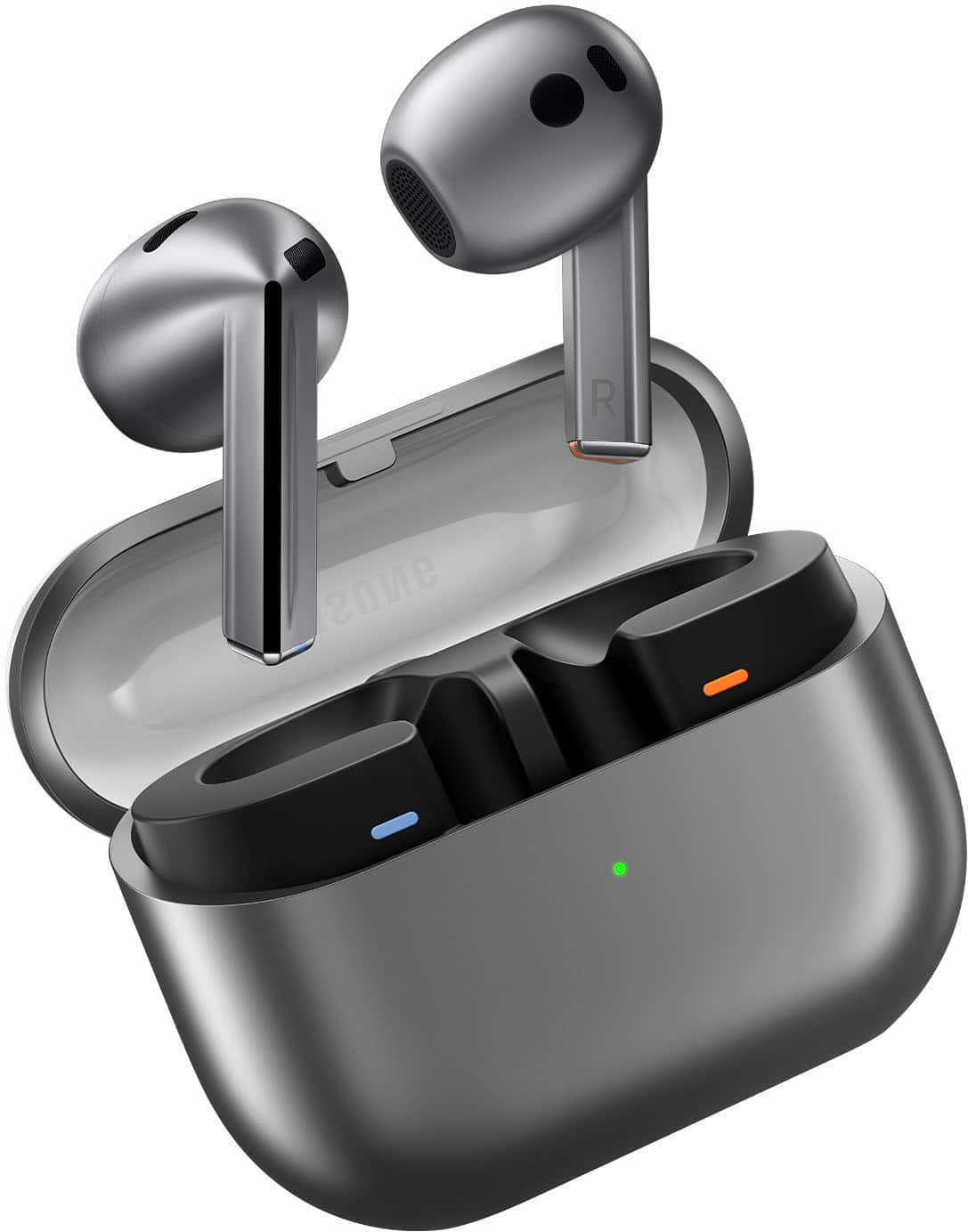
Posted .Howdy Abdul, thanks for taking the time out of your day to share your thoughts with us about your Samsung Galaxy Buds3. We appreciate your feedback as we strive in providing the best products with superior functionality on the market for our customers while staying committed to constant innovation. Our goal is for our customers to feel like they are having the most amazing experiences when using our products. Samsung provides a 12-month warranty on our products for manufacturing defects in materials and workmanship. It's important to wear your earbuds properly for many reasons. You'll get better sound quality from them, they'll fit more comfortably, and they'll stay in your ears. Wearing them improperly can cause discomfort, sound leaks, and makes them more likely to fall out. The Galaxy Buds3 are open-type buds rather than canal types, so they do not have earbud tips. All you have to do to get started is simply place them in your ears. 1. Check the bottom of the earbuds for directional marks. You will see an L and an R. 2. Insert the R bud into your right ear with the R facing you. 3. Insert the L bud into your left ear with the L facing you. 4. Angle the blade slightly so that the microphone on the bottom is pointing towards your mouth rather than straight down. 5. You can adjust the buds by rotating them forwards and backwards until the fit feels right. Feel free to check out, "How to wear your Samsung Galaxy Buds3 and 3 Pro" if you would like more information. If you have any questions for us or if you would like any further assistance, feel free to reach out to Samsung Support. Thank you for being a devoted Samsung customer. - Debra

Great earbuds
||Posted . Owned for 4 months when reviewed.This reviewer received promo considerations or sweepstakes entry for writing a review.I love these earbuds, finally i found ones that fit in my ear. Other ones i've had fall out. The sound is great and if i misplace them i use the wearble to find them. I recommend these earbuds. The battery life is great, they last long.
I would recommend this to a friendGreat earbuds!
||Posted . Owned for 2 weeks when reviewed.This reviewer received promo considerations or sweepstakes entry for writing a review.These earbuds are awesome! I have been using them daily sicne i bought them a few weeks ago. They fit my ears well and stay charged up for a long time. The call quality if good and so is the music quality. I am very pleased with my purchase and would recommend this product to others too!
I would recommend this to a friendGrey ear buds
||Posted . Owned for 3 months when reviewed.This reviewer received promo considerations or sweepstakes entry for writing a review.The sound is good. The issue ive had with other ear buds is that the volume always gives out on one side. I havent had this issue with these. I like the color and material in grey. It hasnt gotten dirty or scratched as other cases would.
I would recommend this to a friendAmazing battery life
||Posted . Owned for 1 month when reviewed.This reviewer received promo considerations or sweepstakes entry for writing a review.Clear sound on videos and calls. Battery life is excellent.
I would recommend this to a friendGalaxy Buds
||Posted . Owned for 10 months when reviewed.This reviewer received promo considerations or sweepstakes entry for writing a review.They were at great price for the features they offer and was surpised by the sound quality of the buds and the easy set-up with a samsung device.
I would recommend this to a friendclean sound good pair for samsung phones
||Posted . Owned for 3 months when reviewed.This reviewer received promo considerations or sweepstakes entry for writing a review.clean sound, if you have smaller size ears they might hurt you at first. do not throw them in the washer. they won’t survive like the airpods
I would recommend this to a friendTruck driver
||Posted . Owned for 1 year when reviewed.This reviewer received promo considerations or sweepstakes entry for writing a review.Great noise cancellation and comfortable to ware the headphones
I would recommend this to a friendSamsung earbuds
||Posted . Owned for 3 weeks when reviewed.This reviewer received promo considerations or sweepstakes entry for writing a review.I really liked the look of the earphones but it kept bugging my ears. I have small ears and it fits great but it started to itch after some time. I used to have airpods and these fit way better but the noise cancellation is better on the airpods. But for such a budget and good looking earbuds I would get these.
I would recommend this to a friendGood Ear Phones but not worth the full price.
||Posted . Owned for 1 month when reviewed.This reviewer received promo considerations or sweepstakes entry for writing a review.Very comfortable but sound unfortunately is not as good as the newest AirPods Pro 4. Missing good bass sounds-but noise cancelation is terrific. Also it is much more user friendly than the AirPods. Much easier to adjust the volume and use other contrils.
I would recommend this to a friendBest Buy customer
||Posted .This reviewer received promo considerations or sweepstakes entry for writing a review.Good sounds comfortable to wear love the silver color
I would recommend this to a friendPretty good
||Posted . Owned for 1 month when reviewed.This reviewer received promo considerations or sweepstakes entry for writing a review.Had them for a couple months now. Thought they would be falling out my ears constantly, but they havent yet. Sound is solid. Still prefer the old stlye but i guess you have to move with the times with technology Would recommend
I would recommend this to a friendNot the loudest, still love them.
||Posted .This reviewer received promo considerations or sweepstakes entry for writing a review.Not quite as loud as I expected. Also, not sure what it is but the fit seems a little off. The buds appear to come "loose" as time goes on. They've never actually fallen out I suppose so I'll give em that. Still love them though.
I would recommend this to a friendGood sound/bad fit
||Posted . Owned for 2 months when reviewed.This reviewer received promo considerations or sweepstakes entry for writing a review.Sound quality was really good, but these didnt fit in my ear, the new version would i bought them instead of thease, because they have the rubber piece on the end.
No, I would not recommend this to a friendBrand response from Samsung
Posted .Hey there Justin, thank you for finding the free time out of your busy day to share your thoughts with us about your Samsung Galaxy Buds3. We appreciate your feedback as we strive to be innovative and improve the design and functionality of our products. If you're wearing your earbuds properly, you'll get better sound quality from them, they'll fit more comfortably, and they'll stay in your ears. Wearing them improperly can cause discomfort, sound leaks, and makes them more likely to fall out. No one wants to lose an earbud, especially while out jogging, so be sure to wear them with the proper fit. Being that the Galaxy Buds3 are open-type buds rather than canal types, so they do not have earbud tips. All you have to do to get started is simply place them in your ears. 1. Check the bottom of the earbuds for directional marks. You will see an L and an R. 2. Insert the R bud into your right ear with the R facing you. 3. Insert the L bud into your left ear with the L facing you. 4. Angle the blade slightly so that the microphone on the bottom is pointing towards your mouth rather than straight down. 5. You can adjust the buds by rotating them forwards and backwards until the fit feels right. Feel free to check out, "How to wear your Samsung Galaxy Buds3 and 3 Pro" if you would like more information. Feel free to reach out to Samsung Support if you would like any further assistance. Thank you for being a valued Samsung customer. - Debra
Samsung buds
||Posted . Owned for 8 months when reviewed.This reviewer received promo considerations or sweepstakes entry for writing a review.Battery life is awesome. Bud is big and they dont fit.
I would recommend this to a friendTerrible design
||Posted . Owned for 1 month when reviewed.This reviewer received promo considerations or sweepstakes entry for writing a review.I'm samsung guy for more than 10 years, and I can say I had all flagmans of this brand. When I bought this device, I thought I can jump from Airpods 2nd generation, but the ears are so big for me. I love hove samsung eco system works. But my comfort is also important. I don't like vacuum earbuds. I waited this inventory so long, and so disappointed. The item itself design of earbud so terrible. Hard to use in one hand, that triangle stick veri inconvenient. To take of and put back.
No, I would not recommend this to a friendBrand response from Samsung
Posted .Hello there Saidalokhon, thank you for finding the available time out of your day to share your sentiments with us about your Samsung Galaxy Buds3. We value your feedback as it allows us the opportunity to improve the functionality and design of our products. If you're wearing your earbuds properly, you'll get better sound quality from them, they'll fit more comfortably, and they'll stay in your ears. Wearing them improperly can cause discomfort, sound leaks, and makes them more likely to fall out. No one wants to lose an earbud, especially while out jogging, so be sure to wear them with the proper fit. Being that the Galaxy Buds3 are open-type buds rather than canal types, so they do not have earbud tips. All you have to do to get started is simply place them in your ears. 1. Check the bottom of the earbuds for directional marks. You will see an L and an R. 2. Insert the R bud into your right ear with the R facing you. 3. Insert the L bud into your left ear with the L facing you. 4. Angle the blade slightly so that the microphone on the bottom is pointing towards your mouth rather than straight down. 5. You can adjust the buds by rotating them forwards and backwards until the fit feels right. Feel free to check out, "How to wear your Samsung Galaxy Buds3 and 3 Pro" if you would like more information. Feel free to contact Support afterward if you would like any further assistance. Thank you for being a steadfast Samsung customer. - Debra

Good Sound But,
|Posted . Owned for 1 week when reviewed.This reviewer received promo considerations or sweepstakes entry for writing a review.[Employee of bestbuy] The sound was really great and was exactly what id want out of earbuds but, the fact that they dont have the gummy rubber tips made me go back to the GB 2 pros. They constantly fell out of my ears and where rather uncomfortable to me.
No, I would not recommend this to a friendGood sound, bad fit
||Posted . Owned for 1 week when reviewed.This reviewer received promo considerations or sweepstakes entry for writing a review.The sound quality was good however noise cancelling and fit were pretty terrible for my ears at least i wouldn't wear them more than an hour before they started hurting
No, I would not recommend this to a friendBrand response from Samsung
Posted .Hi DavidM, thanks for taking the time out of your day to share your thoughts with us about your Samsung Galaxy Buds3. As we strive to be innovative and make improvements on the design and functionality of our products, your feedback is invaluable. Our goal is for our customers to feel like they are having the most incredible experiences while using our products. If you're wearing your earbuds properly, you'll get better sound quality from them, they'll fit more comfortably, and they'll stay in your ears. Wearing them improperly can cause discomfort, sound leaks, and makes them more likely to fall out. No one wants to lose an earbud, especially while out jogging, so be sure to wear them with the proper fit. Being that the Galaxy Buds3 are open-type buds rather than canal types, so they do not have earbud tips. All you have to do to get started is simply place them in your ears. 1. Check the bottom of the earbuds for directional marks. You will see an L and an R. 2. Insert the R bud into your right ear with the R facing you. 3. Insert the L bud into your left ear with the L facing you. 4. Angle the blade slightly so that the microphone on the bottom is pointing towards your mouth rather than straight down. 5. You can adjust the buds by rotating them forwards and backwards until the fit feels right. Feel free to check out, "How to wear your Samsung Galaxy Buds3 and 3 Pro" if you would like more information regarding obtaining the perfect fit for your Buds3. Do not hesitate to contact us if you would like any further assistance after reviewing the resource provided. Thank you for being a cherished Samsung customer. - Debra
Beyond impressed
||Posted . Owned for 2 weeks when reviewed.This reviewer received promo considerations or sweepstakes entry for writing a review.I bought these for my husband for Christmas. He is absolutely obsessed with these. They fit well in his ears, have amazing sound quality with music and phone calls, the touch controls are simple and easy to use, he has no complaints. He works in a very loud environment and is able to make phone calls without having trouble hearing the person he called along with the person on the phone hearing him clearly. No outside noise filters through during the phone call despite him operating and being near heavy machinery. Truly impressed with these earbuds.
I would recommend this to a friendGreat Galaxy Earbuds, Updated Design
||Posted . Owned for 1 week when reviewed.This reviewer received promo considerations or sweepstakes entry for writing a review.I live in the Samsung ecosystem with a Fold 6 and a Tab 9+. As such, my first look for earbuds is the Samsung Galaxy line of buds for ease of use. These buds replaced a set of Galaxy Buds 3 Pro, I decided to get the regular buds for better ambient hearing in my office when people come up to talk to me, regrettably. The stems on the new design are great, I really like the updated design. Sound quality is very good, especially for more open earbuds (the pro line has better sound quality with the closed earbud system, but can be in the way for some people). The case design is really neat looking with the clear cover. I like it! I would recommend them to a friend.
I would recommend this to a friend