Customer Ratings & Reviews


- Model:
- HW-Q600C
- SKU:
- 10103767
Rating by feature
- Value
Rating 4.6 out of 5 stars
- Quality
Rating 4.6 out of 5 stars
- Ease of Use
Rating 4.6 out of 5 stars
Customers are saying
Customers commend the HW-Q600C 3.1.2 Channel Q-series Soundbar for its excellent sound quality, rich bass, and user-friendly Bluetooth connectivity. Many also appreciate its easy setup and impressive volume for movies. However, some customers have reported issues with Bluetooth connection stability, remote control functionality, a small display, and the soundbar's bulky size.
This summary was generated by AI based on customer reviews.
- Pros mentioned:Sound quality
Had to return.
||Posted . Owned for 2 weeks when reviewed.This reviewer received promo considerations or sweepstakes entry for writing a review.The Subwoofer. Would never connect to the sound bar. I returned it. The sound bar did have a good sound.
No, I would not recommend this to a friendBrand response from Samsung
Posted .DonaldH,
Thank you for your review of the Samsung HW-Q600C Soundbar and for sharing the issues that have caused you to return your unit. Your experience is very important to us and will be shared with our product team.
Your soundbar and subwoofer should have connected automatically when they are turned on, but you can also connect manually just as easily.
When both soundbar and subwoofer are plugged in, they should begin to connect automatically. When the subwoofer is completely connected, the blue LED LINK indicator on the subwoofer stops blinking and glows continuously. If the blue LED does not stop blinking, the process has failed.
For manual connection, after both soundbar and subwoofer are plugged in to a wall outlet, press and hold the ID SET button on the back of the subwoofer for at least 5 seconds. The red indicator on the rear of the subwoofer turns off and the blue indicator blinks.
Press and hold the Up button on the remote control for at least 5 seconds. The ID SET message appears on the display of the Soundbar for a moment, and then it disappears. The Soundbar will automatically power on when ID SET is complete.
Check if the LINK LED is solid blue (connection complete). The LINK LED indicator stops blinking and glows a solid blue when a connection is established between the Soundbar and the Wireless Subwoofer.
Should you ever decide to give Samsung Soundbars another try and have questions or need assistance with settings, setup, or features, please know we are always here to help. Call us at 1-800-SAMSUNG, 8AM - 12AM EST, 7 days a week. Our Live Chat with an agent, as well as manuals, software, and warranty information, can be found at the “Support” link on our website. Again, thank you for taking the time to share your experience. We hope to regain you as a customer in the future.
~ Samsung Solutions
Poor sound
||Posted .This reviewer received promo considerations or sweepstakes entry for writing a review.I returned this item for the sound was very poor quality and not worth the money.
No, I would not recommend this to a friend- Cons mentioned:Connectivity
Not with a bravia
||Posted . Owned for 1 month when reviewed.This reviewer received promo considerations or sweepstakes entry for writing a review.Would not set up with our sony bravia 8. We took.it back
No, I would not recommend this to a friendBrand response from Samsung
Posted .Hello RodneyK,
I’m sorry you were not satisfied with the Samsung Q600C Soundbar. We are always here to help and would have been happy to assist you in making settings adjustments to resolve any issues you were experiencing.
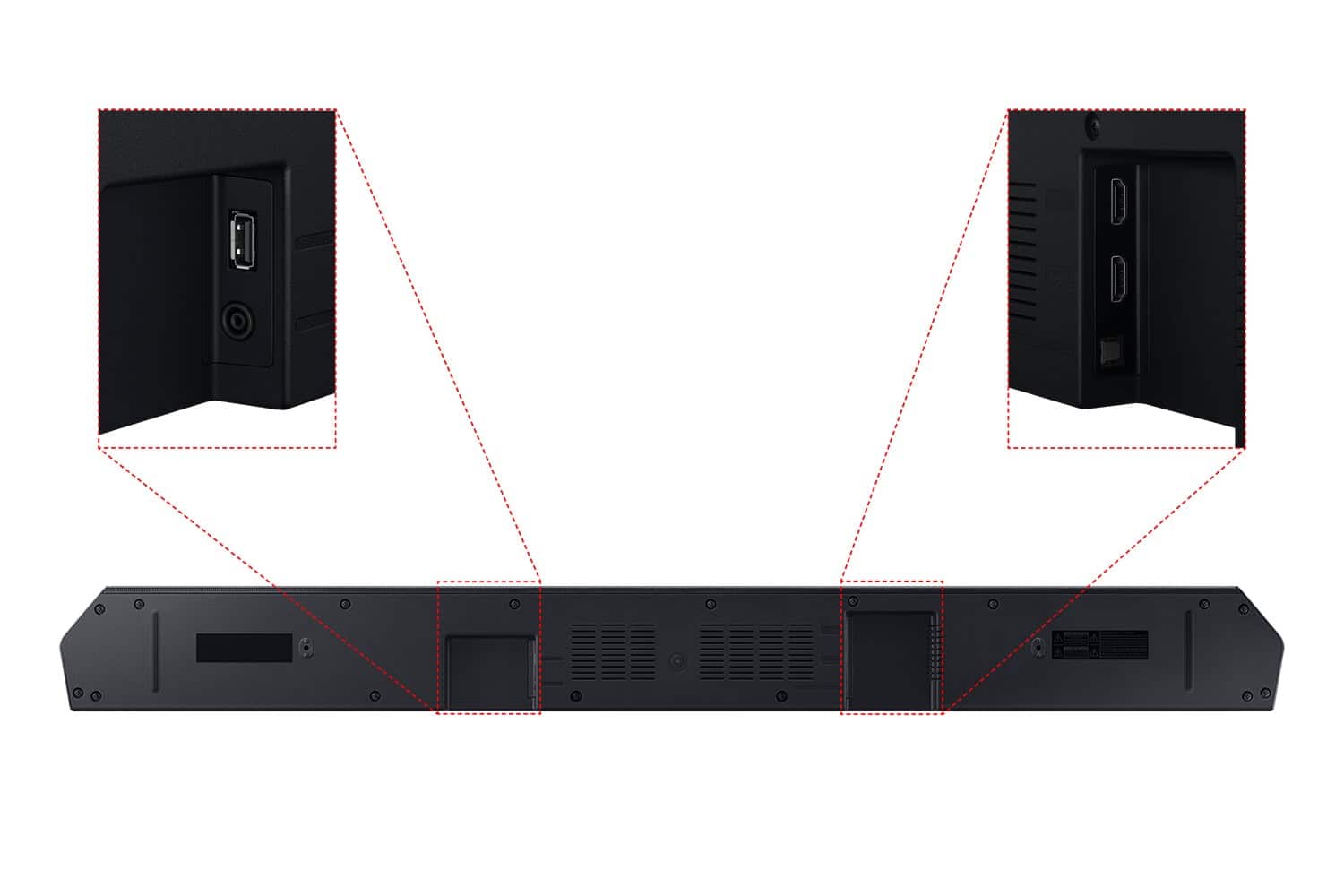
The HW-Q600C Soundbar features three ways to connect to a TV; HDMI/ARC, digital optical audio, and Bluetooth wireless audio technology. If your TV is compatible with one of these three audio connections, you should have no issue connecting the soundbar to your TV. Follow the steps below to connect the soundbar to your TV via one of the three available connections:
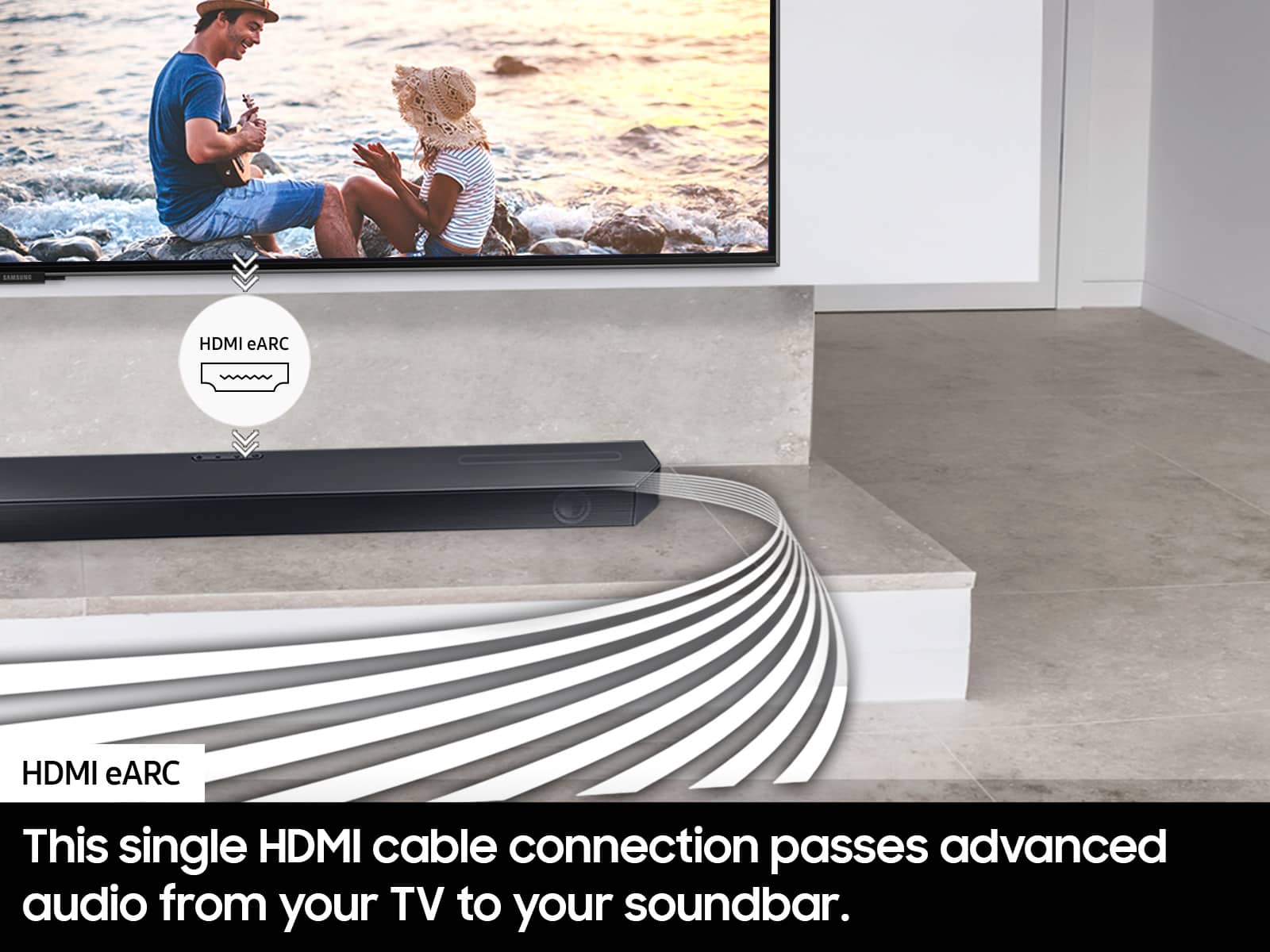
HDMI ARC (Audio Return Channel) lets certain TVs and soundbars transfer audio back and forth using one HDMI cable. In other words, you can use the HDMI port as both an input and audio output. To set up HDMI ARC, power on your TV and soundbar.
1. Next, connect one end of an HDMI cable into the HDMI IN (ARC) port on your TV.
2. Connect the other end into the HDMI OUT (TV-ARC) port on your soundbar.
3. Next, change the source on your soundbar to the D.IN. setting.
4. After a few seconds, "TV ARC" will appear on the soundbar's display, and the TV will transfer audio through the soundbar.
An optical cable is another way to connect your soundbar to your TV. You can also connect your devices (cable boxes, video game systems, and Blu-ray players) to the TV, and have the sound output from the TV to the soundbar.
1. With the TV and soundbar turned on, connect one end of a digital optical cable to the OPTICAL OUT port on the TV.
2. Then, connect the other end to the DIGITAL AUDIO IN (OPTICAL) port on the soundbar.
3. Press Source on the remote or soundbar, and then set the soundbar to the D.IN. setting.
4. Finally, on the TV, you need to set the speaker output to external speakers.
The TV's sound will now play from the soundbar.
Your soundbar is also compatible with a Bluetooth connection to the TV. To connect the soundbar wirelessly, follow the steps below:
1) Press the PAIR button on the remote to enter BT PAIRING mode. You can also press the SOURCE button on the top panel and then select BT. “BT” changes to “BT PAIRING” in a few seconds automatically or changes to “BT READY” if there is a connect record. If BT READY appears, press and hold the SOURCE button on the top panel of the Soundbar for more than 5 seconds to display BT PAIRING.
2) Select the Bluetooth sound mode on your TV (See your TV's user manual for assistance)
3) Select “[AV] Samsung Soundbar xxx Series” from the list on the TV’s screen. An available Soundbar is indicated with “Need Pairing” or “Paired” on the TV’s Bluetooth device list. To connect the TV to the Soundbar, select the message, and then establish a connection.
When the TV is connected, [TV Name] → “BT” appears on the Soundbar’s front display. You should now hear TV sound from the Soundbar. Once you have connected your soundbar for the first time, use the “BT READY” mode to reconnect.
Should you ever decide to give Samsung audio products another try and have questions or need or need help with settings, setup, or features, please know we’re here to help. Call us at 1-800-SAMSUNG, 8AM - 12AM EST, 7 days a week. Our Live Chat with an agent, as well as manuals, software, and warranty information, can be found at the “Support” link on our website. Again, thank you for taking the time to share your experience. We hope to regain you as a customer in the future.
~ Samsung Solutions
Disappointment
||Posted . Owned for 1 month when reviewed.This reviewer received promo considerations or sweepstakes entry for writing a review.I was disappointed with the lack of sound this produced. There was no bass even though it was at it highest setting. Returned and got a LG and love it!
No, I would not recommend this to a friendBrand response from Samsung
Posted .Hello WionaG,
Thank you for your review of the Samsung HW-Q600C Soundbar and for sharing the experience that has caused you to return your unit. Your feedback is very important to us and will be shared with our product team.
Should you ever decide to give Samsung Soundbars another try and have questions or need assistance with settings, setup, or features, please know we are always here to help.
Call us at 1-800-SAMSUNG (ask for Soundbars), available 8 AM – 12 AM EST, 7 days a week.
~ Samsung Solutions
Very Disapointed
||Posted . Owned for less than 1 week when reviewed.This reviewer received promo considerations or sweepstakes entry for writing a review.Was missing the remote control and the manual. The hdmi. cable actually had some rust on it. I've always liked Best Buy, however tne rumor is they will soon be going the way of Radio. Shack
No, I would not recommend this to a friendBrand response from Samsung
Posted .Hi DIXIESUNDAE,
Please know you are leaving a review and 1-star rating for the HW-Q600C, but we are sorry to hear of your Best Buy experience, nonetheless. You may want to consider providing feedback directly to the Best Buy store where you made your purchase.
Should you have questions on the HW-Q600C itself, Samsung is here for you. You can reach us at 1-800-SAMSUNG, 8AM - 12AM EST, 7 days a week. Our LiveChat agents are also available by clicking on the ‘Support’ link on our website.
~ Samsung Solutions
BUYER BEWARE
||Posted .This reviewer received promo considerations or sweepstakes entry for writing a review.GARBAGE!!!! Dont buy. Even the Samsung support team can't fix its problem. But still won't give you a replacement
No, I would not recommend this to a friendBrand response from Samsung
Posted .Hi JohnnyD,
Thank you for taking a moment to review the HW-Q600C Soundbar.
Samsung is committed to providing the best possible product experience, quality, and value. We back this Samsung Soundbar with a 1-year limited manufacturer's warranty, including authorized repair for manufacturer defect, if purchased brand-new directly from an authorized seller.
Please give us the opportunity to assist you by contacting Samsung Customer Support. Just give us a call at 1-800-SAMSUNG (Ask for Soundbars), 8AM - 12AM EST, 7 days a week.
~ Samsung Solutions
Tv
||Posted . Owned for 1 month when reviewed.This reviewer received promo considerations or sweepstakes entry for writing a review.Great purchases every thing i buy at best buy is amazing
I would recommend this to a friendBrand response from Samsung
Posted .Hello JeffreyA,
Thank you for purchasing the Samsung HW-Q600C and for your review. I am glad to hear that you are happy with the performance of your new soundbar.
If you are experiencing specific issues that caused you to give this a 3-star rating, please know Samsung Customer Support is here to help.
Call us at 1-800-SAMSUNG (ask for Soundbars), available 8 AM – 12 AM EST, 7 days a week.
LiveChat with an agent by clicking the ‘Support’ link on the Samsung website.
~Samsung Solutions
Not good
||Posted . Owned for 1 month when reviewed.This reviewer received promo considerations or sweepstakes entry for writing a review.Had first unit about 2-3 months and quit working. Was replaced free of charge and quit working in about a month.
No, I would not recommend this to a friendBrand response from Samsung
Posted .Hi questionmark,
Thank you for taking a few moments to review the Samsung HW-Q600C Soundbar.
Updating the firmware on your soundbar gives you all the benefits of the latest improvements. When an update is available, you can update the Soundbar by connecting the USB drive that contains the update firmware to the SERVICE port of the Soundbar.
1.Go to the Samsung Electronics website (www.samsung.com) → click on the “Support” option in the upper right corner.
2.Click on “Manuals & Software” from the pop-up list > TVs & Home Theater > Home Theater > Select your model
2. Download the firmware file (USB type).
3. Unzip the file to create a folder with the file name.
4. Store the created folder in a USB and then connect it to the Soundbar.
5. A sequence of “UPDATE” > “BYE” > “ON” will appear on the display 3 times. This will take around 6 minutes.
- During update, do not turn it off or remove the USB.
- If “UPDATE” does not appear on the display window, remove the power cord from the Soundbar and then reconnect it.
- When the latest Version is installed, no update is performed.
- Depending on the USB type, update may not be supported.
6. After the 3 cycles are complete, the Soundbar will restart and last source used will appear on the display for about 20 seconds and then it will go off (“UPDATE” > “BYE” > “ON”) 3 times “D.IN” > off
If you need more help, Samsung is here for you. Please call us at 1-800-SAMSUNG, 8AM - 12AM EST (Ask for Soundbars), 7 days a week. Our Live Chat agents are also available by clicking on the ‘Support’ link on our website.
~ Samsung Solutions
The soundbar
||Posted . Owned for 1 month when reviewed.This reviewer received promo considerations or sweepstakes entry for writing a review.I gave 1 star. Bought without it original HDMI cable.
I would recommend this to a friendBrand response from Samsung
Posted .Hi KzRA,
Please know you are leaving a review and 1-star rating for the HW-Q600C, but we are sorry to hear of your Best Buy experience, nonetheless. You may want to consider providing feedback directly to the Best Buy store where you made your purchase.
Should you have questions on the HW-Q600C itself, Samsung is here for you. You can reach us at 1-800-SAMSUNG, 8AM - 12AM EST, 7 days a week. Our LiveChat agents are also available by clicking on the ‘Support’ link on our website.
~ Samsung Solutions
Missing items
||Posted . Owned for 1 month when reviewed.This reviewer received promo considerations or sweepstakes entry for writing a review.We did not receive a remote. Not very happy about this. We spent a decent amount of money on this and should get everything it is suppose to come with.
No, I would not recommend this to a friendBrand response from Samsung
Posted .Hi AmberW,
Please know you are leaving a review and 1-star rating for the HW-Q600C, but we are sorry to hear of your Best Buy experience, nonetheless. You may want to consider providing feedback directly to the Best Buy store where you made your purchase.
Should you have questions on the HW-Q600C itself, Samsung is here for you. You can reach us at 1-800-SAMSUNG, 8AM - 12AM EST, 7 days a week. Our LiveChat agents are also available by clicking on the ‘Support’ link on our website.
~ Samsung Solutions
- Pros mentioned:Ease of use, Sound quality
Killer soundbar
Posted .This reviewer received promo considerations or sweepstakes entry for writing a review.I have been using an old Bose 3-2-1 system for many years and thought I was getting a good sound out of my TV. I purchased a Samsung 85" QLED TV 2 years ago and had to use my Bose system to improve the poor stock speakers from the 85" TV. I recently went to BestBuy to purchase some new earbuds and went to the TV dept. I listened to several soundbars thinking about improving my Bose system. The new soundbars put that old Bose system to shame. I first purchased a SONOS system, took it home and had a few issues hooking it up. Finally was able to make it work but didn't like the fact it offered no remote and you had to leave the power on all the time. I had to return the SONOS and thought I should try a Bose system with no sub speaker. Took it home and wasn't too impressed with the sound. My problem was I was trying to keep a low budget. I spent a whole weekend reading reviews and researched several new systems. I decided to stick with a system made by the same company as my Samsung TV. GREAT decision. BestBuy had a sale going and I raised my budget a little. Ended up listening to the HW-Q600C 3.1.2 Samsung soundbar. The sale price was great. Took it home, no problem hooking it up. Sounds fantastic. The remote allows you to adjust all the functions with no problems. Looks great sounds great and I would highly recommend this system if you have a lower budget. Thanks Chandler at my local store.
I would recommend this to a friend Bad delay
||Posted . Owned for 1 month when reviewed.This reviewer received promo considerations or sweepstakes entry for writing a review.Had to return the sound bar because the sound would not match the speech on the TV. There was a slight delay when the people talked. This drove me craze.
No, I would not recommend this to a friendBrand response from Samsung
Posted .Hello JohnB,
Thank you for your review of the Samsung HW-Q600C Soundbar and for sharing the experience that has caused you to return your unit. Your feedback is very important to us and will be shared with our product team.
Should you ever decide to give Samsung Soundbars another try and have questions or need assistance with settings, setup, or features, please know we are always here to help.
Call us at 1-800-SAMSUNG (ask for Soundbars), available 8 AM – 12 AM EST, 7 days a week.
~ Samsung Solutions
Shop elsewhere
||Posted . Owned for 1 month when reviewed.This reviewer received promo considerations or sweepstakes entry for writing a review.Best Buy sent a used, broken sound bar instead of the Brand new one we ordered. Very disappointed by the service from Best Buy.
No, I would not recommend this to a friendBrand response from Samsung
Posted .Hello KatieO,
Please know you are leaving a review for the HW-Q600C Soundbar, not the service provided by Best Buy. Please follow up directly with Best Buy for further assistance. We hope your issue is resolved in a timely manner.
Should you ever have questions or need help related to Samsung Soundbars, please call us at 1-800-SAMSUNG (ask for Soundbars), available 8 AM – 12 AM EST, 7 days a week.
For additional support resources such as downloading a full manual, visit us on the Samsung website and click on the ‘Support’ link in the upper right corner of the homepage.
~Samsung Solutions
Not worth it
||Posted . Owned for 2 weeks when reviewed.This reviewer received promo considerations or sweepstakes entry for writing a review.Thought it had terrible sound with hardly any bass in the sub. Returned right away and replaced with something else
No, I would not recommend this to a friendBrand response from Samsung
Posted .TinaB,
Thank you for your review of Samsung's Q600C Soundbar and for sharing the issues that have caused you to return your unit. Your experience is very important to us and will be shared with our product team.
It is possible that your unit needed minor troubleshooting, a firmware update, or adjustments in settings.
Should you ever decide to give Samsung Soundbars another try and have questions or need assistance with settings, setup, or features, please know we are always here to help. Call us at 1-800-SAMSUNG, 8AM - 12AM EST, 7 days a week.
LiveChat with an agent as well as manuals, software, and warranty info can be found at the ‘Support’ link on our Samsung website.
We hope to regain you as a customer in the future.
~ Samsung Specialist
Broken device
||Posted . Owned for 1 month when reviewed.This reviewer received promo considerations or sweepstakes entry for writing a review.The product came to me broken and samsung couldn't fix it, I'm struggling to get my money back
No, I would not recommend this to a friendBrand response from Samsung
Posted .ManuelL,
I'm sorry to hear of this. We recommend you contact Best Buy Customer Support or your local Best Buy store directly for assistance in correcting this situation. We hope your issue is resolved in a timely manner.
Should you have questions or concerns regarding the usage or setup of your Soundbar once your issue has been resolved, please contact Samsung Customer Support at 1-800-SAMSUNG, 8AM - 12AM EST, 7 days a week. Our LiveChat agents are also available by clicking on the ‘Support’ link on our website.
~ Samsung Specialist
We didnt like the sound quality.
||Posted . Owned for 3 weeks when reviewed.This reviewer received promo considerations or sweepstakes entry for writing a review.Took it back to store.sounded terrible.bought a vizio sounds 10 tines better.
No, I would not recommend this to a friendBrand response from Samsung
Posted .Hello Wanderer,
Thank you for your review of the Samsung HW-Q600C Soundbar and for sharing your experiences with the issues that have caused you to consider returning your soundbar. Your experience is very important to us and will be shared with our product team.
If you have not yet returned your unit, please give us the opportunity to troubleshoot your issue and work toward a solution.
You can reach Samsung Support at 1-800-SAMSUNG (ask for Soundbars) 8 AM – 12 AM EST, 7 days a week.
We hope to hear from you soon.
~Samsung Solutions
Sounds bar
||Posted . Owned for 1 week when reviewed.This reviewer received promo considerations or sweepstakes entry for writing a review.Had to return cause It would just turn off randomly & turn back on as it pleased
No, I would not recommend this to a friendBrand response from Samsung
Posted .Hello Nana,
Thank you for your review of the Samsung HW-Q600C Soundbar and for sharing the experience that has caused you to return your unit. Your feedback is very important to us and will be shared with our product team.
Should you ever decide to give Samsung Soundbars another try and have questions or need assistance with settings, setup, or features, please know we are always here to help.
Call us at 1-800-SAMSUNG (ask for Soundbars), available 8 AM – 12 AM EST, 7 days a week.
~ Samsung Solutions
- Pros mentioned:Ease of use, Sound quality
Awesome sound bar that my cat can't stand.
Posted .This reviewer received promo considerations or sweepstakes entry for writing a review.I'm enjoying this sound bar. While looking for one in the store, I heard this model of soundbar playing. It surprised me with the quality of sound it produced. I knew that it was the one that I wanted. When i got it home, it was a breeze to set up right out of the box. It is awesome, and i have no regrets. I also find it interesting that it can do magic and make my cat disappear for the length of a movie.
I would recommend this to a friend - Pros mentioned:Sound qualityCons mentioned:Size
Definitely recommending
Posted .This reviewer received promo considerations or sweepstakes entry for writing a review.My boyfriend and I upgraded from a 2018 lg soundbar dolby atmos, which I loved the sound but didn’t like how bulky it was. We got this on president’s day weekend sale with a 77 inch Samsung TV. So far, we love it! I would recommend to family and friends.
I would recommend this to a friend - Pros mentioned:Ease of use, Sound quality
Great sound bar
Posted .This reviewer received promo considerations or sweepstakes entry for writing a review.The sound bar works exceptionally well and provides really high quality and immersive sound. The sound is crisp and really makes a movie at home sound like a movie in theaters. The sound bar is also easy to set up and control.
I would recommend this to a friend