Customer Ratings & Reviews






- Model:
- cl
- SKU:
- 6451294
Rating by feature
- Picture Quality
Rating 4.7 out of 5 stars
- Sound Quality
Rating 4.6 out of 5 stars
- Brightness
Rating 4.7 out of 5 stars
Customers are saying
Customers praise the 65" Class X80J Series LED 4K UHD Smart Google TV for its exceptional picture quality, easy setup, and affordable price. Many users are impressed with the vibrant colors and crisp images, while others appreciate the user-friendly interface and hassle-free installation. However, a few customers have encountered minor issues with the remote control and internet connectivity.
This summary was generated by AI based on customer reviews.
- Pros mentioned:Color, Picture quality
Don't knock it until you see this in person.
Posted .This reviewer received promo considerations or sweepstakes entry for writing a review.I purchased this TV yesterday and I have to say it is a huge upgrade from my 2 year old LG. The color is so much more advanced, the setup is super simple and the I did not experience any issues with motion flow watching a hockey game, gaming, or movie watching. The only issue I have had was when it comes to setting up the Google TV and phone so that I could screen share to watch Hockey. After screen sharing it would automatically disconnect without warning. So it became very frustrating when watching a LIVE game, it had no time limit or even if your phone is timed out or not. It seems to be a common issue with the Google TV app and not the TV. I will have to trouble shoot to see if I can get both to link to the 5GHZ on my router. Don't let this one bad thing detour you, from what I had to this it's totally worth the money and the X1 chip makes for a crazy picture that I know will last for years to come.
I would recommend this to a friendBrand response from SonyListens
Posted .Hi Psway5788, We're sorry to hear about your issue with the setting of Chromecast Built-in or in Apple Airplay. The operation of a mobile device such as an iPhone or iPad varies depending on the OS version. For your reference, please check the link below:
https://helpguide.sony.net/tv/iusltn1/v1/en-003/05_04.html
We're glad to hear that you chose the X80J 4K Ultra HD High Dynamic Range (HDR) Smart TV (Google TV). Enjoy an intuitive smart TV experience with natural color and clear sound with the BRAVIA X80J LED TV. The powerful 4K HDR Processor X1 reduces digital noise and boosts details for lifelike picture quality. Google TV gives you access to all your favorite streaming apps, while Google Assistant easily searches for content and controls your smart home simply by using your voice. Thank you for sharing this feedback. Jay
Green Lines
||Posted . Owned for 2 weeks when reviewed.This reviewer received promo considerations or sweepstakes entry for writing a review.Awful awful awful. After two weeks the tv started to produce green lines in the tv. I returned it once and made an exchange for the same tv. The same second I exchanged did the same thing after a week. I returned it and picked up an LG Nano.
No, I would not recommend this to a friendBrand response from SonyListens
Posted .Hi Fabes,
Thank you for your review.
We sincerely regret that your two X80J had to be returned due to the lines on the screen problem. This is definitely not the experience we'd like to hear from you.
Some of these issues can be fixed by performing the troubleshooting steps on this article:
https://www.sony.com/electronics/support/televisions-projectors-lcd-tvs-android-/kd-65x80j/articles/00032635
We value you, and we are so sorry for the inconvenience. We hope that you'll consider Sony again in your future purchase.
Sincerely,
Romeo
Sony Social Support
Don’t buy this
||Posted . Owned for 1 month when reviewed.This reviewer received promo considerations or sweepstakes entry for writing a review.Do don’t buy this TV! I wish I had done more research before buying this TVs only works with abs which means you would have to buy your own Roku or fire stick or Apple TV. Is a pain to watch anything. I wish I had stick with my $250 TV
No, I would not recommend this to a friendBrand response from SonyListens
Posted .Hi DaisyD,
Thank you for sharing your experience using your X80J LED 4K Ultra HD Smart Google TV. We're sorry you've been running into difficulty. We'd also like to know more about the situation that you faced with the TV and help you out.
Picture quality depends on the signal and content. Also, the TV has huge range of apps available from Google Play Store that make your life more fun and entertaining. If you are concerned about the picture quality when watching a content, you can configure various settings related to the TV display such as color and brightness for picture quality, or screen size. Select the appropriate picture setting for your Android TV. For more information on how you can enhance your viewing experience check the Adjust Picture Settings on your Android TV.
The picture quality may improve if you change it in [Picture] under [Settings]. For more information, please visit the link here: https://helpguide.sony.net/tv/iusltn1/v1/en-003/01-03-09_01.html
If this does not help, may we contact you to help? If so, please email the below information to socialsupport@am.sony.com.
Apologies if you disclosed some of this information in your review and to customer service, we just want to ensure that we have your accurate details at the time of communication.
Full Name:
Best Buy Username:
Telephone Number:
Sony TV Model Number:
Additional Information regarding your experience with the X80J:
We value you being a Sony customer. Sorry for the inconvenience and hope to speak directly to you to resolve this matter.
Thank you for the feedback and for letting us help assist you.
Sincerely,
Jess
Nope
||Posted .This reviewer received promo considerations or sweepstakes entry for writing a review.Picture is crap on this tv. And i messed with the settings and still crappy. I bought an LG series 8 for my bedroom and picture is incredible. Won't buy sony again.
No, I would not recommend this to a friendBrand response from SonyListens
Posted .Hi Jillybean,
We're sorry to hear about the picture issue of the TV. This is definitely not the experience we wanted you to have on our products. We apologize for the inconvenience. The actual display may vary or some settings may not be available depending on your model/country/region and the content you are watching. You can configure various settings related to the TV display such as color and brightness for picture quality, or screen size. Press the (Quick Settings) button on the remote control, then select [Settings] — [Display & Sound] — the desired option.
If you are unable to resolve your concern, may we contact you to help? If so, please email the below information to socialsupport@am.sony.com or chat with us from Sony’s e-support webpage. Apologies if you disclosed some of this information in your review and to customer service, we just want to ensure that we have your accurate details at the time of communication.
Full Name:
Best Buy Username:
Telephone Number:
Sony Model Number:
Additional Information regarding your experience with the X80J:
We are sorry for the inconvenience and hope to speak to you to resolve this matter. We appreciate you and thanks again for shopping Sony!
Sincerely,
Jay
TV got messed up after a few months
||Posted . Owned for 1 year when reviewed.This reviewer received promo considerations or sweepstakes entry for writing a review.My Tv started showing two lines on the screen. One horizontal and a vertical line. This was just a few months after purchase
No, I would not recommend this to a friendBrand response from SonyListens
Posted .Hi ChukA, We are sorry to hear about the lines that appear on your TV screen. This is usually not the case for our TVs nor the experience we want you to have. Let's try to resolve this issue by following the troubleshooting steps on the link:
https://www.sony.com/electronics/support/articles/00032635
If you're unable to resolve the issue, may we contact you to help and get more information? If so, please email the below information to socialsupport@am.sony.com. Apologies if you disclosed some of this information in your review and to customer service, we just want to ensure that we have your accurate details at the time of communication.
Full Name:
Best Buy Username:
Telephone Number:
Sony Model Number:
Additional Information regarding your experience with the X80J:
We are sorry for the inconvenience and hope to speak to you to resolve this matter.
Sincerely,
Sam
Very disappointed
||Posted . Owned for less than 1 week when reviewed.This reviewer received promo considerations or sweepstakes entry for writing a review.With white screen you can see black spots in the screen, google tv is horrible, black is more a grey. Very disappointed
No, I would not recommend this to a friendBrand response from SonyListens
Posted .Hi PreassureCook,
We're sorry to hear about the black spots issue with the screen of this TV. This is definitely not the experience we wanted you to have on our products. We apologize for the inconvenience. You can isolate and resolve this issue by following the troubleshooting steps from this link: https://www.sony.com/electronics/support/televisions-projectors-lcd-tvs-android-/kd-65x80j/articles/00200862
If you are unable to resolve your concern, may we contact you to help? If so, please email the below information to socialsupport@am.sony.com or chat with us from Sony’s e-support webpage. Apologies if you disclosed some of this information in your review and to customer service, we just want to ensure that we have your accurate details at the time of communication.
Full Name:
Best Buy Username:
Telephone Number:
Sony Model Number:
Additional Information regarding your experience with the X80J:
We are sorry for the inconvenience and hope to speak to you to resolve this matter. We appreciate you and thanks again for shopping Sony!
Sincerely,
Jay
- Pros mentioned:Picture quality
Great TV but think the screen should be stronger
Posted .This reviewer received promo considerations or sweepstakes entry for writing a review.These TV are incredible, they are loud without rocking your ear drums. As a mom of some crazy kids, it's nice to hear your show over the chaos. Only thing was my kid accidentally it the TV with a toy and the one little crack, lead to the TV going black and not working. We replaced it with the same TV but a newer model and we put "COVID" glass over it! Loved it though! And the new one
I would recommend this to a friend Tv dead after 3 montha
||Posted . Owned for 2 months when reviewed.This reviewer received promo considerations or sweepstakes entry for writing a review.TV won't turn on after 3 months.... very upsetting. Tv was great while it worked...
No, I would not recommend this to a friendBrand response from SonyListens
Posted .Hi Kyle15,
We regret to hear about the issue of this TV. Does the indicator light blink or flash? If so, how many times? You can isolate and diagnose the issue by following the troubleshooting steps from the link below: https://www.sony.com/electronics/support/televisions-projectors-lcd-tvs-android-/kd-65x80j/articles/00023331
If you are unable to resolve your concern, may we contact you to help? If so, please email the below information to socialsupport@am.sony.com or chat with us from Sony’s e-support webpage. Apologies if you disclosed some of this information in your review and to customer service, we just want to ensure that we have your accurate details at the time of communication.
Full Name:
Best Buy Username:
Telephone Number:
Sony Model Number:
Additional Information regarding your experience with the X80J:
We are sorry for the inconvenience and hope to speak to you to resolve this matter. We appreciate you and thanks again for shopping Sony!
Sincerely,
Jay
get a samsung!
||Posted . Owned for 6 months when reviewed.This reviewer received promo considerations or sweepstakes entry for writing a review.i hate this tv. it wont direct connect with my samsung phones. i wish i had bought the samsung tv
No, I would not recommend this to a friendBrand response from SonyListens
Posted .Hi LeeK, We're sorry to hear you're having an issue connecting this TV to your Samsung phone. There are several ways to display the content of your mobile device on the TV screen using wired or wireless connections. Please follow the steps provided on this link for more information.
https://www.sony.com/electronics/support/televisions-projectors-lcd-tvs-android-/kd-65x80j/articles/00044409
For future reference, we can offer assistance on how to set up or operate the features and functions, and troubleshoot the issue of your Sony product by visiting our Sony Support website to download the help guide and look for additional information about your product. Also, you can reach out to one of our agents through this link: https://us.esupport.sony.com/support/s/service?language=en_US. who would be glad to help.
Or email us at socialsupport@am.sony.com with the following details:
Name:
Username:
Model Number:
Issue:
Telephone Number:
Sincerely,
Sam
Had to return
||Posted .This reviewer received promo considerations or sweepstakes entry for writing a review.The interface with the apps did not work, we had to return the Sony for an LG.
No, I would not recommend this to a friendBrand response from SonyListens
Posted .Hello,
We're sorry to hear about the issue with the TV. We apologize for the inconvenience. If you still have the TV, you can follow the troubleshooting steps from this link to isolate this issue: https://www.sony.com/electronics/support/televisions-projectors-lcd-tvs-android-/kd-65x80j/articles/00159487
If you are unable to resolve your concern, may we contact you to help? If so, please email the below information to socialsupport@am.sony.com or chat with us from Sony’s e-support webpage. Apologies if you disclosed some of this information in your review and to customer service, we just want to ensure that we have your accurate details at the time of communication.
Full Name:
Best Buy Username:
Telephone Number:
Sony Model Number:
Additional Information regarding your experience with the X80J:
We are sorry for the inconvenience and hope to speak to you to resolve this matter. We appreciate you and thanks again for shopping Sony!
Sincerely,
Jay
Poor quality waste of money GarBAGE
||Posted . Owned for 1 month when reviewed.This reviewer received promo considerations or sweepstakes entry for writing a review.garbage will not connect to internet 17 days past warranty
No, I would not recommend this to a friendBrand response from SonyListens
Posted .Hi Suckfish,
We regret to hear that you're having issue with the TV. This is definitely not the experience we wanted you to have on our products. We apologize for the inconvenience. In this case, we recommend restarting the TV.
Restart the using the menu. On the remote:
Press (Quick Settings) → Settings → System → Restart → Restart
Press HOME → Settings → About → Restart → Restart
Press HOME → Settings → Device Preferences → About → Restart → Restart
Refer to this link for more details: https://www.sony.com/electronics/support/televisions-projectors-lcd-tvs-android-/kd-65x80j/articles/00127011
If you are unable to resolve your concern, may we contact you to help? If so, please email the below information to socialsupport@am.sony.com or chat with us from Sony’s e-support webpage. Apologies if you disclosed some of this information in your review and to customer service, we just want to ensure that we have your accurate details at the time of communication.
Full Name:
Best Buy Username:
Telephone Number:
Sony Model Number:
Additional Information regarding your experience with the X80J:
We are sorry for the inconvenience and hope to speak to you to resolve this matter. We appreciate you and thanks again for shopping Sony!
Sincerely,
Jay
- Pros mentioned:Picture quality
Recommend!
Posted .This reviewer received promo considerations or sweepstakes entry for writing a review.This TV is great. Set up was easy, connection was easy, screen provides bright and crisp images, sound is decent.
I would recommend this to a friend - Pros mentioned:Picture quality
Sony 65
Posted .This reviewer received promo considerations or sweepstakes entry for writing a review.Excellent pictures, and great surround sounds! Modern gadgets for all age groups.
I would recommend this to a friend - Pros mentioned:Picture quality
Spectacular buy
Posted .This reviewer received promo considerations or sweepstakes entry for writing a review.Spectacular. This is an awesome TV worth for the money. Ive been using it for 3 years now and its as good as I first bought it
I would recommend this to a friend - Pros mentioned:Picture quality
Good tv for the price
Posted .This reviewer received promo considerations or sweepstakes entry for writing a review.So far so good. Colors are good vibrant. The only issue is sound disconnects from external sound bar often. I have a good quality hd cable and arc just disconnects and end up restarting the tv which fixes it. It’s annoying but otherwise tv wise it’s good
I would recommend this to a friend - Pros mentioned:Picture quality
Excellent
Posted .This reviewer received promo considerations or sweepstakes entry for writing a review.A good investment, very good TV and a clean image!!
I would recommend this to a friend - Pros mentioned:Ease of use
Sony led tv
Posted .This reviewer received promo considerations or sweepstakes entry for writing a review.Awesome service and great display fully hd and easy to use
I would recommend this to a friend - Pros mentioned:Picture quality
Google tv
Posted .This reviewer received promo considerations or sweepstakes entry for writing a review.Love the picture quality and even without a sound bar the room is filled. The features that are connected to the tv are pretty great. You can have one remote for all the additional apps you may have. One thing I did notice, I’ve been getting flashing green spots every-once in a while. I’ve only had it for three months so a bit worried about that.
I would recommend this to a friendBrand response from SonyListens
Posted .Hi Aj89,
Thank you for taking the time to review the BRAVIA X80J LED TV. We apologize for any inconvenience. Does the indicator light blink or flash? If so, how many times? Does the green spots appear on the screen? You can isolate and resolve this issue by following the troubleshooting steps from this link: https://www.sony.com/electronics/support/televisions-projectors-lcd-tvs-android-/kd-65x80j/articles/00200862.
In any case that you need our assistance, please email the below information to socialsupport@am.sony.com or chat with us from Sony’s e-support webpage. Apologies if you disclosed some of this information in your review and to customer service, we just want to ensure that we have your accurate details at the time of communication.
Full Name:
Best Buy Username:
Telephone Number:
Sony Model Number:
Additional Information regarding your experience with the X80J:
We are sorry for the inconvenience and hope to speak to you to resolve this matter. We appreciate you and thanks again for shopping Sony!
Sincerely,
Jay
- Pros mentioned:Picture quality
SONY X80J is all you need!
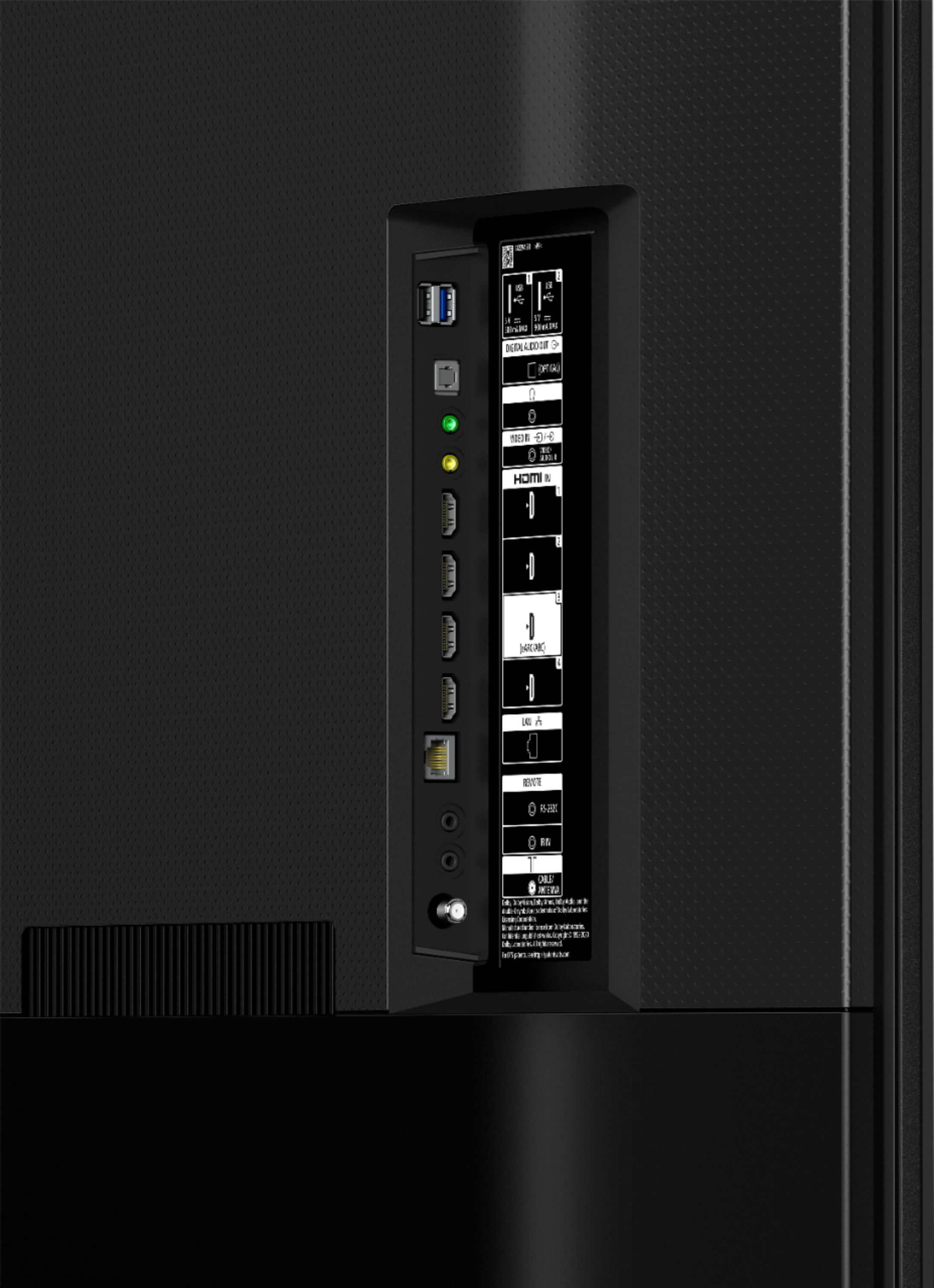
Posted .This reviewer received promo considerations or sweepstakes entry for writing a review.The SONT X80J is a great 4k UHD TV. Fits perfectly in its space and the picture is really good viewing 1080P FIOS cable. Can't wait to see how it looks with a 4K signal. Set up was a breeze as the prompts walk you through every step. Using primarily FIOS cable for now and have watched free You Tube which looks great. Still playing around with it and will be fine tuning and calibrating it as well. A bit of a premium vs Samsung AU8000 and LG UP8000 which was a close second. The SONY had more HDMI ports (4) and USB ports (2) than the others, a higher 240 motion flow rate vs 120 with the oters. Also like the wider viewing angle with the ADS Panel on this size. Contrast and brightness are both great. Lots of adjustments can be made to suite your viewing preferences. Why spend $2k when this model is as good as it is!
I would recommend this to a friendBrand response from SonyListens
Posted .Hi FNT4, Wow! That's great! We're glad to hear that! Enjoy an intuitive smart TV experience with natural color and clear sound with the BRAVIA X80J LED TV. The powerful 4K HDR Processor X1 reduces digital noise and boosts details for lifelike picture quality. Google TV gives you access to all your favorite streaming apps, while Google Assistant easily searches for content and controls your smart home simply by using your voice. Thank you for giving the product a perfect rating! Jay
- Pros mentioned:Picture quality
Fantastic tv
Posted .This reviewer received promo considerations or sweepstakes entry for writing a review.LETS GET TO IT I JUST EXCHANGE MY HISENSE H9G FOR THIS TV AND ITS WAS THE BEST DECISION I MADE THE X80J BLOW THAT TV OUT THE WATER JUST FINISHED WATCHING KONG VS GODZILLA DOLBY VISION AND IT LOOKED FANTASTIC AND THE SDR CHANNELS LOOKS GREAT ON FAST MOVING OJECTS LOOKS GREAT ITS HAS DOLBY VISION,HDR 10 ,HLG SOUND DOLBY ATMOS BUT WHAT WAS CRAZY WAS WHEN I PLUG MY PS5 TO IT WAS BEAUTIFUL THE COLORS THERE NO LAG THE BOX ON TOP SAY NEXTGEN SO WHATEVER THEY PUT ON THIS WAS MENT FOR THE PS5 YES ITS 60 FRAMES BUT THEY ADDED SOMETHING TO THIS TV THATS MENT FOR NEXTGEN CONSOLES STILL GOING THROUGH THE SETTING BUT IF YOU THINKING ABOUT GETTING THIS X80J DONT HESITATE THEY GOT A DISPLAY ON BESTBUY FOR NOW LET ME GET BACK TO GOD OF WAR IT LOOKS AWESOME ON THIS TV SEE YA
I would recommend this to a friendBrand response from SonyListens
Posted .Hi Danny,
Wow! This X80J TV is a great choice of an upgrade and you definitely made the best decision! We always strive to deliver the best quality in our TVs and we truly appreciate that you are enjoying the fantastic picture quality and connection to your external devices. Discover worlds of entertainment on this Google™ TV, brought to life in beautiful color by the realism of our picture and sound technology. With TRILUMINOS PRO™ and our 4K3 HDR Processor X1™, over a billion colors are brought to life and with extreme contrast, everything you watch feels so real! Thank you for choosing Sony! - Kris