Customer Ratings & Reviews





- Model:
- WF1000XM3/B
- SKU:
- 6359820
Rating by feature
- Sound Quality
Rating 4.6 out of 5 stars
- Battery Life
Rating 4.2 out of 5 stars
- Connectivity
Rating 4.1 out of 5 stars
Customers are saying
Customers frequently mention the excellent sound quality and great battery life of the WF-1000XM3 True Wireless Noise Cancelling In-Ear Headphones. Many also appreciate the comfortable fit and effective Active Noise Cancellation. However, some customers have concerns about the fit, connection stability, and water resistance, and a few would prefer a higher maximum volume.
This summary was generated by AI based on customer reviews.
Disappointed ears
||Posted . Owned for less than 1 week when reviewed.This reviewer received promo considerations or sweepstakes entry for writing a review.Noise canceling only enables more noise that annoys the person on the other end of a phone call. Returned to swap out for another pair of the same only to receive another defective set of “noise canceling” earbuds.
No, I would not recommend this to a friendBrand response from SonyListens
Posted .Hi DisappointedEars,
Thank you for sharing your experience with the WF1000XM3. We're sorry to hear that your having issue with the noise canceling feature when making phone calls. We'd like to help and troubleshoot this issue. Please open this link with steps to follow if the noise canceling doesn't work on your earbud headphones. https://www.sony.com/electronics/support/wireless-headphones-bluetooth-headphones/wf-1000xm3/articles/00229318
May we contact you to help? If so, please email the below information to socialsupport@am.sony.com.
Full Name:
Best Buy Username:
Telephone Number:
Model Number:
Issue:
We are sorry for the inconvenience and hope to speak to you to resolve this matter.
We appreciate you and thanks again for shopping Sony!
Sincerely,
Kris
They turn off suddenly and the sound cuts
||Posted . Owned for 1 month when reviewed.This reviewer received promo considerations or sweepstakes entry for writing a review.When I am listening to music there are time when they both turn off suddenly and sometimes only the left one works. Also when I watch a video and I skip and rewind, the sound cuts like if I am making a call and there is low signal type of sound.
I would recommend this to a friendBrand response from SonyListens
Posted .Hi, Agarcia519!
Thank you for reaching us! Please try Initializing the headset to restore factory settings. Here's the link on how to.
https://helpguide.sony.net/mdr/wf1000xm3/v1/en/contents/TP0002289926.html?search=reset
If you are unable to resolve your concern, please email us at [email protected] with the following details:
Name:
[Insert platform name] Username:
Model Number:
Issue:
Telephone Number:
Sincerely,
David
Terrible
||Posted . Owned for 3 weeks when reviewed.This reviewer received promo considerations or sweepstakes entry for writing a review.As much money I spend on these earphones, they are terrible. They suppose to be noise cancelling but you can hear every noise there is. Terrible static. You can hear anything at all for the static. I will take them back.
No, I would not recommend this to a friendBad sound quality.
||Posted . Owned for 1 week when reviewed.This reviewer received promo considerations or sweepstakes entry for writing a review.I purchased the product at launched day. Tested and the sound quality was very poor. Apple Airpods sounded better. I tried to tested with different phones but got the same result. I ended up returned and got Bose 7000 instead which I love.
No, I would not recommend this to a friendBrand response from SonyListens
Posted .Hi, Rwii!
We apologize for any inconvenience that you experienced. Sony takes into consideration all feedback to improve the performance and quality of our products and services. We're always looking to make Sony better. We appreciate your time sharing this feedback.
~Earl
They work ok.
||Posted . Owned for 2 months when reviewed.This reviewer received promo considerations or sweepstakes entry for writing a review.I have the WH-1000XM3. Loved them, so I purchased these. Greatly disappointed. Frankely, my AirPods sound better. I tried all the different ear buds, but none would give me a fit that would actually cancel out the noise.
No, I would not recommend this to a friendBrand response from SonyListens
Posted .Hi summers, we are sorry to hear about what happened. This is definitely not the experience we want you to have. Allow us to help you and turn this experience around. Please email us at [email protected] with the following details:
Name:
Username:
Model Number:
Issue:
Telephone Number:
Sincerely,
Erin
WINDOWS 10 Incompatible
||Posted . Owned for less than 1 week when reviewed.This reviewer received promo considerations or sweepstakes entry for writing a review.Save yourself the headaches. These might be great but are not Windows 10 compatible. Sony is aware and has no plans to change this. They will connect in headset only mode, not in stereo headset mode, and the sound quality is garbage.
No, I would not recommend this to a friendBrand response from SonyListens
Posted .A firmware update to resolve the Windows 10 and charging/no power issues was released on August 27, 2019. Please visit https://www.sony.com/electronics/support/wireless-headphones-bluetooth-headphones/wf-1000xm3/downloads for update instructions.
Would not stay in ears.
||Posted . Owned for 1 year when reviewed.This reviewer received promo considerations or sweepstakes entry for writing a review.Great sound, but would not stay in ears despite much effort with all provided ear pieces and several others. Just too heavy. This was during normal use, not exercise or sudden, erratic movement.
No, I would not recommend this to a friendBrand response from SonyListens
Posted .Hi Brian510, we're glad you like the sound quality of our product. We're sorry to hear that you have a comfort issue with your SONY unit. To ensure optimal performance with noise canceling, as well as to obtain the best fit and prevent the headsets from falling out, please refer to one or both of the following:1. Help Guide https://helpguide.sony.net/mdr/wf1000xm3/v1/en/contents/TP0002392265.html2. Animated Tutorial on the Sony Headphones Connect app (ref https://helpguide.sony.net/mdr/hpc/v1/en/contents/TP0001548864.html?search=tutorial)
If you require any additional support in regards to this product, please email us at socialsupport@am.sony.com with the following details: Name: Username: Model Number: Issue: Telephone Number:
~Earl
Heavy and awkward
||Posted . Owned for 1 week when reviewed.This reviewer received promo considerations or sweepstakes entry for writing a review.I really wanted to like these but I’ll be going back to AirPod pro. These hurt my ears after only 15-20 minutes of use, they’re pretty heavy too so they might ease their way out of your ears If you’re active.
No, I would not recommend this to a friendBrand response from SonyListens
Posted .Hi Anthony, We regret to hear about your experience. The WF-1000XM3 comes with different sizes of earbuds to ensure there is a great fit for all ear sizes and an optimal noise canceling experience. Please use the right size according to the size of your ears. When wearing them, gently pull on the top of your ear as you twist the earbud into your ear. This should give you a firmer hold, more comfortable and a better noise canceling experience. We appreciate your feedback. -Vincent
Nope
||Posted . Owned for 1 year when reviewed.This reviewer received promo considerations or sweepstakes entry for writing a review.Returned the same day I bought them. The functionality of this product was frustrating. It's been a while since I bought them, but it was clear within an hour, that these were going back to the store.
No, I would not recommend this to a friendBrand response from SonyListens
Posted .Hello 33yearsold, we are sorry to hear that the headphones had to be returned.
We value your input and appreciate your feedback. Sony takes into consideration all feedback to improve the performance and quality of our products and services. Thank you. -Vincent
- Pros mentioned:Comfort, Sound quality

Awesome ear buds
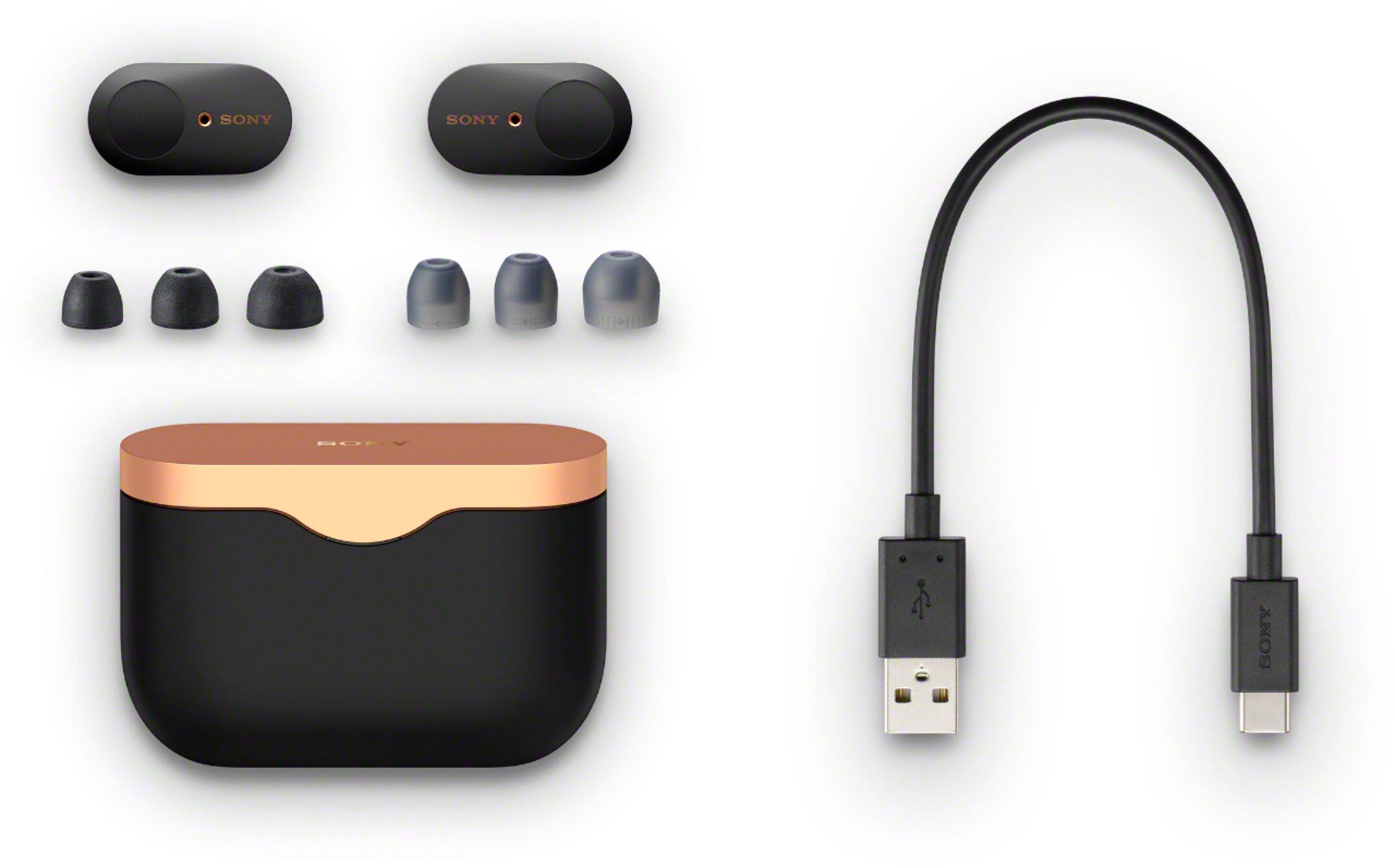
|Posted .This reviewer received promo considerations or sweepstakes entry for writing a review.Have tried a few earbuds and they always fall out. These don’t. I have a lump in my left ear that prevents me from being able to use earbuds. I was able to use these fine. Sound is great. I used them in our car on a trip and wife had the car stereo loud and I was able to hear my own music easily. They are fairly comfortable for earbuds. Personally not used to wearing but was surprised. They are easy to set up, and can adjust functions with the app. Like what ear piece does what etc. has a tap touch to use. So like 1 tap on right side would pause music, 2 taps next song etc. It comes with a great case to put in that will charge them if needed. Also comes with a few extra tips. Over all love these, they work great and drown out background noise.
I would recommend this to a friend They cut out a lot and I can’t keep them in my ear
||Posted . Owned for 3 weeks when reviewed.This reviewer received promo considerations or sweepstakes entry for writing a review.None of the ear cushions work So they fall out way too often Sound is ok but not great Apple wired buds have better sound They cut out every time there’s activity on my phone (email, text etc)
No, I would not recommend this to a friendBrand response from SonyListens
Posted .Hello Saulz, We are sorry to hear about your experience. Sony provides different sizes of earbuds to obtain the best fit and prevent the headsets from falling out. You may select the earbuds that fit your ears the best and wear the headset correctly. The earbud will be easier to slide deep into your ear if you pull up on the top of the ear lightly while twisting the headset: https://helpguide.sony.net/mdr/wf1000xm3/v1/en/contents/TP0002392265.html. You have the ability to set the priority of these headphones to either sound quality or stable connection. Stable connection can improve the usable distance of the WF-1000XM3s. If you are listening to music with your smartphone, the situation may be improved by shutting down unnecessary apps or restarting your smartphone.
If you are still having the same issue, you can email us at [email protected] with the following details:
Name:
Best Buy Username:
Model Number:
Issue:
Telephone Number:
Sincerely,
Vincent
Buy Bose instead!!!!
||Posted . Owned for less than 1 week when reviewed.This reviewer received promo considerations or sweepstakes entry for writing a review.Over the last two or three years I've owned multiple pairs of Bose earbuds. I used my extended warranty plan to purchase a pair of Sony's due to them being out of the Bose. Worst mistake ever!
No, I would not recommend this to a friendBrand response from SonyListens
Posted .Hi Dave, We are sorry if you are having an issue with your Sony headphones. We can reset your headphones to isolate the issue. Place the headset in the charging case, leave the lid of the charging case open, then hold your finger to the touch sensor on the left unit for about 20 seconds. Release your finger when the indicator (red) of the headset turns off after flashing. Then hold your finger to the touch sensor on the right unit for about 20 seconds. Release your finger when the indicator (red) of the headset turns off after flashing. When there is a problem with the headset, the indicator (red) of the headset remains off and does not start flashing even if you perform the procedures described above. In this case, hold your finger to the touch sensor longer (for about 30 seconds), and release your finger when the indicator (red) of the headset turns on.
If you are still having the same issue, you can email us at [email protected] with the following details:
Name:
Best Buy Username:
Model Number:
Issue:
Telephone Number:
Sincerely,
Vincent
Eh
||Posted . Owned for 3 weeks when reviewed.This reviewer received promo considerations or sweepstakes entry for writing a review.They were a gift, but he didn’t like them. Seemed as tho he couldn’t hear, he kept saying HELLOOOOOOO and what did you say, every couple of minutes. Exchanged em for the Bose ¯\_(ツ)_/¯.
No, I would not recommend this to a friendBrand response from SonyListens
Posted .Hi there,
Thank you for purchasing the WF-1000XM3 Wireless Noise-Canceling Headphones.
We value your opinion and we would like to apologize if the unit did not meet your expectations. The communication between the devices will be poor if there is an obstruction between the unit and the connected device. As a suggestion, you may try setting the Sound quality mode to Priority on stable connection and see if it resolves the problem. Check that both the headset and the connected device (i.e., smartphone) are turned on. Turn up the volume of the connected device if it is too low.
- Check the audio settings of the Bluetooth device to make sure the sound is output to the headset during a call.
- Use the Bluetooth device to reestablish the connection. Select HFP or HSP for the profile.
- While listening to music with the headset, stop playback and tap the touch sensor twice quickly on the left or right unit to respond to an incoming call.
Also, check that the headphones are running on the latest firmware version. The software includes key features, applications, bug fixes, and feature improvements.
We regret to know that the unit had to be returned. Thank you for sharing your feedback, it helps us improve our future products.
We hope that you will shop Sony again in the future
Sincerely,
Jess
Need some serious upgrade on the Noise cancelling
||Posted .This reviewer received promo considerations or sweepstakes entry for writing a review.I loved that it was very secure in my ear. But the noise cancelling feature definitely didnt work for me. I tried 2 different sets and both didnt work. So sad cuz I really loved them.
No, I would not recommend this to a friendBrand response from SonyListens
Posted .Hi Meagurl,
Thank you for purchasing the WF-1000XM3 Wireless Noise-Canceling Headphones.
We regret to hear that you are having issues with your wireless headphones. This is not the experience we want you to have. Good to know that you like the fit of the earbuds.
For the noise-canceling issue, we provide an assortment of earbuds in various sizes to ensure there is a great fit for all ear sizes and an optimal noise-canceling experience. To ensure optimal performance with noise canceling, as well as to obtain the best fit and prevent the headsets from falling out, please refer to one or both of the following:
1.Help Guide https://helpguide.sony.net/mdr/wf1000xm3/v1/en/contents/TP0002392265.html
2.Animated Tutorial on the Sony Headphones Connect app (ref https://helpguide.sony.net/mdr/hpc/v1/en/contents/TP0001548864.html?search=tutorial)
3.Instructional Video https://youtu.be/HnXJ_f2nbb4
For more information, please refer to this link: https://www.sony.com/electronics/support/wireless-headphones-bluetooth-headphones/wf-1000xm3/articles/00229318
Should you need further assistance, please email the below information to [email protected].
Apologies if you disclosed some of this information in your review and to customer service, we just want to ensure that we have your accurate details at the time of communication.
Full Name:
Best Buy Username:
Telephone Number:
Sony Headphones Model Number:
Additional Information regarding your experience with the WF-1000XM3
We are sorry for the inconvenience and hope to speak to you to resolve this matter.
We appreciate you and thanks again for shopping Sony!
Sincerely,
Jess
Bad connection
||Posted . Owned for less than 1 week when reviewed.This reviewer received promo considerations or sweepstakes entry for writing a review.Everything was fine until it came to phone calls sometimes they would sound like a robot cutting in and out and alsocand figure out how to answer and end call
No, I would not recommend this to a friendBrand response from SonyListens
Posted .Hello Damien,
Thank you for your review.
We are so sorry you are encountering an issue when using our WF-1000XM3 for phone calls. This is usually not the case and definitely not the experience we wanted you to have on our premium headphones.
For audio issue when using for phone calls, please follow the troubleshooting steps provided on the links below to isolate and fix the problem:
https://www.sony.com/electronics/support/wireless-headphones-bluetooth-headphones/wf-1000xm3/articles/00097458
https://www.sony.com/electronics/support/wireless-headphones-bluetooth-headphones/wf-1000xm3/articles/00231110?model=WF-1000XM3&category=wireless-headphones-bluetooth-headphones
And for the functions of these headphones for a phone call, please visit the link below:
https://helpguide.sony.net/mdr/wf1000xm3/v1/en/contents/TP0002289894.html
To ensure you get the most out of your WF-1000XM3, we recommend updating its firmware to the latest version (3.1.2). The software includes key features, applications, bug fixes, and feature improvements. For more information, please visit the link below:
https://www.sony.com/electronics/support/wireless-headphones-bluetooth-headphones/wf-1000xm3/downloads
If this does not help, please email us at socialsupport@am.sony.com with the following details so we can best assist you.
Name:
BestBuy Username:
Model Number:
Issue:
Telephone Number:
We value you, and thank you for choosing Sony.
Sincerely,
Romeo
Sony Social Support
- Pros mentioned:Sound qualityCons mentioned:Water resistance
Truly noise-canceling!
|Posted .This reviewer received promo considerations or sweepstakes entry for writing a review.Truly noise-canceling! These in-ear headphones sound wonderful, plus you hear nothing but what you want. The left and right earbuds have different controls. There are different sizes of ear tips to help get the best fit. The charging case is magnetic so that when you place the buds into the allotted slot, it always charges. 4 stars due to not being water or sweat resistant. Highly recommend.
I would recommend this to a friend Not worth it
||Posted . Owned for 2 months when reviewed.This reviewer received promo considerations or sweepstakes entry for writing a review.They broke within a week of owning them, they constantly pause your music whenever it adapts. And the earplugs don't for my ears and upon one earbud falling out the noise went out completely.
No, I would not recommend this to a friendBrand response from SonyListens
Posted .Hi, Jake!
We are sorry to hear what happen. Please allow us to help you and turn this into a better experience. For us to better assist you, please email us at [email protected] with the following details:
Name:
Best Buy Username:
Model Number:
Issue:
Telephone Number:
Sincerely,
David
Not a good purchase
||Posted . Owned for less than 1 week when reviewed.This reviewer received promo considerations or sweepstakes entry for writing a review.Just was not a good product. Item constantly drops calls. Terrible sound, I would not recommend. I normally love sony products, but not this one.
No, I would not recommend this to a friendBrand response from SonyListens
Posted .Hi SamsungFan,
Thank you for the feedback on your experience with your WF-1000XM3. We're sorry to hear you are experiencing issues with the headphones. We appreciate your feedback regarding the sound quality and connectivity of this WF-1000XM3. The communication between the devices will be poor if there is an obstruction between the unit and the connected device. As a suggestion, you may try setting the Bluetooth connection mode (Sound quality mode) to Priority on stable connection and see if it resolves the problem. Also, check that the headphones are running on the latest firmware version. The software includes key features, applications, bug fixes, and feature improvements.
https://www.sony.com/electronics/support/wireless-headphones-bluetooth-headphones/wf-1000xm3/downloads
For low sound quality, please try to follow the troubleshooting steps and guidelines on the links below:
https://helpguide.sony.net/mdr/wf1000xm3/v1/en/contents/TP0002289914.html
https://helpguide.sony.net/mdr/wf1000xm3/v1/en/contents/TP0002289889.html
- To get the sound that you prefer, please try the different sound modes found in the Sony Headphones Connect app. There is even an EQ in there—which can be customized to fine-tune your music to your liking.
- Try playing another source on the device. For example, try another music app to see if the issue is with a particular app.
- When you listen to music from a computer on the headset, sound quality may be poor for the first few seconds after a connection is made. This is caused by the computer transmitting music at sound quality for communications at first, and it is not a malfunction.
If you are still having the same issue, you can email us at socialsupport@am.sony.com with the following details:
Name:
Best Buy Username:
Model Number:
Issue:
Telephone Number:
We are sorry for the inconvenience and hope to speak to you to resolve this matter.
Sincerely,
Jess
No volume control and WORST volume ever
||Posted .This reviewer received promo considerations or sweepstakes entry for writing a review.Absolutely NO volume control on buds and even with phone volume cranked to max you can barely hear music. Turn volume down and by mid ramge you can't hear ANYTHING.
No, I would not recommend this to a friendBrand response from SonyListens
Posted .Hi GrandOak,
Thanks for sharing your experience so far with your WF-1000XM3 headphones. We regret to hear that you are having issues with your wireless headphones. We value your input and appreciate the feedback. Please allow us to help you and turn this into a better experience.
For low sound level
• If the headset is in its factory settings, you cannot adjust the volume on the headset. When playing music, adjust the volume on the connected device. If you are unable to adjust the volume on the connected device, install the “Sony | Headphones Connect” smartphone app and adjust the volume in the app.
• When talking on the phone, adjust the volume on the connected device. If you are unable to adjust the volume on the connected device, install the “Sony | Music Center” smartphone app and adjust the volume in the app.
• Connect the Bluetooth device to the headset once again.
If the issue is still unresolved, please follow the steps below for ways to contact us so we can better assist you.
May we contact you to help? If so, please email the below information to socialsupport@am.sony.com.
Name:
Best Buy Username:
Model Number:
Issue:
Telephone Number:
We are sorry for the inconvenience and hope to speak to you to resolve this matter.
We appreciate you and thanks for shopping Sony!
Sincerely,
Jess
Didn't love up to sony's reputation
||Posted . Owned for 1 month when reviewed.This reviewer received promo considerations or sweepstakes entry for writing a review.Battery didn't last as long as they claim. Can't use phones built in equalizer. Requires sony's app. Overpriced for what they are. Got Samsung buds + instead
No, I would not recommend this to a friendBrand response from SonyListens
Posted .Hi Addanc,
We regret to hear that this unit failed to meet your expectations. Please be assured we take this feedback very seriously and continuously strive to improve our products. If you need further assistance, please email us at socialsupport@am.sony.com with the following details:
Name:
Best Buy Username:
Model Number:
Issue:
Telephone Number:
Regards,
David