Customer Ratings & Reviews






- Model:
- 55S435
- |
- SKU:
- 6427942
Customer reviews
Rating 4.5 out of 5 stars with 1047 reviews
(1,047 customer reviews)Rating by feature
- Picture Quality4.6
Rating 4.6 out of 5 stars
- Sound Quality4.5
Rating 4.5 out of 5 stars
- Brightness4.6
Rating 4.6 out of 5 stars
Customers are saying
Customers commend the 55” Class 4 Series 4K UHD Smart Roku TV for its exceptional picture quality, easy setup, and affordable price. Many reviewers rave about the vibrant colors and sharp images, while others appreciate the user-friendly interface and extensive streaming options through Roku. However, some users have expressed concerns about the remote control's responsiveness, viewing angles, short lifespan, brightness levels, and occasional technical issues.
This summary was generated by AI based on customer reviews.
Rated 3 out of 5 stars
Ok for the price
||Posted . Owned for 1 month when reviewed.This reviewer received promo considerations or sweepstakes entry for writing a review.Bought this TV for a guest room. For the price this TV delivers when needed. The only downside was when watching fast moving sports. I feel like the picture isn't the best for this occasion, lots of blurriness.
I would recommend this to a friendBrand response from TCLExpert
Posted .Hi Pabs,
Thank you for taking the time to provide your feedback. There are options available to adjust the settings to better fit your personal preference. You can access the Options menu on the TV by pressing the asterisk (*) button on your remote while watching content. Additionally, you can access expert picture settings by downloading the free Roku mobile app on a smartphone or tablet. The Roku mobile app works as a remote and allows you to access additional features like voice search, private listening, expert picture settings, and more. Hope this helps & happy viewing!
Thank you,
Sara
TCL Customer Support
Rated 2 out of 5 stars
MODEL 55S435 FLICKERS
||Posted .This reviewer received promo considerations or sweepstakes entry for writing a review.This is just crazy,I purchased a TCL 55S435 last week at Walmart and I had to return it because the top screen was suddenly flickering, it’s not really a big deal but I don’t know if it get worse and I just don’t wanna regret later and now I went to best buy this afternoon and purchased the same TV Brand and Model and the crazy part is that I didn’t expect to get the same issue with it, like it’s just weird I don’t know y’all but Im not gonna buy purchase TCL anymore, Im gonna return this as soon as possible.
No, I would not recommend this to a friendBrand response from TCLExpert
Posted .Hi Sammy,
Thank you for taking the time to provide your feedback. We're truly sorry to hear about your experience as this does not sound normal for one of our TVs. Our TVs are carefully designed and engineered to give our customers years of entertainment. We take great measures to ensure that the TVs we send out are in great working condition. We would love the opportunity to look into this for you to see if we can assist you. We'd like to gather more information to see if we can isolate what is occurring. Please reach out to us at tclsocial@tcl.com with your contact information and a description of what you need help with. Someone will get back to you as soon as they can.
Thank you,
Sara
TCL Customer Support
- Cons mentioned:Reliability
Rated 1 out of 5 stars
Bad tv
||Posted . Owned for 4 months when reviewed.This reviewer received promo considerations or sweepstakes entry for writing a review.I’ve owned this tv for 4 months and it keeps going on and off on it’s own. The company says there’s nothing they can do about that. I would not recommend anyone buy this tv.
No, I would not recommend this to a friendBrand response from TCLExpert
Posted .Hi Weee,
Thank you for taking the time to provide your feedback. We're truly sorry to hear about your experience as this does not sound normal for one of our TVs. We would love the opportunity to look into this for you to see if we can assist you. We'd like to gather more information to see if we can isolate what is occurring. Please reach out to us at tclsocial@tcl.com with your contact information and a description of what you need help with. Someone will get back to you as soon as they can.
Thank you,
Sara
TCL Customer Support
Rated 3 out of 5 stars
Good Budget TV, wish picture was clearer
||Posted . Owned for 1 month when reviewed.This reviewer received promo considerations or sweepstakes entry for writing a review.Overall I wasn't impressed with this series of the TCL. I was expecting more after seeing it on display at my local store. Remote was also finicky. Good budget TV but personally I was hoping for a better picture.
No, I would not recommend this to a friendBrand response from TCLExpert
Posted .Hi Butters471,
Thank you for taking the time to provide your feedback. There are options available to adjust the picture settings to better fit your personal preference. You can access the Options menu on the TV by pressing the asterisk (*) button on your remote while watching content. Additionally, you can access expert picture settings by downloading the free Roku mobile app on a smartphone or tablet. The Roku mobile app works as a remote and allows you to access additional features like voice search, private listening, expert picture settings, and more. Hope this helps & happy viewing!
Thank you,
Sara
TCL Customer Support
Rated 1 out of 5 stars
Shame
||Posted .This reviewer received promo considerations or sweepstakes entry for writing a review.I set this tv up - everything was good. Roku installation and all was a breeze. It is lightweight and awesome... Until you turn ut on and see theres two lines - one horitzontal (black) and vertical (red) liike an off centered cross. I waited a few days for it and am upset it turned out this way.
No, I would not recommend this to a friendBrand response from TCLExpert
Posted .Hi,
Thank you for taking the time to provide your feedback. We're truly sorry to hear about your experience as this does not sound normal for one of our TVs. Our TVs are carefully designed and engineered to give our customers years of entertainment. We take great measures to ensure that the TVs we send out are in great working condition. We would love the opportunity to look into this for you to see if we can assist you. We'd like to gather more information to see if we can isolate what is occurring. Please reach out to us at tclsocial@tcl.com with your contact information and a description of what you need help with. Someone will get back to you as soon as they can.
Thank you,
Sara
TCL Customer Support
Rated 3 out of 5 stars
You get what you pay for
||Posted . Owned for 3 weeks when reviewed.This reviewer received promo considerations or sweepstakes entry for writing a review.Roku interface is nice, but the picture quality is pretty poor. Looks washed out especially from an angle. But I guess you get what you pay for.
No, I would not recommend this to a friendBrand response from TCLExpert
Posted .Hi Ck603,
Thank you for taking the time to provide your feedback. There are options available to adjust the settings to better fit your personal preference. You can access the Options menu on the TV by pressing the asterisk (*) button on your remote while watching content. Additionally, you can access expert picture settings by downloading the free Roku mobile app on a smartphone or tablet. The Roku mobile app works as a remote and allows you to access additional features like voice search, private listening, expert picture settings, and more. Hope this helps & happy viewing!
Thank you,
Sara
TCL Customer Support
Rated 1 out of 5 stars
Junk
||Posted . Owned for more than 2 years when reviewed.This reviewer received promo considerations or sweepstakes entry for writing a review.The TV works okay, The Roku part/apps constantly glitch. They freeze, turn off tv or restart tv.
No, I would not recommend this to a friendRated 3 out of 5 stars
TCL smart tv review
||Posted .This reviewer received promo considerations or sweepstakes entry for writing a review.The picture background picture could be improved in a natural or lighted room environment. The settings for adjusting the picture background color don't seem to do that?
I would recommend this to a friendBrand response from TCLExpert
Posted .Hello,
Thank you for taking the time to provide your feedback. There are options available to adjust the picture settings to better fit your personal preference. You can access the Options menu on the TV by pressing the asterisk (*) button on your remote while watching content. Additionally, you can access expert picture settings by downloading the free Roku mobile app on a smartphone or tablet. The Roku mobile app works as a remote and allows you to access additional features like voice search, private listening, expert picture settings, and more. Hope this helps & happy viewing!
Thank you,
Sara
TCL Customer Support
Rated 3 out of 5 stars
Functionality
||Posted . Owned for 3 weeks when reviewed.This reviewer received promo considerations or sweepstakes entry for writing a review.Lousy remote with limited functions. You have to scroll through the channels.Tv is not compatible with any universal remotes.
No, I would not recommend this to a friendBrand response from TCLExpert
Posted .Hi Mark,
Thank you for taking the time to provide your feedback. Currently, our smart TVs do not support the direct input of channel numbers for OTA. However, if your TV is connected to the Internet, you can press the left arrow key to populate a channel guide and navigate channels this way. Additionally, you can enable "favorites" for over the air channels so that your most-watched channels will automatically appear towards the top. To enable favorites you would go to Home>Settings>TV inputs>Antenna TV>Favorite Channels>Enable. Furthermore, our TVs are compatible with most Universal and cable remotes. Many Universal and cable box remotes can be programmed to control select functions on the TV. You can visit https://support.tcl.com/us-remote-codes for more information. If you do not see your specific remote, you would need to contact the remote's manufacturer to obtain the remote code from them. Hope this helps!
Thank you,
Sara
TCL Customer Support
Rated 3 out of 5 stars
Good price, but product may need improvement
||Posted . Owned for 9 months when reviewed.This reviewer received promo considerations or sweepstakes entry for writing a review.Good tv, but not as good as other brands. It is worth spending few extra dollar and get a better brand.
I would recommend this to a friendBrand response from TCLExpert
Posted .Hi Albert,
Thank you for taking the time to provide your feedback. We hope that you are enjoying your TV thus far! If you ever need any assistance, please reach out to us at tclsocial@tcl.com with your contact information and a description of what you need help with. Enjoy!
Thank you,
Sara
TCL Customer Support
Rated 3 out of 5 stars
Not the best
||Posted . Owned for 3 weeks when reviewed.This reviewer received promo considerations or sweepstakes entry for writing a review.Not a great picture. Low contrast. Colors are not vibrant. But it turns on and off; the one we replaced did not!
No, I would not recommend this to a friendBrand response from TCLExpert
Posted .Hi JudyP,
Thank you for taking the time to provide your feedback. There are options available to adjust the settings to better fit your personal preference. You can access the Options menu on the TV by pressing the asterisk (*) button on your remote while watching content. Additionally, you can access expert picture settings by downloading the free Roku mobile app on a smartphone or tablet. The Roku mobile app works as a remote and allows you to access additional features like voice search, private listening, expert picture settings, and more. Hope this helps & happy viewing!
Thank you,
Sara
TCL Customer Support
Rated 2 out of 5 stars
Mutes & Unmutes Itself
||Posted . Owned for 2 months when reviewed.This reviewer received promo considerations or sweepstakes entry for writing a review.TV started muting itself after 2 months. It repetitively mutes/unmutes itself. We tried several different troubleshooting ideas, including a factory reset, but it didn’t work. We read online that it’s a common problem. Otherwise, I have liked the TV.
No, I would not recommend this to a friendBrand response from TCLExpert
Posted .Hello Jboud,
Thank you for taking the time to provide your feedback. We're sorry to hear that you may be experiencing some odd issues with your TV's volume controls. We would love the opportunity to look into this for you to see if we can assist you. We'd like to gather more information to see if we can isolate what is occurring. Please reach out to us at tclsocial@tcl.com with your contact information and a description of what you need help with. Someone will get back to you as soon as they can.
Thank you,
TCL Social Support
- Cons mentioned:Remote control
Rated 1 out of 5 stars
WORST TV EVER
||Posted . Owned for 3 months when reviewed.This reviewer received promo considerations or sweepstakes entry for writing a review.No buttons on tv. Remote stopped working. Cannot program a new remote with using the original which stops working after a few months. TV is now obsolete. Working on this issue. Will update review if I can find a solution. Until then I'm giving this one star.
No, I would not recommend this to a friendBrand response from TCLExpert
Posted .Hello,
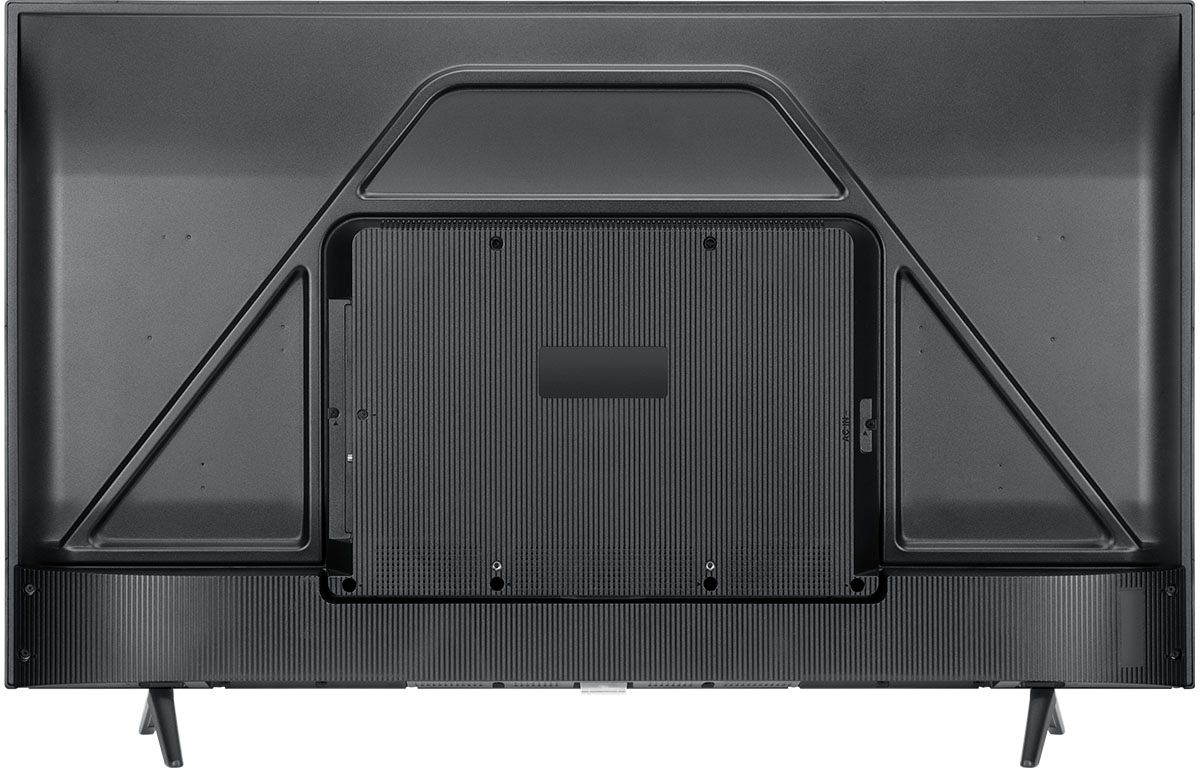
Thank you for taking the time to provide your feedback. We're sorry to hear that you may be experiencing some trouble with your TV. The TV does indeed feature a physical power button located at the center bottom of the TV under the brand logo. We would love the opportunity to look into this for you to see if we can assist you. We'd like to gather more information to see if we can isolate what is occurring. Please reach out to us at tclsocial@tcl.com with your contact information and a description of what you need help with. Someone will get back to you as soon as they can.
Thank you,
Sara
TCL Customer Support
Rated 3 out of 5 stars
TCL - 55" Class A Series 4K UHD Smart Roku TV
||Posted . Owned for 1 month when reviewed.This reviewer received promo considerations or sweepstakes entry for writing a review.I can't seem to get a sharp picture...rather words are blurred and not easy to read on the screen.
No, I would not recommend this to a friendBrand response from TCLExpert
Posted .Hi logi,
Thank you for taking the time to provide your feedback. We’re sorry to hear that you are not having the same great experience that the majority of our customers report having. There are options available to adjust the settings to better fit your personal preference. You can access the Options menu on the TV by pressing the asterisk (*) button on your remote while watching content. Additionally, you can access expert picture settings by downloading the free Roku mobile app on a smartphone or tablet. The Roku mobile app works as a remote and allows you to access additional features like voice search, private listening, expert picture settings, and more. If you need any further assistance, please reach out to us at tclsocial@tcl.com with your contact information and a description of what you need help with. Enjoy!
Thank you,
Sara
TCL Customer Support
Rated 3 out of 5 stars
Hmmm
||Posted . Owned for 3 weeks when reviewed.This reviewer received promo considerations or sweepstakes entry for writing a review.Wouldn’t stay connected to wifi. Best Buy was great in replacing it though. 2nd one works great.
No, I would not recommend this to a friendBrand response from TCLExpert
Posted .Hello,
Thank you for taking the time to provide your feedback. We're sorry to hear that you may be experiencing some trouble with your TV staying connect to the Internet. We're glad to see that you were able to get a replacement. If you need any further assistance, please reach out to us at tclsocial@tcl.com with your contact information and a description of what you need help with. Enjoy!
Thank you,
Sara
TCL Customer Support
Rated 3 out of 5 stars
REVIEW
||Posted . Owned for 1 month when reviewed.This reviewer received promo considerations or sweepstakes entry for writing a review.I could not get the TV sound to work with my existing surround sound system.
I would recommend this to a friendBrand response from TCLExpert
Posted .Hi ROC1,
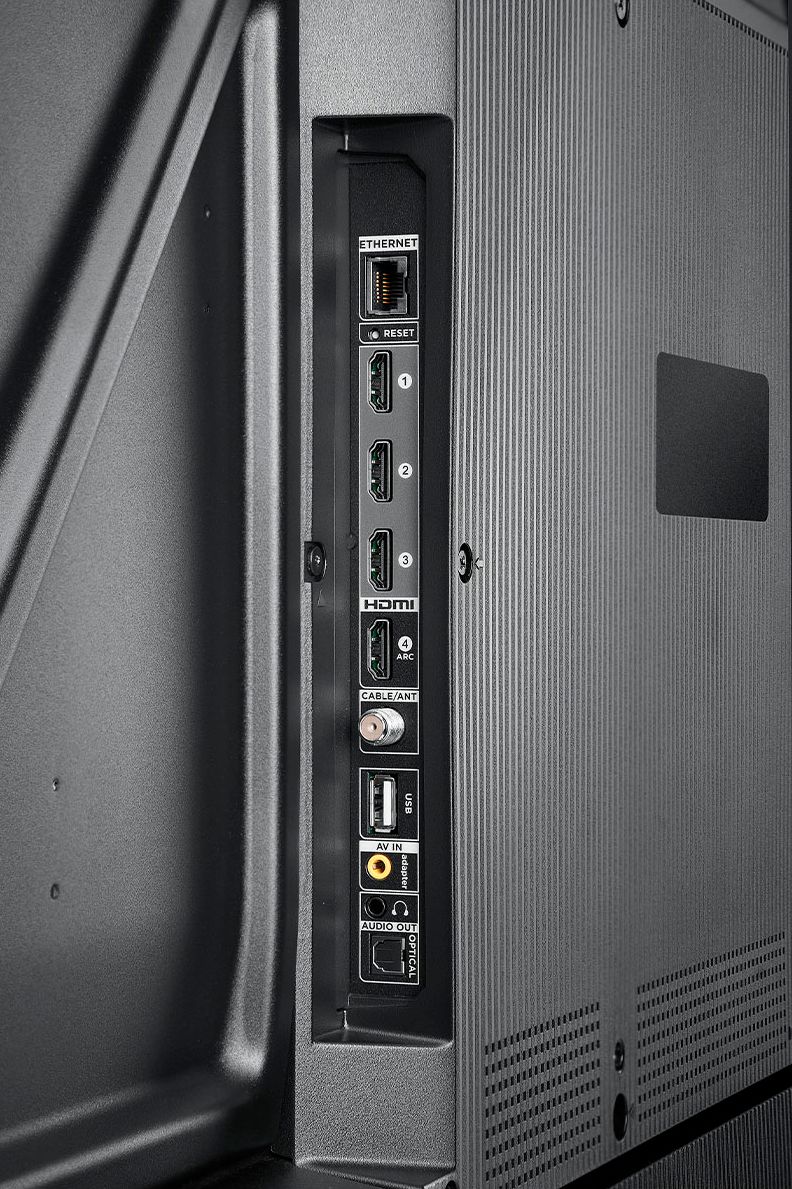
Thank you for taking the time to provide your feedback. We're sorry to hear that you may be experiencing some trouble connecting your sound system to your TV. This TV is compatible with most soundbars/speakers and can be connected via HDMI ARC, Optical, or the 3.5mm headphone jack. We would love the opportunity to look into this for you to see if we can assist you. Please reach out to us at tclsocial@tcl.com with your contact information and a description of what you need help with. Someone will get back to you as soon as they can.
Thank you,
Sara
TCL Customer Support
- Pros mentioned:Ease of use
Rated 2 out of 5 stars
Check on the picture quality
||Posted . Owned for less than 1 week when reviewed.This reviewer received promo considerations or sweepstakes entry for writing a review.Nice features with Roku but image quality is weak. Easy to use.
No, I would not recommend this to a friendBrand response from TCLExpert
Posted .Hello DRJ13,
Thank you for taking the time to provide your feedback. We're sorry to hear that you may be experiencing some trouble with your TV. We would love the opportunity to look into this for you to see if we can assist you. We'd like to gather more information to see if we can isolate what is occurring. Please reach out to us at [email protected] with your contact information and a description of what you need help with. Someone will get back to you as soon as they can.
Rated 3 out of 5 stars
Budget Tv
||Posted . Owned for 1 month when reviewed.This reviewer received promo considerations or sweepstakes entry for writing a review.Slow and quality is not that great for a 4k tv. Wont buy another Roku tv.
No, I would not recommend this to a friendBrand response from TCLExpert
Posted .Hi KyleAcquittedhouse,
Thank you for taking the time to provide your feedback. There are options available to adjust the settings to better fit your personal preference. You can access the Options menu on the TV by pressing the asterisk (*) button on your remote while watching content. Additionally, you can access expert picture settings by downloading the free Roku mobile app on a smartphone or tablet. The Roku mobile app works as a remote and allows you to access additional features like voice search, private listening, expert picture settings, and more. Hope this helps & happy viewing!
Thank you,
Sara
TCL Customer Support
Rated 3 out of 5 stars
Not Bad
||Posted . Owned for 1 month when reviewed.This reviewer received promo considerations or sweepstakes entry for writing a review.I like the TV with minimal remote options, but still facing issue with youtube app sign in
I would recommend this to a friendBrand response from TCLExpert
Posted .Hi Raam86,
Thank you for taking the time to provide your feedback. We're sorry to hear that you may be experiencing some trouble with the YouTube streaming channel on your TV. We would love the opportunity to look into this for you to see if we can assist you. We'd like to gather more information to see if we can isolate what is occurring. Please reach out to us at [email protected] with your contact information and a description of what you need help with. Someone will get back to you as soon as they can.
Thank you,
Sara
TCL Customer Support
Rated 3 out of 5 stars
Tv.
||Posted . Owned for 4 months when reviewed.This reviewer received promo considerations or sweepstakes entry for writing a review.Wonderful tv the roku part sucks cause it always freezes or has a promble.
I would recommend this to a friendBrand response from TCLExpert
Posted .Hi Jen314,
Thank you for taking the time to provide your feedback. We're sorry to hear that you may be experiencing some trouble with your TV. We would love the opportunity to look into this for you to see if we can assist you. We'd like to gather more information to see if we can isolate what is occurring. Please reach out to us at tclsocial@tcl.com with your contact information and a description of what you need help with. Someone will get back to you as soon as they can.
Thank you,
Sara
TCL Customer Support