Customer Ratings & Reviews
- Model:
- TBS-0400-01
- SKU:
- 5377200
Rating by feature
- Value
Rating 4.2 out of 5 stars
- Quality
Rating 4.2 out of 5 stars
- Ease of Use
Rating 4.6 out of 5 stars
Customers are saying
Customers are delighted by the Stream Mic's exceptional sound quality and ease of use. Many appreciate its compatibility with multiple devices and the affordable price point. While some users experienced minor difficulties with the software, the overall positive feedback highlights its value for gamers. The convenient size and straightforward assembly are also frequently praised.
This summary was generated by AI based on customer reviews.
It's okay
||Posted .This reviewer received promo considerations or sweepstakes entry for writing a review.It's okay for streaming I guess but not for making videos. It's not as good as it says it is.
No, I would not recommend this to a friendNot the greatest...
||Posted . Owned for more than 2 years when reviewed.This reviewer received promo considerations or sweepstakes entry for writing a review.The mic leaves far more to be desired. I should've gone with a yeti smh...
No, I would not recommend this to a friend- Pros mentioned:Ease of use, Sound quality

Great sounding stream microphone
|Posted .This reviewer received promo considerations or sweepstakes entry for writing a review.I think the Turtle Beach Stream Mic is worth it's price. It was easily put together and after you have put it together and plug it in it is ready to use. I'm using it with my PC. It looks sleek and has a gamer touch to it which I like, but some people may not. The audio sounds very good, but you have to install the Turtle Beach software otherwise it sounds horrible, after installing the software it sounds great. I can't say how the sound for Xbox One, or PlayStation 4 will be, but it sounds great on my PC with the Turtle Beach software. it has different modes depending on how you are using it. The different modes determine which microphones are being used since it has a number of different microphones built in. So it is easy to set up and sounds great. What is not to like. If you are on the fence, I would definitely recommend it.
I would recommend this to a friend - Pros mentioned:Compatibility, Sound quality
Decent and powerful mic for beginners
|Posted .This reviewer received promo considerations or sweepstakes entry for writing a review.A great professional looking mic for PC and gaming consoles. This is not top of the line that you have to spend a fortune to get one. But this is definitely better than the headset microphone and very clear. It has the option to change various sound settings. I connected this to my PC as well we Xbox One and it worked flawlessly. Both devices recognized it right away and the setup was so easy. I was able to chat wirelessly without holding any mic or having any over the ear mic. The mic has a mute button that is very handy. It is very well designed and is study, even though it is made of plastic and sometimes might feel cheap. The other person hearing me said it was much clearer and there wasn't much noise. Overall, I would definitely recommend it to anyone looking for a decent mic, not just for live streaming, but also for everyday usage.
I would recommend this to a friend - Pros mentioned:Compatibility, Sound quality
Perfect for PS4/Twitch + Works EVERYWHERE!
|Posted .This reviewer received promo considerations or sweepstakes entry for writing a review.I've been using the Turtle Beach Stream Mic for a few days now and I am impressed. I wanted this originally for twitch streams (PS4) but have found it to be awesome for use on my PC for recording audio on YouTube videos. The Turtle Beach Stream Mic also works on PC, Mac and Xbox. So it's the best value mic on the market. One of the features of the mic is it has 4 different modes (Bi-directional, Omnidirectional, Cardiod and Hypercardiod). Don't worry if you don't know what the last 2 mean, just know ihat these modes mean you get set the mic for purpose you need (games streaming to an interview). Highly recommended.
I would recommend this to a friend - Pros mentioned:Sound quality
Excellent Mic
|Posted .This reviewer received promo considerations or sweepstakes entry for writing a review.The short of this is, if you need a MIC for a Boom or on your desk for streaming/podcasting or just chatting this is a great MIC. My family is loving it. Setup: For me the small details can show how great a product is overall and in the packaging I thought Turtle Beach did a wonderful job. Not only is each piece indvidually wrapped, but the parts where labeled with stickers to make assembly easy. Now this is not a difficult device to put together, but something small like that makes all the difference and I think says alot about how they feel about there product. Once all the pieces are out and the MIC assembled (very easy even without the directions) setup for a computer or XBOX (don't have a PS4) was easy. Plug it in and ensure the switch on the back is turned to PC/XBOX. Easy. No problems, nothing extra to download. Turtle Beach though does have a program to update and adjust the MIC on the PC, so I installed that. Very easy to install, only odd thing, but the program tells you, for it to see the MIC to update firmware etc, when plugged to the PC it needs to be set to XBOX Mode and drivers downloaded. Even that was more scratching my head then an issue and it did everything once it detected this. USE: This is a USB MIC. So you need an open USB port on your PC/XBOX/PS4. Luckily the XBOX One S has one right in the front, so easy access. I did like the fact the USB Cord included is long. Long enough to plug into my XBOX by the TV, and still allow me to sit a good distance away from the TV. If your using it with you PC it means if you have to use a USB port in the back no issues and should have plenty of slack to route it. Using was not an issue. My kids wanted to "stream" so I got Mixer working and it saw the MIC with no issues and they went to town playing there games for Grandma watching across the country. I used to play a few online FPS's with friends and it was nice to not have a Boom around my mouth and see at a glance if I was on a hot mic or not. Then I used it for a few calls I had and again no said anything about voice quaility, which to me, means it works great. It has a few modes too to adjust the sound and how it picks up and easy to tune based on the room and situation you are in, since at a glance the color on the front lets you know what mode your in. Again I had no issues with the use and I was loud and clear on the other side. Possible Downsides: If you want to have your headphones to let you listen to your voice that you are sending they better have a 3.5mm jack (that seems to be going away). Not a problem for me for me, but for some who want to go wireless note that won't work with this to hear what you sound like via the MIC. Only other issue is it rather large as you would expect for a MIC like this, so make sure you have real estate on your desk. It does have a nice heavy base, but not too heavy, really just right for me, so it keeps it from sliding. Again if you need a MIC for streaming etc. and have the space or a Boom this works great and couldn't be happier.
I would recommend this to a friend Great packaging, but an inferior product.
||Posted .This reviewer received promo considerations or sweepstakes entry for writing a review.A very deceptive product from when you take it home & try it as it’s wheight would indicate a quality mic, but the base is where the deception lay! The mic itself is poorly constructed, cheap in feel & look & is not of the quality it boasts! Bad! I returned it!
No, I would not recommend this to a friend- Pros mentioned:Sound quality
Really like it so far
|Posted .This reviewer received promo considerations or sweepstakes entry for writing a review.I've had an opportunity to use this mike now for a couple of days. I have used it for recording audio for a business presentation slide show and for a photo slide show for my family. I also let my son use it on his Xbox for online gaming. First off for the gaming portion, my son says it is great and works much better than the mike he is currently using right now. He says there is no hesitation and the audio is very clear. For my tests, I have to say this is something I have been wanting for a long time and so far I have not been disappointed. The set up was fast and within just a few seconds my PC recognized the mike, and I was up and going. I played around with the different settings to see which I liked best. The modes are Cardioid, Bi-directional, hypercardioid, and omnidirectional. I found for the type of audio recording i was doing the Cardioid mode was best. The audio was very clear and crisp, there was really no detectable background noise. I've had an opportunity to use a few microphones in the past, the Turtle Beach, so far, is the best that I have used. I plan to do some live streaming in the future and will update this review if my experience changes. For the price,I would recommend the Turtle Beach Microphone for gaming and for any audio you need to record onto your PC. Im certain there are many other uses for this device and hopefully I'll get to try them in the future. But for business presentations and for photo slide shows, the quality of this microphone is really very good.
I would recommend this to a friend - Pros mentioned:Sound quality
Nice microphone for my PC
|Posted .This reviewer received promo considerations or sweepstakes entry for writing a review.While this device is compatible with a PS4, Mac and xBox, I used it on my personal computer. Let's start with the quality of the microphone. It feels light and very plastic-like without a lot of weight to it. It has a great stand, so it is stable on the desktop. It also comes with a boom attachment, so it can be used by a musician to capture an acoustic guitar as well as voices. There are four different recording modes, making it ideal for multiple noise situations and desired sounds. The range isn't bad, but I only pushed it back a few feet. Each sound mode has a color indicator on the front of the microphone, so it is easy to tell which mode its in. One mode is good for video recordings, another mode is ideal for speaking and interviewing, the third mode is used mainly for a noisy setting and finally the default mode is ideal for a quiet room to record. I tried it for singing and the quality was quite impressive. There could be better instructions included with the product. I found watching a video was helpful. There is software available from Turtle Beach called Audio Hub and if using with a PC, you will need to download and install the latest drivers. I see myself using this to record music to either simply critique or to play over the top of it with my guitar to jam. I will put this microphone to good use.
I would recommend this to a friend - Pros mentioned:Ease of use, Sound quality
Highly impressed
|Posted .This reviewer received promo considerations or sweepstakes entry for writing a review.This microphone was beyond simple to set up. Literally plug and play with 1 more step. The microphone has a nice sturdy base (compared to the ones made of cheap plastic...this is a very nice change), and seems generally well constructed. It was reported to me that the sound was excellent but have not tried it in a noisy room yet. Complaint- It uses color coded LED (which is cool) to show microphone settings so you have to either memorize them or consult the manual or have a cheat sheet.
I would recommend this to a friend - Pros mentioned:Price, Sound quality
Glitches in Function and Poor Support
|Posted .This reviewer received promo considerations or sweepstakes entry for writing a review.This is a tough one to review since the product did not perform as advertised, but part of the functions worked fine. I did contact Turtle Beach with a problem and got a problem assigned through their website; but did not get any reply - that's not so good. I’ve waited 5 days but that does include two weekend days – I don’t expect a reply and their support info says don’t enter a second problem case it just slows things down. The setup guide is not clear as to a key point when using the Turtle Beach Audio Hub. I wanted to use the product with a Windows 10 PC so naturally I set the little selector switch to PS4/PC. By the way, the Guide does not tell you about the Audio HUB which is needed to personalize some of the settings such as ‘Announcer Effect’ {which is just setting how much reverb (and was a requirement for me)}. Before you do anything it is best to go to this YouTube video to understand how to get your microphone configured: https://www.youtube.com/watch?v=R3jPpinpD3Y In fairness the software of the Audio Hub does tell you to switch to XBOX but since you are using a PC, you wonder if there is a connection problem but in fact it’s just the way the design point was set, i.e. you always use the XBOX setting to change parameters for the mic (not good programming nor engineering). The aforementioned video is a good video and does mention that to setup via the Audio Hub regardless of platform you set the selector to XBOX. Once you setup the settings if you want to connect the Stream Mic to your Windows PC, you need to switch this same selector back from XBOX to PS4/PC. Okay who designed that? – not good thinking as I said before. But once you get past that you will also find that when you are in the Turtle Beach Audio Hub, and choose ‘Info’, none of the links work, seems the programming is incomplete. The setting tab stuff does work and that is the most important process. You’d also use this Audio Hub to update firmware. Now I can overcome all those things and I went to make a Podcast with a lot of reverb in my voice. By the way you can set other qualities of your voice and mic levels etc., via this Audio Hub utility – that’s nice. You can connect a headset to the mic and monitor what you are recording. I used a simple movie maker app and recorded a session. In my headset I could hear the reverb and it was nice and the effect I wanted. However, when I played back the recording there was no reverb. I carefully ensured that the recording and playback devices were set to the Turtle Beach Stream Mic for Windows (you can do this by right clicking your speaker icon on the bottom taskbar. I tried several recordings but no luck; I always heard the reverb in my headset, but it was not recorded – that’s not expected per the advertising. The reason I still gave 2 stars is because pricewise it is a solid little microphone – it is not a professional microphone but it is less costly. For podcasts, you may as well use the mic that’s on your laptop or desktop in my opinion. This mic does allow you to change the pickup direction from front only, to front and back (for an interview for example), and also 360 pickup as well (eg. a meeting), and also has noise cancelling. Most of the settings are intuitive except for the puzzling reason for the XBOX setting. It does have a sturdy base and also came with an adapter to attach it to a boom. I would look further for a better microphone if you can afford it that would function better since between it’s hardware and software – there appear to be too many glitches.
No, I would not recommend this to a friend - Pros mentioned:Sound quality
Yes, but sigh.
|Posted .This reviewer received promo considerations or sweepstakes entry for writing a review.Simple Review: For what you get it's not a bad little guy if you are using it for it's very designed for purpose. Streaming. Extended Review: Starting off with the unboxing experience I was a little excited. The packaging and look of the device gave a quality feel but once you open it up you realize maybe not the best build quality. Don't get me wrong they put in one metal bracket which gives that old timey radio authentic feel but everything else is cheap feeling plastic. I do appreciate the adapter for the base incase I needed it even though I personally didn't. Last thing I didn't like in this category was the mini-usb charging cable.....REALLY! We are on USB-C or I would have given less fuss over micro-usb but mini-usb is just insulting and should be a dead cable. Performance to start this off I want to make sure your aware I tried this on my PC, laptop and PS4. PC and laptop handled it like a champ and it made since for the design of it. This is why I brought up earlier if your using it for it's intended purpose than it should do just fine. Once you hit the PS4 well I don't know many gamers, me including, that have a setup that could have this close enough or comfortable enough to me while I'm playing. That unfortunately wasn't my main issue. While the PC and laptop didn't need to learn anything and was very plug and play. The PS4 I plugged in and it said it was good but never worked. I ended up having to pull out the instructions to see if it was something I was doing and well I was unsuccessful. Besides that audio quality was good with nobody complaining about hearing me and I felt like I could be a comfortable distance from the mic. Wrapping this all up I think it's a good product for a very specific need and I know some might think yeah duh but to me why would I spend almost a $100 for something a headset for $150 could do too with more functionality. Enhancing the experience is the point and I feel like this one fell a bit short. I hope this review helped you and thank you for taking the time to read it. Thanks
I would recommend this to a friend - Pros mentioned:Ease of use
Good mic for pc gaming-filters background noise
|Posted .This reviewer received promo considerations or sweepstakes entry for writing a review.When it comes to pc accessories like this I think the most important features are that it is easy to set up and does the fundamental function it is designed for. This Turtle Beach Stream Mic does that for us. We connected it to our Windows 10 PC via USB and the device was set up and ready to use in no time. Our main use for the Turtle Beach Stream Mic is for PC video gaming and it does a very good job of filtering out background noise. We've specifically noticed that typing noises from the keyboard are not as prevalent as they were with our old mic. Also, the mute button is a nice, convenient feature and the color coding for red when muted is a good, visual design. Other consumers may find the Turtle Beach Audio Hub program helpful if they want to choose among four different modes that are designed for things such as conference calls, interviewing, podcasts, streaming, etc... The built in on-board studio-grade digital voice processing tools automatically balance EQ, gain and compression so we have found voice quality to be excellent. This mic is easy for us to recommend since it looks good, has a small footprint on one's desk top, provides easy muting, multiple modes depending on use, filters background noise well and provides excellent voice quality.
I would recommend this to a friend Mic
||Posted . Owned for 1 year when reviewed.This reviewer received promo considerations or sweepstakes entry for writing a review.This product did not last long, broke within the first few month's
No, I would not recommend this to a friend- Pros mentioned:Ease of use
Great mic for beginner!
|Posted .This reviewer received promo considerations or sweepstakes entry for writing a review.This mic was very easy to assemble for the table top set up. It comes with a mic boom adapter piece. After it is assembled - you just plug it in and then connect to your gaming system or computer through the USB. It is a very easy set-up. My son has been using this to stream his Fortnite games and I have used it to record a voiceover for a training presentation. The mic picks up a lot of sound in the whole house. It is hard when you have animals to make sure they don't make any noises because it picks up everything. We have tried the different types of recordings but have not been able to tell too much of a difference. This has been a great mic for beginning streaming and voiceover.
I would recommend this to a friend - Pros mentioned:Sound quality
Decent microphone
|Posted .This reviewer received promo considerations or sweepstakes entry for writing a review.i was hoping to use this mic for recording vocals for music, but it didn't sound so good. I used it for narrating a school project and it was a lot better not so much for video audio though. the highs and lows were just enough (narration). I also tried this mic with a ps4 pro and xbox one s while doing some online gaming, and it worked great! I had the microphone 5 feet away from below the sound bar/tv, i had the volume ar 22 out of 60 and i sounded clear on the other end. I liked the microphone stand holder, i'm sure it will come handy. For the price especially now that is on sale its a pretty good buy. I would recommend it for gaming.
I would recommend this to a friend - Pros mentioned:Sound quality
ok mic for price
|Posted .This reviewer received promo considerations or sweepstakes entry for writing a review.well the price this mic is pretty good. however, for the same price I have a headset that although the mic is not as loud, it does not pick up all the background noise these do. i like that i can sit away from these and they pick my voice up great. but that is also the downside. they also pick up all the background noise as well. i have tried all the different modes that these use, including the software which also has a couple extra modes, and nothing seemed to get rid of the background noise. these also sit on the same table as my keyboard and they do not have a shock mount so it picks up keyboard or anything that hits the table. you can plug in a headset directly into these. however, then you hear yourself talk. great if you want to know how you sound, but this can easily be achieved going thru your sound, and recording devices and selecting these and then selecting properties, listen and listen to device. my issue is that, you cant turn that off if you go directly thru the device. packaging though was on great. each piece was labled with what the direction state. you put it together and directions say piece A and piece A is easily found. its heavy and seems to be a good quality built. have an option to mount this to a boom if you want as well. overall i don't recommend myself, unless you have a quiet room. my setup is in the same room kids game on there xbox and our TV is in. so lots go on. thought these would be great because they have different modes. one mode is hypercordioid. supposed to be a mode if you are in a loud area. and with software you can select to do optional polar and do super or extream hypercordioid as well as automatic noise gate. those are supposed to help with background noise but it does not. sadly my TV is at least 90 degrees from my mic. and no matter what mode i choose they all sound the same with the tv.
No, I would not recommend this to a friend - Pros mentioned:Sound quality
A whole new way to broadcast
|Posted .This reviewer received promo considerations or sweepstakes entry for writing a review.I haven't ever owned a fancy mic for use with streaming or podcasts, so this is a first for me. Overall, I'm really impressed with the sound quality from the Mic. When hooked up to a PC, it gives stunningly clear audio, and does a pretty good job of filtering out the background noise. The various EQ settings are also well tuned for a good balance depending on use. If you're looking for a good mic for your own podcast, this is a good option. Those of you looking for a mic for gaming, will find that this will be an awesome addition for your Twitch or YouTube streams. It works very well with my Xbox One and PS4. The setup is pretty basic: plug it in, and you're ready to go. I highly recommend this mic for those gamers looking to upgrade their presentations online.
I would recommend this to a friend Horrible sound
||Posted .This reviewer received promo considerations or sweepstakes entry for writing a review.Not worth the price. Basic headsets a sound better
No, I would not recommend this to a friend- Pros mentioned:Sound quality
Great product
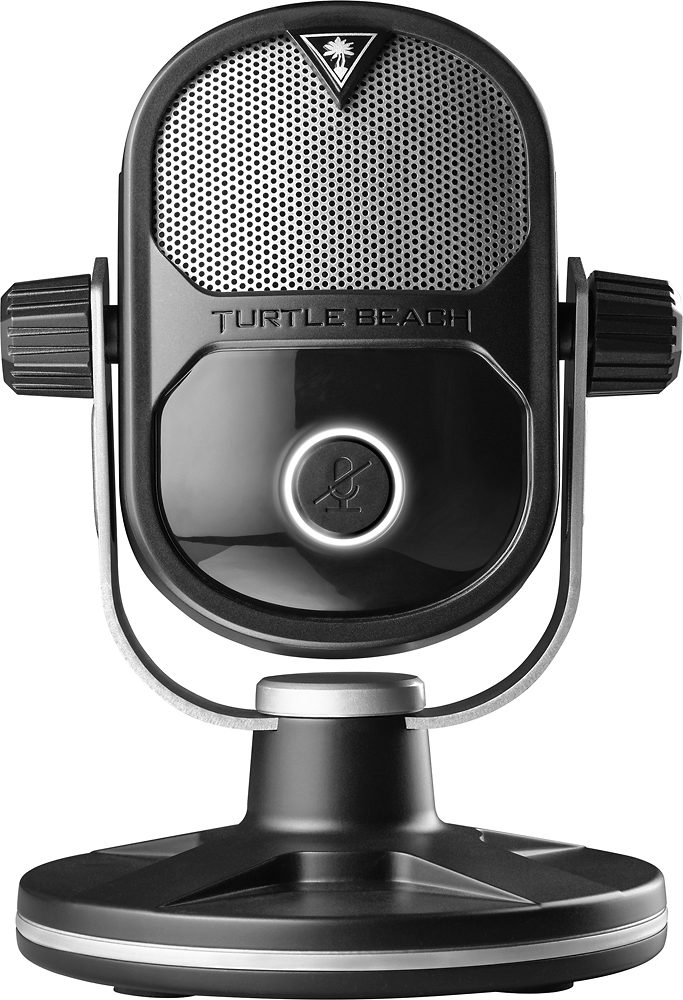
|Posted .This reviewer received promo considerations or sweepstakes entry for writing a review.I got this for my son who is an avid gamer. He does a lot of multiplayer games and needs something with better quality than his current mic. In short, he loves this product. At first, he didn't "get" the retro look of the mic until I showed him some old school mics from the past. After he saw it, it became his new favorite device! I think Turtle Beach did a great job of combining the old-school look with a highly-functional device for today's gamer. Setup was quick & easy and he was up an running in minutes. Great product!
I would recommend this to a friend