Customer Ratings & Reviews
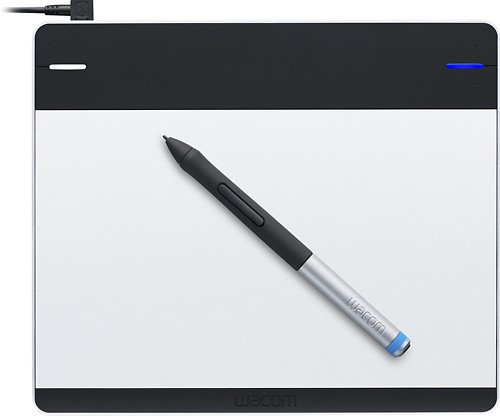
- Model:
- CTL480
- |
- SKU:
- 1680776
Customer reviews
Rating 4.4 out of 5 stars with 196 reviews
(196 customer reviews)to a friend
Customers are saying
Customers are delighted by the Intuos Creative Small Pen Tablet's ease of use, responsiveness, and small size, finding it well-suited for drawing and compatible with various programs. While some users experienced minor difficulties with software installation and pen button sensitivity, the overall experience was positive, with many praising its accuracy and affordability. The tablet's lightweight design also received positive feedback.
This summary was generated by AI based on customer reviews.
Rated 3 out of 5 stars
Great
||Posted .This reviewer received promo considerations or sweepstakes entry for writing a review.The product is great. My friend love it . It works great
I would recommend this to a friendRated 3 out of 5 stars
Good for the money
||Posted .This reviewer received promo considerations or sweepstakes entry for writing a review.This product is good for a super beginner. For only 20 or 30 bucks more you could get the sister tablet which is wireless.
No, I would not recommend this to a friendRated 3 out of 5 stars
variety of items
||Posted .This reviewer received promo considerations or sweepstakes entry for writing a review.variety of items online and in store. special deals at holidays.
I would recommend this to a friend- Pros mentioned:Price, Responsiveness
Rated 5 out of 5 stars
Very good.
Posted .This reviewer received promo considerations or sweepstakes entry for writing a review.This graphics tablet, CTL-480 or the intuos pen tablet is the next product on the intuos line. Unlike the the older models (CTL 470, 460) This supports wireless (sold separate) and there is a nib puller in the middle back of the tablet. This tablet also has additional nibs (3) on the plate in the back (Pretty hard to see). This product also has a color changer (Don't know what to call it!) where you can make the pen holder blue or black, same for the pen rubber top grip. The pen feels very lightweight and feels sturdy as well. This tablet supports 1024 pressure sensitivity good for beginners getting started to digital graphics (Like myself). If you want to get a tablet well worth the price without touch (Paying more $) then get this. I easily rate this product 5 stars. I have used this tablet for almost a year and it is very good and working in good condition.
I would recommend this to a friend Rated 2 out of 5 stars
not so great
||Posted .This reviewer received promo considerations or sweepstakes entry for writing a review.I am not a professional user just for fun, It is not as fun and as useful as I was thinking it will be. if I could I will return it ...
No, I would not recommend this to a friendRated 1 out of 5 stars
Has not worked properly yet
||Posted .This reviewer received promo considerations or sweepstakes entry for writing a review.I bought it for it's abilities and it has to work first and I have tried on several computers I have, so it is not the platform. I may have to return he device.
No, I would not recommend this to a friendRated 5 out of 5 stars
Solid update from Pen & Touch
Posted .This reviewer received promo considerations or sweepstakes entry for writing a review.I am a public school teacher, but work primarily online with distance-learning students. I wanted a way to be able to "mark up" papers like I used to when getting paper documents turned in and giving students feedback exactly where in the work they need it. A few years ago, I bought a Wacom Bamboo Pen & Touch tablet that has served me well, but I had some rewards certificates that were going to expire, so I chose to update. Improvements: The pen is lighter, has a rubberized grip and a more narrow shaft. I have VERY small hands, so these design changes were very welcome for me! The tablet itself is a little rougher with more paper-like resistance, which actually helps me write more smoothly and with more control. I'm able to write more finely with the updated model. Of course, I made a calculated decision in getting this model rather than the more expensive one with trackpad capabilities. The trackpad feature wasn't something I often used on the older model, so if that's not something you need, why pay for it? Bottom line: My old Pen & Touch is still kicking after three years (and now bequeathed to a colleague), so I have utmost confidence in Wacom as a brand. I'm very happy about my purchase!
I would recommend this to a friend- Pros mentioned:Ease of use
Rated 4 out of 5 stars
Enhance my work
Posted .This reviewer received promo considerations or sweepstakes entry for writing a review.I bought this tablet for my graphic design class. I was satisfied with precision and also easiness of the pen. I found this tablet better than the one the school provide us in the Computer Lab. I will recommend it to any graphic design student.
I would recommend this to a friend Rated 5 out of 5 stars
great product
Posted .This reviewer received promo considerations or sweepstakes entry for writing a review.I just purchased 9/23/13. and I have to say I was not to sure if it was worth the money. Got home installed it and started playing with it, and was shocked that the pen doesn't need to touch the tablet to move the curser. its a hover type pen. the only time you touch the tablet is when you want to click on a icon or scroll a page. I am getting use to using it and I have disconnect the computer mouse because it works better then it. it is a must have for me. whey make all computers with the tablet feature and just do away with the mouse forever...
I would recommend this to a friend- Pros mentioned:Size
Rated 5 out of 5 stars
Five Stars!
Posted .This reviewer received promo considerations or sweepstakes entry for writing a review.Works well on my Windows 7 Pro 15.6" HP laptop. Nice Product on affordable price. I love the size of this tablet. This is perfect for the beginner, I highly recommend!
I would recommend this to a friend - Pros mentioned:Ease of use
Rated 5 out of 5 stars
Great for people who don't like to draw on paper
Posted .This reviewer received promo considerations or sweepstakes entry for writing a review.I never liked drawing because I would spend too much time erasing but this drawing tablet is making drawing more enjoyable. It functions well without any problems and is easy to use. I've been using it to work on a rotoscope project and it has really helped speed up the process. All in all a good product that I highly recommenced to any visual communication student.
I would recommend this to a friend Rated 5 out of 5 stars
Best Tablet for osu!
Posted .This reviewer received promo considerations or sweepstakes entry for writing a review.One day we will get a tablet like this again. And Shige will get 1000pp.
I would recommend this to a friendRated 5 out of 5 stars
Great little tablet
Posted .This reviewer received promo considerations or sweepstakes entry for writing a review.This is a great little tablet. Easy to use and inexpensive.
I would recommend this to a friend- Cons mentioned:Software
Rated 2 out of 5 stars
This thing sucks
Posted .This reviewer received promo considerations or sweepstakes entry for writing a review.The driver doesnt work and cause more troubles than comodity. I don't know what the ones commenting in the wacom main page have been smoking, but my wacom is a nightmare and i hate it. The hardware is ok, is the software that suck. The mains problems are: *It stop working by not reason at all and i have to reinstall everything again. *Many little glitches that make the use of the wacom imposible sometimes. *The last update makes me restart my computer trice because of stupid problems. But as i say the bad things i said also the good ones. When both agree to work together (software, hardware) I really like it. However, it sucks hard, never recomend this to anyone.
No, I would not recommend this to a friend Rated 3 out of 5 stars
It needs minor tweeking by Wacom
Posted .This reviewer received promo considerations or sweepstakes entry for writing a review.The tablet is basically good. The problem is that if you map the tablet to a small area the pointer, cursor, brush, what ever, speeds up considerably and the device becomes very hard to use since every motion is amplified. There is no control for this. The only thing you can to is map your device to a larger area. I've made 3 contacts to tech support and I've gotten no response form Wacom. They want your money but not your input.
No, I would not recommend this to a friendRated 5 out of 5 stars
Bought one
Posted .This reviewer received promo considerations or sweepstakes entry for writing a review.I just bought this one today :D sadly I can't use it YET cause my laptop isn't home with me now but it might come home tomorrow and I'm pretty excited to use it c:
I would recommend this to a friend