Customer Ratings & Reviews




- Model:
- WDBVXC0040HWT-NESN
- SKU:
- 5990204
Rating by feature
- Value
Rating 4.0 out of 5 stars
- Quality
Rating 4.2 out of 5 stars
- Ease of Use
Rating 4.0 out of 5 stars
Customers are saying
Customers love the My Cloud Home 4TB Personal Cloud for its easy setup, ample storage, and reasonable price. They appreciate the convenience of being able to access and share their files from anywhere. However, some users have experienced compatibility issues with previous generation drives, software crashes, and data loss.
This summary was generated by AI based on customer reviews.
- Pros mentioned:Ease of use

Great Entry Level Home Cloud
|Posted .This reviewer received promo considerations or sweepstakes entry for writing a review.Had this unit out of the box and up and running on my network in probably 10 mins. It uses a mobile app for setup, and it's pretty straightforward. I then installed the WD desktop software so I can view this drive and my other WD 8TB My Book from one utility. Once up and running you can move files to the drive and being network enabled you can then view all those files on any connected device, you just need the WD app for mobile or desktop. You can also share files from your cloud drive to external parties by creating a unique URL to the file, you can also share access to folders as well. the drive can also be set up to auto backup your mobile device, and is also Apple Time Machine compatible. The mobile app UI is ok, not anything fantastic. Some things can be very clunky to navigate through, especially when you are looking at very large folders of images. But performance so far of the drive and apps has been very good.
I would recommend this to a friend - Pros mentioned:Ease of use
Very easy to use.
|Posted .This reviewer received promo considerations or sweepstakes entry for writing a review.I have to say as far as network attached storage devices this drive is one of the easiest I have ever set up and used. The drive looks good enough that I don't care to leave it on my desk next to the router and overall it is very quiet. If you're looking for an easy to use device this is most likely the way you want to take. However if your uncomfortable with your personal information being available outside of your home network this may not be the best choice and you should stick to the USB external drive variety. As far as the web page for access outside of your home, I think it is one of the best ones I have used so far. Its very intuitive and it even takes all the contents and anything that is a picture shows up in a nice picture tab, no need to have a specific folder for all of your photos. This allowed me to easily find duplicate photos because of the photo page and even find photos that we had forgotten about over the years of 1+TB of pictures. Overall good device. Looking forward to see how well it holds up in the long run.
I would recommend this to a friend Not user friendly
||Posted .This reviewer received promo considerations or sweepstakes entry for writing a review.Wasn't aware Plex was involved and still couldn't play on mycloud home on my phone had to use Plex and Plex stinks
No, I would not recommend this to a friend- Pros mentioned:Setup
Good purchase-works well
Posted .This reviewer received promo considerations or sweepstakes entry for writing a review.This is a very good unit. It was just a little tricky to set up on a friend's Windows 11 machine... until after 2 days of support calls, they decided that the unit was faulty and advised me to exchange it for another one - which I set up quickly and easily. I set up the backup app that came with it and it is all working as expected. Good purchase works well.
I would recommend this to a friend - Pros mentioned:Storage
The Time Machine's Time Was Up
Posted .This reviewer received promo considerations or sweepstakes entry for writing a review.Since I have not tried to retrieve any of the material that MyCloud Home has backed up, I cannot get the product 5 stars. It may deserve it. It works—and there are sounds that let you know it. That's OK. I was happy with my old Apple Time Machine until it stopped backing up—and Apple also stopped backing IT up and even quit making the Time Machine. Because I am a writer, back-ups are important to me and I even have WD for Mac attached directly to my laptop. An excellent byproduct of My Cloud Home: No subscription costs.
I would recommend this to a friend Easy to use cloud drive..has room to improve
|Posted .This reviewer received promo considerations or sweepstakes entry for writing a review.Pros: Super easy setup IFTTT App Plex App Social Media Backup Easy way to backup existing cloud content from DropBox, Google Drive, etc. Easy phone/photo backup Cons: Needs more Apps and IFTTT Recipes No direct control of drive shares No disk encryption option No easy way to backup the cloud drive itself either to the cloud or another drive Apps have shortcomings No advance configuation No backwards compatibility with prior gen drives Apps need enhancements In short this is a great drive from the perspective of being very easy to setup (almost too easy) and use for the purpose of backing up or saving photos/videos. Stopping there I'd say 5 stars and I'd recommend it! All you need is a Phone/Tablet/PC or Mac to set it up and use it for that. In fact, I used my Android phone to set the drive up in about a minute. Once setup, it's a simple matter of either installing the app on other devices or just beginning to use it from there with your phones. In all it would be great for someone who needs the simplicity of setup and use. For needs beyond this read ahead to see why i rated it 3 stars... Use on a PC... The drive very much seems to be designed more around phones and tablets than it is regular PCs/Macs though it works with them too.. That is it works just fine ONLY with the desktop software installed and ONLY once you sign in to your My Cloud Home account from what I could see. There is no Windows 10 app in the Windows Store, and only the desktop software which I downloaded and installed. The desktop software was confusing to use at first as there is marketing for Apps to services/companies that don't really have anything to do directly with your cloud drive. Having figured it out after I installed the desktop software and successfully signing in it enabled it to show up as a drive in Windows but there is no direct way to browse to the file share without the software installed - VERY disappointing! I wasn't able to test on Mac but imagine it functions exactly the same way. You can access the drive from anywhere using a Web Browser but obviously for moving/opening or browsing any number of files this would not be an ideal way to access or manage them. Last there is no disk encryption option that I could see and it isn't clearly stated if the drive was already encrypted by default so I would be very concerned about data on the drive if the drive was stolen or misplaced. Use with a Phone/Tablet... I was also a bit disappointed to see that with it being designed around the phone/tablet app that there really is no way to upload files outside of photos/videos in the My Cloud Home app (both on Android and iOS)... meaning if you were looking to upload docs from the app like Word/PDF docs or Excel spreadsheets from your phone, you'll be very disappointed to know that the only way to do that is with a PC/Mac as the Android/Mac app does not browse to see any files outside of Photos or Videos at least as of the time this was wrote. There is also no "iPad" version of the app so you'll have to install the phone version so it'll look funny but work fine. A Note on the Plex Server... The instructions to configure the server were not clear and doing so from a phone/tablet was not easy and i ended up having to use a PC to do it anyway. Having been familiar with Plex I was able to figure it out but for someone not familiar the current way it works would be confusing/frustrating to some. There is no way to custom configure media folders/libraries in folders of your own and it definitely can't be mapped to folders with media on other My Cloud drives .. so in order to get that to work you would either A) Have two Plex Media Servers Running (your old one and the new one) or B) Be forced to migrate all your data to the new My Cloud Home drive using the included App for that. Backward Compatibility...like if you have the previous generation "My Cloud" drive... Western Digital obviously wants this to be an upgrade to My Cloud Drives that you already have. It needs to be clear that there is no "backwards" compatibility with the new My Cloud Home app to the original My Cloud drive and that in order to use both you need both apps. The only option I saw on the new drive was to import data from an old drive to the new drive with the App which is another disappointment considering the old drive works fine and could easy serve as a backup. Unfortunately, there's absolutely no included app to backup the new drive to any other drive after you import your data so using your old drive to backup the new one is not really going to work if you wanted to do that (like the Safepoint feature allowed in the older generation). Overall... As stated in the beginning of this review... if you are looking for a Cloud drive that can easily and simply backup your photos/videos and social media/online cloud drives this is great and I would recommend it for that. It really is super easy to configure. Outside of this and for anyone who is looking for the flexibility of managing file shares/permissions to those shares and such then I would not recommend this drive. The app needs more features and there needs to be a better file management interface all around for the app .. tablet versions would be ideal too! Oh yeah, and what happened to a Windows Store app??? I searched there only to get frustrated and to then look at the card again to realize i had to go to the website and once there it wasn't clear on how to download and install the software. So, for setup on a PC/Mac, setup is a far cry from being as easy as it was on the phone. If Western Digital updates the app so you can upload other types of media and makes more enhancements to make the Android/iOS Apps more flexible /easy to use it'll be great for those who intend to use it only in this way otherwise I'd have a hard time recommending for Phone/Tablet users that don't have a PC. That said, based on how often the old My Cloud app and Apps/Features on the previous My Cloud was updated, I wouldn't expect too many enhancements outside of basic bug fixes or minor enhancements. Hopefully that changes with this generation starting with fixes for some of these concerns as described above .. which if those were fixed then I would absolutely recommend this drive overall and give it five stars.
I would recommend this to a friend- Pros mentioned:Ease of use, Storage
Perfect solution for storing my files
|Posted .This reviewer received promo considerations or sweepstakes entry for writing a review.The My Cloud home was easy to setup. I just plugged it in to my router and downloaded the software to my laptop and phone. I was able to upload video and pictures from both to free up space. I was able to access the files away from home using the mobile app. This is a great alternative to the online cloud based backup options. I like knowing that my data is stored locally at home. With 4TB of space it will be a whole before I run out of room.
I would recommend this to a friend - Pros mentioned:Storage
Very Easy To Setup and SHARE with others!
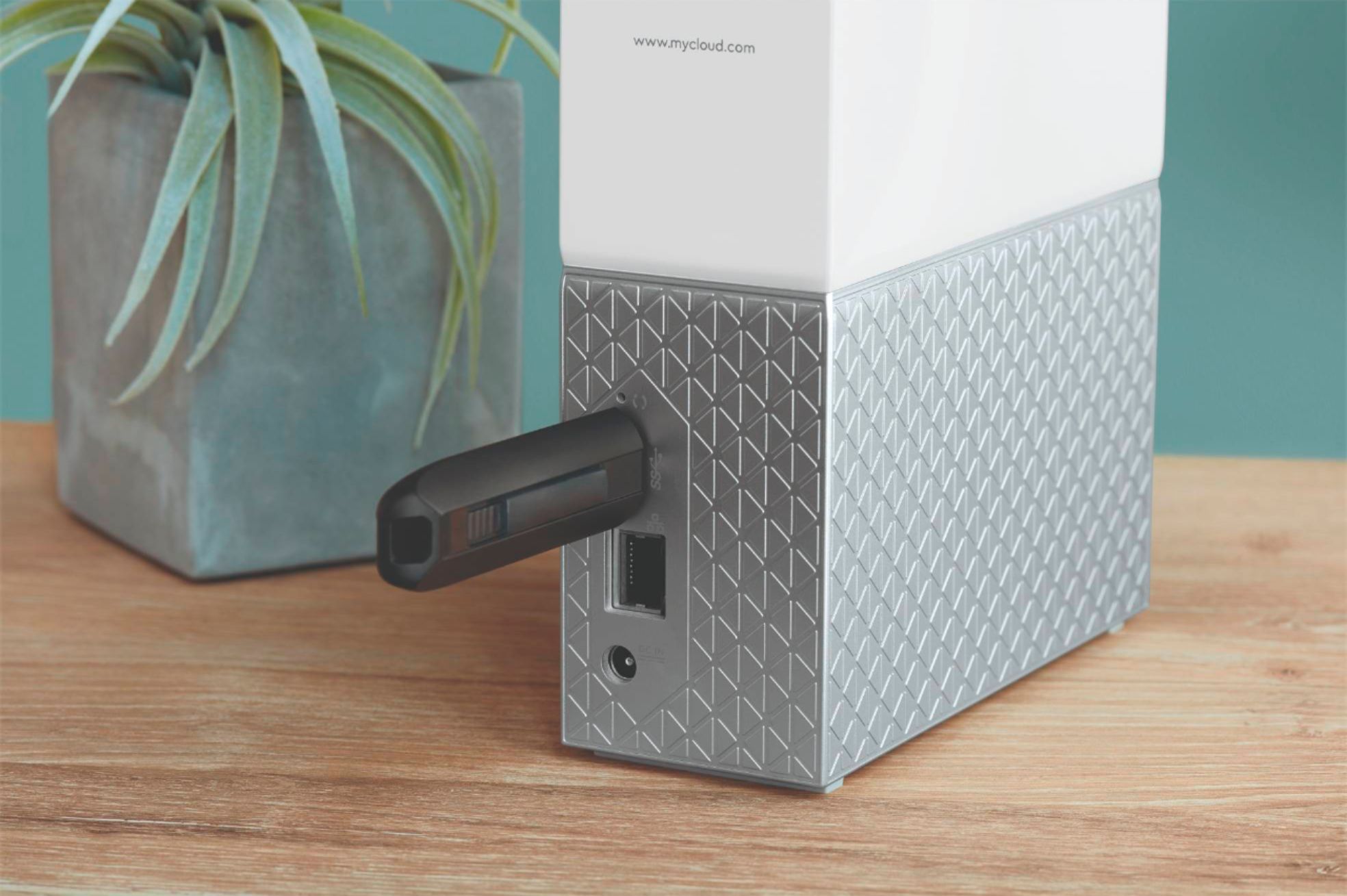
|Posted .This reviewer received promo considerations or sweepstakes entry for writing a review.If you've setup a Esata/usb 3.0 drive on an always on computer or even a conventional NAS to have others backup things on and it doesn't get used beyond set and forget things like Windows 10 File History or whole drive imaging, then this might be what you are looking for. Especially for sharing things easily with others outside the household and accessing things while on the go. 4 TB is plenty of space for selected projects and photos and files, we will use for things mostly that might or will be shared with others, in the house and outside of it. We still use Google Drive for long term storage of family photos and files. I still use a redundant raid backup for system images and windows 10 File History / whatever the Mac equivalent is. My favorite thing about this network attached storage is the ability to invite others via email address to have their own, completely isolated space on the device. Also you can share down to individual files with create a link to send access to only that stuff to family or friends. It also streams videos very well to the My Cloud Home app on Smartphones and Android Tablets. MP4 home movies resized well for smaller device screens. Cons would be: Can't use the USB 3.0 port to add more storage. It is only for directly transferring stuff from your other external drives/ thumbsticks to this device. Only other Cons I can think of are minor and that is "Desktop App" has a different name (WD Discovery) and not much functionality. I find it easier to use the mycloud.com web page on desktop. Also wish the iOS app worked on Ipad, but its only for IPhone as of now. It works on both Android phones AND tablets.
I would recommend this to a friend - Pros mentioned:StorageCons mentioned:Reliability
Ok
Posted .This reviewer received promo considerations or sweepstakes entry for writing a review.It's wonderful with such huge storage but you gonna make sure it stays plug in 24/7 or else you might lose some stuff saved on it.
I would recommend this to a friend - Pros mentioned:Ease of use
So Far so Good
Posted .This reviewer received promo considerations or sweepstakes entry for writing a review.So far so good. Used it to back a my older Cloud and it works fine. It was really easy to set up and run on my network.
I would recommend this to a friend - Cons mentioned:Software
Not a workhorse
Posted .This reviewer received promo considerations or sweepstakes entry for writing a review.The only way you can really test a network drive is to stress test it and see how it performs. I tend to skip reviewing products during the "honeymoon" phase where everything looks good. I've owned this WDC MyCloud Home 4TB drive for a few months now and recently stress tested it by doing routine file management (copy, modify and organize). I've discovered some disturbing characteristics of this drive as attached to my iMac running the latest Mojave. The WD Discovery software is ok. It recognizes my MyCloud and other WD drives and updates the firmware when available. The MyCloud has support for a handful of services (Cloud, Plex, Sonos, Backup, UpThere and more). Don't get excited about Plex. It comes with hard coded folders and any attempts to create additional folder structure will not be seen by Plex clients. This drive does not use standard networking connectivity protocols like SMB/CIFS, AFP and this may be. one of the reasons why the drive tends to refresh the window after every change. Modify a name and suddenly the files may disappear and then pop back in after some mysterious update. Thumbnails are slow to load and running duplicate finding apps results in an error that says there's no Trash found which leads me to believe it's WD's custom software that presents itself differently from your typical filesystem. The iOS app is fairly easy to use. Plays back quickly over LTE, I'd like support for animated gifs and some basic editing features. My recommendation for this drive is basically tertiary storage where you won't need to do a bunch of changes. I've had to resort to copying data to a direct attach storage drive to edit and then reload back onto the MyCloud Home drive to bypass the wonkiness of file modification. I probably wouldn't buy this drive again. The limitations have simply cost me too much time. My next drive will be based on standard protocols and I figure that will eliminate many of the issues. WD makes some higher end MyC.oud drives supporting standard protocols so you might want to look there if you need to to some manipulation of data.
No, I would not recommend this to a friend - Cons mentioned:Software
Planned obsolescence
Posted .This reviewer received promo considerations or sweepstakes entry for writing a review.I’ve purchased multiple MyCloud NAS storage devices that they stopped supporting with the deprecation of the WD Access application. As a result, I upgraded to MyCloud Home. And they are now deprecating the supporting software (WD Discovery) as of June 2023 (according to the email they just sent their customers). I still have the drives and they are working well from a hardware perspective. But without the software that they offer as part of the system, they are difficult to use and, in my opinion, akin to planned obsolescence that drives customers to buy new WD systems. Yes, the older MyCloud and MyCloud Home hardware DOES work and accessible with mounted drives using a convoluted workaround provided by WD. But, it’s not what I bought when I made my investment. While I don’t expect manufacturers to support hardware and the accompanying software indefinitely, it should be supported for more than a few months or years. I see that WD STILL has this device (4GB MyCloud Home) for sale referencing the WD Discovery app as one of the tools to operate the device. Yet, they are stopping support in less than six months and this is not explained on their products page. I’m assuming the buyer will only know they will have this functionality after they make their own investment and register their account. I believe this is a good example of a planned obsolescence business model from a company that has lost it’s focus on customer satisfaction.
No, I would not recommend this to a friend Small affordable as simple to use.
|Posted .This reviewer received promo considerations or sweepstakes entry for writing a review.The Western Digital My Cloud 4TB drive is a neat little device that can fit many different roles depending on what you want. With cloud in the name it is mostly intended to be a device where you can store pictures and files that you can access anywhere in the world you have an internet connection. But the need to access your picture library from your phone is probably something most people already can do. Both Apple and Android phones already provide that service. Most people that have important files like insurance policies can already access those from their insurance provider. If I need my car insurance I go to the app from my insurance company or login to my account on my desktop. But that is not to imply there is not some real value to be had here. One of the most important roles a network device like this can provide is the backup of your local computer or tablets for example. So that is a real value because with a 4TB drive you can backup all of you computers with one device. That is where I think the real value here is and it is dead simple to setup and put into service. And I have to say it is very nice looking and takes up almost no room. Plug it into your network from a wired connection, create a online account and it is ready to use. If you read the features list there is much you can do here. Strangely missing is any mention of it being UPnP, (Universal Plug n’ Play). This is an industry standard protocol that permits networked devices to be accessed from other devices that also support this protocol. It is not mentioned anywhere I could find in the WD home pages or in the limited documentation it comes with unless I just missed it. Typically you would expect to see this prominently on the outside of the box or in the features list. But depending on your skill level it does work but not without separate software. It comes with a PLEX software client so that can use the device to stream. I had no problem playing music streamed from my phone to my Samsung TV from files on the My Cloud device. PLEX can stream most anything so its is there but is a separate software to be installed. This works like another much more expensive NAS, (Network Attached Storage) device I have. Now you can’t really compare these two because my current NAS is way more expensive and more complicated to setup. Here you have a neat little device that is very simple to use and very attractive no matter where you decide to place it. You can access it’s contents from anywhere in the world you have an internet connection. And a very important feature that really matters is you have your files on one device you could run out of the house with. Yes much of our pictures and music are already in the cloud but there is something to be said about having them and any other files you store on your computer, tablet or phone in a package you can put in a bag. That value alone can make this a perfect safety net when something like a hurricane is bearing down on you. I like it, I like how easy it is to setup and use and if you don’t have a device like this you should. It also fully supports Windows backup and Apple time machine. Don’t worry if you have never thought you needed a network device like this or are afraid to setup one up. There are tons of resources and even the Western Digital help files are very well done. Western Digital has had this same My Cloud device out in various sizes and styles for years so it is a very mature device that just works
I would recommend this to a friend- Pros mentioned:Remote access
Easy to use and flexible!!!
|Posted .This reviewer received promo considerations or sweepstakes entry for writing a review.This little server works great in my home office and was very easy to setup. Network speed is great with no hiccups and I was able to perform backups of my 4 home machines and also stream HD movies at the same time. The WD SmartWare Pro software is very easy to use for backups on all of your devices and the MyCloud app for my phone and iPads are easy to use to monitor the progress. Just make sure you have a good router for connectivity. The Cloud backup pricing is very competitive, great, and easy to use. When it comes to remote access to the data from outside of my home, the service provided by WD is definitely great for the cost.
I would recommend this to a friend Good but deceiving
Posted .This reviewer received promo considerations or sweepstakes entry for writing a review.For data back up works great, almost seamless integration as a network drive, would be 5 stars on tat alone. being able to access everywhere, a major plus. But for streaming videos, which is half of what I got it for what I got it for, is lacking, you need to use PLEX which has zero support, unable to find my cloud after 30 minutes. Bought this to stream to my X-Box one to replace WD My Passport on my Linksys WRT3200AC which was plugged into USB as a media server WD website shows a different interface than you get when using it, unable to enable DLNA natively so media players wont see it even though both this drive and player are hardwired on same network. Other than this beef, a solid 4.5 for me.
I would recommend this to a friend- Cons mentioned:Software
Nice design but..
Posted .This reviewer received promo considerations or sweepstakes entry for writing a review.This the worst IT product I can remember I have bought. From the very beginning it was extremely slow to transfer files from and to my computer. It kept making a constant noise from the hard disk spinning. And the software that accompanies it is outdated. The WD guys have really messed up with this product. It should never has been sold.
I would recommend this to a friend - Pros mentioned:Setup
Very easy to setup, very useful
|Posted .This reviewer received promo considerations or sweepstakes entry for writing a review.As the owner of several WD external drives, I have to say that this is by far the easiest to set up. WD have outdone themselves when it comes to making this drive 'idiot proof.' What I am using it for: iOS backups, Time Machine, and shared files. All of these things were a breeze to configure. Also - and not as important - this drive looks cool as well. I'm happy to have it out in the open.
I would recommend this to a friend Loss in functionality outweighs increased Speed
Posted .This reviewer received promo considerations or sweepstakes entry for writing a review.Originally purchased a WD MyCloud, then returned it because a week later the MyCloud Home came out. It has a faster ethernet port (1 Gig) and faster processor, but when I set it up at home I realized that it doesn't have the same Admin Dashboard\Software that the original MyCloud came with. I lost the ability to set up folders that can be shared amongst users. I can't imagine why WD would come out with an upgraded piece of HW, and then reduce the functionality of the software. If anything, create an Easy and Advanced mode for those who want to be able to act as an admin. Will probably return and look for a product with the speed of MyCloud Home but the functionality of MyCloud.
No, I would not recommend this to a friendNot satisfied
Posted .This reviewer received promo considerations or sweepstakes entry for writing a review.I recently bought My Cloud Home from Bestbuy. When I started, it was looking good just for transferring photos and files from Mac and iPhones. But it doesn't have a dashboard or admin view, where we can see the devices. When I connect my external Toshiba hard drive(Please note Toshiba is a recognized hard drive for WD My cloud home), I was expecting my cloud home to show that in my Mac. But it did not show up. I spent a lot of time and spoke to couple of customer service rep but they were also not able to solve the problem. I am able to see a notification in my iPhone app, that a USB drive has been inserted, and in that also, it just has an option to copy the data from my external drive to my cloud and it doesn't have an option for me to open the files and folders to read it, from external drive. I was expecting my cloud home Mac app to show the external hard drive and to allow me to see whats in it and accordingly decide what to do with that. This was the main feature that I was expecting from my cloud home, and it seems to be not available. WD Discovery app is not that great. I am not able to view the admin console, where I can specify what to share/mount/ssh or ftp etc...
No, I would not recommend this to a friend- Pros mentioned:Ease of use
Solid
Posted .This reviewer received promo considerations or sweepstakes entry for writing a review.Easy set up, works great. Looks great on the desk
I would recommend this to a friend