Back To School Stylus Pens
Gear up for a successful school year with back to school stylus pens designed to help students stay organized and creative. Whether you’re taking notes on a tablet, sketching out ideas, or navigating digital textbooks, the right stylus pen can make all the difference in your daily routine. Browse a wide selection of options perfect for classrooms, home study sessions, and everything in between. Find the ideal back to school stylus pens to complement your favorite devices and enhance your productivity as you head into a new academic season.
Read More-
Apple - Pencil (2nd Generation) - White
SKU: JJGCQ83X6HBest store ever...I love Best Buy, best store ever, deals are amazing and the products are great, best warranty!...My daughter in low will love it.The brand is great and Best Buy is best store! I love...
See all Tablet Stylus PensProduct Description
A white wireless stylus with magnetic attachment and double-tap tool switching, designed for compatible iPad models.$129.00 Your price for this item is $129.00 -
Microsoft - Surface Pen - Poppy Red
SKU: J3ZKK44F89I love how easy it makes using my tablet as a laptop or a tablet. best buy ever, wasn't sure if I was
See all Microsoft Surface Stylus PensProduct Description
A poppy red aluminum stylus offering precise, lag-free writing and drawing with 4,096 pressure points.$89.99 Your price for this item is $89.99 -
Apple - Pencil Pro - White
SKU: JJGCQ35H4QI love best buy great service and great prices, perfect !!...Great pen great store i love best buy inhope i win this gift card
See all Tablet Stylus PensProduct Description
A white stylus featuring haptic feedback, squeeze controls, and precise gyroscope support for creative tasks.$129.00 Your price for this item is $129.00 -
Apple - Pencil (USB-C) - White
SKU: JJGCQXK6ZJWorks great love this purchase best pen for drawing /coloring ❤️❤️❤️...i love best buy...the best product, I reallylove it, I love best buy
See all Tablet Stylus PensProduct Description
A white stylus with USB-C charging, magnetic attachment, and broad iPad compatibility for seamless creativity.$79.00 Your price for this item is $79.00 -
Apple - Pencil (1st Generation) with USB-C to Pencil Adapter - White
SKU: JJGCQ8PHWJIt was great service and i love to shop in best buy...Best buy...It’s great never had one before but I love it it’s the best
See all Tablet Stylus PensProduct Description
A white stylus offering pixel-perfect precision for note-taking, drawing, and marking up on compatible iPad models.$85.99 Your price for this item is $85.99Save $13Was $99.00The previous price was $99.00 -
Insignia™ - Slim Stylus for Smartphones, Tablets and More - White
SKU: J2FPJKP5YGThis is the best product ever I really love this t...This is the best product ever I really love this the best product to own...Great Purchase! Needed it for my new Best Buy Samsung Tablet!
See all Tablet Stylus PensProduct Description
A slim white aluminum stylus with a sensitive silicone tip for smooth, smudge-free touchscreen use.$9.99 Your price for this item is $9.99 -
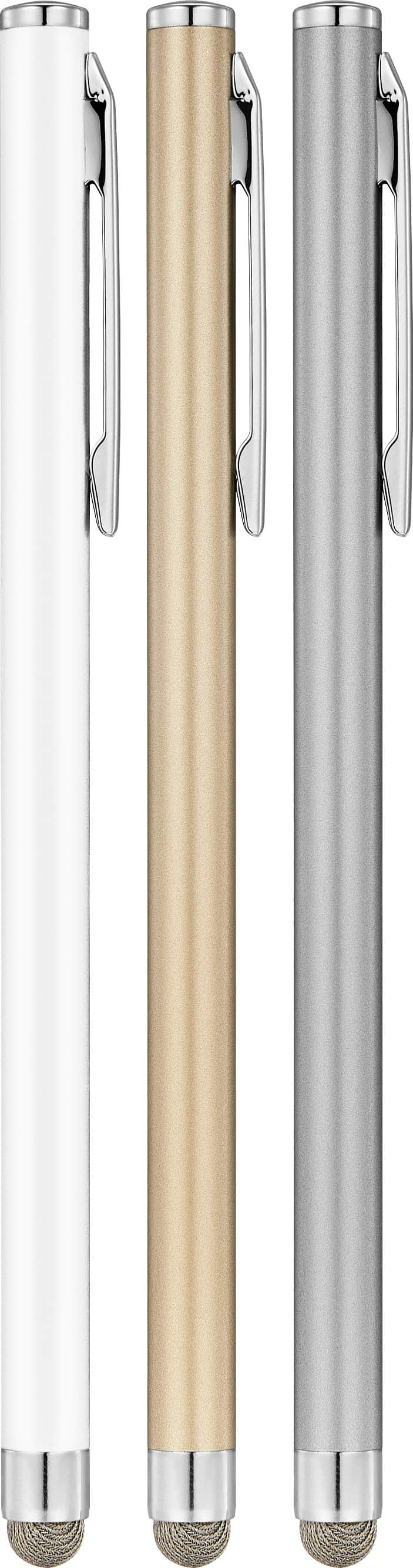
Insignia™ - Slim Stylus for Smartphones, Tablets and More (3-Pack) - Multicolor
SKU: J2FPJKP5P8Love this slim stylus pen. Versital for tablets and cell phones. Best price I have found...Best Buy is the best to buy any the thing and I love to buy from there...I love best buy
See all Tablet Stylus PensProduct Description
A multicolor aluminum stylus 3-pack with silicone tips for smooth, scratch-free use on touchscreens.$19.99 Your price for this item is $19.99 -
Microsoft - Surface Slim Pen (2nd Edition) - Matte Black
SKU: J3ZKK59ZFTThe best!...The best! I buy this pencil for gift. And my friend liked this pencil....Great
See all Tablet Stylus PensProduct Description
A matte black plastic stylus offering precise handwriting, shading, and pressure sensitivity for Microsoft Surface devices.$109.99 Your price for this item is $109.99Save $20Was $129.99The previous price was $129.99 -
Insignia™ - Active Stylus for iPad, iPad Pro, iPad Air and iPad mini - White
SKU: J2FPJKS5Z3Product was great buy! I love shopping at Best Buy!...Love it...I love it... the best, easy to use. I just in love with my pen
See all Tablet Stylus PensProduct Description
A white active stylus offering precise control, tilt sensitivity, magnetic support, and fast USB-C charging for iPads.$39.99 Your price for this item is $39.99 -
Lenovo - Digital Pen 2 - Gray
SKU: JJGCYLHP39Best pencil for lenovo...Love using this, Im a college student so it really helps...Great value for the price and quality...Great quality and the best price I could find....It is great to be able to get...
See all Tablet Stylus PensProduct Description
A grey stylus featuring an enhanced grip, precision elastomer tip, long battery life, and quick-access buttons.$37.99 Your price for this item is $37.99Save $2Was $39.99The previous price was $39.99
Back-to-school stylus pens bring together two everyday tools in one convenient design: a traditional ballpoint pen for handwritten notes and a soft touchscreen tip for navigating tablets, phones and other compatible devices. That combination can be especially useful when a school day moves between paper worksheets, digital assignments and quick notes in the hallway. A student might use the ink end to label a folder, sign a permission slip or jot down a reminder, then turn the pen around to select an answer, scroll through an online lesson or sketch an idea on a touchscreen. For families trying to keep backpacks organized, a two-in-one pen can help reduce the number of loose accessories that tend to collect at the bottom of a bag. It can also be a practical choice for remote learning spaces, libraries, study groups and tutoring sessions where a student may move back and forth between a notebook and a tablet. When comparing stylus pens, begin with compatibility. Most capacitive stylus tips are designed for common touchscreens, but performance can vary by device, screen protector and the type of work being done. A basic rubber or silicone tip is well suited to tapping, swiping, selecting icons and writing short notes, while students who draw, diagram or complete detailed digital work may prefer a more precise tip or a model designed for a particular tablet. Active styluses may offer features such as pressure sensitivity, palm rejection, shortcut buttons or a rechargeable battery, but those capabilities depend on the device and operating system. Checking the tablet’s compatibility information before purchasing helps ensure that the pen will behave as expected. It is also worth considering whether the stylus needs to work through a screen protector, since thicker protectors can affect sensitivity. For shared household devices, a simple universal design may be the most flexible option; for a dedicated school tablet, a device-specific stylus can provide a closer fit and more responsive writing experience.
Comfort and durability matter just as much as touchscreen performance, particularly when a stylus pen will be used throughout a full day of classes. Look for a barrel that feels secure between the fingers without being overly heavy, along with a grip that stays comfortable during extended writing. A thicker, rounded shape can be easier for younger learners to hold, while older students may prefer a slim profile that slips neatly into a pencil pouch. Soft-touch finishes and textured grips can help prevent the pen from sliding across a desk, and balanced construction can make quick note-taking feel less tiring. The stylus tip should be smooth enough to glide across glass without dragging, yet firm enough to register taps accurately. Replaceable or removable tips may extend the useful life of the pen, while a capped tip can help keep dust and lint away when it is stored in a backpack. For ink, consider the color, point size and writing style that best match the student’s assignments. Black or blue ink is a dependable choice for everyday classwork, while a fine point can suit compact planners and margins, and a broader point can create bold, easy-to-read notes. Twist-action or click-action mechanisms may be preferable for students who tend to misplace caps. Younger children can benefit from bright colors, larger barrels and playful shapes that make the tool easy to spot and hold, while middle school, high school and college students may lean toward understated colors or a pen that looks at home in both the classroom and a part-time workplace. Stylus pens can make thoughtful additions to a back-to-school supply bundle for a student, teacher, tutor or family member who uses a tablet regularly. They also work well as practical gifts for learners settling into a new grade, starting college or building a mobile study station. For classrooms, clubs and welcome events, multipacks can provide a useful option for distributing matching supplies or keeping extras available when a pen disappears. Even when purchasing a single stylus pen, choosing a color that stands out can make it easier to identify among shared supplies.
A stylus pen is most useful when it fits naturally into the student’s routine. Keeping one beside a tablet stand creates a ready setup for digital flashcards, reading assignments, educational apps and handwritten annotations. At a kitchen table, the ink side can mark a printed schedule while the stylus side moves through a lesson on a family tablet. In a lecture hall or study room, the same pen can capture a quick quote in a notebook, then navigate presentation slides without requiring a separate accessory. Students who enjoy drawing may use the touchscreen end to outline diagrams, shade a digital art project or practice lettering, while younger learners can benefit from a wider grip that feels more like a familiar crayon or marker. A stylus pen can also support accessibility by offering an alternative to tapping with a fingertip, especially for users who prefer a defined writing tool or need a larger object that is easier to grasp. To keep it working smoothly, wipe the tip and barrel with a soft, dry cloth when needed, avoid pressing harder than necessary and store it away from sharp objects that could damage the tip. Keep ink pens closed or retracted before placing them in a backpack, and check the tip periodically for wear, loose material or buildup that could scratch a screen. Pairing a stylus pen with protective accessories can make a mobile school setup more convenient; browse Back To School Tablet Cases for ways to help protect a tablet as it travels between home, class and extracurricular activities. During the cooler months, when students may spend more time studying indoors, a dependable pen can stay on a desk for homework, digital reading and creative projects. With the right balance of compatibility, comfort, ink quality and durability, back-to-school stylus pens can become small but dependable companions for the entire school routine.
Best Sellers
Related Pages
FAQ
When choosing a stylus pen for back to school, consider features such as compatibility with your device, pressure sensitivity, palm rejection technology, battery life, and ergonomic design for comfortable use during long study sessions.
Many stylus pens are designed to work with a wide range of touchscreen devices, including tablets and smartphones. However, it's important to check the product specifications to ensure compatibility with your specific device model.
A stylus pen allows students to write or draw directly on their digital devices, making it easier to take handwritten notes, annotate documents, and create diagrams. This can enhance organization and make studying more interactive.
While most basic functions of a stylus pen work without additional apps, using note-taking or drawing apps can unlock advanced features like handwriting recognition, shape correction, and cloud syncing for better productivity.
Yes, many stylus pens are ideal for creative tasks such as drawing, sketching, and graphic design. Look for models with high pressure sensitivity and precision tips if you plan to use your stylus for artistic projects.