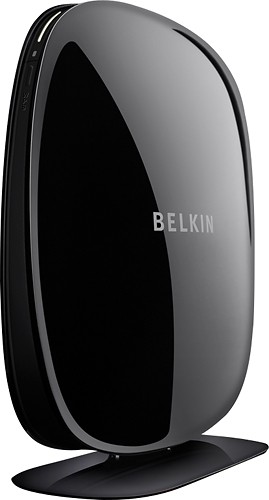
Belkin - Dual-Band Wireless Range Extender
This item is no longer available in new condition.
See similar items below.
Description
Features
5 built-in ports
Include 4 LAN, 1 WAN and 1 USB 2.0 for versatile connectivity.
Maintains network security
Helps keep your information secure.
Plug-and-play installation
For fast, easy setup.
Wireless-N technology
Also compatible with Wireless-G, Wireless-A and Wireless-B standards to deliver improved range while eliminating drops and dead zones.
Up to 300 Mbps data transfer rates with Wireless-N
For fast, efficient operation.
Extends both bands of your dual-band network
For use with your existing modem and router (not included) for extended Wi-Fi coverage throughout your home. MultiBeam technology provides a high-powered signal for multiple devices.
What's Included
Belkin Dual-Band Wireless Range Extender
Setup CD
Power supply, networking cable
Owner's manual
Other
- Energy Star CompatibleNo
- <a href="javascript:winopengld('1087340810700','pcmcat38200050027','cat12080')">Speed</a>Up to 300 Mbps
- <a href="javascript:winopengld('1087340810565','pcmcat38200050027','cat12080')">Number of LAN Ports</a>4
- System RequirementsPC: Windows XP 32-bit (SP3 or later), Vista (32- or 64-bit) or 7 (32- or 64-bit); Mac: OS X 10.5 or 10.6; 1.8GHz processor; 512MB RAM
- <a href="javascript:winopengld('1087340810600','pcmcat38200050027','cat12080')">Number of WAN Ports</a>1
- Number of Ports5
- Wireless StandardWireless-N
- <a href="javascript:winopengld('1218870374819','pcmcat38200050027','cat12080')">ENERGY STAR Certified</a>No
- UPC722868845707
Customer reviews
Rating 3.9 out of 5 stars with 633 reviews
(633 customer reviews)Rating by feature
- Ease of Use4.0
Rating 4.0 out of 5 stars
Customers are saying
Customers appreciate the ease of use, range, and signal strength of this product, with many commenting on how easy it was to set up and how much it improved their Wi-Fi coverage. Positive feedback also highlights the product's value for its price. However, some customers experienced issues with the reliability of the device, reporting the need for frequent restarts.
This summary was generated by AI based on customer reviews.
- Pros mentioned:Ease of use
Rated 5 out of 5 stars
Did what it says.
||Posted .This reviewer received promo considerations or sweepstakes entry for writing a review.I got the signal boost that I needed. Easy to set up!
I would recommend this to a friend - Pros mentioned:Range, Setup
Rated 4 out of 5 stars
Decent throughput
||Posted .This reviewer received promo considerations or sweepstakes entry for writing a review.Purchased for a customer needing greater signal across their elongated house, this unit worked great, since their cable internet was in the office at one end of the house. Placed this Belkin unit in the middle of the house, and then they had signal in all rooms. Pretty easy setup, though very hard to get back to make changes once set up. Needed to actually reset the device and do the setup again.
I would recommend this to a friend - Pros mentioned:Ease of use, Range
Rated 4 out of 5 stars
Fantastic solution to dead wi-fi spots in the home
||Posted .This reviewer received promo considerations or sweepstakes entry for writing a review.I bought it because I just have a few rooms in my house where I don't receive Wi-fi signals and the range extender has been amazing! I have signals in every room now. The most interesting thing about it is that it takes less than 5 mins to setup and anyone can set it up.
I would recommend this to a friend - Pros mentioned:Signal strengthCons mentioned:Reliability
Rated 4 out of 5 stars
Good Buy!
||Posted .This reviewer received promo considerations or sweepstakes entry for writing a review.We bought this to extend the range of our internet in the house. It does a good job sending a better signal to the back of the house where my son and daughter play video games and watch Netflix. The only problem we have occurred is that sometimes it stops working. It is a simple of fix of turning the extender off and back on.
I would recommend this to a friend - Pros mentioned:Ease of use, Range
Rated 4 out of 5 stars
Good range extender
||Posted .This reviewer received promo considerations or sweepstakes entry for writing a review.This is my second one of this particular model. Last one died, That being said, these are very easy to setup and once setup there is no maintenance. It is not only nice to extend the range of your wifi but the fact that there are four ports on the back.Overall a good unit.
I would recommend this to a friend - Pros mentioned:Ease of use, RangeCons mentioned:Reliability
Rated 4 out of 5 stars
Works as marketed
||Posted .This reviewer received promo considerations or sweepstakes entry for writing a review.Very easy to set up, and works great in extending the range of the original router to parts of the house that is more convenient for the family! The only minor complaints I have are that the salesman said that this dual-band extender would be very useful for my household - I later found out that it is not, unless you have a 5 GHz network (which we don't), so was overkill for our simple family's needs - and it has sporadically stopped working and reset at the beginning; it should be noted though that this problem hasn't arisen again after the first week. Good purchase overall!
I would recommend this to a friend - Pros mentioned:Ease of use, Range
Rated 5 out of 5 stars
Best Range Extender So Far...
||Posted .This reviewer received promo considerations or sweepstakes entry for writing a review.The was by far the easiest range extender I have set up. I needed to hard wire a security camera on the other side of the house and there are no LAN connections and the wireless would not reach to the garage. I purchased the Belkin Range Extender just to handle the security camera and LAN connection for my generator. It is working great with the security camera even with HD video. I also have the added benefit of the wireless. It is currently extending a Linksys router without any issues with either. Great buy and very happy with it for several months now.
I would recommend this to a friend - Pros mentioned:Range
Rated 4 out of 5 stars
Good router
||Posted .This reviewer received promo considerations or sweepstakes entry for writing a review.Bought this router to extend my current wifi set up. The only issue I had and still have is I was unable to figure out how to set up the network extender using the same wifi name. During setup it would only let me do the same wifi name with a "_xt" or "_5xt". This is why I gave it 4 stars and not 5 stars because it says you should be able to use the same name network but that does not seem to be the case. Other than that my wifi is now able to reach from my basement to my second story and even in the garage and deck areas.
I would recommend this to a friendBrand response from BelkinStaff
Posted .Hi Cifichera,
We appreciate your feedback about your experience with the Belkin Range Extender. We suggest that you manually configure the settings of the device. You may check this user guide: http://cache-www.belkin.com/support/dl/MAN_F9K1106_8820-00923_A00_Dual-Band_WRX.PDF
In case you need our assistance, please do not hesitate to send us an email at [email protected] with your contact details and the link to this review.
Regards,
Belkin Support
www.belkin.com/support
Q: QuestionWill this device boost my wifi availability from my Belkin 5482 downstairs? ANd is it just an electric plug-in or does it have to be connected to upstupstairs computers? ie is it self-sufficient or will it have to be placenta-attached ? Is there a better product to increase my bars upstairs from my downstairs router?
Asked by Anonymous.
- A:Answer As long as you can get a "decent" signal (better than 30% maybe? -- see the STATUS screen after set up) to the extender location from your router, then this will work just fine. You have to set it up using a computer but that can be any computer on your network anywhere in your house as long as there is a free ethernet connection. Example: I used my wireless laptop to configure the device in my kitchen with a decent wireless signal. Just plug in the included ethernet cable and use the Quick Config Guide and follow along. Then read my review for some tips and tricks. My router is 75ft through three walls from my kitchen. My Wii is in the lower level -- down a flight of stairs and then another 25 ft. So it's over 100ft. from my router, through four walls, and down a flight of stairs on another level. I was measuring around -94 dB at the Wii and had an unstable connection for online play and Netflix. With the extender in the Kitchen, I now have a -72dB at the Wii (closer to Zero the better). This amounts to a speed of better than 32Mb/s and rock solid stability. No more drop-offs.
Answered by oldAGE
Q: QuestionCan I use more than one range extender on my system?
Asked by Anonymous.
- A:Answer Yes, but each will have a different name. For example - The main router will be home and the extender will be Home_XT. And then beyond that, Home_XT2. It's not recommended to extend an extension though.
Answered by George
Q: QuestionSetupWill I be able to set this device up without physical access to the router. I share the internet as part of the condo complex and do not have access to restart the router.
Asked by Anonymous.
- A:Answer Set up of the extender is done on your computer and I did not need access to the router but if the network is passkey protected you will need to have the password.
Answered by jojester21
Q: QuestionWAN/USB portsI just bought this unit & it didn't have a WAN or a USB port... Is the description on BestBuy incorrect? or was I given an old model?
Asked by Anonymous.
- A:Answer The description that Best Buy currently has on their website is unfortunately false. The Belkin Dual Band Range Extender only contains 4 wired ethernet ports. There is no Wan nor USB port on this device. You can see a correct description on our website. Regards, Belkin Support
Answered by BelkinStaff

Q: QuestionHow far will it provide wifi? I'm looking for at least 100 feet
Asked by Linda.
- A:Answer I used the Belkin in my travel trailer at a campground. The wifi signal comes off a bldg approximately 200 feet away. My buddy got the signal for his labtop but I had constant problems with my Apple Ipod until I installed the Belkin. Print off theirs DVD that comes with the Belkin and follow their instructions.
Answered by Flyhigh5
Q: QuestionWill this work with my iPhone 5 acting as a hotspot/router?We use an iPhone 5 (Verizon) as a hotspot for our wireless internet access since we live in a rural area. We get 3 bars of LTE with the phone sitting in our dining room (drops to 3G in other parts of the house) and our MacBooks find it if we are close but if we go to the back of the house they usually don't connect. We live in a small 1200 sq. ft. home but it is brick, has a tin roof and plaster walls. We just want to be able to connect to the iPhone with the Mac's and tablet anywhere in the house.
Asked by Anonymous.
- A:Answer Hi, I am not that technical, but I believe that your connection to the internet, your hot spot, has to have a consistant & strong signal before any extender will work, If you are in a rural area you might consider internet via satellite, if its available in your area. Q
Answered by Quixshopper
Q: QuestionWill this work with my device?I have a device without a built in wifi but it has a LAN connector. Can I use Belkin range extender to connect the device to work wirelessly?
Asked by Dan.
- A:Answer The range extender has four ethernet ports that you can use to connect to the ethernet port on your device. If you have a wireless router then you can connect to the router wirelessly through the extender. Once you have a connection to the router you will have access to anything the router can connect to ie; internet, network printer, other computers etc.
Answered by jeffln
Q: QuestionConnecting with Prolink H501GI had been trying to connect the Belkin dual band range extender model F9K1106v1 with Prolink H5301G ADSL router with no luck. It always says that the password is not correct. There is no question about the wrong password as it is being used for the tablets, laptops and phones the family uses. Had tried it with Netgrear router though and it works. Both routers are "802.11g"- 2.4ghz Is it not compatible? I bought this unit from Bestbuy Philadelphia last December.
Asked by Mar.
- A:Answer I had a similar issue with a Linksys router and extender. It would not connect due to "wrong" password. I tried changing the password, and then everything worked. Not a very technical answer - just something to try if you haven't already.
Answered by AKL244
Most viewed
- $599.99Your price for this item is $599.99
- $430.49Your price for this item is $430.49
- $249.99Your price for this item is $249.99
- $399.99Your price for this item is $399.99$499.99The comparable value for this item is $499.99
- $799.00Your price for this item is $799.00$999.00The comparable value for this item is $999.00
- $160.99Your price for this item is $160.99
- $929.99Your price for this item is $929.99$1,099.99The comparable value for this item is $1,099.99
- $499.99Your price for this item is $499.99
- $249.00Your price for this item is $249.00$299.00The comparable value for this item is $299.00
- $799.00Your price for this item is $799.00
- Year End Deal$199.99Your price for this item is $199.99
- $384.99Your price for this item is $384.99$399.00The comparable value for this item is $399.00
- $179.99Your price for this item is $179.99$199.00The comparable value for this item is $199.00
- $59.99Your price for this item is $59.99$199.99The comparable value for this item is $199.99
- $249.99Your price for this item is $249.99$449.99The comparable value for this item is $449.99
- $491.99Your price for this item is $491.99$599.99The comparable value for this item is $599.99
- $199.99Your price for this item is $199.99
- Year End Deal$15.99Your price for this item is $15.99
- $699.99Your price for this item is $699.99$999.99The comparable value for this item is $999.99

















