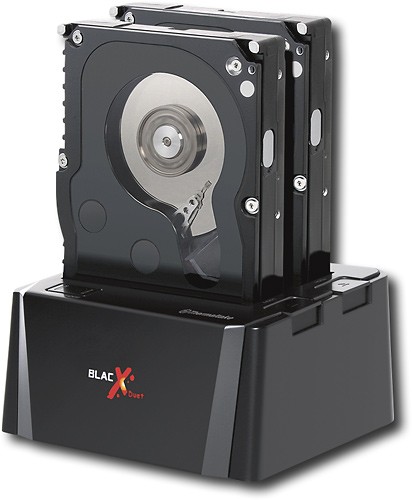
Thermaltake - Dual Bay Docking Station for Most Internal SATA Hard Drives
This item is no longer available in new condition.
See similar items below.
Description
Features
Compatible with most 2.5" and 3.5" internal SATA hard drives
Up to 2TB capacity for expansive storage space.
USB and eSATA connections
Let you connect an internal-type SATA hard drive to your computer externally. Up to 3 Gbps data transfer rates via eSATA.
Hot-swap capability
For quick and easy connection without the need to turn off your PC.
8r over docking station design
Maximizes heat dissipation and exhaust.
RoHS compliant with SSG technology
For ensured compatibility.
What's Included
Thermaltake Dual Bay Docking Station for Most Internal SATA Hard Drives
Power adapter
Owner's manual
Other
- Hot SwappableYes
- CompatibilityMost 2.5" and 3.5" internal SATA hard drives up to 2TB capacity
- Internal or ExternalExternal
- UPC841163035368
Customer reviews
Rating 4.6 out of 5 stars with 259 reviews
(259 customer reviews)Rating by feature
- Ease of Use4.6
Rating 4.6 out of 5 stars
Customers are saying
Customers are pleased with the data recovery capabilities, ease of use, and compatibility of the product. They appreciate that it can recover data from multiple hard drives and that it is simple to operate. Additionally, customers find it convenient for accessing hard drives without an enclosure. While some customers would prefer a USB 3.0 connection, the overall sentiment is positive.
This summary was generated by AI based on customer reviews.
Rated 5 out of 5 stars
Great product
||Posted .This reviewer received promo considerations or sweepstakes entry for writing a review.Great product when it comes to cloning hard drives, is very reliable and fast transferring.
I would recommend this to a friend- Pros mentioned:Data transfer, Hard drive
Rated 5 out of 5 stars
Awesome device
Posted .This reviewer received promo considerations or sweepstakes entry for writing a review.I bought this and 2 x 1.5TB HDs just to do all my backups of my different computers. I have also used this to clone HDs while doing upgrades to my older systems. I have also used this to help my friends recover data from computers that had failures other than HDs bringing back valuable files. This is a must have for any casual computer nerd!
I would recommend this to a friend - Pros mentioned:Ease of use, Usb
Rated 5 out of 5 stars
Greatdivice for Cloning drives or transferring to
||Posted .This reviewer received promo considerations or sweepstakes entry for writing a review.seems quicker that using two separate devices on two different usb ports, great for going from a note book drive to a full size drive or vice versa, i use it to clone drive images saves me a lot of time
I would recommend this to a friend - Pros mentioned:Ease of use
Rated 5 out of 5 stars
A must have
||Posted .This reviewer received promo considerations or sweepstakes entry for writing a review.This is one of the best duplicators I have ever used that wasn't commercial. This is a must for anybody wanting to upgrade their hard drive or just want to make an exactly copy of there hard drive on another drive. Very easy to use. My nieces laptops hard drive was failing and would only boot one out of twenty times. I took her hard drive and made an exact clone in about an hour, installed new clone hard drive in her laptop and puff. Good as new.
I would recommend this to a friend - Pros mentioned:Compatibility, Usb
Rated 5 out of 5 stars
Great way to move, copy, load and check drives.
||Posted .This reviewer received promo considerations or sweepstakes entry for writing a review.This Dual USB Docking Station is a great way to move, copy, load and check drives. The docking station always works and continues to work even if a failed drive has been inserted while many of the other USB Docking Stations out there will get locked up and even fail to work on that computer again.
I would recommend this to a friend - Pros mentioned:Ease of use
Rated 5 out of 5 stars
Excellent Product
||Posted .This reviewer received promo considerations or sweepstakes entry for writing a review.I bought this product after I had had several friends and family members reaching out to me with hard drive issues on their computers (I have an IT degree). I had no desktop PC at the time, so diagnosing some of the more serious problems was difficult for me. I purchased this as a way to plug 3.5" and 2.5" hard drives in to my laptop like an external drive. It has worked great for me for the last 2 years, and along with some software I have, its made diagnosing hard drive failures and other issues incredibly easy! It works well if you need to add storage to a computer that has no room inside, or need to get files from an old hard drive. This is a great product!
I would recommend this to a friend Rated 5 out of 5 stars
does what it's made for! fast and easy!
||Posted .This reviewer received promo considerations or sweepstakes entry for writing a review.awesome and fast little plastic box. nice and sturdy build and great speeds at an affordible price. i would highly recomend unless you need to handle 8 drives at the same time but i think 2 drives should be enough! :)
I would recommend this to a friend- Pros mentioned:Usb
Rated 5 out of 5 stars
Exactly what I wanted ...
||Posted .This reviewer received promo considerations or sweepstakes entry for writing a review.I had some old SATA drives in a box and had no idea what was on them. I really didn't want to go through the trouble of opening up my comp and installing them one at a time to see what was there. So I started out looking for an external usb enclosure ... then I saw this item. It is exactly what I didn't know I needed. No setup, no drivers, no installation. I opened the box, plugged it in and dropped in the first drive. It popped up in windows explorer ready to go! With this model you can hot swap up to 2 SATA drives, 2.5" or 3.5", including SSD! Works flawlessly with my desktop and my laptops! I couldn't be happier with this purchase!
I would recommend this to a friend
Q: QuestionWill this work for older desktop drives AND newer laptop drives?I have an old Gateway desktop that the power unit went out on. I also have an HP desktop and Compaq laptop. I want to make sure this product will work with the desktop drive and two laptop drives (obviously, not at the same time). Thanks!
Asked by Wes.
- A:Answer Thai device will work for any drive with a SATA connector, some older computers used IDE however most desktops and laptops manufactured in the past 5 years use SATA drives.
Answered by LesReview
Q: QuestionStorage capacity says 2tbis that 2 tb per drive or total, just installed a msata ssd and sata III ssd would like to use this for old hdd's of 1tb + 2tb = 3tb total
Asked by pirateG.
- A:Answer That is 2TB per drive. I put 2 2TB drives in the enclosure and it worked fine.
Answered by Wylm
Q: QuestionCan i use this to clone HDD or SSD?
Asked by Peter.
- A:Answer You can, but you'll need a software to clone. Look for a different product. This one doesn't last long.
Answered by popshadow
Q: QuestionDoes this offer any RAID capabilities?
Asked by JerseyShore.
- A:Answer No.
Answered by HolidayPurchase
Q: Questiondoes it come with everything you need to connect to a dell inspirion?
Asked by Anonymous.
- A:Answer Yes. It comes with the dock, the USB 3 cable, and the power cable. You need to have a USB 3 port on your system. All you have to do is plug it in to the USB 3, plug it into a power outlet and then plug in your hard drives.
Answered by amuddyjeep
Q: Questionthermaltake need this, because in mexico d. f. what would be the final pricethermaltake need this, because in mexico d. f. what would be the final price SKU: 9419596
Asked by IPROJECT.
- A:Answer Too much
Answered by BooJsmes
Q: QuestionCan't get my old ATA desktop drive to connectHello! I have an old Maxtor DiamondMax Plus 9 160GB ATA/133 HDD drive. I've tried putting it into this device, but I don't believe it's compatible, as it doesn't seem to fit. Any tips?
Asked by Wes.
- A:Answer ATA drives use parallel processing, while SATA drives use serial processing -- completely different approaches to handling data. ATA drives are also known as IDE. What you want is a device like this one but designed for connecting IDE drives.
Answered by FernCreek
Q: QuestionIs this really USB 3.0?Many of the recent reviews complain that it is only USB 2.0. Also, since both drives share the USB interface, using two drives at the same time will reduce the throughput. Does it cut in it half?
Asked by veehb.
- A:Answer I haven't seen a single performance issue and I run dual drives all the time. One of which is my music and video drive (it gets a lot of use). Make sure you plug it into a USB 3 port on your system. My system: Intel Core i5 3570k 3.4Ghz, ASUS Sabertooth Z77 mobo, 16Gb Ram, Sandisk 500Gb SSD, Windows 10 Pro 64bit.
Answered by amuddyjeep
Most viewed
- $999.99Your price for this item is $999.99
- $499.99Your price for this item is $499.99
- $249.99Your price for this item is $249.99
- $899.00Your price for this item is $899.00$999.00The comparable value for this item is $999.00
- $529.99Your price for this item is $529.99$629.99The comparable value for this item is $629.99
- $239.99Your price for this item is $239.99$499.99The comparable value for this item is $499.99
- $579.99Your price for this item is $579.99$869.99The comparable value for this item is $869.99
- $299.00Your price for this item is $299.00$349.00The comparable value for this item is $349.00
- $279.99Your price for this item is $279.99$379.99The comparable value for this item is $379.99
- $69.99Your price for this item is $69.99
- $1,249.99Your price for this item is $1,249.99
- $499.99Your price for this item is $499.99
- $779.99Your price for this item is $779.99
- $169.00Your price for this item is $169.00$399.00The comparable value for this item is $399.00
- $115.99Your price for this item is $115.99$139.99The comparable value for this item is $139.99
- $499.00Your price for this item is $499.00$599.00The comparable value for this item is $599.00
- $1,567.89Your price for this item is $1,567.89
- $649.99Your price for this item is $649.99
- $299.99Your price for this item is $299.99$499.99The comparable value for this item is $499.99
- $79.99Your price for this item is $79.99$499.99The comparable value for this item is $499.99