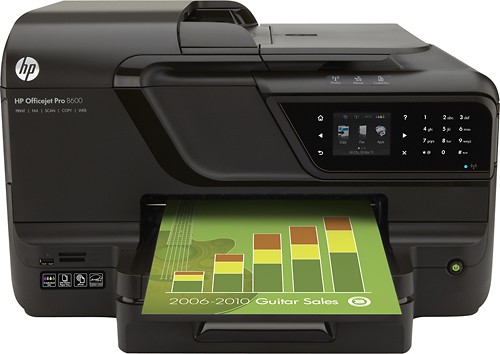
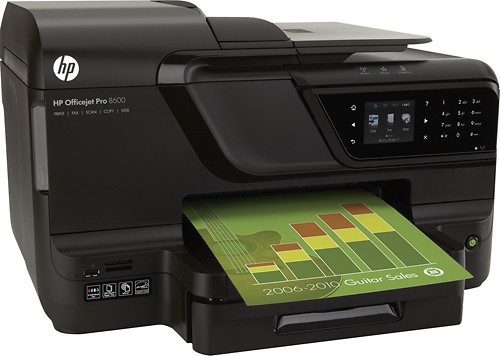
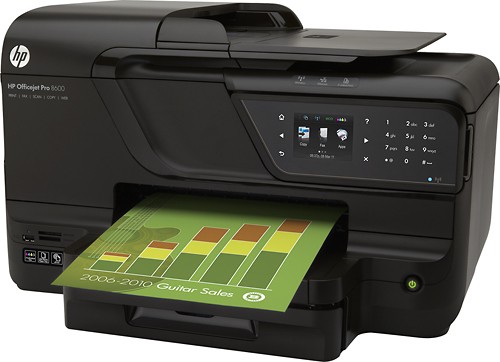
HP - Officejet Pro 8600 Multifunction Printer - Black
This item is no longer available in new condition.
See similar items below.
Description
Features
Fast print speeds up to 18 ISO ppm* in black, up to 13 ISO ppm* in color
To generate documents quickly.
4-in-1 functionality
Prints, copies, scans and faxes to meet your home or office needs.
Network-ready with 802.11b/g/n wireless LAN
For wireless printing from any computer on your network.
ePrint enabled
Print documents on your HP printer with ePrint by e-mailing them from your mobile device or an Internet-connected computer.
Color resolution up to 4800 x 1200 dpi optimized (up to 1200 x 600 dpi in black)
To produce clear, vibrant images.
Memory card slots
Extend your ability to save documents and images (card not included).
Copy resolution up to 1200 x 600 dpi in color or black
For clear, clean copies.
Copier settings
Include poster, clone, mirror copy and auto enlarge. Up to 99 copies maximum.
ID copy function
Allows you to copy both sides of an ID card onto a single page.
Flat-bed scanner with 24-bit color and 8.5" x 11.7" scan area
Plus a scan resolution up to 4800 dpi to reproduce exact colors and large documents. Scan speed up to 5.6 ppm* in black and in color. 4" x 6" photo scanning in less than 10 seconds*.
Fax resolution up to 203 x 98 dpi black and up to 200 x 200 dpi color
To meet your office needs. Up to 100 pages fax memory.
2.7" color touch-screen display
For easy operation.
USB 2.0 connectivity
For a simple connection to your computer.
*Print speeds vary with use. See manufacturer for info on print speeds.
What's Included
Officejet Pro 8600 N911A Multifunction Printer
1 x Black Ink Cartridge
1 x Cyan Ink Cartridge
1 x Magenta Ink Cartridge
1 x Yellow Ink Cartridge
Automatic Two-Sided Printing Accessory
Power Cord
Phone Cord
Setup Poster
Getting Started Guide
Software, Drivers and User Guide CD
Other
- Assembly RequiredNo
- Energy Star CompatibleYes
- <a href="javascript:winopengld('1087340571468','pcmcat38200050027','cat12080')">Print Speed (B&W)</a>Up to 18 ppm (Print speeds vary with use. See manufacturer for info on print speeds.)
- <a href="javascript:winopengld('1087340571541','pcmcat38200050027','cat12080')">Print Speed (Color)</a>up to 13 ppm (Print speeds vary with use. See manufacturer for info on print speeds.)
- <a href="javascript:winopengld('1087340571577','pcmcat38200050027','cat12080')">Black Printer Resolution</a>Up to 4800 x 1200 dpi
- <a href="javascript:winopengld('1087340571611','pcmcat38200050027','cat12080')">Color Printer Resolution</a>Up to 4800 x 1200 dpi optimized
- <a href="javascript:winopengld('1087340571658','pcmcat38200050027','cat12080')">Media Types</a>Card Stock, Envelope, Photo Paper, Plain Paper, pack
- <a href="javascript:winopengld('1087340571708','pcmcat38200050027','cat12080')">Media Sizes</a>Letter, legal, statement, executive, 3" x 5", 4" x 6", 5" x 8", 4" x 10", 4" x 11", 4" x 12", 8" x 10", envelopes (#10, monarch, DL)
- <a href="javascript:winopengld('1087340571743','pcmcat38200050027','cat12080')">Input Paper Capacity</a>Up to 250 sheets
- <a href="javascript:winopengld('1087340571783','pcmcat38200050027','cat12080')">Output Paper Capacity</a>Up to 150 sheets letter/legal, up to 60 cards, up to 25 envelopes, up to 60 sheets label
- <a href="javascript:winopengld('1087340571817','pcmcat38200050027','cat12080')">Memory</a>128MB
- <a href="javascript:winopengld('1087340571851','pcmcat38200050027','cat12080')">Type of Interface</a>Yes,
- <a href="javascript:winopengld('1087340572115','pcmcat38200050027','cat12080')">Total Ink Tanks/Cartridge</a>1 black, 1 cyan, 1 magenta, 1 yellow (included)
- <a href="javascript:winopengld('1087340572271','pcmcat38200050027','cat12080')">Print Quality</a>For documents
- PC-Free PrintingYes
- Two-Sided PrinterYes
- <a href="javascript:winopengld('1087340809469','pcmcat38200050027','cat12080')">Duty Cycle</a>Up to 25,000 pages/mo.
- <a href="javascript:winopengld('1087340809515','pcmcat38200050027','cat12080')">Networking Capabilities</a>Yes
- <a href="javascript:winopengld('1087340809619','pcmcat38200050027','cat12080')">Scanner Resolution (dpi)</a>4800 dpi
- <a href="javascript:winopengld('1087340809653','pcmcat38200050027','cat12080')">Bit Depth</a>24
- Scanner TypeFlatbed
- <a href="javascript:winopengld('1087340809696','pcmcat38200050027','cat12080')">Scan Method</a>Flatbed
- <a href="javascript:winopengld('1087340809730','pcmcat38200050027','cat12080')">Copier Resolution (dpi)</a>Up to 1200 x 600 dpi black; up to 1200 x 600 dpi color
- <a href="javascript:winopengld('1087340809851','pcmcat38200050027','cat12080')">Multiple Copies</a>Up to 9,999
- <a href="javascript:winopengld('1087340809999','pcmcat38200050027','cat12080')">Automatic Document Feeder</a>Yes
- <a href="javascript:winopengld('1087340810077','pcmcat38200050027','cat12080')">Fax Transmission Speed</a>Approx. 4 sec./page
- <a href="javascript:winopengld('1087340810112','pcmcat38200050027','cat12080')">Fax Memory</a>Up to 100 pages
- Fax TypeBlack-and-white and color (when sending to or receiving from other color fax machines)
- Automatic RedialYes
- Minimum System RequirementsPC: Intel® Pentium® II, Celeron® or compatible processor; Windows XP (SP3), Vista or 7; 2GB hard drive space; Mac: PowerPC G4 or Intel® Core™ processor; OS X 10.5 or 10.6; 500MB hard drive space; CD- or DVD-ROM drive; USB Port
- Wireless NetworkingWi-Fi,
- <a href="javascript:winopengld('1218870374819','pcmcat38200050027','cat12080')">ENERGY STAR Certified</a>Yes
- UPC886111607112
Customer reviews
Rating 4.5 out of 5 stars with 1544 reviews
(1,544 customer reviews)to a friend
Customers are saying
Customers praise the product's excellent print quality and ease of use, frequently citing its wireless functionality as a key advantage. Positive feedback also highlights the scanning capabilities and the generally good value for the price. However, some users expressed concerns about the paper tray's sturdiness and the responsiveness of the touchscreen.
This summary was generated by AI based on customer reviews.
- Pros mentioned:Ease of use, Print quality, Wireless
Rated 5 out of 5 stars
Excellent Product
||Posted .This reviewer received promo considerations or sweepstakes entry for writing a review.Wanted a reasonably priced wireless all-in-one printer to work with all our mobile devices and our new laptops. I have an old all-in-one printer wired to an old desktop computer and was looking for the ability to retire the desktop computer. The only reason we turned it on was to print something. It became too much of a hassle to find updated drivers for our old printer to put on our laptops and figure out how to connect it to our network. Decided it was a good time to replace our printer. This printer was very affordable, easy to set up and connect with our home network. Works great with our laptops and my iPad. Good quality printing and copies. The scan feature does a nice job with documents and photos and easy to use. I haven't printed any photos yet but expect it will do a nice job. I have an older model of the same printer at work which produces nice printed photos. It was also easy to set up ePrint. I do not use the fax feature so I can't review that part I have the printer set up in our living room where we use our laptops rather than chase down our printed material in the den on the other end of the house. The printer fits well on a small tv stand in the corner and doesn't look at all out of place. It is convenient and nice to have it in the room where we are using our computers. It is quiet as well.
I would recommend this to a friend - Pros mentioned:Ease of use, Print quality, Scanning
Rated 5 out of 5 stars
Wasn't looking to buy an HP, but glad I did.
||Posted .This reviewer received promo considerations or sweepstakes entry for writing a review.I was not a fan of HP printers, but after talking with an HP rep at Best Buy, I realized even though the ink is more expensive initially, the amount of pages you get per cartridge makes the ink cheaper in the long run. Based on the price and options, wanted to give this printer a try. It is bigger than some people may want their printer to be, but it doesn't bother me at all and it is the only negative I can think of after having it for several weeks. I wanted a printer that had an e-mail address to send print jobs too and wanted one that would allow printing from a smart phone and this printer does that and much more. The set-up was simple. The ability to send e-mails to the printer is from a smart phone is awesome. Scanning is pretty awesome as well. You scan documents by using the touch panel and you no longer need to have the computer directly connected to the printer via USB to receive the scan like with some other printers. You scan the document and it asks where you want to send it and lists the computers available on your network. It also has the ability to send the scans to smart phones on the same wireless network. The printer prints very quickly and the front panel is extremely easy to use. I went in with options in mind and again was steering clear of HP, but am so glad I chose this printer. I was looking at the price of the ink cartridge and not the amount of pages the ink cartridge would do and I'm glad the HP rep helped me understand the difference. I researched other printers (of all models) in regards to the amount of pages per cartridge based on the price and this is the most cost effective printer in regards to price per page printed that I could find. When you take that and add the amazing features, ease of use, and ease of set-up/installation...I think it is the best printer to buy hands down. Wish I would have bought it a long time ago and I'm glad my Canon printer broke forcing me to purchase a new printer.
I would recommend this to a friend - Pros mentioned:Print quality, Scanning
Rated 5 out of 5 stars
An ultimate all-in-one inkjet
||Posted .This reviewer received promo considerations or sweepstakes entry for writing a review.Set up was easy on our Mac with help from the HP web page where you define and store parameters. It connected to our home network with no problem using an ethernet connection. (We never tried to connect it wirelessly.) We've connected from PC-based laptops. Says it can be accessed by mobile devices, but we haven't tried that. The touch screen is clear and responsive with a friendly interface. Printing is quick; should be fast enough for home use (which is how we use it). Prints are good with the caveat that we haven't used it for printing photos yet. Scanning to a computer is easy. You can scan to an email address, but the emails have to be in an address book you build with HP. Duplex printing works fine, as does the automatic document feeder that can also handle two-sided documents. There are two paper trays, though we've only used one. Can handle legal-sized documents. It's about the same size as other printers that do duplex printing and document feeding, but that's still pretty large. Make sure you have the space for it, and don't forget about overhead clearance to open the lid for copies and scanning. It's not cheap, but we bought it on sale and consider it a good value for the money. We haven't had it enough to comment on the life of the print cartridges, but what we read suggests the per page costs are among the lowest among all-in-ones.
I would recommend this to a friend - Pros mentioned:Ease of use, Price, Print quality
Rated 4 out of 5 stars
Reliable Printing
||Posted .This reviewer received promo considerations or sweepstakes entry for writing a review.I bought this printer on sale for a fantastic price. It was a replacement for a five year old printer that my 90 year old mother had been using to primarily print posters and greeting cards for people in the independent living center where she resides. HP printers are very reliable and the functions were just what my mother needed. It is a fast printer for an inkjet and does two sided printing. It was easy to set up and install and basically works well with clear function buttons. My 90 year old mother operates it without any difficulty.
I would recommend this to a friend - Pros mentioned:Scanning, Wireless
Rated 4 out of 5 stars
Does what I need
||Posted .This reviewer received promo considerations or sweepstakes entry for writing a review.This is first wi-fi network printer we have had. Due to sudden loss of existing canon all-in-one, we did some quick research and opted for the HP 8600. It was easier to set up than I expected. I really like being able to print from any computer in the house and from my iPhone. The e-print feature proved surprisingly useful. Instead of brining a document home from the office for my wife to review, I was able to print it at home, and she just pulled it off the printer. We have not used the scanning much yet, but that will be an important feature. For some reason one computer (an HP Pavilion) loses its connection to the printer periodically, and I have not found an easy fix. That's frustrating.
I would recommend this to a friend - Pros mentioned:Ease of use, Print quality, Wireless
Rated 5 out of 5 stars
Great printer easy to use
||Posted .This reviewer received promo considerations or sweepstakes entry for writing a review.Great printer, its easy to use and understand the screen features. I love the wireless capability, it was easy to set up, unlike my last printer (I won't mention the brand but it was NOT a hp) I was never able to figure out how to set the wireless connection up, regardless how many times I uninstalled it and started over. This has great print quality, I mainly use it for documents and faxing, but I have printed pictures from it too that I was satisfied with. Overall, its a great printer!
I would recommend this to a friend - Pros mentioned:Ease of use, Print quality, Wireless
Rated 4 out of 5 stars
This is a good product
||Posted .This reviewer received promo considerations or sweepstakes entry for writing a review.This is a good product. Wireless communication woks real well. The print quality is very good. It is very simple to setup the printer . It is easy to use. I would definitely recommend this product.
I would recommend this to a friend - Pros mentioned:Ease of use, Print quality, Wireless
Rated 5 out of 5 stars
Great HP Printer
||Posted .This reviewer received promo considerations or sweepstakes entry for writing a review.I was not sure about getting another HP printer due to all the other choices on the market. After reviewing other printers I decided on the 8600. It was a very easy set up and I was able to connect my devices fast. The print quality and the apps that are included are great. This is my first printer in 7 years. I had another HP but did not realize how much better the products are now. I had to use a print server to connect wireless with my old HP. That was a pain. I am very satisfied with this new printer.
I would recommend this to a friend
Q: QuestionCan you print from an ipad
Asked by Anonymous.
- A:Answer The model is equipped with HP AirPrint, which will allow you to print wirelessly from your iPad.
Answered by HP Team

Q: QuestionIs there a document feeder on this printer?
Asked by Anonymous.
- A:Answer Yes, this printer features a 35-sheet automatic document feeder.
Answered by HP Team
Q: Questioncan I use 5 by 7 photo paper or 4 by 6 photo paper on this printer
Asked by Anonymous.
- A:Answer Yes, this printer will accept 4" x 6" and 5" x 7" photo paper.
Answered by HP Team
Q: QuestionWhen scanning multiple documents at once, does this machine save the documents individually?
Asked by Anonymous.
- A:Answer When scanning multiple document through the automatic document feeder, you can choose to save the files together or individually.
Answered by HP Team
Q: Questionwhat is the cost per page to print
Asked by Anonymous.
- A:Answer This printer has an average cost per page of 2.7 cents. This is tested on 8.5" x 11" paper with 5% page coverage.
Answered by HP Team
Q: QuestionReduce/enlarge from the printerCan you reduce or enlarge a document from the printer (with a button or icon) or do you have to go onto your computer and into the software?
Asked by KC.
- A:Answer For copying, the printer is able to reduce and enlarge directly from the printer control panel. For printing, any enlargement/reduction will need to be done through the software on the PC.
Answered by HP Team
Q: QuestionHow do you activate airprint?Help- want to print from Ipad and I phone.
Asked by Michael.
- A:Answer Michael.... you will need to download the HP eprint application from the ITunes store, it is free. Once you have downloaded it to your apple product it will guide you through the set up process.
Answered by Riggatoni
Q: QuestionCan I plug my flash dirve storage, directly into the printer?Can I take my usb storage flash drive and plug it into the Printer and print documents stored on that flash drive?
Asked by DENDEN.
- A:Answer No, this printer is not able to print document from a USB flash drive plugged directly into the printer.
Answered by HP Team
Most viewed
- $299.00Your price for this item is $299.00$349.00The comparable value for this item is $349.00
- Year End Deal$799.00Your price for this item is $799.00
- $399.99Your price for this item is $399.99$499.99The comparable value for this item is $499.99
- $99.99Your price for this item is $99.99$129.99The comparable value for this item is $129.99
- $160.99Your price for this item is $160.99
- $499.99Your price for this item is $499.99
- $929.99Your price for this item is $929.99$1,099.99The comparable value for this item is $1,099.99
- $599.99Your price for this item is $599.99
- $249.00Your price for this item is $249.00$299.00The comparable value for this item is $299.00
- $799.00Your price for this item is $799.00
- Year End Deal$249.99Your price for this item is $249.99
- Year End Deal$199.99Your price for this item is $199.99
- Year End Deal$549.99Your price for this item is $549.99
- Year End Deal$15.99Your price for this item is $15.99
- $199.99Your price for this item is $199.99
- $679.99Your price for this item is $679.99$979.99The comparable value for this item is $979.99
- $579.99Your price for this item is $579.99$849.99The comparable value for this item is $849.99
- $599.99Your price for this item is $599.99$899.99The comparable value for this item is $899.99
- $649.99Your price for this item is $649.99$1,049.99The comparable value for this item is $1,049.99



















