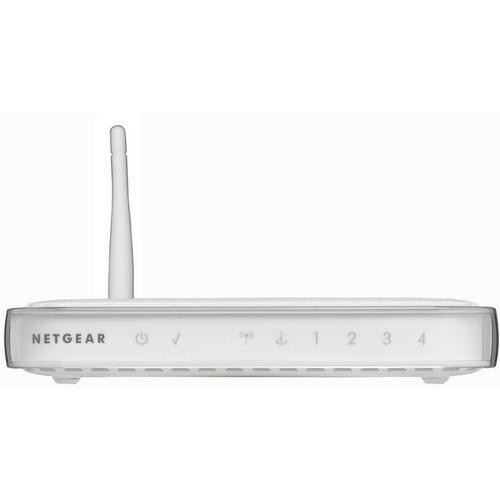
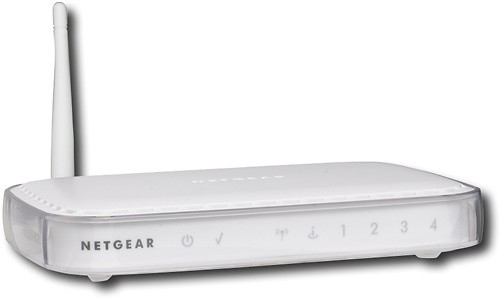
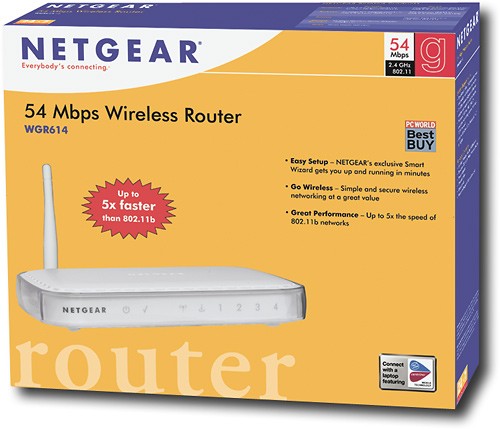
NETGEAR - Wireless-G Router with 4-Port Ethernet Switch
This item is no longer available in new condition.
See similar items below.
Description
Features
From our expanded online assortment; not available in all Best Buy stores
Wireless-G technology
Along with an additional internal antenna delivers enhanced range. Backward compatible with 802.11b networks, so you can upgrade easily.
Up to 54 Mbps data transfer rates
Offer fast, efficient operation.
Allows you to share your wireless high-speed Internet connection
For surfing the Internet, access to e-mail and online chatting. Configurable for private networks and public hotspots.
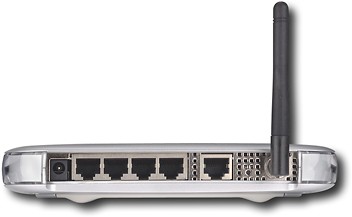
Built-in 4-port 10/100 Mbps Ethernet switch
Provides wired connection of up to 4 computers.
Auto sensing
Automatically adjusts to the speed of your network to simplify setup of devices.
SPI and DoS firewall protection
Along with 40- and 128-bit and WEP encryption and WPA-PSK and WPA2-PSK security helps keep your data safe.
Smart Wizard setup
Offers easy installation.
What's Included
NETGEAR Wireless-G Router with 4-Port Ethernet Switch
Setup CD
Ethernet cable, power adapter, vertical stand
Owner's manual
Other
- Energy Star CompatibleNo
- <a href="javascript:winopengld('1087340810700','pcmcat38200050027','cat12080')">Speed</a>Up to 54 Mbps
- <a href="javascript:winopengld('1087340810442','pcmcat38200050027','cat12080')">Interface Slot Type</a>Does not apply
- <a href="javascript:winopengld('1087340810374','pcmcat38200050027','cat12080')">Auto Detecting</a>Yes
- <a href="javascript:winopengld('1087340810408','pcmcat38200050027','cat12080')">Auto Sensing</a>Yes
- <a href="javascript:winopengld('1087340810565','pcmcat38200050027','cat12080')">Number of LAN Ports</a>4
- System RequirementsWindows NT, Me, 98, 2000, XP or Vista; Internet Explorer 5.0 or Netscape 7.0 or higher; Broadband (cable, DSL) Internet service; modem with Internet connection; 2.4GHz wireless adapter or Ethernet adapter and cable for each computer
- <a href="javascript:winopengld('1087340810477','pcmcat38200050027','cat12080')">LAN Connection</a>RJ-45 Ethernet
- Wireless StandardWireless G
- <a href="javascript:winopengld('1218870374819','pcmcat38200050027','cat12080')">ENERGY STAR Certified</a>No
- UPC606449027600
Customer reviews
Rating 4 out of 5 stars with 442 reviews
(442 customer reviews)Rating by feature
- Ease of Use4.1
Rating 4.1 out of 5 stars
Customers are saying
Customers commend the router's ease of use, strong signal, and wide range. Positive feedback also highlights its quick setup, reliable performance, and competitive price. However, some users experienced issues with inconsistent wireless connectivity and occasional compatibility problems. A few customers reported connection drops requiring router resets.
This summary was generated by AI based on customer reviews.
- Pros mentioned:Ease of use
Rated 5 out of 5 stars
Reliable Router on a Budget
Posted .This reviewer received promo considerations or sweepstakes entry for writing a review.This is my first router and I have been very happy with it. The setup is very simple and takes less than 10 minutes, although you do need to follow the instructions since there is a specific order in which you are supposed to do things. Within minutes I had my WPA key encrypted--WEP and WPA2 are also offered--and was online with both my PC and PS3. Being somewhat of a power-user, when I started getting into some of the more advanced features I was pleased to find them logically organized in the router config with helpful explanations of each setting along the side of the screen; a very pain free experience... if you know what it is that you're trying to do. The transfer speeds are quite acceptable. When transferring files between my PC and PS3, for example 700MB at a 75% connection, it only takes 2-3 minutes to get the job done. And as far as gaming, Web browsing, or downloading is concerned I have experienced little to no lag. Over several months of use I have had very few dropped connections (not counting someone firing up the microwave), and really no large issues of any kind. The only bug that has crept up is the router somehow not recognizing my WPA key. This has happened twice so far, and only required my returning to the router configuration screen to re-enter the password; however it is very odd that I have not once, but twice had this occur. Other than that one issue, I am very pleased and give this product my full recommendation.
I would recommend this to a friend Rated 5 out of 5 stars
Great wireless router
||Posted .This reviewer received promo considerations or sweepstakes entry for writing a review.Purchased this wireless router to use at my Aunts house down in Florida since she did not have one and I needed to take my MacBook Pro and work wireless for some clients while I was at her house. This wireless router is a basic one that will only connect a limited amount of wireless devices. If you are going to connect NAS, multiple wireless devices and IP camera's, I would advise not to purchase this wireless router and spend the $150 for a bigger capacity one.
I would recommend this to a friend- Pros mentioned:Ease of use, Range
Rated 5 out of 5 stars
For a Simple Cheap Router at BB, this is it.
Posted .This reviewer received promo considerations or sweepstakes entry for writing a review.I installed this using Windows 7 before it is officially released and caused me problems getting it installed from the CD. I had search for compatible installation drivers which led me to http://kbserver.netgear.com/kb_web_files/n101649_all.asp and I installed it and it worked fine. But this is an affordable, fast, and very easy to install(I'm a network expert) router unlike what others are saying. I tested it for distance and it worked just as fast ~ 20-25 feet away(I live in an apartment). The 192.168.1.1/ had a simple GUI interface with some normal features like WPA + WPA2 but had a few cool features like Port Forwarding/Triggering for game connections(AOE and quake) and simple firmware upgrading. This is definitely a router for simple use, but don't buy this if your expecting to use next generation N+ support and 108MBPS but that won't be too popular for another few years.
I would recommend this to a friend - Pros mentioned:Ease of use, Range
Rated 5 out of 5 stars
Great Home Router
Posted .This reviewer received promo considerations or sweepstakes entry for writing a review.At first I was extremely concerned when making my first router purchase mainly because I use the internet a lot for downloads, uploads, movie/tv watching and I did not want my internet connection becoming so slow it became obsolete. Well I just went for this router, mainly because of it's design-which is super beautiful and minimal-and price. Well worth it! We have our whole townhome covered, the router in the living room, and it reaches every crevice from our home. The only negative would be that when I had installed this on my mac and then found out that for some reason the netgear router, wifi or something was not being read on the other windows laptop. THIS IS NOT A NETGEAR ISSUE, rather it is an issue with drivers on some windows computers and if you too have this issue and think it's because of the router, it isn't. Google the solution, I had called HP and they rudely did not want to give me an answer because I was not in warranty, they were going to charge me 15 dollars to even tell me. I spent more time fighting HP than I did googling the issue, finding the missing drive and installing it. Great home router, very simple to install and manage.
I would recommend this to a friend - Pros mentioned:Ease of use, Performance, Setup
Rated 5 out of 5 stars
So easy a 6-year-old could install it...
Posted .This reviewer received promo considerations or sweepstakes entry for writing a review....and he did! I was worried I couldn't hook it up so my two sons (6 and 8) took the initiative. I'm not kidding. The instructions are illustrated, so even a chimpanzee with good fine motor skills could get this working. My younger son was eager to pop in the CD that comes with the device, but my desktop is so old, it couldn't support the version of Windows required to run it. So, we skipped the CD, as one other reviewer suggested. And now my kids are able to hook up their video games and I can run my laptop and iPad off the router. Now if I could only get these two geniuses to help me secure the network... Bottom line: Great product for the money. Great performance. Easy to install. As my 6-year-old would say: How cool is that?
I would recommend this to a friend - Pros mentioned:Ease of use, Range
Rated 5 out of 5 stars
Simple Setup, Solid Performance
Posted .This reviewer received promo considerations or sweepstakes entry for writing a review.I discontinued my dependence on the cable company for my Internet and went with a local provider. We have two desktops, two laptops, a netbook, an iPad, and a Blackberry that all use WiFi access to the Internet. I installed the WGR614 Netgear 802.11g Wireless Router in my utility closet (where my Internet enters the house) and I've got solid signal upstairs and down. My entire network is totally wireless. It was a piece of cake to configure, including security. One of my desktop computers and a printer are connected to a WGPS606 Netgear Wireless Print Server, which receive their network connectivity through the Wireless Router. We've been using this setup round-the-clock for about two months now and haven't had any problems at all. I deliberately selected the less exensive "slower" model because the 54Mbps network speed is higher than my 10Mbps Internet source speed. We don't do a lot of network communications between devices and so we didn't feel the higher speed router was necessary. Someday, when we move into a bigger house and do more file sharing between machines, I will probably upgrade to a faster Netgear router. But for right now, this serves our needs at a very reasonable price.
I would recommend this to a friend - Pros mentioned:SetupCons mentioned:Compatibility
Rated 4 out of 5 stars
Great Wireless Router!!
Posted .This reviewer received promo considerations or sweepstakes entry for writing a review.This is my first wireless router, and it's nothing short of awesome! Before the Netgear wireless router, i had a wired Linksys router. and was obviously limited to cables and wires. but with this wireless router, you can enjoy the FREEDOM of wireless networking! It's small, it's apealing to the eyes, it's easy to set up. the only complaint is that the installation cd that came with the router was NOT compatible with windows 7. the router is compatible with windows 7, but the cd does not recognize the O.S., and will not install the proper drivers for you. so i had to call the NetGear customer service...and they were able to hook me up through their website with no problem. within 15 mintues i had my desktop, laptop, and netbook all connected to the internet. overall, it's great! not the BEST, but certainly not the worst! excellent product
I would recommend this to a friend - Pros mentioned:SetupCons mentioned:Connection
Rated 4 out of 5 stars
Decent router
Posted .This reviewer received promo considerations or sweepstakes entry for writing a review.Firstly installation was very simple. Pop the disc in and follow the instructions(apparently some of the people who were complaining about installation can't follow directions) all together it took 5-8 mins tops. Don't see why people are having a hard time installing a simple router that comes with a instruction manual, that or people bought bum routers. Overall this is a very good router. For me i need a cheap router even though my modem goes at 101 Mbps, this router gives you around 52 Mbps, but it is still decently fast. The only problem is that once in a while it will drop the connection, but all you have to do is plug it out then back in,thats all. If you want decent a router a a decent price then i suggest you buy this
I would recommend this to a friend
Q: QuestionWhat is the operating distance for this wireless router?What is the operating distance for this wireless router?
Asked by Anonymous.
- A:Answer I've used it outside and an additional 100 feet away from the house. I've heard the range is good to 400 feet, but I can't verify that.
Answered by NedTeach
Q: Questiondo it work on psp or ipod touch
Asked by Anonymous.
- A:Answer Yes it should. I have an Apple iPhone so your iPod Touch should work just fine. The PSP should as well as long as it has connectivity with wireless B/G networks which it should. The wireless speed should be enough to play games with others on the PSP. It's excellent on the iOS devices as the speed works great with Safari, Apps, and Mail.
Answered by just84wvu
Q: Questionwill this router connect with kindle
Asked by Anonymous.
- A:Answer Yes, it will work with your Kindle just fine. Just enter your username and pass as normal for it, if you have that set up.
Answered by RedWyv3
Q: QuestionIs this router compatible with Comcast Xfinity?can I use it for that?
Asked by Cereal_killer.
- A:Answer Yes it is. We are using it right now with Comcast.
Answered by just84wvu
Q: Questionhow far i can go away from homei have a labtop and i want to be able to carry my computer with me,but when i go away from home i'm no longer connected. what can i do?
Asked by Anonymous.
- A:Answer only go 100 feet
Answered by Anonymous
Q: Questioncould i hook my xbox live, laptop, and ipod touch up to this
Asked by Anonymous.
- A:Answer Yes you can. I have all of those plus some hooked up to mine and it works like a dream.
Answered by CJSibley
Q: QuestionWhat else do I need?I'm moving to a new apartment, and I want to have wireless internet. I will get the internet through the cable company, but I don't want to rent their modem. What are all of the components that I need to buy to make this happen?
Asked by Lisa.
- A:Answer You'll definitely need a modem whether it's from a store or renting from the company. I would recommend getting one that has both wired and wireless built right in. If you rent then I recommend the Netgear Wireless G router because it's reliable, that's all you'll need. Also check out if you have Clear service available around your area. It offers MUCH more freedom. Good Luck. www.clear.com
I would recommend:
Answered by Nomee

Most viewed
- $999.99Your price for this item is $999.99
- $499.99Your price for this item is $499.99
- $249.99Your price for this item is $249.99
- $499.99Your price for this item is $499.99$629.99The comparable value for this item is $629.99
- $899.00Your price for this item is $899.00$999.00The comparable value for this item is $999.00
- $239.99Your price for this item is $239.99$499.99The comparable value for this item is $499.99
- $579.99Your price for this item is $579.99$869.99The comparable value for this item is $869.99
- $279.99Your price for this item is $279.99$379.99The comparable value for this item is $379.99
- $299.00Your price for this item is $299.00$349.00The comparable value for this item is $349.00
- $69.99Your price for this item is $69.99
- $499.99Your price for this item is $499.99
- $99.99Your price for this item is $99.99$139.99The comparable value for this item is $139.99
- $779.99Your price for this item is $779.99
- $169.00Your price for this item is $169.00$399.00The comparable value for this item is $399.00
- $499.00Your price for this item is $499.00$599.00The comparable value for this item is $599.00
- $1,804.95Your price for this item is $1,804.95
- $649.99Your price for this item is $649.99
- $299.99Your price for this item is $299.99$499.99The comparable value for this item is $499.99
- $749.99Your price for this item is $749.99
- $194.99Your price for this item is $194.99$299.99The comparable value for this item is $299.99