Best Buy  ›  Computers & Tablets  ›  Networking & Wireless  ›  PC USB Wireless Adapters  ›  Product Info

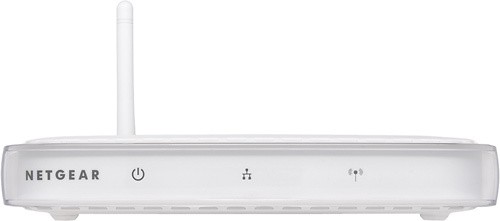
NETGEAR - IEEE 802.11b/g 54 Mbps Wireless Access Point

Model: WG602

SKU: 5521107
4.0 of 5 4.0 of 5 (9 reviews)

Shipping: Usually leaves our warehouse in 1 business day

Estimate Arrival Time

Store Pickup:

Check Stores

Our Price:
$74.99
×

Buying Options

All new, refurbished and used buying options are shown on this tab, including any options available from Best Buy.

Share This Product

Delivers up to 54 Mbps wireless speed. Ensures security with MAC Address authentication and up to 128-bit WEP. Business-class security with WPA2 PSK encryption. Supports client mode with MAC based cloning. Smart Wizard for easy installation. WiFi certified to work with laptops with built-in adapters. Supports bridging and repeater modes to extend your wireless network. Detachable antenna can be replaced with accessory high-gain antennas. Backward compatible with 802.11b

What's Included

  • WG602 Wireless Access Point
  • Vertical stand
  • Power adapter
  • Ethernet cable
  • Resource CD
  • User's guide
  • Warranty card
  • Support information card

Product Features

  • Wi-Fi Standard: IEEE 802.11b/g
  • ISM Band: Yes
  • ISM Minimum Frequency: 2.41 GHz
  • ISM Maximum Frequency: 2.46 GHz
  • Antenna Gain: 2 dBi
  • Wireless Transmission Speed: 54 Mbps
  • Fast Ethernet Port: Yes
  • Number of Network (RJ-45) Ports: 2
  • Form Factor: Desktop
  • Height: 1.1"
  • Depth: 4.7"
  • Weight (Approximate): 11.20 oz
  • Limited Warranty: 3 Year
Product images, including color, may differ from actual product appearance.
  • Warranty Terms - Parts
    3Year
  • Product Height
    1.1"
  • Product Width
    6.9"
  • Product Weight
    11.20oz
  • Product Depth
    4.7"
  • Assembly Required
    No
  • Up to 54 Mbps
  • System Requirements
    Intel® Pentium® processor; Windows 98 SE, 2000, ME, XP or Vista
  • Wireless
  • Wireless Standard
    Wireless G
  • Yes
  • Product Depth
    4.7"
  • UPC
    606449011272

Customer Reviews

NETGEAR - IEEE 802.11b/g 54 Mbps Wireless Access Point (7 out of 9)
Great wifi
5
Posted by: from on 03/18/2013Hard to hook up at first, but all has been amazing since!

0 out of 0 found this review helpful.

Was this review helpful?

Great Range
5
Posted by: from Thumb, MI on 05/31/2012I am well versed in this so maybe that why it was simple to setup. But It was easy and I love it and it works great.

1 out of 1 found this review helpful.

Was this review helpful?

Good performance. Average setup time
4
Posted by: from MD on 08/24/2011Although set-up instructions good be clearer, it did not take too long to set this up. The performance is very good. We have 5 wireless devices connected to this with no problems.

0 out of 0 found this review helpful.

Was this review helpful?

Could not access the setup page
1
Posted by: from Texas on 08/03/2011Everything installed and powered up fine, but I could not access the HTML setup pages on the product. Returned to store.

0 out of 4 found this review helpful.

Was this review helpful?

Great product!
5
Posted by: from Gainesville, Ga on 01/17/2011Took it out of the box, plugged it in and that's all there was too it. Works great.

2 out of 2 found this review helpful.

Was this review helpful?

Good for home
3
Posted by: from California on 08/06/2010I think this would fit most home users, but I tried to use this in a office environment with filters, open ports, and it just does not have the horse power to do it... The router seems to slow down, sometimes looking up. I upgraded to the latest code, but really didn't help much. So I took it out and put it at a freinds home and it works like a charm.

0 out of 0 found this review helpful.

Was this review helpful?

Perfect if you already have a router
5
Posted by: from Silicon Valley, CA on 02/11/2010What do you do if you already have a router and all you want to do is add a wireless access point or upgrade an existing one? I've tried twice now trying to get a combination router+wireless access point to work just as wireless access point. No go. This is addressed exactly what I needed. Plus, it does not force you to use an installation wizard. It has clear written instruction for setting it up. What's helpful is that it has the MAC address on the outside cover so you can spot it on the network where it is assigned a dynamic IP address. This is helpful for logging into it to change settings: just bring up the IP address in a web browser. In poking around in the instructions, it looks like you can also use it as part of wireless relay solution to extend the range of your wireless network. Good to know. My only quibble is that it costs more than the combination router/wireless access points. It's kind of the opposite of what you'd expect: less functionality, but costing more. BTW, the picture as I write this is of an older model. I bought the V4, which is white.

3 out of 4 found this review helpful.

Was this review helpful?

Works great for me
5
Posted by: from Down by the River on 01/05/2010This unit is plugged directly into my Cable Modem and used as a Wireless AP and as router. At another location plugged it directly into an Actiontec DSL Modem and up and running in under 10 minutes. I was traveling this summer and took it along and just plugged it into an available port on Relative's/Friend's Routers. Never a problem accessing this Wireless AP this way. Just made sure that their Router's default IP address was different than its. Currently there are 1 W9x, 2 XP's connecting, 1 Linux and 1 Windows 7. Just had to configure the software on the respective machines Wireless Hardware/software for the correct level of Security and the correct Passphrase.

0 out of 0 found this review helpful.

Was this review helpful?

Does not work with Vista machines
3
Posted by: from Willoughby on 12/30/2008Easy to set up, good range (not outstanding but, for example, covered my whole basement). But be aware that it won't work with Vista. My fault as I bought it few months ago (and worked perfectly with my Vaio XP laptop) and then when I purchased two weeks ago an HP Pavilion with Vista, then it did not connect. After checking with Microsoft and Netgear realized that is not compatible with this OS. Hope this helps. I would not recommend it to someone with Vista-enabled machines. As of the end of 2008, Netgear has not released upgraded drivers/firmware for the device.

3 out of 8 found this review helpful.

Was this review helpful?

Tech Support

1 year of Tech Support $99.99 with qualifying purchase.
Learn more ›