It looks like you're using an older version of Internet Explorer.
To best view our site — and for a better experience overall on the Web — please update your browser using the links below. It's free and it takes just a minute. Download the latest version of Chrome, FireFox or Internet Explorer.
Best Buy is dedicated to always offering the best value to our customers. We will match the price, at the time of purchase, on a Low Price Guarantee product if you find the same item at a lower price at a Designated Major Online Retailer or at a local retail competitor's store.
Here's how:
If you find a qualifying lower price online, call 1-888-BEST BUY and direct a customer service agent to the web site with the lower price, or when visiting a Best Buy store, one of our employees will assist you.
On qualifying products, Best Buy will then verify the current price to complete the price match.
Some exclusions apply. See the list of Designated Major Online Retailers and full details.
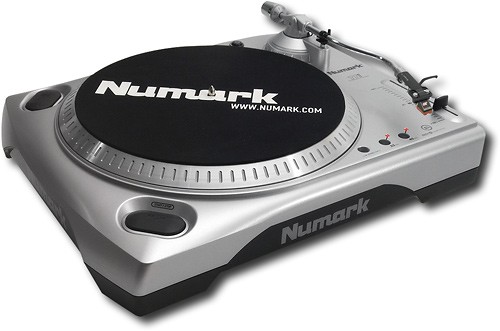
The TTX stands alone among professional turntables because it was exclusively designed for the modern DJ, with a silicon rubber base that absorbs vibration and dampens low end feedback, and an interchangeable tone arm system that adapts to any DJ style. The TTX also delivers versatility and control thanks to an illuminated output bay, a built-in BPM counter, and interchangeable S-shaped or straight tonearms. Additional features include digital outputs for direct sampling, Key Lock and ?50% pitch control for unprecedented mixing options.
Product Features
Torque: 4.1 lbf?in
Tone Arm: - Adjustable
Speed: 33.33rpm, 45rpm, 78rpm
Pitch Adjustment: ?8% to ?50%
Braking System: Electronic Brake
Ports: S/PDIF
Status Indicators: Removable aluminum target light and strobe with super-bright white LED
Posted by: rockergirl1 from santamonica, CA on 05/03/2013Fun piece of stereo equipment to play records and bring you back to a fun time. Easy to use, comes with a "45 record" adaptor
1 out of 1 found this review helpful.
Was this review helpful?
piece of junk
1
Posted by: esscurv from michigan on 03/19/2013set up on two different systems. it does not work on the left channel. waste of money. I havn't even tried recording from the usb since it won't play thru the stereo.
3 out of 3 found this review helpful.
Was this review helpful?
good but not great
3
Posted by: jcsp from redwood city on 12/30/2012my did not come with the black pad to cover the wheel ,IM very desappointed
1 out of 5 found this review helpful.
Was this review helpful?
great product for burning records to cds
5
Posted by: bonebombermom from texarkana, texas on 11/02/2012We purchased this product for the sole purpose of taking old records and burning them to cds. It worked like a charm and now we have a collection of some oldies but goodies in cd form.
4 out of 4 found this review helpful.
Was this review helpful?
Not best method for converting vinyl to digital
2
Posted by: 12stringer from Missouri on 05/09/2012I purchased one of these under the Ion brand [Ion is basically the consumer electronics division of Alesis, which is owned by Numark]. While it is convenient to use [just plug into computer's USB port, plug it into a power source, install the software and go], it is lacking in many ways.
First, the turntable lacks a cueing lever, Since these have been standard features on every quality turntable made since the mid 1970s, it is difficult to determine what Ion/Numark designers were thinking when they omitted this feature.
The second problem is the A/D conversion bit rate and format. And since this is a software issue, this is the problem with the included EZ converter software. The A/D conversion rate/format is 160 kbps/.mp3. It's the lowest recommended resolution for recording music into a digital format--this is the digital equivalent of recording an AM radio signal onto a cheap cassette. As an audio engineer who works in archiving vinyl to digital, the minimum resolution should be at least 320kbps if one is archiving to .mp3 format. The optimal [best] resolution would be 1411kbps as either a .wav or .da format.
My recommendation, for the best audio results is a turntable patched into a dedicated CD recorder, which will record into a .da format. More expensive? Yes. But the results, especially if you are seeking archival quality, is light years better.
23 out of 28 found this review helpful.
Was this review helpful?
Simple, gets the job done, great value
5
Posted by: nosoup4you from Ballwin, MO on 04/01/2012Just finished burning a couple albums using my new Numark TTUSB and am loving it. I searched reviews of turntables for a while specifically for the purpose of converting my vinyl and decided on this one. I wanted something that is simple, good quality, but not overboard with features since I don't really need them for this purpose.
Two parts to the equation - the turntable and the software. My TTUSB came with EZ Vinyl Converter software. I read several other reviews that talked about Audacity software and can’t comment on that since apparently now the turntable comes with the EZ Vinyl. You can always decide to download different software, but the EZ Vinyl is simple and good enough for me. Just start the turntable, begin recording, and let software do the rest. The software will assign tracks based on "gaps" in the music which isn't always accurate but can be fixed later if not. Only recorded a few albums but still trying to master the “flip” to the other album side during recording. After you are done recording, you enter the song name, artist, and album then it moves the track to iTunes. You can then get the album art from iTunes if available.
The turntable is simple to set up but recommend the other review referencing the videos on You Tube to assist with setting the tone arm weight and anti-skate #if needed#. Some reviews stated the drive belt was missing; it is already wrapped around the bottom of the platter so make sure to check there. The shell of the turntable is plastic but everything seems durable and solid. I was concerned about not having a "cueing lever"; you have to manually lift and place the tone arm but turned out to not be a big deal to me since you don't have to record each track on the album individually. Works for 33 and 45 RPM and comes with the 45 RPM adapter so has everything I needed to do the job. On top of everything else, I think it looks cool!
If you aren't a professional DJ or and audiophile and just want a table to convert your albums, you can't go wrong with this one for the price. I actually think the tracks on iTunes that I converted sound as good and "richer" than those that I downloaded directly.
7 out of 7 found this review helpful.
Was this review helpful?
Adequate for converting vinyl to electronic music
4
Posted by: kdblue from Dallas, Texas on 03/09/2012This is a good value for the price and gets the job done easily. Converting vinyl to electronic recordings is a time-consuming venture. I wish there was a way to pause during the recording. On live albums, the track break may not work and will have to be done manually and there is a feature for this. Sound quality is not great on some of the very old albums, but that is probably due to the age and technology used at that time. I wish there was more instructions such as what replacement needle to purchase.
6 out of 7 found this review helpful.
Was this review helpful?
Sounds and looks great but wish it had dust shield
5
Posted by: KTPett from Vancouver, WA on 01/09/2012I bought this for my son to help him experience music outside of the modern digitial formats. It has opened up a new world for him (and for me.) I pulled old vinyl out of storage and have been to a handful of record stores we used to just walk by. We may upgrade to something nicer in the future, but for now...this gift was a home run!
6 out of 9 found this review helpful.
Was this review helpful?
does what it says
4
Posted by: sideshowsids3 from south padre island on 01/20/2011were mainly using to preserve our record collection...
set up was not that hard...but set up is needed
soft ware is hands on and data entry is needed...song titles and such
works great and does what it says
15 out of 18 found this review helpful.
Was this review helpful?
Set the Weight and Anti-Skate before Bashing
4
Posted by: rjsoderlund from Duluth, MN on 11/27/2010I see many negative reviews, and was close to leaving one myself about this player. Until I went on YouTube and learned more about it. I am a first time turntable owner.
Things to know, this turntable is completely manual, it does NOT stop itself or start itself, it DOES not have any motorized mechanism on the tone arm.
When setting this turntable up for the first time, watch these youtube videos first, or you will be disappointed and possibly return the product for no good reason.
Anti-Skate Calibrating
http://www.youtube.com/watch?v=eIBtZR941Yw&feature=related
Tone Arm Weight
http://www.youtube.com/watch?v=ynIDWgo2lpo
Follow the instructions and you will be amazed at how well your records sound from this turntable.
50 out of 55 found this review helpful.
Was this review helpful?
Product images, including color, may differ from actual product appearance.