Self-Service Kiosk for iPad (USB-C)
About This Item
- Key Specs
- Subscription/Contract Required: No long term contracts
- Payment Types Supported: Magnetic stripe cards, NFC (Tap) cards, Chip cards
- General
- Brand: Square
- Model Number: A-SKU-0844
- Product Name: Self-Service Kiosk for iPad (USB-C)
- Color: Black
- Dimensions
- Product Height: 12.6 inches (The out of box height of the item. Height is measured as the vertical distance from the bottom of the item to the top as it would be primarily used or placed.)
- Product Depth: 0.87 inches (The out of box depth of the item. Depth is measured as the distance from the front of the item to the back as it would be primarily used or placed.)
- Product Width: 7.75 inches (The out of box width of the item. Width is measured as the horizontal distance from one side of the item to the other as it would be primarily used or placed.)
- Product Weight: 26 pounds (The out of box weight of the item.)
- Compatibility
- Subscription/Contract Required: No long term contracts
- Features
- Product Type: Self-service kiosk
- Payment Types Supported: Magnetic stripe cards, NFC (Tap) cards, Chip cards
- Power
- Power Source: Battery-powered
- Rechargeable Battery: true
- Charging Interface(s): USB-C (The connection for transmitting power to charge the device.)
- Warranty
- Warranty - Parts: 1 year
- Warranty - Labor: 1 year
- Other
- UPC: 817044023359
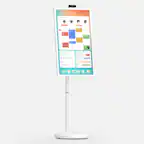
Easily turn an iPad into a versatile kiosk device with built-in contactless and chip payments, a slim profile, and multiple mounting options. Get started in minutes with a device that’s as easy to set up as it is to use — no costly service visits or configuration fees required. With a range of mounting options, Square Kiosk adapts to what your space needs. No hidden fees or long-term contracts required. Download and subscribe to the Square Kiosk app to start running a total self-serve ordering solution that reduces wait times, frees up staff, and simplifies the dining experience. Accept all major credit and debit cards and pay one simple rate with no hidden fees and no long-term contracts required. To use this device as a slim, space-saving POS, simply find the Square software that’s tailored to your business type. iPad not included. Compatible with: iPad (10th generation), iPad Air (4th, 5th generation), iPad Pro 11-inch (1st, 2nd, 3rd, 4th generation), iPad Air 11-inch (M2).
- Versatile iPad-based kiosk device: Turn your iPad into a complete kiosk solution with payments built right in — just download and subscribe to the Square Kiosk app to offer your diners fast and easy self-service ordering and payments.
- Flexible to fit where you need it: With multiple configurations, you can put an affordable, self-serve kiosk exactly where it makes sense for your unique business. Affix to a wall, countertop, or any 100x100mm VESA-compatible mount. All mounting hardware for installation is included in the box.
- Fast checkouts, shorter lines: Built-in payments and guiding LED lights make checkout fast with no second-guessing. And with a subscription to the Square Kiosk app, guests can quickly customize orders without any back and forth with staff.
- Affordable, easy setup: Get your kiosk up and running quickly with no costly installation or service visits. Just add an iPad and follow the included step-by-step instructions to set Square Kiosk up entirely on your own.
- Payments made easy: Pay one simple transaction rate for every tap, dip, or swipe (with an additional Square Reader for magstripe) with no hidden fees or long-term contracts.
- Stay powered even without power: if you need to unplug or if you lose power, Square Kiosk can run off a full iPad battery. iPad-powered mode only on USB-C compatible version.
- Compatible with select iPads: iPad (10th generation), iPad Air (4th, 5th generation), iPad Pro 11-inch (1st, 2nd, 3rd, 4th generation) and iPad Air 11-inch (M2)
- Versatile iPad-based kiosk device: Turn your iPad into a complete kiosk solution with payments built right in — just download and subscribe to the Square Kiosk app to offer your diners fast and easy self-service ordering and payments.
- Flexible to fit where you need it: With multiple configurations, you can put an affordable, self-serve kiosk exactly where it makes sense for your unique business. Affix to a wall, countertop, or any 100x100mm VESA-compatible mount. All mounting hardware for installation is included in the box.
- Fast checkouts, shorter lines: Built-in payments and guiding LED lights make checkout fast with no second-guessing. And with a subscription to the Square Kiosk app, guests can quickly customize orders without any back and forth with staff.
- Affordable, easy setup: Get your kiosk up and running quickly with no costly installation or service visits. Just add an iPad and follow the included step-by-step instructions to set Square Kiosk up entirely on your own.
- Payments made easy: Pay one simple transaction rate for every tap, dip, or swipe (with an additional Square Reader for magstripe) with no hidden fees or long-term contracts.
- Stay powered even without power: if you need to unplug or if you lose power, Square Kiosk can run off a full iPad battery. iPad-powered mode only on USB-C compatible version.
- Compatible with select iPads: iPad (10th generation), iPad Air (4th, 5th generation), iPad Pro 11-inch (1st, 2nd, 3rd, 4th generation) and iPad Air 11-inch (M2)
Whats Included
- Square Kiosk device
- Hub
- Power adapter
- Power adapter cable
- Mounting kit
- Getting Started Guide
- Square Stand and Square Kiosk Adapter for iPad Air and iPad Pro
- Square Kiosk device
- Hub
- Power adapter
- Power adapter cable
- Mounting kit
- Getting Started Guide
- Square Stand and Square Kiosk Adapter for iPad Air and iPad Pro
Q: What payment methods does the Square Kiosk accept?
A: The Square Kiosk accepts all major credit card types and payment types, including Apple Pay, Google Pay, and Samsung Pay.
Q: Does the Square Kiosk require any additional fees or contracts?
A: No, there are no hidden fees or long-term contracts required to use the Square Kiosk.
Q: How is the Square Kiosk powered?
A: The Square Kiosk can be powered through an outlet or a fully charged, compatible iPad.
Q: Which iPad models are compatible with the Square Kiosk?
A: The Square Kiosk is compatible with iPad (10th generation), iPad Air (4th, 5th generation), iPad Pro 11-inch (1st, 2nd, 3rd, 4th generation), and iPad Air 11-inch (M2).
Q: How does the Square Kiosk help with customer checkout?
A: The Square Kiosk has a buyer-facing checkout screen that guides customers through order confirmation, tipping, and payment.
A: The Square Kiosk isn't compatible with iPad Mini models at this time. View all compatible models here: https://squ.re/47dMi3D.
A: undefined
A: The Square Kiosk comes with the hardware needed to mount the device to a wall, on a countertop, or on a stand - however the stand itself will need to be purchased separately.
Reviews
Customers are saying
Customers are satisfied with the ease of use and the straightforward setup process, thanks to the included accessories. The USB-C feature is also well-received, allowing users to easily slide in their USB-C iPads. However, some customers have expressed concerns regarding card insertion for payments.
Customer Images
The vast majority of our reviews come from verified purchases. Reviews from customers may include My Best Buy members, employees, and Tech Insider Network members (as tagged). Select reviewers may receive discounted products, promotional considerations or entries into drawings for honest, helpful reviews.
Compare similar products

Easily turn an iPad into a versatile kiosk device with built-in contactless and chip payments, a slim profile, and multiple mounting options. Get started in minutes with a device that’s as easy to set up as it is to use — no costly service visits or configuration fees required. With a range of mounting options, Square Kiosk adapts to what your space needs. No hidden fees or long-term contracts required. Download and subscribe to the Square Kiosk app to start running a total self-serve ordering solution that reduces wait times, frees up staff, and simplifies the dining experience. Accept all major credit and debit cards and pay one simple rate with no hidden fees and no long-term contracts required. To use this device as a slim, space-saving POS, simply find the Square software that’s tailored to your business type. iPad not included. Compatible with: iPad (10th generation), iPad Air (4th, 5th generation), iPad Pro 11-inch (1st, 2nd, 3rd, 4th generation), iPad Air 11-inch (M2).
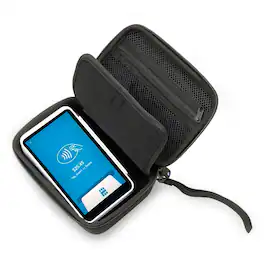
Protect your Square Terminal POS reader with this compact CASEMATIX travel case, featuring a durable EVA hard shell, soft non-scratch interior, and a gel-padded divider that keeps the device secure in the 6.5" x 4.25" compartment. Measuring just 7" x 5" x 3", it’s easy to carry using the built-in handle or included wrist strap, while the heavy-duty zipper ensures quick access. Fits the card reader only—does not accommodate paper or large accessories. Case only.

In just a few minutes, turn an iPad into an easy-to-use, professional point of sale with built-in payments and none of the clutter of extra cables and card readers. Manage your entire business from one place — no manuals, service visits, or training required. Then, keep your lines moving with an intuitive checkout that guides your customers through order confirmation and payment. Accept all major credit and debit cards and pay one simple rate with no hidden fees and no long-term contracts required. iPad sold separately.
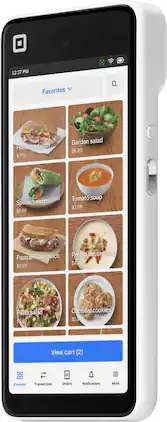
Square Handheld is a powerful, portable POS that lets you take payments quickly, wherever your customers are. Security is built in with 24/7 fraud prevention. Scan barcodes or take tableside orders with a pocketable, durable design and a battery that powers through. Accept all major cards at one simple rate and get funds in your bank account as fast as the next business day. There are no long-term contracts required or hidden fees — ever. Square Point of Sale has tailored solutions for your industry with unique tools to streamline everything you do.
| Pros for Self-Service Kiosk for iPad (USB-C) | |||
|---|---|---|---|
| Ease of use, USB-C | There were no pros for this product— | Build Quality | Ease of Use, Overall Performance |
| Cons for Self-Service Kiosk for iPad (USB-C) | |||
| Card Insertion | There were no cons for this product— | Connectivity | There were no cons for this product— |