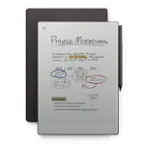
Amazon - Kindle Scribe (16GB) - 2024 - Tungsten
Total Storage Capacity
16GB- Amazon - Kindle Scribe (32GB) - 2024 - Tungsten$419.99
Related Item

Specifications
- Screen Size10.2 inchesScreen Resolution300 pixels per inchTotal Storage Capacity16 gigabytesBattery ChemistryLithium-ion
- Key Specs
- Screen Size: 10.2 inches (Size of the screen, measured diagonally from corner to corner.)
- Screen Resolution: 300 pixels per inch
- Total Storage Capacity: 16 gigabytes
- Battery Chemistry: Lithium-ion
- General
- Brand: Amazon
- Model Number: B0CZ9VFQ2P
- Product Name: Kindle Scribe (16GB)
- Color: Tungsten
- Year of Release: 2024
- Display
- Screen Type: E Ink
- Screen Size: 10.2 inches (Size of the screen, measured diagonally from corner to corner.)
- Screen Resolution: 300 pixels per inch
- Screen Display: Black and white
- Storage
- Total Storage Capacity: 16 gigabytes
- Power
- Charging Interface(s): USB-C (The connection for transmitting power to charge the device.)
- Battery Chemistry: Lithium-ion
- Dimensions
- Product Height: 0.23 inches (The out of box height of the item. Height is measured as the vertical distance from the bottom of the item to the top as it would be primarily used or placed.)
- Product Width: 7.72 inches (The out of box width of the item. Width is measured as the horizontal distance from one side of the item to the other as it would be primarily used or placed.)
- Product Depth: 9.06 inches (The out of box depth of the item. Depth is measured as the distance from the front of the item to the back as it would be primarily used or placed.)
- Product Weight: 0.95 ounces (The out of box weight of the item.)
- Warranty
- Warranty - Parts: 1 year limited
- Warranty - Labor: Not applicable
- Other
- UPC: 840414615816
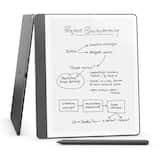
Kindle Scribe - A Kindle and a notebook, all in one. Redesigned flush-front display with uniform white borders and upgraded Premium Pen, feels like writing on paper.
- Write in books as inspiration strikes: Start writing directly on the page and Active Canvas will create space for your notes.
- Built-in notebook: Create meeting notes and to-do lists, or journal all in one place. Convert handwritten notes to text and email them to yourself or your contacts.
- Notebook summaries: Easily summarize and refine your notes with new built-in AI notebook tools.
- Read and write in any light: The 10.2" glare-free, 300 ppi front-lit display is designed for reading and writing anytime, indoors and out.
- No distractions: Focus on your thoughts with a device purpose-built for reading, writing, and marking up documents. No notifications or social media.
- Premium Pen included: No need to set up or charge, just start writing. Upgraded design, shortcut button, and soft eraser provide a perfect writing companion.
Whats Included
- Kindle Scribe (16GB) - Now write directly on books and documents. Built-in notebook summarization. Includes Premium Pen
Q: Can you use the Kindle Scribe to read regular books?
A: The Kindle Scribe is a device that allows you to read books and also functions as a notebook.
Q: What is the screen resolution of the Kindle Scribe?
A: The screen resolution of the Kindle Scribe is 300 pixels per inch.
Q: What is the warranty period for the Kindle Scribe?
A: The Kindle Scribe comes with a 1-year limited warranty on parts.
Q: How do you covert writing to txt
A: Hi there! You can use the AI tools to convert your hand written notes to typed text by tapping on the diamond shaped icon next to the notebook settings icon, and selecting 'Refine Writing'. From there, you can choose to refine just the page you are on, or the entire notebook. This feature is great for quickly collecting your notes in one place, and makes it easy to export them using the 'Share Current Page' feature. I hope that helps, have a great rest of your day!
A: Hello Chad! Thank you for your questions. The Kindle Scribe lets you export your handwritten notes as PDFs, though it cannot directly upload notes to OneNote - you'll need to send your notes via email first and then add them to OneNote from there. Yes, you can definitely upload and read PDFs on your Kindle Scribe by sending them through your Amazon account or transferring them via USB cable, and you can write directly on these PDFs too. However, the Kindle Scribe is not designed to read emails, as it's primarily focused on reading, writing, and note-taking features rather than email functionality. I hope that helps and have a great day!
Q: Is this device waterproof or water resistant?
A: Hi Reader1, Unfortunately, the Kindle Scribe is not waterproof or water resistant, so it’s best to keep it away from water or moisture. Hope this helps!
Q: Can the kindle convert handwritten notes to digital text to be uploaded
A: Hi Text, thanks for reaching out regarding the Kindle Scribe. You are able to convert handwritten notes to digital text. To access the Convert to text options in the Share menu: Go to the Notebook tab. Pick a downloaded notebook and select the More menu under the notebook’s thumbnail. Select Share and choose one of these options: Convert to text and quick send [to your registered email]. Convert to text and email. A preview window opens and you can edit the text by tapping on each page. You can also access these options by tapping on the Share icon at the top of a notebook. Hope this info helps. Happy Holidays!
A: Hello Denise! A Kindle and a notebook, all in one - Read and write down thoughts in books and documents, now with Active Canvas. Take notes in the built-in notebook, now with AI notebook tools. Write in books as inspiration strikes - Start writing directly on the page and Active Canvas will create space for your notes. Create notebooks - Journal, sketch, take meeting notes, and more. Summarize and refine your notes with new built-in AI notebook tools. Import and mark up documents - Review and take notes directly on documents and PDFs. I hope this information helps, have a great day!
Compare similar products
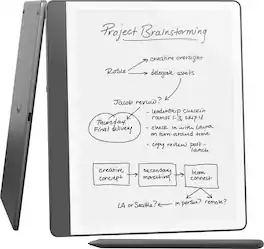
Kindle Scribe - A Kindle and a notebook, all in one. Redesigned flush-front display with uniform white borders and upgraded Premium Pen, feels like writing on paper.

Kindle Scribe - A Kindle and a notebook, all in one. Redesigned flush-front display with uniform white borders and upgraded Premium Pen, feels like writing on paper.

Kindle Scribe - A Kindle and a notebook, all in one. Redesigned flush-front display with uniform white borders and upgraded Premium Pen, feels like writing on paper.

All-new Kindle Scribe – Features an 11” glare-free display with front light, built-in notebook, AI tools, and support for popular cloud services.
| Pros for Amazon - Kindle Scribe (16GB) - 2024 - Tungsten | |||
|---|---|---|---|
| There were no pros for this product— | Overall Performance, Battery Life, Note Taking, Portability, Size | Overall Performance, Note Taking, Battery Life, Functionality, Screen Quality | There were no pros for this product— |
Specs

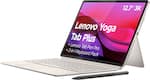
- Lenovo - Yoga Tab Plus - 12.7" 3K Tablet - 16GB RAM - 256GB UFS - with Keyboard Stand + Pen - Seashell$599.99The price was $739.99
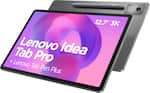
- Lenovo - Idea Tab Pro - 12.7" 3K Tablet - 8GB RAM - 256GB UFS - with Tab Pen Plus - Luna Grey$339.99The price was $399.99
Reviews
Customer Images
The vast majority of our reviews come from verified purchases. Reviews from customers may include My Best Buy members, employees, and Tech Insider Network members (as tagged). Select reviewers may receive discounted products, promotional considerations or entries into drawings for honest, helpful reviews.
- Rated 5 out of 5 stars
E reading has become my new hobby.
I love my kindle scribe.!- The only downfall is that I don’t like that I can’t just annotate and write wherever I feel like when I’m reading. I’m not fond of how a box has to be placed around every time I do my own note taking. It’s just a preference that I don’t like. I was slightly disappointed that after I bought the scribe that the color scribe was released a few days later. I do believe the prices are absurd, they cost more than a small flatscreen TV. But other than that I find it much easier for me to read than with a book sometimes, and I am very happy with my product.
Brianna Posted
- Rated 5 out of 5 stars
Love this Kindle!
Love it! And super fast shipping. Ordered on a Sunday night. Had it shipped and it said it would arrive the following Saturday. It ended up arriving two days later! I looked at the color soft option as well but found this to be more than enough for note taking, drawing, and obviously reading. The pen and screen are very responsive. I haven’t put a screen protector on mine but the screen seems durable enough I shouldn’t need one. I bought a budget case from Amazon with a kick stand, highly recommend getting a case with a kickstand! I also love the size of this one. The regular kindle felt too small for me, this one is more on par with an iPad size. Makes reading very easy! I love the feature that switches hand written notes to typeface, I prefer hand writing notes and this has been a game changer for my marketing business. I have larger hands and fingers and wear glasses so a large screen and larger device works best for me. Page turns are very responsive and the speed for downloading is great! I’ve only charged it once when I received it. I’ve had it for about 2-3 weeks now and haven’t needed to charge again. I use it for hours daily. Everyone who’s tried my Scribe loves it. I went with the Tungsten color but the jade green is also gorgeous.
This review is from Amazon - Kindle Scribe (16GB) - 2024 - Tungsten
GabrielleF Posted
- Rated 5 out of 5 stars
The device is amazing! But...
The shipping and packaging were atrocious, when I got it it was held together by massive amounts of packing tape and loose scraps of cardboard. Not to mention that they didn't even leave it at my front door they left it down the street. If I hadn't of been watching it before it arrived I would have lost my Kindle for sure. But the device itself is phenomenal and it's basically going to replace all of my notebooks and book books. If you're brand new to Kindle there is a learning curve but nothing that watching a couple videos wont solve.
Opsin18 Posted