
Amazon - Echo Show 8 (newest model), Vibrant HD 8.7" display with spatial audio, designed for Alexa+ - Graphite
Amazon - Echo Show 8 (newest model), Vibrant HD 8.7" display with spatial audio, designed for Alexa+ - Graphite
Color
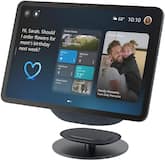
Graphite- Adjustable Stand | Designed for Amazon Echo Show 8 & 11 (2025 releases, sold separately) - Graphite$39.99
More Buying Options
Specifications
- Built-In SpeakersYesFeatured Streaming ServicesPrime VideoNumber of Microphones1
- Key Specs
- Built-In Speakers: true
- Featured Streaming Services: Prime Video (Streaming services and other programs are available on this device. Keep in mind, there may be more services supported than just those shown here.)
- Number of Microphones: 1
- General
- Brand: Amazon
- Model Number: B0DC8ZMR1P
- Product Name: Amazon Echo Show 8 (newest model), Vibrant HD 8.7" display with spatial audio, designed for Alexa+
- Color: Graphite
- Audio
- Built-In Speakers: true
- Featured Streaming Services: Prime Video (Streaming services and other programs are available on this device. Keep in mind, there may be more services supported than just those shown here.)
- Number of Speakers: 3
- Voice
- Voice Assistant Built-in: Amazon Alexa (A digital assistant built into the device that uses voice commands to answer questions and control smart devices.)
- Number of Microphones: 1
- Connectivity
- Wireless Multi-Room Audio: true (Technology that allows multiple speakers and/or soundbars to be connected wirelessly and play audio in separate rooms.)
- Connectivity Technology: Bluetooth, Wi-Fi (The manner in which a device sends data to another device over a short distance.)
- Works With: Amazon Alexa (Compatible with or able to be connected to other smart devices or applications.)
- Wireless Connectivity: Bluetooth, Wi-Fi (The manner in which a device sends data to another device over a short distance without the use of wires or cables.)
- Operating System Compatibility: Fire OS
- Features
- Wake Word: Alexa (The term or phrase used to activate a device.)
- Power
- Power Source: Plug-in
- Display
- Display Screen: true
- Screen Size: 8.68 inches (Size of the screen, measured diagonally from corner to corner.)
- Touch Screen: true (Touch-screen devices make navigating more intuitive. Using a touch-screen display, you can do things such as tap to select, hold and drag to move items, swipe to scroll, and pinch to zoom.)
- Screen Resolution: 1340 x 800 (Screens come in a range of resolutions (measured in pixels, horizontal x vertical). The higher the resolution, the greater the picture quality.)
- Dimensions
- Product Height: 5.9 inches (The out of box height of the item. Height is measured as the vertical distance from the bottom of the item to the top as it would be primarily used or placed.)
- Product Width: 8.2 inches (The out of box width of the item. Width is measured as the horizontal distance from one side of the item to the other as it would be primarily used or placed.)
- Product Depth: 5.0 inches (The out of box depth of the item. Depth is measured as the distance from the front of the item to the back as it would be primarily used or placed.)
- Product Weight: 2.31 pounds (The out of box weight of the item.)
- Warranty
- Warranty - Parts: 1 year
- Warranty - Labor: Not applicable
- Other
- UPC: 840414684003
Fresh from every angle - Completely redesigned with a thinner display, fast processing, and room-filling spatial audio.
- Powerfully smart, beautifully built: The redesigned 8.7" smart display features a vibrant HD touchscreen, built-in smart home hub, AZ3 Pro chip for powerful performance, and Omnisense technology for highly personalized experiences.
- Alexa+ is free with Prime: Echo Show 8 is designed for Alexa+. A Prime membership or a subscription to the Alexa+ Standard plan is required to use use Alexa+ on compatible devices.
- Content sounds incredible: Stream music or watch shows on Prime Video, Netflix, and more. All with room-filling spatial audio, crisper vocals, wider sound stage, and up to 2x bass versus Echo Show 8 (2023 release). With Alexa+, find the name of that song you love and discover new shows based on your preferences.
- Your everyday assistant: See recipes and calendars at a glance, easily find meal inspo and manage your shopping lists. With Alexa+, find recipes based on foods you love, make reservations, order groceries, and more.
- Simple Smart Home control: Pair and control thousands of devices that work with Alexa without needing a separate smart home hub. Easily view your camera feeds. Manage lights, thermostats, and more using the display or your voice. With Omnisense technology, you can activate routines via temperature, presence, or visual ID detection.
- Crystal-clear video calls: Video calls feel natural with a centered, auto-framing camera, 3.3x zoom, and noise reduction technology. Use live view to check in on your family, pets, and more while you're away.
- Photo memories on display: Turn your home screen into a stylish digital photo frame when not in use. With Alexa+, you can ask Alexa to find specific photos or curate a personal slideshow.
- Designed to protect your privacy: Amazon is not in the business of selling your personal information to others. Built with multiple layers of privacy controls, including a microphones & camera enable/disable button, and dedicated camera controls on device and in-app.
- Disclaimer: Alexa+ will be free with your Prime membership or available to non-Prime customers for $19.99/month. The original Alexa continues to be included with all Alexa enabled devices. Alexa+ Early Access requires a personal, US-based Amazon account with US English language set on all compatible Alexa+ devices. Access to Alexa+ when you purchase this device will be granted on the Amazon account you use to set up this device (certified refurbished or used devices excluded).
- Powerfully smart, beautifully built: The redesigned 8.7" smart display features a vibrant HD touchscreen, built-in smart home hub, AZ3 Pro chip for powerful performance, and Omnisense technology for highly personalized experiences.
- Alexa+ is free with Prime: Echo Show 8 is designed for Alexa+. A Prime membership or a subscription to the Alexa+ Standard plan is required to use use Alexa+ on compatible devices.
- Content sounds incredible: Stream music or watch shows on Prime Video, Netflix, and more. All with room-filling spatial audio, crisper vocals, wider sound stage, and up to 2x bass versus Echo Show 8 (2023 release). With Alexa+, find the name of that song you love and discover new shows based on your preferences.
- Your everyday assistant: See recipes and calendars at a glance, easily find meal inspo and manage your shopping lists. With Alexa+, find recipes based on foods you love, make reservations, order groceries, and more.
- Simple Smart Home control: Pair and control thousands of devices that work with Alexa without needing a separate smart home hub. Easily view your camera feeds. Manage lights, thermostats, and more using the display or your voice. With Omnisense technology, you can activate routines via temperature, presence, or visual ID detection.
- Crystal-clear video calls: Video calls feel natural with a centered, auto-framing camera, 3.3x zoom, and noise reduction technology. Use live view to check in on your family, pets, and more while you're away.
- Photo memories on display: Turn your home screen into a stylish digital photo frame when not in use. With Alexa+, you can ask Alexa to find specific photos or curate a personal slideshow.
- Designed to protect your privacy: Amazon is not in the business of selling your personal information to others. Built with multiple layers of privacy controls, including a microphones & camera enable/disable button, and dedicated camera controls on device and in-app.
- Disclaimer: Alexa+ will be free with your Prime membership or available to non-Prime customers for $19.99/month. The original Alexa continues to be included with all Alexa enabled devices. Alexa+ Early Access requires a personal, US-based Amazon account with US English language set on all compatible Alexa+ devices. Access to Alexa+ when you purchase this device will be granted on the Amazon account you use to set up this device (certified refurbished or used devices excluded).
Whats Included
- Echo Show 8 (2025 release)
- Power adapter (30W)
- Quick start guide.
- Echo Show 8 (2025 release)
- Power adapter (30W)
- Quick start guide.
A: Hello Michael! The Amazon Echo Show 8 (newest model) cannot directly control all your Echo devices through itself, but it works as part of your connected Alexa ecosystem. You can create Multi-Room Music groups using the Alexa app that include your Echo Show 8 and other Echo devices, which allows you to play synchronized music across multiple devices in different rooms by saying "Alexa, play music everywhere" or on a specific group name. However, there are important limitations: Multi-Room Music groups work within the same home/location on the same Amazon account, and devices at different physical locations (like a vacation home or office) cannot be included in the same Multi-Room Music group, and audio from video content doesn't play on Multi-Room Music groups. For stereo pairing, you can create a stereo pair, but this requires two identical Echo devices (e.g., two Echo Show 8s or two Echo Studios) placed in the same room to create left/right channel stereo sound, and the Echo Show 8 cannot be paired in stereo with different Echo models. The key limitations are that multi-room music and device grouping only works for devices registered to the same Amazon account and connected to the same home network location, you cannot group or control Echo devices at another physical location (like a second home) through multi-room music features, and while the Echo Show 8 (newest model) features spatial audio for enhanced sound on the device itself, this is a single-device feature, not a multi-device capability. have a great day!
Q: How do I get to join Zoom Meeting on the echo show 8?
A: Hi Diana, That is a great question! If you have a Zoom account, you should sign in to the Zoom for Home app for the best experience. In order to sign in, simply say “Alexa, open the Zoom app”. Follow the on-screen instructions to sign in using your Zoom account. In order to easily join meetings we recommend you connect your calendar in the Alexa app. This will allow you to ask Alexa to start your Zoom meetings by saying, “Alexa start my Zoom meeting.” To connect your calendar in the Alexa app, follow these steps: - Open the Alexa app. - Tap More and tap Settings. - Tap Calendar & Email. - Select your account provider, and then tap Connect Account. - Follow the on-screen instructions to link your calendar. Repeat these steps for each calendar you want to link.
Q: Does this device act as a Matter thread router?
A: Hello ScottK, The Echo Show 8 does have a built-in hub for Matter, Thread, and Zigbee devices. I hope this information helps. Have a great day!
Q: Does the Echo show 8 include the adjustable stand?
A: Hello Wonderling and thank you for your question! No, the adjustable stand for the Amazon Echo Show 8 is sold separately. Hope this helps! Have a great day!
Q: Will the echo Show 8 have home controls on it ?
A: Yes it does
Q: Can I watch netflix on this
A: Hi Jigh, Yes, you can watch Netflix on the Amazon Echo Show 8 (all generations), as it has a native Netflix app. I hope this answers your question!
Q: Do this wok with ring doorbell
A: Dear Rosco, Yes, the Echo Show 8 works great with Ring doorbells! You can: See and talk to visitors when your Ring doorbell is pressed View your Ring camera's live feed anytime by asking Alexa Get motion alerts on your Echo Show 8's display Use two-way talk through the Echo Show 8 to communicate with visitors Just make sure to enable the Ring skill in the Alexa app to connect your devices. Your Echo Show 8 will then automatically announce when someone's at the door and display the video feed. Thanks for reaching out and have a great day!
Compare similar products

Fresh from every angle - Completely redesigned with a thinner display, fast processing, and room-filling spatial audio.
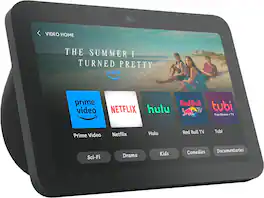
Better Inside and Out — Entertainment is more immersive with spatial audio and an 8" HD touchscreen. Video calling is crisper with high-quality sound and a 13 MP camera. And your home is more connected than ever with the built-in smart home hub.

New size, more viewing area. The 11“ smart display features a vibrant Full-HD touchscreen, built-in smart home hub, AZ3 Pro chip for powerful performance, and Omnisense technology for highly personalized experiences.

Echo Show 15 - 15.6" Full-HD (up to 1080p) smart display that's ready to show you more. Use customizable widgets to keep your day on track, watch your favorite shows with Fire TV and powerful vibrant sound, and enjoy natural video calling, with 3.3x zoom and wide field of view.
| Pros for Amazon - Echo Show 8 (newest model), Vibrant HD 8.7" display with spatial audio, designed for Alexa+ - Graphite | |||
|---|---|---|---|
| Overall Performance, Ease of Use, Screen Size, Touchscreen Responsiveness, Volume | There were no pros for this product— | Screen Size, Ease of Use, Sound Quality, Responsiveness | Overall Performance, Ease of Use, Screen Size, TV |
Specs
Reviews
Customer Images
The vast majority of our reviews come from verified purchases. Reviews from customers may include My Best Buy members, employees, and Tech Insider Network members (as tagged). Select reviewers may receive discounted products, promotional considerations or entries into drawings for honest, helpful reviews.
- Rated 5 out of 5 stars
Excellent smart display
This is a great smart display with a clear screen and smooth performance. Setup was quick and easy, and it works perfectly for video calls, watching videos, and controlling smart home devices. The sound quality is better than expected, and the touch screen is very responsive. Overall, it’s a very useful device and definitely worth the price. Highly recommended.
KhadijehB Posted
- Rated 5 out of 5 stars
My new addition
Great addition to my existing home environment. It compliments my room and I can control all of security, home task, calendar, schedules, reminders, alarms. This is like have an assistant to many of my needs. Bravo to new addition to my home.
Robin Posted
- Rated 5 out of 5 stars
Amazing
Very convenient, being able to search recipes while you watch your favorite shows.
JoseT Posted