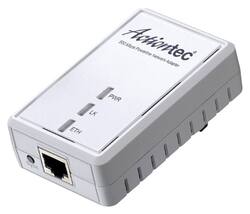
Actiontec - 500 AV Powerline Network Adapter - Gray
- Key Specs
- Adapter Type: Wired
- General
- Product Name: 500 AV Powerline Network Adapter
- Brand: Actiontec
- Model Number: PWR511WB1
- Color: Gray
- Compatibility
- System Requirements: 2 available Ethernet ports; 2 Ethernet cables (included); 2 powerline devices on the network; standard power/electrical wiring with at least 2 available power/electrical outlets (The software that a product must have for it to be able to integrate with another product.)
- Warranty
- Manufacturer's Warranty - Parts: 1 year
- Manufacturer's Warranty - Labor: 1 year
- Other
- UPC: 789286808417
Extend an Internet connection to an Ethernet-enabled device with this Actiontec 500 AV PWR511WB1 powerline network adapter that connects to set-top boxes, HDTVs, gaming consoles and more to provide fast networking speeds.
- HomePlug AV technology: Turns most power outlets on the same circuit into a high-speed network connection.
- Fast networking speeds: Up to 500 Mbps on powerline and up to 100 Mbps on Enternet for rapid high-definition video streaming and other bandwidth-intensive applications.
- Works over existing electrical wiring: For simple setup in a variety of locations.
Whats Included
- Actiontec 500 AV Powerline Network Adapter
Q: I already have Actiontec powerline and 4 port Hub.
A: Put one Actiontec in your room, the other one near your 4 port hub. Assuming you have your 4 port hub as your "router" which is then plugged into your Cable / DSL model??? Is it a 4 port like Wireless Hub? If all you have is 1 of these you can't do squat. Need 2. One has to be plugged into your router so it can route the requests from all your other "power adapters" in the building. Then you put one in each room that you want to use them. If you have 5 rooms, you need 6... 3 you need 4 and so on.
A: The simple answer is yes, but only if you have more than 1. You plug your computer into this, this into the wall. Then you go to where your router is and plug another into the wall, and then a cable from it into your router... Done
A: That is correct. You will need to make sure it comes with two. Sometimes they sell them individually. Ethernet out of your LAN port on your router, other end into the adapter, plug the adapter into an outlet. Take your second one and do the reverse. Plug into the wall in the room with the PS4, then ethernet from the adapter into your PS4. Bear in mind, these only work when you are connecting two outlets in the same breaker panel. For example, If you have a separate breaker panel/box for your first and second floor, those are two independent "circuits", so it won't work. If your whole two story home uses one breaker panel/ box, you are golden.
A: Yes, but you will need to make sure you set the router being used as an extender into an "access point only" mode. There should be instructions on how to link together two routers in your router's user manual, if it's possible.
A: Negative. .. it's only one unit. Continue looking and make sure that in description states that they are 2 units. Sometimes people get crash with shorts and incomplete descriptions. Good luck!