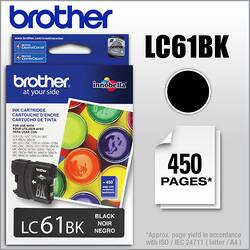
Brother - LC61BK Standard-Yield Ink Cartridge - Black
- General
- Brand: Brother
- Model Number: LC61BKS
- Product Name: LC61BK Standard-Yield Ink Cartridge
- Color: Black
- Features
- Package Type: Single
- Ink Type: Dye
- Cartridge Color(s): Black
- High Yield: false (Contains more ink or toner than a comparable standard-size unit and is capable of producing a higher page yield.)
- Photo Compatible: true
- Water Resistant: false (Resists some degree of water penetration.)
- Included
- Ink Cartridges Included: 1 x Black (The quantity and color of ink cartridges included.)
- Performance
- Approximate Page Yield (Black): 450
- Other
- UPC: 012502620938
With this black ink cartridge you can replace only the color you need and enjoy vivid printouts.
- Be sure you have the right cartridge: Enter your printer's model number into our Ink and Toner Finder to find compatible cartridges. Get started ›
- Compatible with select Brother printers and faxes: Including DCP165c, 385c, 585cw, MFC290C, MFC490CW, MFC5890CN, MFC5490c and MFC6490CW.
- Superior quality and reliable page yields: Brother Genuine black ink cartridge delivers superior inkjet print quality you can consistently rely on for up to 450 pages.(1)
- Easy-to-use, front-loading plug-ins that make replacing ink a breeze: Just pop out the empty cartridge, plug-in a replacement and get back to printing with no waiting and no mess.
- Brother offers environmentally responsible cartridge disposal: Brother offers an environmentally responsible way to dispose of Brother Genuine inkjet cartridges. Visit manufacturer’s website for more information.
Q: What other Brother printer uses LC61 ink cartridges aside from MFC-255CW printer?
A: Here is a list of printers that can use the LC61 series ink cartridge: DCP-165C, DCP-385C, DCP-395CN, DCP-585CW, DCP-J125, DCP-J140W, MFC-250C, MFC-255CW, MFC-290C, MFC-295CN, MFC-490CW, MFC-495CW, MFC-5490CN, MFC-5890CN, MFC-5895cw, MFC-6490CW, MFC-6890CDW, MFC-790CW, MFC-795CW, MFC-990CW, MFC-J220, MFC-J265w, MFC-J270w, MFC-J410w, MFC-J415w, MFC-J615W and MFC-J630W
Q: can the 450 page cartridge LC61 be used in the MFC-J220 printer
A: I use the LC61 in my own J220, no problem, only take s one minute to change cartridge.
Q: Do Best Buy repair brother printers
A: yes
Q: What Brother Printer uses LC65HY ink cartridges
A: MFC-6490CW
A: The front door panel on the right side of the machine pops open. You click out the old ink and open the package on the new ink and pop it in. This will take seconds to do. Easy breezy
Q: Can I replace the black only in my MFC - 290c
A: From the Brother support site regarding the MFC 290c, the answer is yes! "4-Cartridge Ink System. Only change the cartridge that needs to be replaced." OBTW. Their site is full of useful information. Since it's been 9 months since you asked, is your question still unanswered? Did you replace the discontinued model with a newer one? Hope you worked it out. ;-)
Q: Ca n I activate the black only , if so please explain the steps to do so . Thank you MFC-J410w
A: If you want to just print using the black cartridge, go into your word processor print menu and set the print option to black and white rather than color. If your problem is the printer won't print because of an empty color cartridge, you should replace any empty color cartridges and just use a black font for documents or print black and white photos, then you will just use the black ink, Since you asked your question 10 months ago, is it still an issue? Hope you worked it out.
Q: Will this cartridge work on brother mfcj615w printer
A: According to the Brother web site, the answer is yes, the LC61 cartridges work on the mfcj615w printer. Since your question is over a year old, is it still even relevant? Hope you worked it out.












