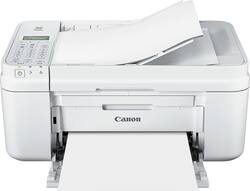
Canon - PIXMA MX492 Wireless All-In-One Printer - White
- Key Specs
- Networking: Wireless
- ENERGY STAR Certified: true (Devices carrying the ENERGY STAR service mark, such as computer products and peripherals, kitchen appliances, and other products, generally use 20% to 30% less energy than required by federal standards.)
- Printer Type: All In One
- ISO Color Print Speed: 4.4 pages per minute (The number of color pages able to be printed per minute in the device's default single-side mode, as tested by the International Standards Organization (ISO).)
- ISO Mono Print Speed: 8.8 pages per minute (The number of black ink (grayscale) pages able to be printed per minute in the device's default single-side mode, as tested by the International Standards Organization (ISO).)
- Output Tray Capacity: 50
- Touch Screen: false (Touch-screen devices make navigating more intuitive. Using a touch-screen display, you can do things such as tap to select, hold and drag to move items, swipe to scroll, and pinch to zoom.)
- General
- Product Name: PIXMA MX492 Wireless All-In-One Printer
- Brand: Canon
- Display Screen: true
- Display Screen Size: 1.1 inches
- Model Number: MX492
- Color: White
- Dimensions
- Product Height: 7.5 inches (The out of box height of the item. Height is measured as the vertical distance from the bottom of the item to the top as it would be primarily used or placed.)
- Product Width: 17.2 inches (The out of box width of the item. Width is measured as the horizontal distance from one side of the item to the other as it would be primarily used or placed.)
- Product Depth: 17.2 inches (The out of box depth of the item. Depth is measured as the distance from the front of the item to the back as it would be primarily used or placed.)
- Product Weight: 13 pounds (The out of box weight of the item.)
- Features
- Automatic Document Feeder: true
- Photo Printing: true
- Monochromatic/Color: Color
- Automatic Reduction/Enlargement: true
- Automatic Two-Sided Printing: false
- Tray Capacity: 100
- Certifications Listings & Approvals
- EPEAT Qualified: false (The Electronic Product Environmental Assessment Tool (EPEAT) was designed to provide an environmental assessment tool for purchasers. In order to qualify for EPEAT, a product must meet all 23 required criteria.)
- Scanner Info
- Scanner Type: Flatbed
- Duplex Scan Function: false
- Scanner Resolution: Up to 600 x 1200 (Refers to the number of pixels/dots, both horizontally and vertically, of the image produced by the scanner. Generally, the higher the resolution, the sharper and cleaner the produced image.)
- Fax Info
- Integrated Fax: false
- Ink
- Compatible Cartridges: PG-245 XL Black, PG-245 Black, CL-246XL Color, CL-246 Color and PG-245XL/CL-246XL combo pack
- Memory
- Memory Card Slot: false
- Paper Info
- Automatic Document Feeder Capacity: 100 sheets
- Maximum Document Length: 14 inches
- Maximum Document Width: 8.5 inches
- Supported Paper Sizes: 4" x 6", 5" x 7", 8" x 10", letter, legal and U.S. #10 envelopes
- Paper Feeder: Tray loader
- Copier Info
- Maximum Number Of Copies: 99
- Copier Resolution (Black): Up to 600 x 600 (Refers to the number of pixels/dots, both horizontally and vertically, of the image produced by the copier in black ink. Generally, the higher the resolution, the sharper and cleaner the produced image.)
- Copier Resolution (Color): Up to 4800 x 1200 (Refers to the number of pixels/dots, both horizontally and vertically, of the image produced by the copier in colored ink. Generally, the higher the resolution, the sharper and cleaner the produced image.)
- Performance
- Printer Resolution (Black): Up to 600 x 600 (Refers to the number of pixels/dots, both horizontally and vertically, of the image produced by the printer in black ink. Generally, the higher the resolution, the sharper and cleaner the produced image.)
- Printer Resolution (Color): Up to 4800 x 1200 (Refers to the number of pixels/dots, both horizontally and vertically, of the image produced by the printer in colored ink. Generally, the higher the resolution, the sharper and cleaner the produced image.)
- Connectivity
- Minimum System Requirements: PC: Windows XP (32-bit with SP3), Vista (SP1 or SP2), 7, 7 (SP1), 8, 8.1 and 8.1 Update; Mac: OS X 10.7.5 - 10.10
- Other
- UPC: 013803258622
Easily print documents from your compatible smartphone or tablet with this Canon PIXMA MX492 all-in-one printer, which features wireless networking and is compatible with AirPrint and Google Cloud Print for a simple mobile-print solution.
- Prints up to 8.8 ISO ipm* in black, up to 4.4 ISO ipm* in color: To generate documents quickly.
- Be sure you have the right cartridge: Enter your printer's model number into our Ink and Toner Finder to find compatible cartridges. Get started ›
- 4-in-1 functionality: Prints, copies, scans and faxes for convenience.
- Built-in wireless LAN (802.11b/g/n): Provides speedy data transfer over a wireless connection.
- Color resolution up to 4800 x 1200 dpi: To produce clear, vibrant images. Up to 600 x 600 dpi resolution for crisp monochromatic prints.
- Accepts a variety of paper sizes: Including 4" x 6", 5" x 7", 8" x 10", letter, legal and U.S. #10 envelopes for flexible use.
- Compatible with AirPrint and Google Cloud Print: For simple printing from your smartphone or tablet.
- Copies up to 8.8 ipm* in black, up to 3.6 ipm* in color: So you can easily perform copy jobs.
- Copy resolution up to 4800 x 1200 dpi in color, up to 600 x 600 dpi in black: For clean, crisp copies.
- Flatbed/ADF scanner with up to 600 x 1200 resolution: Accurately reproduces your documents.
- High-speed fax: With 33.6 Kbps modem to meet your office needs.
- Integrated automatic document feeder: Offers practical functionality.
- High-speed USB port: Facilitates connection to your computer.
- Prints up to 8.8 ISO ipm* in black, up to 4.4 ISO ipm* in color: To generate documents quickly.
- Be sure you have the right cartridge: Enter your printer's model number into our Ink and Toner Finder to find compatible cartridges. Get started ›
- 4-in-1 functionality: Prints, copies, scans and faxes for convenience.
- Built-in wireless LAN (802.11b/g/n): Provides speedy data transfer over a wireless connection.
- Color resolution up to 4800 x 1200 dpi: To produce clear, vibrant images. Up to 600 x 600 dpi resolution for crisp monochromatic prints.
- Accepts a variety of paper sizes: Including 4" x 6", 5" x 7", 8" x 10", letter, legal and U.S. #10 envelopes for flexible use.
- Compatible with AirPrint and Google Cloud Print: For simple printing from your smartphone or tablet.
- Copies up to 8.8 ipm* in black, up to 3.6 ipm* in color: So you can easily perform copy jobs.
- Copy resolution up to 4800 x 1200 dpi in color, up to 600 x 600 dpi in black: For clean, crisp copies.
- Flatbed/ADF scanner with up to 600 x 1200 resolution: Accurately reproduces your documents.
- High-speed fax: With 33.6 Kbps modem to meet your office needs.
- Integrated automatic document feeder: Offers practical functionality.
- High-speed USB port: Facilitates connection to your computer.
Whats Included
- PIXMA MX492 Wireless All-In-One Printer
- 2 FINE cartridges
- Power cord, phone line cable
- CD-ROM
- Owner's manual
- PIXMA MX492 Wireless All-In-One Printer
- 2 FINE cartridges
- Power cord, phone line cable
- CD-ROM
- Owner's manual
Q: Dies this come with ink cartridges or purchased separately?
A: With first cartridges.
Q: What is the difference between PIXMA MX492 vs PIXMA MX490?
A: Just so you know, I actually called Canon Customer Support today (11/27/2018) with this question because I was having the same question/concern. Canon said this - "The printers are exactly the same. We simply used the SAME printer with different numbers. If you purchase either one, they are identical. There is no difference between them whatsoever." Now...WHY Canon did this? I have no idea.
Q: Will this printer work with a windows 7?
A: Yessir!!!
Q: How many draft quality sheets from one cartridge?
A: Roughly 125 black ink sheets of school type print per cartridge
A: Do you have a wi-fi router with your system from your internet provider? If so, it should and it will automatically find what your router, and your computer. The disk that came with the MX 490 should be downloaded into your computer. That is your driver. At that point, the computer and router will recognize your Canon PIXMA MX 490. You don't even have to put the ID from your GATEWAY in the printer. It works automatically. Give it a try. You won't hurt anything, and you can still get a wired connection and hook up that way if you can't figure it out. It's a lot simpler than you think. I'm 67 and haven't had a new printer until this one, in a while. If that doesn't work, go back to the Canon site, explain to them, on their chat line, what your problem is. Once they tell you what you need, go online and do a search, either through Google or Explorer.
Q: Is it compatible with Chromebook ?
A: No, the printer is not compatible with Chromebook.
A: The ink cartridge opening is right above the print page return tray.
A: Dear Frustrated; Okay, this is a common issue. I would go and buy 22 lb paper. Sometimes, the thickness of the paper does the trick. Old, thin paper (like typewriter paper of the past) will not suffice with today's technology. My suggestion is to try this before you give up and bring back for a return / exchange. Best of luck.