Rating 4 out of 5 stars with 59 reviews
4.0- Ease of use (13)
- Size (10)
- Bluetooth (3)
- Sensitivity (3)
Customer Images
The vast majority of our reviews come from verified purchases. Reviews from customers may include My Best Buy members, employees, and Tech Insider Network members (as tagged). Select reviewers may receive discounted products, promotional considerations or entries into drawings for honest, helpful reviews.
- Rated 3 out of 5 stars
Future Interfaces...Touch & Projection
Worth trying and can only get better as touch & projection interfaces continue to evolve...
Posted by ltw919
- Rated 4 out of 5 stars
Good if you don't have space for a keyboard
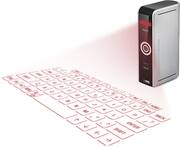
My son wanted this instead of a keyboard. It takes up almost no space and is very convenient. At first I couldn't get it to work at all. Then I realized the sensitivity was set too high. Once I made the proper adjustments it works surprisingly well. Be advised, it has a very small footprint so it works best on a solid surface. On soft areas like beds and some carpets, it tends to fall over. Take a few minutes to read the instructions. It has some very cool shortcuts, especially for turning the keyboard back on. As well as it works, I think a standard keyboard works a bit better. But if space is a problem, this device is the solution.
Posted by Rebound
- Rated 5 out of 5 stars
Works surprisingly well
I was amazed at how accurate the keyboard was I did not expected to do as well as it has been doing I can type at least as fast as I did on my iPad without it. I am going to move it to my surface pro as my keyboard I use on the road I keep it plugged in most of the time the battery does not last very long but it works off of USB for power. It was easy to connect using Bluetooth I take it everywhere the best way to describe it is it turns a flat surface into a touchscreen. It works better on light surfaces dark surfaces makes it hard to see the keyboard. The only thing I would change is the cooking every time you type a letter it clicks for every key hit. I would like that to be an option to turn off it was good in the beginning to help learn to use it it's not necessary once you're used to typing with it. It's loud enough to bother someone if you are in A library or a quiet area
Posted by Technition001
- Rated 4 out of 5 stars
Dificult at first - READ THE MANUAL
I've watched these for years, tried a few, this is the first one I've liked! Initially I couldn't get the keys to send, it randomly started working after a day, and has been for weeks. You can adjust the sensitivity, brightness, and "click" noise that gives you feedback to know you've pressed a key. It relates a lot closer to typing on an iPad than a keyboard, since you have NO tactile feedback. It takes some time to feel "normal". You can shut off the light to save power if you start reading a document, and don't need it, but don't want to disconnect it. Tap three fingers on the table to bring it back, and this is one of the coolest features on ANYTHING I've ever seen. BAM - Keyboard. The manual is short, READ IT COVER TO COVER. I'm one of those that usually skips this step, but it offers simple suggestions to use before you learn the wrong operational habits. For devices that support it, you can use a cursor with it, and it works flawlessly. The keyboard still projects and is a little misleading, watch the blue indicator to determine it's mode.
Posted by Spence
- Rated 4 out of 5 stars
A little quirky
This was a great find as I was looking for a keyboard to use with my tablet that was ultra portable as I travel a lot. It is sometimes a little quirky when you hit the "buttons" it doesn't always register what you typed, but that is to be expected for a virtual device.
Posted by Blaze464