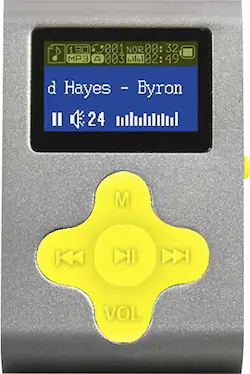
Eclipse - Fit Clip 4GB* MP3 Player - Silver/Yellow
- Key Specs
- Bluetooth Enabled: false (The device is capable of communicating with another device via Bluetooth, provided they are within the required range of each other. A Bluetooth-enabled device must also be the same Bluetooth version or higher than the accessory it is intended to pair with.)
- Storage Capacity: 4 gigabytes (Measured in megabytes (MB), gigabytes (GB) and terabytes (TB), this is the amount available for storing files, music, movies, photos and more. The total includes the capacity of the hard disk drive and solid state drive if both are included on the computer.)
- Video Playback: false
- General
- Product Name: Fit Clip 4GB* MP3 Player
- Brand: Eclipse
- Model Number: ECLIPSE-FIT CLIP SL/YW
- Audio
- Supported File Formats: MP3, WAV
- Connectivity
- Wi-Fi Compatible: false
- Display
- Screen Size: 0.5 inches (Size of the screen, measured diagonally from corner to corner.)
- Display Screen: true
- Touch Screen: false (Touch-screen devices make navigating more intuitive. Using a touch-screen display, you can do things such as tap to select, hold and drag to move items, swipe to scroll, and pinch to zoom.)
- Features
- Memory Card Slot: false
- Included
- Integrated Speaker(s): false
- Integrated Microphone: false
- Integrated Camera: None
- Cable(s) Included: true
- Belt Clip Included: true
- Software Included: true
- Warranty
- Manufacturer's Warranty - Parts: 1 year
- Manufacturer's Warranty - Labor: 1 year
- Other
- UPC: 878376003051
Take your tunes on the go with this Eclipse Fit Clip MP3 player that features 4GB* of internal memory to store your favorite songs. The 0.5" LCD screen allows for easy viewing.
- 4GB* internal flash memory: For storing songs.
- Ultracompact design: Measures just 0.5" thin and weighs only 3.2 oz. for portability to the gym, to work or when traveling.
- Supported formats: Include MP3 and WAV, so you can take your media on the go.
- 0.5" LCD: Offers a clear view of information.
- High-speed USB 2.0 interface: For blazing-fast transfer speeds.
- Built-in lithium-ion battery: Provides up to 8 hours of playback.
- Media Monkey: Software included.
- PC and Mac compatible: For multifunctional use.
Whats Included
- Eclipse Fit Clip 4GB* MP3 Player
- Earbud headphones
- USB cable
- Owner's manual
A: No. When I turn it off, and then turn it back on, it starts up where it left off.
A: undefined
Q: Can I download music from u-tube from my phone
A: You can, by use of a YouTube to mp3 file converting site. However, this is considered piracy, and illegal, though nowadays most aren't persecuted unless they distribute the files. So definitely don't go to a conversion website and input the YouTube address of the song you want to download. I would recommend going to a band's Bandcamp or other site, and purchasing the mp3 files of their music directly from them. Especially if they are a small indie band. :)
Q: Hi...how do I adjust volume,,,Thanks
A: undefined
A: Mine has 9k songs but I just used songs I had off my old cd's that I put on my laptops but my cd's are 30 years old so that's why I could
A: Yes ok so go to the settings on the menu and go to the very bottom of the settings menu and click on the link or folder then go up to 英语 click it if it doesn't look like that then go to 英語 and click on that then it should be done and in English
A: Go to settings and click on the folder under EQ set it will say play mode click on it and see what mode you want in your case it maybe on rand folder so just click on the mode you want it on and it should fix your problem