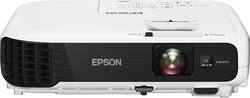
Epson - VS240 SVGA 3LCD Projector - White/Black
- Key Specs
- Product Weight: 5.29 pounds (The out of box weight of the item.)
- Contrast Ratio: Up to 15,000:1 (Measured difference between a displayed image's brightest whites and darkest blacks. The larger the first number, the more detail and color that can be displayed.)
- General
- Brand: Epson
- Model Number: VS240 Projector - V11H719220
- Product Name: VS240 SVGA 3LCD Projector
- Color: White/Black
- Dimensions
- Product Height: 3.2 inches (The out of box height of the item. Height is measured as the vertical distance from the bottom of the item to the top as it would be primarily used or placed.)
- Product Width: 11.7 inches (The out of box width of the item. Width is measured as the horizontal distance from one side of the item to the other as it would be primarily used or placed.)
- Product Depth: 9.2 inches (The out of box depth of the item. Depth is measured as the distance from the front of the item to the back as it would be primarily used or placed.)
- Product Weight: 5.29 pounds (The out of box weight of the item.)
- Display
- Resolution (Native): 800 x 600 (Native resolution of a screen refers to its single, fixed resolution. Sometimes screens must scale an image up or down in order to fit the native resolution. This can cause a loss of resolution or detail.)
- 3-Chip Technology: true (Projectors with this technology are able to display images with optimal brightness, color, and detail. Because of their high-performance design, these projectors are primarily used in large venues and digital cinemas.)
- Contrast Ratio: Up to 15,000:1 (Measured difference between a displayed image's brightest whites and darkest blacks. The larger the first number, the more detail and color that can be displayed.)
- Aspect Ratio: 4:3 (The measurement of the width of a screen compared to the height of a screen, expressed as a ratio.)
- Throw Ratio Range: 1.45 (zoom: wide), 1.96 (zoom: telephoto) (This measurement indicates what size of projected image can be produced from a certain distance. The smaller the ratio, the closer the projector can be to the screen while still producing a large image.)
- Digital Keystone Correction: true ("Keystone effect" refers to the distortion of an image when it is projected on an angled surface or when the projector is positioned too high or too low from the center of the display. Projectors with a digital keystone correction feature are able to scale the image as needed before it is projected, resulting in the correct image orientation no matter where it is displayed.)
- 3D Technology: false
- Viewing
- Minimum Projector Distance: 2.9 feet (Minimum distance that the projector can be placed from the screen to produce a display with acceptable visual performance.)
- Maximum Projector Distance: 34.25 feet (Maximum distance that the projector can be placed from the screen to produce a display with acceptable visual performance.)
- Minimum Viewable Screen Size: 30 inches
- Maximum Viewable Screen Size: 350 inches
- Features
- Remote Control Included: true
- Connectivity
- Number of USB Port(s): 2
- Audio
- Speaker(s) Included: true
- Certifications Listings & Approvals
- ENERGY STAR Certified: false (Devices carrying the ENERGY STAR service mark, such as computer products and peripherals, kitchen appliances, and other products, generally use 20% to 30% less energy than required by federal standards.)
- Other
- UPC: 010343922617
Showcase ideas with this Epson VS240 projector, which displays presentations in 800 x 600 resolution and offers 3000 lumens of white and color brightness for enhanced visibility and vibrancy. USB Plug 'n Play instant setup lets you get started quickly.
- Not sure what size projector or screen you need? Learn more.

- Portable design: Weighs just 5.29 lbs. for simple transport.
- 3LCD, 3-chip technology*: Delivers 3x brighter colors and reliable performance for brilliant images with true-to-life color.
- 3000 lumens of color brightness and 3000 lumens of white brightness: Offer a highly visible display with crisp images.
- Up to 15,000:1 contrast ratio: Creates a large number of shades between black and white for rich, lifelike color saturation.
- 800 x 600 SVGA resolution: Provides sharp images. Resize support for 1024 x 768 (XGA), 1152 x 864 (SXGA), 1280 x 800 (WXGA), 1280 x 960 (SXGA2) and 1280 x 1024 (SXGA3) resolutions.
- 30" - 350" viewable screen size (diagonal): Makes it easy to share presentations and videos with large or small groups.
- 2.9' - 34.25' projector distance: Along with a 1.45 (zoom: wide), 1.96 (zoom: telephoto) throw ratio range to help properly reproduce the proportions of wide images.
- USB Plug 'n Play instant setup: Instantly projects audio and video from a PC or Mac via a USB connection.
- Horizontal and vertical image correction: Projects rectangular images from any angle; just move the easy-slide control bar to make the necessary horizontal image adjustments; vertical adjustments are automatic.
- Manual digital zoom: Brings details into clear view. Manual focus offers a sharp picture.
- 200W UHE lamp: Delivers up to 10,000 hours of use in ECO mode or up to 5,000 hours of use in normal mode.
- HDMI, VGA (D-sub), S-Video, composite (RCA) and RCA audio inputs: For versatile connectivity options. USB Type-A port allows easy access to content stored on a USB-enabled device without a PC.
- Remote: Allows simple operation at a distance and helpful source search selection, power, volume, E-zoom, A/V mute, freeze, menu, page up and down, help, auto and mouse functions.
- Portable design: Weighs just 5.29 lbs. for simple transport.
- 3LCD, 3-chip technology*: Delivers 3x brighter colors and reliable performance for brilliant images with true-to-life color.
- 3000 lumens of color brightness and 3000 lumens of white brightness: Offer a highly visible display with crisp images.
- Up to 15,000:1 contrast ratio: Creates a large number of shades between black and white for rich, lifelike color saturation.
- 800 x 600 SVGA resolution: Provides sharp images. Resize support for 1024 x 768 (XGA), 1152 x 864 (SXGA), 1280 x 800 (WXGA), 1280 x 960 (SXGA2) and 1280 x 1024 (SXGA3) resolutions.
- 30" - 350" viewable screen size (diagonal): Makes it easy to share presentations and videos with large or small groups.
- 2.9' - 34.25' projector distance: Along with a 1.45 (zoom: wide), 1.96 (zoom: telephoto) throw ratio range to help properly reproduce the proportions of wide images.
- USB Plug 'n Play instant setup: Instantly projects audio and video from a PC or Mac via a USB connection.
- Horizontal and vertical image correction: Projects rectangular images from any angle; just move the easy-slide control bar to make the necessary horizontal image adjustments; vertical adjustments are automatic.
- Manual digital zoom: Brings details into clear view. Manual focus offers a sharp picture.
- 200W UHE lamp: Delivers up to 10,000 hours of use in ECO mode or up to 5,000 hours of use in normal mode.
- HDMI, VGA (D-sub), S-Video, composite (RCA) and RCA audio inputs: For versatile connectivity options. USB Type-A port allows easy access to content stored on a USB-enabled device without a PC.
- Remote: Allows simple operation at a distance and helpful source search selection, power, volume, E-zoom, A/V mute, freeze, menu, page up and down, help, auto and mouse functions.
Whats Included
- VS240 SVGA 3LCD Projector
- Remote with batteries
- Power cable, VGA cable
- Owner's manual
- VS240 SVGA 3LCD Projector
- Remote with batteries
- Power cable, VGA cable
- Owner's manual
Q: i would like to know abot the audio output
A: This has an audio input but no audio output. You would need to send the audio to a different output rather than into the projector if you want to have better sound than from the included internal speaker.
Q: How is this for business powerpoint presentations with various laptop types?
A: This projector would be great for PowerPoint presentations as long as the room size is not too large. Classroom size room is OK, larger auditorium type venue would require a better image quality.
A: the sound quality isn't too great an additional speaker system would probably be great but if planning on lounging behind the projector it will not be needed
Q: Can this projector be upside-down ceiling mountable?
A: Absolutely, that is how ours is setup.
A: There is a line out on it. Standard headphone jack. I use my tablet via hdmi cable for video source and Bluetooth my harmen kardin speaker to tablet. Works great
A: It will work front, front ceiling, rear and rear ceiling projection. Go into settings and arrow to projection and enter and all that comes up. Arrow to the one you want and press enter.
Q: how do iget Atmos *.mp4 file to work off the USB ports ??
A: MP4 files have to be converted to avi files. Look up on Epson's website for the specific requirements. I downloaded probably 25 apps before I found an app that converted my file correctly for it to work for the PC free feature.