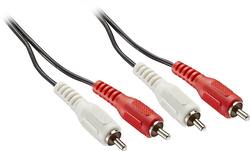
Insignia™ - 20' Stereo Audio RCA Cable - Black
- Key Specs
- Cable Length: 20 feet
- Connector Type (End 1): RCA (phono)
- Gender (End 1): Male
- Connector Type (End 2): RCA (phono)
- Gender (End 2): Male
- In-Wall Rated: false
- General
- Brand: Insignia™
- Model Number: NS-HZ502
- Product Name: 20' Stereo Audio RCA Cable
- Color: Black
- Connectivity
- Cable Type: RCA
- Cable Length: 20 feet
- Product Type: Cable
- Connector Type (End 1): RCA (phono)
- Gender (End 1): Male
- Connector Type (End 2): RCA (phono)
- Gender (End 2): Male
- Environmental
- In-Wall Rated: false
- Warranty
- Warranty - Parts: 1 year
- Warranty - Labor: 1 year
- Other
- UPC: 600603163814
Only @ Best Buy
Easily connect most analog stereo audio components using this Insignia NS-HZ502 cable that delivers analog stereo audio signals through RCA jacks and features a 20' length to ensure flexible placement options.
- Compatible with most analog stereo audio components: For wide-ranging use.
- Sends analog stereo audio signals through RCA jacks: So you can easily connect components.
- 20' length: Allows flexible placement.
- Compatible with most analog stereo audio components: For wide-ranging use.
- Sends analog stereo audio signals through RCA jacks: So you can easily connect components.
- 20' length: Allows flexible placement.
Whats Included
- Insignia 20' Stereo Audio RCA Cable
- Insignia 20' Stereo Audio RCA Cable
Product Manuals
A: Not sure what you mean by "wire clips" but you can pretty much do anything you want with wire. You just strip the ends and add whatever adapter you need. Try searching online for videos on stripping speaker wire and adding banana plugs. Might not be the type of plug/adapter you need, but it'll give you an idea of how to do it. Good luck.
Q: WHAT DO I NEED TO CONNECT MY ROKU 3 TO MY TV THAT DOES NOT HAVE HDMI
A: Typically, the device maker (Roku) would or can supply the appropriate converter cable. We had the same issue hooking up one of our satellite receivers to an old CRT television that had only analog inputs. The adapter cable came with the satellite equipment. Otherwise, use the optional analog outputs on the Roku (if it has any) instead of the HDMI output.