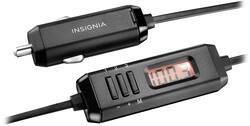
Stream the music from your phone, iPod or other MP3 player through your vehicle’s FM stereo using this device, featuring easy plug-and-play operation compatible with any device with a 3.5mm headphone jack. This Insignia™ NS-M35FMT FM transmitter offers easy frequency adjustments and an auto scan function that helps you quickly find unused stations.
- Connects via 3.5mm port: For a universal fit.
- Button controls: Let you adjust the transmitter's frequency with ease.
- Auto scan: Quickly finds unused stations.
- Connects via 3.5mm port: For a universal fit.
- Button controls: Let you adjust the transmitter's frequency with ease.
- Auto scan: Quickly finds unused stations.
Whats Included
- Universal FM Transmitter
- Owner's manual
- Universal FM Transmitter
- Owner's manual
Q: Why is this called a transmitter? It is a FM Receiver.
A: Actually, it is a personal transmitter. A personal FM transmitter is a low-power FM radio transmitter that broadcasts a signal from a portable audio device (such as an MP3 player, smartphone, laptop, etc.) to a standard FM radio. The transmitter plugs into the device's headphone jack and then broadcasts the signal over an FM broadcast band frequency (selected on the device), so that it can be picked up by any nearby radio. Being low-powered, most transmitters typically have a short range of 100–300 feet, which is more than enough for your car radio. So, the device it the FM transmitter and your car radio is the FM receiver.
Q: will this work with a i pod touch 6
A: Yes, this will work with a iPod touch 6.
Q: Does it work with an IPod 7th generation? Or is it only Bluetooth? Thank you
A: Works with. 7 hard wired
A: I believe if you hold down the #3 button it will start to blink and then you can adjust with the #1 & #2 buttons. Or you can hold down the #1 button and it will automatically adjust to a station that will work and you can adjust your stereo accordingly.
Q: Will this also charge your device?
A: No, it connects through your headphone jack so it will only transmit audio.
Q: Will this product allow me to play music from my iphone???
A: Yes, if it has a headphone jack
A: Unfortunately this seems to be a problem with this transmitter. I would try bringing it back into best buy with the receipt and let them know, but it is now past the return time. Good luck!
Q: You say it can plug into headphone jack on iPhone but picture shows cigarette lighter plug?
A: Yes, plug the 3.5 mm end into the headphone jack on the iPhone and the other end into the cigarette lighter. Here is the link for the Quick Setup Guide https://files.bbystatic.com/EH2Q27ZEsDaSx1E3XeWqKA%3D%3D/NS-M35FMT_QSG_EN.pdf