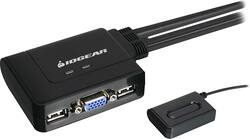
IOGEAR - 2-Port USB KVM Switch - Black
- Key Specs
- Switch Management Type: Smart managed (Unmanaged switches don't require user configuration and are typically used for basic connectivity. Managed switches have more features and can be configured by the user for custom network use.)
- General
- Product Name: 2-Port USB KVM Switch
- Brand: IOGEAR
- Model Number: GCS22U
- Compatibility
- System Requirements: true (The software that a product must have for it to be able to integrate with another product.)
- Dimensions
- Product Height: 0.9 inches (The out of box height of the item. Height is measured as the vertical distance from the bottom of the item to the top as it would be primarily used or placed.)
- Product Length: 2.5 inches (The out of box length of the item. Length is measured as the longest dimension of the item.)
- Product Width: 3 inches (The out of box width of the item. Width is measured as the horizontal distance from one side of the item to the other as it would be primarily used or placed.)
- Product Weight: 14 pounds (The out of box weight of the item.)
- Other
- UPC: 881317011022
This switch features a VGA port and 2 USB ports that let you share the use of a monitor and 2 USB peripherals, such as a mouse and a keyboard, between 2 different computers. The plug-and-play design allows easy setup.
- Compatible with PC, Mac and Sun operating platforms: For wide-ranging use.
- 1 VGA and 2 USB ports: Let you connect a monitor and 2 peripherals for shared use between 2 computers.
- Two 3' molded-in KVM cables: Simplify setup.
- Plug-and-play design: For easy installation.
- 6' remote cable: For easy selection of a device from across a room.
Whats Included
- IOGEAR 2-Port USB KVM Switch
- Owner's manual
Q: extra cables
A: No, the switch has two pairs of cables that goes to the two computers. As long as your monitor has its own cable (which it should unless it's a TV), you should be good.
Q: Will this KVM switch work with a wireless keyboard / mouse combo?
A: Yes. I'm using a Logitech mouse and keyboard, and it works well. This combo unit also only uses one dongle.
Q: will it work with vista and 7
A: I know it works with 7 and 8. Unknown about Vista capability.
Q: will this work with windows xp and windows 8
A: Yes, I am currently using it with a Windows 8 computer and a Windows XP computer. It shifts seamlessly between the 2 machines.
A: Rick, first part right. Now you have two sets of three wires each coming from (and permanently attached to) the device; one set for each computer. On each of the two computers: plug the USB cables into ANY two USB ports. That takes care of the mouse and KB. Now look at the big plug at the end of the of the third cable which is video/monitor. Find a port/jack which is a mirror image as far as holes and pins. Examine it to make sure everything lines up. Gently try to plug it in just to be sure. If it fits, it will work. Tighten the screws and you're done. You may find two potential problems, especially with older computers or laptops. The port may have more holes than the plug has pins. That should still work and shouldn't be a problem. The opposite IS A PROBLEM, don't force the plug in. If the latter is the case there are all kinds of adapters you can buy to solve that problem. The other things is the port on the computer may not have the screw-in configuration. This is not a problem, everything will still work, but it is a real nusiance. I had a situation like that once and there was no good solution. I just put everything where it would be disturbed and every once in a while the plug would fall out and I had to plug it back in .
Q: What types of USB are supported?
A: It supports USB 2.0 and older. Sorry but it doesn't support 3.0 and 3.1. Thanks.
Q: will this work with a webcam?
A: IOGEAR says: As long as the webcam has a direct VGA connection the GCS22U should work as long as the USB connector on the KVM cable is connected. The USB portion of the KVM cable is for power to the KVM. Thank you for choosing IOGEAR.