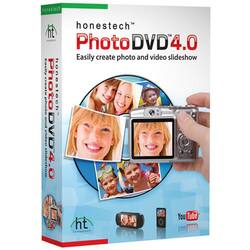
VIDBOX - Photo DVD 4.0 - Windows
- Key Specs
- Operating System Compatibility: Windows
- Software Format: Physical (Physical software requires a disc, cartridge, etc. be inserted into the gaming console or computer to download and/or operate the software. Digital software allows for downloading and/or playing the software on the gaming console or computer without a physical disc, cartridge, etc. Physical (Download Code Only) software is purchased in physical form with a code that allows for downloading and/or playing the software on the gaming console or computer without a physical disc, cartridge, etc.)
- General
- Brand: VIDBOX
- Model Number: HON787800F022
- Product Name: Photo DVD 4.0
- Publisher: VIDBOX
- Features
- Software Subject: Photo editing
- Compatibility
- Operating System Compatibility: Windows
- Software Format: Physical (Physical software requires a disc, cartridge, etc. be inserted into the gaming console or computer to download and/or operate the software. Digital software allows for downloading and/or playing the software on the gaming console or computer without a physical disc, cartridge, etc. Physical (Download Code Only) software is purchased in physical form with a code that allows for downloading and/or playing the software on the gaming console or computer without a physical disc, cartridge, etc.)
- Other
- UPC: 882960200542
Now, you can organize your digital pictures and compile them into spectacular slideshows using ready-made themes and the latest multimedia technology. With a variety of editing options and two easy modes, Photo DVD 4.0 lets you upload your creations to popular Web sites, and makes it easy to burn your slideshows onto CD and DVD to give to your friends and family. Enhance the presentation of your digital memories using cinematic slideshows — with just a few simple clicks.
Photo DVD 4.0 makes creating beautiful slideshows quick and easy for beginners and professionals alike. Get started quickly, and create masterpieces without using any editing tools or complicated photo software jargon in Easy mode. Select a theme from the list, import your photos and video clips to the Storyboard, and convert your slideshow to DVD or other formats — it's that simple. For more experienced users, the Advanced mode offers more control to shape slideshows using photo editing capabilities, effects, title options, background music, voice-over narration and more. Enhance your slideshows and make them one-of-a-kind by creating your own menus and using a number of transition, motion and title effects. Crop, rotate, remove red eye, adjust brightness and contrast or add graphic effects to fine-tune your photos quickly and easily. Convert your creation into MPEG-4/AVC format to view it on your portable device, or share your slideshow by uploading it to YouTube directly from the software using the One-Click option. Burn custom-made slideshows to DVD or CD to hand out copies to friends and family. Present your digital photos in an organized, artistic manner — it's never been easier.