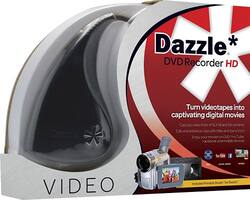
Pinnacle - Dazzle DVD Recorder HD - Silver
- Key Specs
- Smart Capable: true (Smart, or smart-capable devices are able to connect directly to your home network in order to stream content from the Internet, run Internet-based apps, or connect to other smart devices.)
- Ethernet Port(s): false (Connection on the device that fits an ethernet cable, allowing for connection to wired network hardware.)
- General
- Product Name: Dazzle DVD Recorder HD
- Brand: Pinnacle
- Model Number: 8112150
- Dimensions
- Product Height: 8 inches (The out of box height of the item. Height is measured as the vertical distance from the bottom of the item to the top as it would be primarily used or placed.)
- Product Depth: 2.2 inches (The out of box depth of the item. Depth is measured as the distance from the front of the item to the back as it would be primarily used or placed.)
- Product Width: 10.6 inches (The out of box width of the item. Width is measured as the horizontal distance from one side of the item to the other as it would be primarily used or placed.)
- Product Weight: 0.9 pounds (The out of box weight of the item.)
- Other
- Hard Drive: true (Allows for temporary video storage and program recording in addition to recording on DVDs.)
- HD Upconversion: true
- VCR Conversion: true (Function that allows VCR tapes to be converted and recorded onto DVDs.)
- Hard Drive Size: 3.2 gigabytes
- Video Input(s): RCA
- Video Output(s): S-Video
- Audio Input(s): RCA
- UPC: 735163141535
This Pinnacle Dazzle DVD Recorder HD 8112150 allows you to import photos and videos and convert them to digital files via a USB video capture device. The included editing software features effects, transitions and more to inspire your creativity.
- USB video capture device: Makes it easy to upload photos and videos and convert them to digital movies.
- Pinnacle Studio for Dazzler software: Lets you edit your clips and add effects, transitions and soundtrack options for professional-quality videos.
- 1-click uploading: Allows you to share your creations on YouTube or transfer files to a compatible Apple® iPod®, a Sony PSP, select mobile phones and tablets and more.
Whats Included
- Pinnacle Studio for Dazzle software
- Dazzle USB video capture device
A: This product is not compatible with Windows XP. Otherwise, it comes complete with everything needed to convert video in order to burn to DVD.
Q: Computer crashes mid way through a vhs tape capture
A: Return it. Spent too much time trying to mess with it. Does not work at all with Microsoft 10. Must be a better product out there.
Q: Is this Windows 8.1 Compatible?
A: Yes,it has a camcorder import button.It requires composite rca type cables which are included or if you want S-video output you will have to supply this yourself.this catures this to your hard drive.I wrote a detailed instructions on this product on Best Buy reviews.Find the review by algrn and I give a step by step instruction because there is no instruction book that comes with this,that is why I go into detail about it and it is too much to write here
A: Yes - any audio/video you can play through RCA cables (in my case) can be recorded on your computer. You can then save it for playing on your computer or other devices as well as making a DVD. I believe it also accepts a S-Video signal as well.
A: I have Windows 7 Home Premium SP1 on my Dell Laptop, and I have the Dazzle Video Capture USB V1.0. I just recently upgraded the Pinnacle Studio for Dazzle to Pinnacle Studio 20 - 64bit and it runs fine. Make sure that you check your computers specifications against the recommended requirements of the Pinnacle software that you are upgrading to. Pinnacle Studio requires A LOT of processing power and memory to run efficiently. There is a program that you can download from the Pinnacle web-site that will test your system to see if Pinnacle will run on it. Mine barely made the specs for rendering 1080 HD video. I believe that it was called NEMO Check. Try here first for information on Pinnacle Studio issues; https://support.corel.com/hc/en-us/categories/202536578-Pinnacle
Q: Can I record a VCR tape to DVD?
A: Yes. Install the s/w and drivers on your PC, then simply attach the RCA or S-Video "Out" on your VCR player with the provided cables, then the USB to your computer. Then load up the PC s/w, and off you go! Press play on the VCR, and at the same time click Record within the Import section of the s/w on the PC and let the tape play. You can pause or stop the recording anytime. Once imported/captured, then the s/w allows you to edit the recorded movie, add titles, etc. before exporting to a DVD or other format. Dead easy!
A: If it is the hi 8 I would look for something else, the for some reason it will not transfer sound. If you can figure that out I would say but it