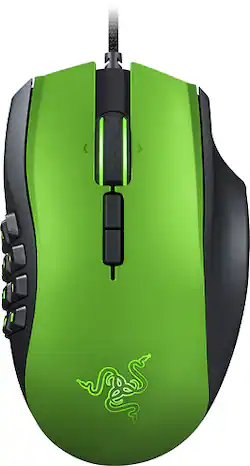
Razer - Naga MMO Laser Gaming Mouse - Limited Edition Green
- Key Specs
- Number of Buttons (Total): 14
- General
- Product Name: Naga MMO Laser Gaming Mouse
- Brand: Razer
- System Requirements: PC or Mac (The software that a product must have for it to be able to integrate with another product.)
- Model Number: RZ01-01040300-R3U1
- Features
- Mouse Type: Gaming
- Performance
- Mouse Operation: Button(s), Scroll wheel
- Handedness: Right-handed
- Tracking Method: Laser (There are several types of computer mice, optical and laser being among the most common. Optical mice detect less detail and provide more precise and accurate movement. Laser mice detect more detail and can be used on a wider variety of surfaces, but are more sensitive to small movements.)
- Number of Buttons (Total): 14
- Connectivity
- Operating System Compatibility: Mac, Windows
- Dimensions
- Product Height: 4.7 inches (The out of box height of the item. Height is measured as the vertical distance from the bottom of the item to the top as it would be primarily used or placed.)
- Product Width: 2.9 inches (The out of box width of the item. Width is measured as the horizontal distance from one side of the item to the other as it would be primarily used or placed.)
- Product Weight: 0.3 ounces (The out of box weight of the item.)
- Warranty
- Manufacturer's Warranty - Parts: 1 year
- Manufacturer's Warranty - Labor: 1 year
- Other
- UPC: 811254024939
Only at Best Buy
Gain the upper hand while you play with this Razer Naga MMO laser gaming mouse, which features a mechanical 12-button thumb grid for fast access to important functions. The tilt-click scroll wheel lets you navigate features quickly.
- Mechanical 12-button thumb grid: Simplifies access to commands.
- Tilt-click scroll wheel: Permits quick and easy navigation.
- In-game MMO configurator: Lets you adjust the mouse while you play.
- Razer Synapse 2.0 enabled: For enhanced functionality.
- 7' lightweight, braided-fiber cable: Offers durability and allows a flexible range of motion.
- USB interface: Enables simple connection to your compatible PC or Mac.
Whats Included
- Razer Naga MMO Laser Gaming Mouse
- Owner's manual
Q: How many DPIs have this thing?
A: 8,200.
Q: How do you program the 12 keys?
A: You have to download Razer Synapse. If you already downloaded Razer Surround before using any Razer product, you will have to uninstal Razer Surround and go to the Razer Synapse website and download it from there (I know this from personal expierence). Once you download Razer Synapse, open it up and go to the Mouse tab and click on the Customize button under it. Under where the picture of the mouse is, click "go to Side View." Then, click on the button you want to program something to and program it to a function, like a macro or a keyboard button. This is very helpful when playing MMO and MOBA games. I have also found the macros to work good with buying in CS:GO. I hope I answered your question.
A: Its really small but does not have grip adjustment's.
Q: Does this mouse's wireless feature Bluetooth or use?
A: if you mean connect it to your computer using Bluetooth then NO it connects thru the docking stand that comes with it in order to do this u will have to connect the usb cable to the docking stand and then turn the mice wireless mode on and you will be able to use it wireless!
Q: How long does this product last?
A: My last naga lasted 5 years, it would have gone another 5 if my ex hadn't taken it apart to see what was inside... This mouse is amazingly sturdy and very well made.
Q: Does it work with left hand too?
A: I hate to say this, but if you search by name just add left handed to description. Amazon does a left handed razer naga, but it doesn't say if it is a chroma or not.
A: Yes it is
Q: Does the wireless feature work with a Mac?
A: Yes, absolutely.