Customer Ratings & Reviews
- Model:
- 27-n110
- |
- SKU:
- 4454709
Customer reviews
Rating 4.7 out of 5 stars with 9 reviews
(9 customer reviews)to a friend
Customers are saying
Customers consistently note the large screen size as a major positive, with many comments expressing appreciation for its size and how it facilitates their work. The touchscreen functionality also receives praise, exceeding some users' initial expectations. There were no negative customer comments reported.
This summary was generated by AI based on customer reviews.
Rated 5 out of 5 stars
Looking to upgrade a desktop. HP makes an easy to
||Posted .This reviewer received promo considerations or sweepstakes entry for writing a review.It's been seven years since I upgraded my desktop PC. I had one of the original all-in-ones from HP (and have been running Vista). This appears to be on of the newest versions. With a 27" inch screen and Windows 10 and one of the only models with a DVD drive, I am pleased with the setup. It was relatively simple to start up and I have liked the ease to which Window 10 syncs for calendars and my other devices.
I would recommend this to a friend- Pros mentioned:Screen size
Rated 4 out of 5 stars
Had it for 3 weeks. Made a good choice.
||Posted .This reviewer received promo considerations or sweepstakes entry for writing a review.Thought I wanted an Apple, because of my iPad's ease of use. But decided it wasn't worth the extra cost, especially w/no CD drive. Didn't think touch screen feature was a big deal, but find myself using it frequently. Love the BIG screen. Even beginning to like Windows 10 the more I use it. Probably would rate it 4+, maybe even 4.5, if that were an option. Very satisfied.
I would recommend this to a friend - Pros mentioned:Screen size
Rated 4 out of 5 stars
Huge screen
||Posted .This reviewer received promo considerations or sweepstakes entry for writing a review.This computer feels so big compared to our others. We basically use it to surf the web, plus my daughter plays some games & watches movies on it. We immediately changed keyboards to our old one. The one that came with the computer was too small & had hesitations when typing. We have really liked the computer, but have had a few issues. Geek Squad has helped us with them, but I am hoping we don't get any further ones. We've only had it for 2 months, so I will update if there are any serious problems that arise.
I would recommend this to a friend Rated 4 out of 5 stars
Excellent value for an all in one PC
||Posted .This reviewer received promo considerations or sweepstakes entry for writing a review.This is an above average All in One PC. I wish they would offer SSD hard drives instead of the larger SATA drives. With cloud storage I would rather go for the speed of a SSD drive.
I would recommend this to a friend- Pros mentioned:Screen size
Rated 5 out of 5 stars
Love the screen and all in one features
||Posted .This reviewer received promo considerations or sweepstakes entry for writing a review.Had to have unit repaired after just 9 months, optical drive didn't work and was unable to connect to Internet. Taken care of, free of charge, being under warranty. Working beautifully. Like the idea of being able to free desk space with all in one and love large screen.
I would recommend this to a friend Rated 5 out of 5 stars
wife's computer
||Posted .This reviewer received promo considerations or sweepstakes entry for writing a review.We are very happy with this computer. Everything is great.
I would recommend this to a friend- Pros mentioned:Screen size
Rated 5 out of 5 stars
Love this HP All-in-One computer!
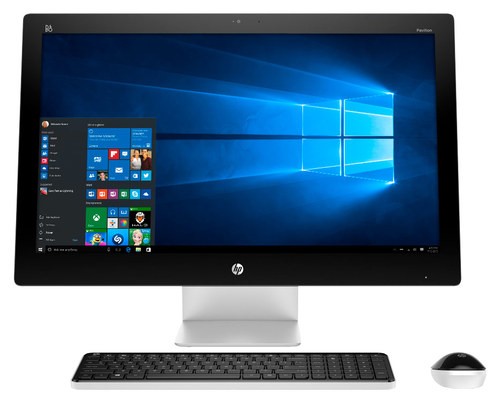
||Posted .This reviewer received promo considerations or sweepstakes entry for writing a review.I hemmed and hawed over whether to buy an all-in-one. I've been using a laptop exclusively for more than 10 years. But the fact is I don't lug it around anymore, so I started thinking maybe a desktop was the way to go. Then I saw the all-in-ones and fell in love. Just one device and one cord, plus wireless keyboard and mouse, and you're ready to go. Love the big screen--so sharp and vivid, something my laptop screen had never been able to deliver. I've been nothing but happy since the all-in-one arrived.
I would recommend this to a friend - Pros mentioned:Screen size
Rated 5 out of 5 stars
Very fast computer and very beautiful design.
||Posted .This reviewer received promo considerations or sweepstakes entry for writing a review.I really like this pc it has everything I want in a computer it's fast it's beautiful it operates with windows 10 . And it's big so you can easily work in any program you want
I would recommend this to a friend Rated 5 out of 5 stars
Great computer for everyday needs
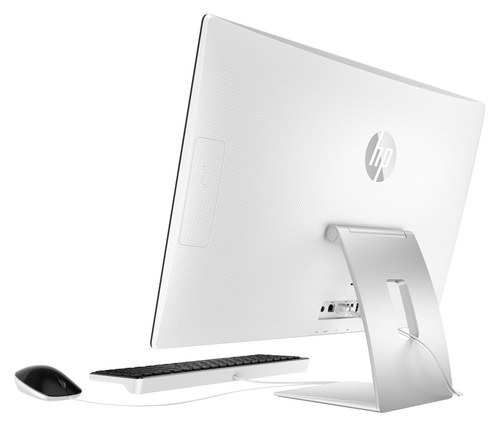
Posted .This reviewer received promo considerations or sweepstakes entry for writing a review.I needed to upgrade my old Dell tower desktop running Vista since it wouldn't update anymore. Since I had a horrible customer relations experience with Dell, I wanted to try something else. My monitor on my old system wasn't bad, but after seeing a 23" all in one HP in the store, I was sold. Setting it up was a snap. Windows 10 is very easy to navigate and made getting started on it easy. One thing I had to do after some research is uninstall the McAfee security system and go with Defender because I use Google Chrome and McAfee wouldn't let Chrome open. Also, I have a great Klipsch speaker system from my old system which I plugged in, so I haven't had a chance to try out the speaker built into the computer, but have read they're good. Also when I was researching this computer, I read conflicting specs on whether this had a built in camera or not. Well it does along with a mike, so you can Skype. May not use the disc drive much but it's nice to have one just in case. The only downside I can see are the USB ports. You get 2 3.0 underneath which you have to fumble around a little bit get get a flash drive into, and there are 4 standard usb ports in the back which are difficult to get to, along with an Ethernet port. And, the power button is underneath to the right of the usb 3.0s and it takes a little searching to find it. But, overall, this was a long needed upgrade and everything is great so far.
I would recommend this to a friend