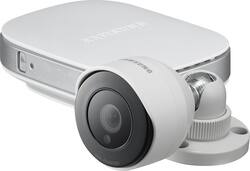
Samsung - SmartCam Indoor/Outdoor Wireless High-Definition Home-Monitoring Camera - White
- Key Specs
- Night Vision: true
- Camera Power Source: Plug-in
- Storage Type: Cloud, Memory card
- Indoor Or Outdoor Use: Outdoor (Indicates the appropriate environment product was designed to be used in.)
- General
- Product Name: SmartCam Indoor/Outdoor Wireless High-Definition Home-Monitoring Camera
- Brand: Samsung
- Model Number: SNH-E6440BN
- Camera
- Night Vision: true
- Night Vision Distance: 50 feet
- Image Sensor Type: CMOS (CCD and CMOS are the two main technologies used in image sensors. CCD, the older of the two types, turns analog light signals into digital pixels. This conversion happens without distortion, resulting in high-quality images. Newer CMOS sensors use transistors at each pixel to move electrical charges. CMOS sensors are typically less expensive, but also require more light to create distortion-free images.)
- Power
- Camera Power Source: Plug-in
- Voltage: 5 volts (Amount of power needed to support an electrical current.)
- Compatibility
- Compatibility: Select iOS and Android devices
- Operating System Compatibility: Android, Apple iOS, Mac, Windows
- Connectivity
- Camera Connectivity: Wireless (Security system cameras can be set up in several ways. Wired cameras require cables for power and footage transmission, while wire-free cameras don't need cables for either. Wireless cameras still require cables for receiving power but are able to transmit footage via a wireless network.)
- Storage
- Storage Type: Cloud, Memory card
- Performance
- Indoor Or Outdoor Use: Outdoor (Indicates the appropriate environment product was designed to be used in.)
- Dimensions
- Product Height: 2.1 inches (The out of box height of the item. Height is measured as the vertical distance from the bottom of the item to the top as it would be primarily used or placed.)
- Product Width: 4.2 inches (The out of box width of the item. Width is measured as the horizontal distance from one side of the item to the other as it would be primarily used or placed.)
- Product Depth: 2.1 inches (The out of box depth of the item. Depth is measured as the distance from the front of the item to the back as it would be primarily used or placed.)
- Product Weight: 0.5 pounds (The out of box weight of the item.)
- Display
- Color Display: false
- Other
- UPC: 849688001868
Samsung SmartCam SNH-E6440BN Indoor/Outdoor Wireless High-Definition Home-Monitoring Camera: Enhance the safety of your interior and exterior living spaces with this monitoring system. View secured areas from anywhere with remote access through your PC or mobile devices.
- Download the free app to access the system remotely: Personalize notifications, watch video, and make changes from your computer or compatible iOS or Android device.
- Monitor your home in real time: Receive instant notifications on your mobile device or PC when motion or noises are detected, program the camera to capture a scheduled time or record continuously, and view the footage from anywhere.
- 2-way communication: External microphone and speaker let you hear what happens around the camera and talk back through your phone, no matter where you are.
- Capture high-resolution footage: Full HD camera uses advanced image sensors to record crystal-clear video.
- Night vision capability for up to 50 ft.: Monitor your home or business, even in muted lighting, by automatically switching the picture to black-and-white in low-light conditions.
- Enrich the quality of your video: Light Enhancer improves visibility in dark areas so you can view clear and detailed images.
- 128° field of view: Captures an expansive area of your property for high-level security when you need it.
- Personalized for your priorities: Detect movements and receive alerts for up to 3 specific areas, or zones, throughout your home, such as entrances or windows.
- Save essential images: Set this function within the free app and use a microSD card (sold separately) to store your footage.
- Secure and trustworthy video feed: SSL AES 256-bit technology offers a high level of encryption that protects your privacy.
- Easy indoor or outdoor installation: Remove the weather-resistant camera from its base to install it in an outdoor area or outside your home. Connect to your existing wireless network with the touch of a button through Wi-Fi Direct.
Whats Included
- SmartCam Indoor/Outdoor Wireless Camera
- 8.2' power adapter, 26' camera cable
- Owner's manual
Q: Is a pc required to operate this camera?
A: A PC is not required. I configured the SmartCam for my iPhone 5, my wife's iPhone 6 and our iPad. After that, I did add the SmartCam app to my PC, but it was not necessary.
Q: Do the cameras operate on batteries
A: This is a two part system - The camera and the networking component (small box that looks like a mini router). They attach via a 12'-15' cable. You plug the supplied AC adapter into networking component. The Camera gets power from the networking component through the cable. You can also attach CAT5 and SD card into the networking component.
A: Yes. There is an indentation in the base that allows the camera cable to come out from the base so that it can be mounted in any orientation you wish.
Q: Does this camera have to pluged directly into router
A: I initially plugged mine into the router to get the network to find the camera. Immediately after that, the installation procedure allows you to switch to wireless and you can unplug the network cable. So, just hook up the camera to your router and make it work in the same room as your computer and then when you move the camera to wherever you want, plug the power in again, and press the wireless button on the base and it will wirelessly find your network.
Q: can i record on the cloud or only in the sd card ?
A: The camera and controls are in two parts. The camera is the outdoor piece and is very weather tight. It has a ~15' cable attached that you run to some protected spot to mount the networking component. The SD card resides in the networking component. Good idea to drill a ½" hole to run the cable through then knot it or tie-wrap a loop. No worries about someone outside gaining access to the SD card inside this way.
Q: which external outdoor microphone and speakers are compatible with this?
A: I ended up using a Sony ECM-PC60 mic and positioned it under an overhang so weather exposure is limited. The mic is not sold as an outdoor unit though temperature compatibility is fairly broad. i used a 25' extension cable to reach the box. You need a wind boot for the mic, they can be purchased at most phone stores.
Q: Wireless?
A: Yes, it requires a wire for power, but can send signal wirelessly.
Q: Operating temperature range?
A: From the User Manual: Camera: -10 C - 50 C ( 17 F - 107 F) Body: 0 C - 40 C ( 32 F - 92 F)