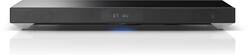
Sony - 2.1-Channel TV Sound System with Dual Built-In Subwoofers - Black
- General
- Product Name: 2.1-Channel TV Sound System with Dual Built-In Subwoofers
- Brand: Sony
- Model Number: HTXT1
- Audio
- Peak Power Handling: 170 watts (The maximum amount of power an electronic device, like a speaker, can handle without damage. This refers to short bursts of power, while root mean square (RMS) power handling indicates the amount of continuous power a device can sustain. Higher levels of distortion can also occur at peak power levels when the device is powered beyond its recommended usage.)
- Dimensions
- Product Height: 2.83 inches (The out of box height of the item. Height is measured as the vertical distance from the bottom of the item to the top as it would be primarily used or placed.)
- Product Width: 28.35 inches (The out of box width of the item. Width is measured as the horizontal distance from one side of the item to the other as it would be primarily used or placed.)
- Product Depth: 12.20 inches (The out of box depth of the item. Depth is measured as the distance from the front of the item to the back as it would be primarily used or placed.)
- Product Weight: 17.64 pounds (The out of box weight of the item.)
- Certifications Listings & Approvals
- ENERGY STAR Certified: false (Devices carrying the ENERGY STAR service mark, such as computer products and peripherals, kitchen appliances, and other products, generally use 20% to 30% less energy than required by federal standards.)
- Other
- UPC: 027242873223
Designed for use with most 32" to 55" TVs, this Sony HTXT1 sound system's integrated full-range speakers and dual built-in subwoofers enrich your favorite TV shows, movies and games. The 170W S-Master amplifier effectively powers the unit.
- 170W total system power (35W x 2; 100W subwoofers): Delivers rich, high-quality sound to complement your 32" to 55" TV. The tempered-glass top surface provides a durable, stable surface for your TV (supports up to 66 lbs.).
- Integrated full-range speaker system: Includes 1-3/8" x 3-1/8" oval cones, so you can enjoy crisp, strikingly realistic sound.
- Dual built-in active, down-firing subwoofers: With 3-9/10" drivers, plus a powerful S-Master amplifier, deliver thunderous, heart-pounding bass.
- S-Force PRO technology: Creates a virtual surround sound effect, making it easy to become immersed in your media.
- DTS and Dolby Digital decoders: Along with DTS-HD, DTS 96/24, Dolby Digital Plus and Dolby TrueHD decoders enhance acoustic quality.
- Bluetooth technology: With built-in SBC and AAC codec support enables you to wirelessly stream music stored on select cell phones, tablets and audio devices. NFC (near-field communication) technology allows one-touch pairing.
- 7 selectable sound modes: Allow you to choose a mode that best suits your media, including movies, music, sports and games. The ClearAudio+ setting offers automatic sound adjustments.
- Independent bass, treble and subwoofer levels: Make it easy to customize audio output. The selectable voice control adjustments help you hear every whisper and spoken word in clear detail.
- Inputs: Include 3 HDMI, 1 optical and one 1/8" stereo auxiliary.
- Outputs: Include 1 HDMI.
- Supports 3D and 4K pass-through: So you can enjoy ultrarealistic images when connected to a compatible display.
- SongPal app (download required, additional fees may apply): Lets you use a compatible Android device or Apple® iPhone® or iPod® to remotely control the system.
Whats Included
- Sony 2.1-Channel TV Sound System with Dual Built-In Subwoofers
- Wireless multifunction remote (RM-ANU207)
- 4.9' optical cable
- Owner's manual
Q: Do I need to buy a cable to connect with TV or is one in the box? If I need to buy one, which one?
A: Hello Teresa, thank you for your message. In regards to your question, the only supply accessory in the box is the remote commander for this particular Sound Bar. To hook it up into a TV would depend of the available ports that your TV has. These are the ports available on the Sound System with Dual Built-in Subwoofers: Digital Optical IN / Analog IN/ 3 HDMI IN jacks / 1 HDMI OUT (ARC). All of the previous ports would let you make a connection between both units (TV & Sound Bar). I kindly share with you the marketing specifications: https://docs.sony.com/release/specs/HTXT1_mksp.pdf . Best regards, Oscar.
Q: Complete Dimensions of Sound System
A: Hi, Dimensions (Approx.) : 28.375 x 2.875 x 12.25 inches (720 x 72 x 310 mm) Thanks. >Joffrey
Q: compatible with tv's other than Sony
A: You should be fine. This unit supports up to 66 lbs. Just don't drop your TV down on it. Gently place it...
A: Hello, thank you for your message. In regards to your question, these are the following available ports: HDMI/ Optical IN/ Audio IN. For more information, check this link: https://docs.sony.com/release/HTXT1_EN_ES_FR.pdf. Best regards, Oscar.
Q: Can the basic functions, etc changing channels and volume, be programed into a comcast remote.
A: Yes! You can program this soundbar to a Comcast/Xfinity remote. Just look up the digit code for the manufacturer (it IS included on the list in Comcast's remote control user guide) and follow the steps in the user guide provided by Comcast to program it as an AUX device. It will power on and off and adjust volume through the Comcast remote. (I think you press Aux, hold "setup" until the light blinks, enter the digit code, and Aux blinks twice if correct (I believe). Easy, takes 20 seconds.
Q: Wobbliness?
A: My question to you is, what surface are you placing the sound base on? My unit is extremely stable. It sits atop my bedroom dresser. The 4 feet have rubber pads preventing them from slipping and when the weight of the TV is on the unit, it adds even more stability. It will not move without considerable effort. Your surface must be level. If your unit is defective, send it back for a replacement.
Q: Headphone Bluetooth compatibility
A: Hello Juno, thank you for your message. A profile is a standard that defines the specifications of the devices to be connected and the communication protocols used between them. Communication using Bluetooth wireless technology requires the devices connected have the same profile. IMPORTANT: Not all Bluetooth® devices are compatible with all profiles. Check the specifications of both devices you are attempting to connect via Bluetooth to ensure they both support the required Bluetooth profile. Communication system BLUETOOTH Specification version 3.0 / Compatible BLUETOOTH profiles) A2DP (Advanced Audio Distribution Profile) / AVRCP 1.3 (Audio Video Remote Control Profile). For more information, check the link below: https://us.en.kb.sony.com/app/answers/detail/a_id/30414. -Oscar.
Q: CAN IT BE USED AS A COMPUTER SPEAKER?
A: I'm able to get sound from it using the HDMI ports. I actually have my computer displayed on my TV so it's an easier setup for me but if your computer and monitor support HDMI, then you should be able to use this sound bar.