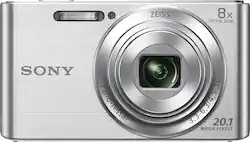
Sony - DSC-W830 20.1-Megapixel Digital Camera - Silver
- Key Specs
- Image Sensor Size: Other
- Effective Pixels: 20.1 megapixels (The actual number of pixels which make up the viewable image.)
- General
- Product Name: DSC-W830 20.1-Megapixel Digital Camera
- Brand: Sony
- Model Number: DSCW830
- Color: Silver
- Digital Camera Type: Point and Shoot Cameras
- Imaging
- Image Sensor Type: CCD (CCD and CMOS are the two main technologies used in image sensors. CCD, the older of the two types, turns analog light signals into digital pixels. This conversion happens without distortion, resulting in high-quality images. Newer CMOS sensors use transistors at each pixel to move electrical charges. CMOS sensors are typically less expensive, but also require more light to create distortion-free images.)
- Image Sensor Size: Other
- Total Pixels: 20 megapixels (Generally, the more pixels, the higher the image resolution and the finer the detail that can be seen.)
- Image Resolution (Display): 5152 x 2896 (Refers to the number of pixels, both horizontally and vertically, used to either capture an image or display it. The higher the resolution the finer the image details.)
- Zoom Capability: true (This function allows for magnification of the subject.)
- Digital Zoom: 32x (A digital zoom is accomplished electronically, with no adjustment of the camera's optics, and no optical resolution gained in the process. The existing data is not enhanced or added to, merely displayed at a lower resolution, thereby giving an illusion of an enlarged image.)
- Optical Zoom: 8x (The optical zoom uses a combination of lenses that magnify the image prior to it being registered at high resolution by the imaging sensor.)
- In-Camera Image Stabilization: false (This feature helps reduce image blurring from camera motion. In-camera stabilization means the image sensor itself moves to counteract detected motion.)
- Low Light/High Sensitivity: true (High sensitivity digital imaging devices are designed to work in low light conditions to produce a high dynamic range image.)
- Image File Format(s): JPEG (Standardized software format(s) of storing digital images. The type of format chosen for capturing and compressing the image can determine quality, level of detail, and storage space required.)
- Focus
- Autofocus: true (Allows the camera to automatically focus through the lens, rather than by adjusting the lens manually.)
- Eye Autofocus (Eye AF): false (Automatically seeks out and focuses on the subject's eye and holds it as the camera and subject move and as the photographer shoots at high frame rates.)
- Exposure Control
- Shutter Speeds: iAuto: 2 - 1/1600 sec.; Program Auto: 1 - 1/1600 sec. (The length of time the shutter remains open when the shutter release is activated, expressed in fractions of seconds. The longer the shutter is open, the more light that is able to be captured by the camera sensor.)
- Brightness Control: true (Allows the camera to adjust the brightness of a captured image for optimal exposure.)
- Burst Mode: true (Also referred to as continuous shooting. This feature captures multiple shots in rapid succession.)
- Burst Rate: 1 frames per second
- Self Timer: true
- Shooting Modes: High sensitivity, soft snap, soft skin, landscape, night portrait, night scene, gourmet, beach, snow, fireworks and pet (Exposure modes employed by the photographer to control the optimal aperture, shutter speed, ISO, and other settings for capturing specific subjects/scenes. Examples include Aperture-Priority, Macro, and Manual modes.)
- Panorama Mode: true
- White Balance Modes: Auto, daylight, cloudy, fluorescent 1 (white), fluorescent 2 (natural white), fluorescent 3 (day white), incandescent, flash, one push, one push set (Settings that calibrates how the color white is rendered in an image/video, reducing the appearance of unnatural contrasts caused by various light sources.)
- Effective Pixels: 20.1 megapixels (The actual number of pixels which make up the viewable image.)
- Lens
- In-Lens Image Stabilization: false (This feature helps reduce image blurring from camera motion. Lens stabilization means an element within the lens moves automatically to counteract detected motion.)
- Flash
- Flash Modes: Automatic, Off, Slow sync (The flash feature emits light to increase the brightness of a subject in dimly lit environments. Common modes include Auto and Red-Eye Reduction.)
- Integrated Flash: true
- Display
- Display Type: LCD
- Screen Size: 2.7 inches (Size of the screen, measured diagonally from corner to corner.)
- Viewfinder Type: Electronic (A viewfinder is the part of a camera (or attachment) that allows you to see and focus a scene in frame. Optical viewfinders let you view the scene directly through the lens. Electronic viewfinders display the image on a screen in its approximate final form.)
- Touch Screen: false (Touch-screen devices make navigating more intuitive. Using a touch-screen display, you can do things such as tap to select, hold and drag to move items, swipe to scroll, and pinch to zoom.)
- Varying Angle Screen: false (The camera's screen can be flipped out and adjusted to rotate, tilt, and/or swivel.)
- Video
- Maximum Video Frame Rate: Up to 30 fps (The maximum frequency at which consecutive images can be captured by a video recording device.)
- HDR Mode: false (HDR Mode uses multiple photos taken at different exposures to add more dynamic range to photographs. HDR technology displays content with greater contrast between bright and dark, resulting in clearer and more lifelike images.)
- Slow Motion Recording: false
- Compatibility
- Tripod/Monopod Mountable: true (A support function that allows the device to be mounted to monopods and tripods for leveling and stability.)
- Memory Card Compatibility: Memory Stick PRO Duo, Memory Stick Micro, microSD, Secure Digital, Secure Digital Extended Capacity (SDXC), Secure Digital High Capacity (SDHC) (The type of memory card(s) recommended for use with the product.)
- Remote Compatible: false
- Features
- Face Detection: true (A function that automatically detects human faces and then sets focus and appropriate exposure to capture them.)
- Integrated GPS: No
- Records Audio: true
- Connectivity
- Wireless Connectivity: None (The manner in which a device sends data to another device over a short distance without the use of wires or cables.)
- Output(s): USB
- Microphone Input: false (The device features an input for connecting an external microphone.)
- Headphone Jack: false (The device features an interface that allows for the connection of headphones.)
- PictBridge Enabled: false (PictBridge allows digital cameras, camcorders and other image capture devices to connect and print directly to photo printers and other output devices without using a computer.)
- Power
- Rechargeable Battery: true
- AC Adapter Compatible: true (The device is able to be charged using an external power adapter which meets input and output voltages specified by the manufacturer.)
- Removable Battery: true
- Battery Model: NP-BN (The model number of the battery necessary for operation of the device.)
- Included
- Camera Bag/Case Included: false
- Batteries Included: true (Indicates whether the product comes with the required batteries for its operation.)
- AC Adapter Included: true (An external power adapter is included for operation.)
- Memory Card Included: false (Indicates whether a memory card is included.)
- Dimensions
- Product Height: 2.1 inches (The out of box height of the item. Height is measured as the vertical distance from the bottom of the item to the top as it would be primarily used or placed.)
- Product Width: 3.7 inches (The out of box width of the item. Width is measured as the horizontal distance from one side of the item to the other as it would be primarily used or placed.)
- Product Depth: 0.9 inches (The out of box depth of the item. Depth is measured as the distance from the front of the item to the back as it would be primarily used or placed.)
- Product Weight: 0.25 pounds (The out of box weight of the item.)
- Other
- UPC: 027242876965
With Optical SteadyShot image stabilization, this 20.1-megapixel Sony DSC-W830 digital camera allows you to take crisp, blur-free pictures, even with shaky hands. The high-definition movie mode lets you preserve special moments in vibrant 720p resolution. . .
.
- 20.1-megapixel, 1.7" Super HAD CCD sensor: Captures high-resolution images up to 5152 x 2896 pixels.
- 8x optical/up to 32x digital/up to 256x total zoom: Through a Carl Zeiss Vario-Tessar lens for precise zooming and accuracy.
- 2.7" LCD: Provides a clear view, so you can easily compose and review your shots.
- High-definition movie mode: Allows you to record smooth, detailed video clips in 720p resolution.
- Optical SteadyShot image stabilization: With Active mode reduces image blur caused by camera shake and vibration, so you can take crisp, steady shots. ISO up to 3200 for improved image capture in low-light conditions.
- Scene modes: Include high sensitivity, soft snap, soft skin, landscape, night portrait, night scene, gourmet, beach, snow, fireworks and pet to accommodate various shooting scenarios. Sweep Panorama mode lets you capture expansive landscapes.
- Burst mode: Allows you to capture up to 100 shots at 1 fps and 16.1MP resolution for dynamic, fast-action shooting. Face detection recognizes up to 8 faces, so you can take high-quality pictures of friends and family members.
- Auto mode: Automatically optimizes camera settings for improved image capture in a wide range of shooting conditions.
- White balance modes: Include auto, daylight, cloudy, fluorescent 1 (white), fluorescent 2 (natural white), fluorescent 3 (day white), incandescent, flash, one push and one push set to help achieve natural tones in various lighting conditions.
- Advanced flash mode: Illuminates distant subjects, so you can take properly lit photos.
- Built-in picture and beauty effects: Allow you to enhance your images by adjusting skin tone and text, whitening teeth and more.
- Autofocus: Lets you focus as close as 2", so you can take up-close photos of subjects in clear, sharp detail.
- Multicard slot: Supports Secure Digital, Secure Digital High Capacity, SDXC and Memory Stick PRO Duo memory cards (not included). Also supports Memory Stick Micro and microSD memory cards with select adapters (not included).
Whats Included
- Sony DSC-W830 20.1-Megapixel Digital Camera
- Rechargeable lithium-ion battery
- Multi-USB cable, AC adapter
- Owner's manual
Q: Does this come with a wrist strap?
A: Yes it is included. Look at the back view screen and on the right side of camera look for the charging port. Right below this is a slit. Feed the loop of wrist strap into it and pull it out from the other end of slit and the loop it together for use.
Q: Does this come with the batter charger?
A: Yes it does.
Q: Is there a memory card come with camera
A: Hi, here are the supplied accessories: -Battery (NP-BN) -AC Adaptor (AC-UB10) -Multi USB Cable -Wrist Strap -Instruction Manual Dave
Q: Can you download photos with a USB cord to your computer?
A: Yes, you absolutely can add photos from the USB to your computer.
Q: What is the price of this camera?
A: 89.99 as a price match
Q: Why does it take so long to see the picture you just took?
A: I suspect that you are saving LARGE images. Check. It takes time to get these into your camera memory. SIZE is issue #1. Second, you might be using a "slow" memory chip. Today's large images encourage the use of fast chips, with upload speeds of 60mb/s or higher. I have most images from this camera at ~7MB/image. I use chips with speeds of 60mb/sec. SPEED is issue #2. You can set the JPEG compression to a higher compression, smaller saved image, and you can use faster chips. The camera performance will improve if you do those. Check out the recommendations on the $2000 DSLR and they sortof explain this.
A: Hi Lia, The Sony DSCW830 has an automatic lens cover. -Anthony
Q: can you charge the camera battery via USB from a computer?
A: Yes, the battery can be charged from a computer using USB connection.