- Key Specs
- Display Type: LED
- Screen Size Class: 65 inches (The group size measurement of a screen. This differs from a screen size measured diagonally from corner to corner.)
- High Dynamic Range (HDR): true (An HDR-compatible 4K TV or other HDR-compatible product displays HDR video content when it's available from sources like 4K Ultra HD Blu-ray Discs and 4K streaming services.)
- High Dynamic Range Format: Dolby Vision (There are a few HDR formats that tell the TV or other HDR-compatible product how to best utilize its capabilities to display HDR content. HDR technology can support one or multiple formats, each with various benefits to picture quality.)
- Refresh Rate: 240Hz (The number of frames per second the device can produce natively without enhancement. Higher rates help produce smooth, seamless pictures.)
- Motion Enhancement Technology: Clear Action 960 (Proprietary technologies produced in addition to the Refresh Rate that smooth out faster moving pictures to reduce blur and pixelation.)
- General
- Brand: VIZIO
- Model Number: P65-C1
- Dimensions
- Product Height With Stand: 35.39 inches
- Product Width: 57.44 inches (The out of box width of the item. Width is measured as the horizontal distance from one side of the item to the other as it would be primarily used or placed.)
- Product Depth With Stand: 11.26 inches
- Product Height Without Stand: 32.99 inches
- Product Depth Without Stand: 2.54 inches
- Product Weight With Stand: 62.39 pounds
- Product Weight Without Stand: 61.4 pounds
- Display
- Display Type: LED
- Screen Size: 64.52 inches (Size of the screen, measured diagonally from corner to corner.)
- Screen Size Class: 65 inches (The group size measurement of a screen. This differs from a screen size measured diagonally from corner to corner.)
- High Dynamic Range (HDR): true (An HDR-compatible 4K TV or other HDR-compatible product displays HDR video content when it's available from sources like 4K Ultra HD Blu-ray Discs and 4K streaming services.)
- High Dynamic Range Format: Dolby Vision (There are a few HDR formats that tell the TV or other HDR-compatible product how to best utilize its capabilities to display HDR content. HDR technology can support one or multiple formats, each with various benefits to picture quality.)
- Curved Screen: false
- Refresh Rate: 240Hz (The number of frames per second the device can produce natively without enhancement. Higher rates help produce smooth, seamless pictures.)
- Motion Enhancement Technology: Clear Action 960 (Proprietary technologies produced in addition to the Refresh Rate that smooth out faster moving pictures to reduce blur and pixelation.)
- Language(s) Displayed: English, French, Spanish (The available language options for displayed text or captions.)
- Features
- Remote Control Type: Smart Touch
- Smart Capable: true (Smart, or smart-capable devices are able to connect directly to your home network in order to stream content from the Internet, run Internet-based apps, or connect to other smart devices.)
- TV Tuner: Not included (The ATSC TV Tuner is a component built into conventional TV sets or other devices for receiving over-the-air broadcast TV without a cable/satellite box. Digital tuners may be purchased separately and connected to a device if it does not have one built in.)
- Connectivity
- RF Antenna Input: false (This input is used to connect devices such as antennas or cable boxes to a TV via a coaxial cable.)
- Number Of USB Port(s) (Total): 2 (The total number of USB ports including all generations and versions.)
- Compatibility
- VESA Wall Mount Standard: 400mm x 400mm (VESA wall mount standards refer to the spacing of screw holes built into a TV in order to fit with standard TV wall mounts. These standards are implemented into most TVs and monitors.)
- Audio
- Built-In Speakers: true
- Surround Sound Supported: DTS Studio Sound (Surround sound systems use multiple audio channels and speakers to create an immersive sound experience for the listener. There are also various proprietary technologies that imitate this kind of sound via a device's built-in speakers or soundbar.)
- Speaker Output: 10 watts
- Power
- ENERGY STAR Certified: false (Devices carrying the ENERGY STAR service mark, such as computer products and peripherals, kitchen appliances, and other products, generally use 20% to 30% less energy than required by federal standards.)
- EPEAT Qualified: false (The Electronic Product Environmental Assessment Tool (EPEAT) was designed to provide an environmental assessment tool for purchasers. In order to qualify for EPEAT, a product must meet all 23 required criteria.)
- Included
- Stand Included: true
- Warranty
- Manufacturer's Warranty - Parts: 1 year
- Manufacturer's Warranty - Labor: 1 year
- Box Dimension
- Height: 37.28 inches
- Width: 66.54 inches
- Depth: 8.58 inches
- CubicDimension: 21284 inches
- Other
- UPC: 845226013027
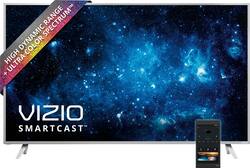
LED 4K Ultra HD Home Theater Display: Change the way you experience home entertainment with this VIZIO P-series 4K smart Home Theater Display. The UHD picture quality and 65-inch screen size combine with DTS StudioSound for a rich visual and audio combo. The powerful V6 six-core processor of this VIZIO P-series 4K smart Home Theater Display lets you stream UHD from apps such as Netflix smoothly.
- Tuner-Free Home Theater Display: Play content from cable and satellite set-top boxes, game consoles, Blu-ray players and more. If you use an external antenna to watch local over-the-air broadcast TV signals, a TV tuner is required.
- 64.52" screen (measured diagonally from corner to corner): A great size for a living room or mid-sized home theater space.
- VIZIO SmartCast app: To access available smart content on your Home Theater Display, download this free app to a compatible smartphone or tablet. It also turns that device into a powerful Smart Touch remote.
- Chromecast Built-in: In order to cast your favorite shows, movies, music and more, you must download the Google Cast app and use your compatible mobile device along with cast-enabled apps to send content right to your Home Theater Display.
- Works with Google Home powered by the Google Assistant: Stream your favorite entertainment using just your voice. Turn up the volume, play your favorite show, or stop the music - all without having to raise a finger.
- 2160p resolution for breathtaking HD images: Watch 4K movies and TV shows at 4x the resolution of Full HD, and upscale your current HD content to gorgeous, Ultra HD-level picture quality.
- High dynamic range (HDR) creates a more realistic picture: With support for Dolby Vision content get a vividly different visual experience, HDR elevates picture quality with amazing brightness, extremely high contrast, and captivating color.
- Extremely high contrast with deep black levels and vibrant details: LED backlighting with enhanced brightness performance and 128 Active LED Zones provides deep, rich black levels and accurate contrast levels with astonishing bright detail.
- Clear Action 960 for smooth action scenes: Enjoy fast-moving movies, sports and video games with virtually no motion blur.
- 6" Android™ Tablet Remote with Wireless Charging Station: Preinstalled with the VIZIO SmartCast app that puts you in control of your entertainment like never before with simple tap, swipe and voice-based commands.
- Spatial Scaling Engine: Beautifully transforms HD and Full HD content to spectacular 4K Ultra HD resolution.
- Full-Array LED backlight: Evenly distributes LEDs across the screen's backlight delivering superior light uniformity, color consistency, and astonishing bright detail.
- Ambient Light Sensor: Intelligent backlight sensors automatically adjust to surrounding brightness for a great picture in virtually any level of lighting in the room.
- DTS Studio Sound: Advanced virtual surround sound audio from the TV's two built-in speakers.
- 5 HDMI inputs for the best home theater connection: High-speed HDMI delivers a full 2160p picture and digital surround sound in one convenient cable. 6' HDMI cable included.
Whats Included
- 6" Android™ Tablet Remote with Wireless Charging Station
- 6' HDMI cable
- VIZIO 65" Class (64.52" Diag.) - LED - 2160p - with Chromecast Built-in - 4K UHD Home Theater Display with High Dynamic Range
- VIZIO Smart Touch Remote Control
Product Manuals
Q: How do you get 4k Netflix with Google Cast?
A: Google Cast and Chrome cast cannot be used interchangeably. ChromeCast is a piece of hardware developed by google as a cheap casting device. Google Cast is the software that runs the hardware, but a Chromecast is not required to use it. Yes, Chrome Cast hardware is limited to 1080p. But the Google Cast software does not share this limitation. Hope this helps clear things up a bit.
Q: how wide is the stand base?
A: Distance Between Stands (inner)46.81" Distance Between Stands (outer)49.96"
A: Hello I own this TV and am a Twitchy gamer and bought this t.v. researching only low input lag tvs. I use to own the Sony w802a top rated input lag TV. Always this P-Series 65 inch is incredibly fast for all 5 Hdmi inputs.. All inputs can handle 4k as well.. I have my PS4 in Input 5 and Xbox One in Input 1. I also own a Benqrl27HM 1gtg input lag. This TV you will not have a problem playing fast paced fps games.. Also let it be known that when in Game Low Latency Mode the picture quality doesn't distort at all.. This is a Must own 4k HDR Dolby Vision Set for Gamers.. 65 Inch and 75 Inch are VA Panels. I own the 65 Inch and its a Agressive Gaming TV for FPS Gamers like myself. Halo 1 and Blackops 1 and 2, and Halo 5/ NBA2k16
A: It's useful for finetuning the display and other setting while still watching your content, so you can see the changes happen while you adjust. You can use it to 'Cast' whatever is on the tablet (Netflix, Hulu, YouTube, etc) to the TV. If you are watching cable/satellite, then don't use the tablet, or use the tablet to surf the Internet while you watch cable.
Q: Do I need hdmi 2.0 cables to enable HDR?
A: Honestly, there is no such thing as HDMI 2.0 cables, only a new "Premium" certification that few cables have. After tons of research and trying a number of cables, just use a 6 foot or shorter and thick "High Speed" cable and you will be fine.
A: Yes, there is an optical out (I'm using it).
Q: does this tv currently support both versions of HDR?
A: As of the most recent software update which I got this week, the answer is "yes"
A: It upscales everything automatically, otherwise the picture wouldn't take up the whole screen. You can play with the sharpness setting if the upscaled image looks too "soft" but don't turn sharpness up too much or it will make it look worse.