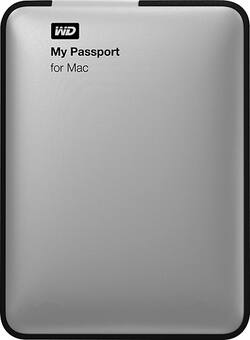
WD - My Passport for Mac 1TB External USB 3.0 Portable Hard Drive - Silver
- Key Specs
- Storage Capacity: 1000 gigabytes (Measured in megabytes (MB), gigabytes (GB) and terabytes (TB), this is the amount available for storing files, music, movies, photos and more. The total includes the capacity of the hard disk drive and solid state drive if both are included on the computer.)
- Storage Drive Type: HDD (Traditional, mechanical hard disk drives are the most common type of storage because they're relatively inexpensive and offer huge capacities. However, they also generate both noise and heat. Solid state drives, also known as SSDs, are many times faster than hard disk drives and have no moving parts to wear out, but typically offer less capacity for the same price.)
- Interface(s): USB 3.0 (Refers to the types of connections that devices use to interact and communicate with each other.)
- General
- Product Name: My Passport for Mac 1TB External USB 3.0 Portable Hard Drive
- Brand: WD
- Model Number: WDBLUZ0010BSL-NESN
- Capacity
- Storage Capacity: 1000 gigabytes (Measured in megabytes (MB), gigabytes (GB) and terabytes (TB), this is the amount available for storing files, music, movies, photos and more. The total includes the capacity of the hard disk drive and solid state drive if both are included on the computer.)
- Performance
- Storage Drive Type: HDD (Traditional, mechanical hard disk drives are the most common type of storage because they're relatively inexpensive and offer huge capacities. However, they also generate both noise and heat. Solid state drives, also known as SSDs, are many times faster than hard disk drives and have no moving parts to wear out, but typically offer less capacity for the same price.)
- Compatibility
- Internal Or External: External
- External Hard Drive Type: Portable (Physical characteristics of the hard drive, including size, weight and how you connect to your device.)
- Interface(s): USB 3.0 (Refers to the types of connections that devices use to interact and communicate with each other.)
- Minimum System Requirements: Mac: OS X Lion or Mountain Lion
- Features
- Security Features: Password Protection
- Dimensions
- Product Height: 0.6 inches (The out of box height of the item. Height is measured as the vertical distance from the bottom of the item to the top as it would be primarily used or placed.)
- Product Width: 4.4 inches (The out of box width of the item. Width is measured as the horizontal distance from one side of the item to the other as it would be primarily used or placed.)
- Product Weight: 4.8 ounces (The out of box weight of the item.)
- Included
- Included Software: WD Security, WD Drive Utilities
- Other
- UPC: 718037814285
Take up to 1TB of files on the go with this WD My Passport for Mac external hard drive, which features password protection and hardware encryption to protect your data. The USB 3.0 interface simplifies connection to your MacBook® or MacBook Air®.
- 1TB storage capacity: Offers ample space for your photos, music, movies, games and more.
- USB 3.0 interface: Enables simple connectivity.
- Data transfer rates up to 480 Mbps: For a quick response when updating files.
- Password protection and hardware encryption: Help keep sensitive data private.
- Sleek, compact design: Makes it easy to take the drive on the go.
- Compatible with Mac: For use with your existing computer. Also compatible with Apple® Time Machine.
Whats Included
- Owner's manual
- USB cable, WD Security and WD Drive Utilities software
- WD My Passport for Mac 1TB External USB 3.0 Portable Hard Drive
Q: Is this drive compatible with Yosemite?
A: Yes it works flawlessly with Yosemite, plugged it in and it was instantly recognized and I was even asked if I wanted to use it for Time Machine. That is my primary use for this drive as a Time Machine back up, works GREAT no issues at all.
A: There will not be a pouch in the contents of the box. The cases are usually nearby at Best Buy, and aren't that expensive. If you are going to be fairly mobile, you'll want a case to just throw the hard drive in your back pack. You can use the hard drive with a PC as well, but it requires a few minutes with disk utility to reformat the hard drive. You can choose a format that works for both, or, and I recommend this, you can partition the hard drive and format each partition for the operating system you choose. Your Mac of course will be able to see both. The PC will only see the partition that is formatted for PCs. I did this before naming the Mac side the "Good side" and the PC side the "Bad Side" kind of referencing the Force from Star Wars.
Q: Can this be used for Time Machine out of the box or do I need to reformat?
A: Can be used by Time Machine out of the box.
Q: is this drive compatible with usb2
A: Western Digital external hard drives are backwards compatible with USB 2.0. It will work fine, just expect a slower data transfer rate than USB 3.0.
Q: I saw it said it's compatible with a Macbook and Macbook Air. What about a Macbook Pro?
A: Yes it is compatible with both MacBooks and pros
Q: Will this work on a 5 yr old iMac running Yosemite?
A: Backward compatible with USB 2. Should work.
Q: does this have Drag-and-drop file management?
A: yes. drag and drop friendly