Rating 4.4 out of 5 stars with 82 reviews
4.4- Ease of use (20)
- Pain Relief (16)
- Wireless (12)
- Battery Life (7)
- Intensity (6)
- Power (3)
Customer Images
The vast majority of our reviews come from verified purchases. Reviews from customers may include My Best Buy members, employees, and Tech Insider Network members (as tagged). Select reviewers may receive discounted products, promotional considerations or entries into drawings for honest, helpful reviews.
- Rated 5 out of 5 stars
AccuRelief Provides Real Pain Relief
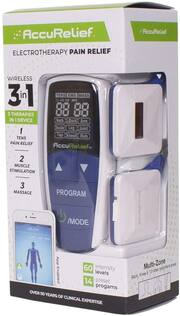
Over the years I have broken both wrists, had golfer’s elbow with several Cortisone shots (including a PRP injection), Neck surgery, a broken jaw and severely sprained ankles. I am no stranger when it comes to pain and pain relief. Whether the pain relief comes from a sports trainer, doctor or chiropractor, it’s always a process. Thankfully science has progressed to help people with injuries to heal and to become pain free. Over the years I have had professional and over-the-counter TENS/EMS treatment on sprained ankles, knots in my neck, knots in shoulder and lower back. Do these TENS machines work to relieve pain and improve your quality of life? The short answer is yes, over time they help the body heal. The over-the-counter AccuRelief 3-n-1 TENS/EMS machine is particularly advanced and loaded with features from the App or remote to promote a better feeling body. • Use any combination of the AccuRelief TENS/EMS or massage from the machine to achieve relief of pain from the shoulders, neck, knee, back, arms, hands, and/or feet. I used the AccuRelief machine on my lower back and shoulders. I was surprised how strong the electronic pulses were. I actually backed off the initial intensity I had set this from the TENS machine. This is by far the strongest TENS device I have used (I was really surprised because it was over the counter!) • The AccuRelief package includes: 4 adhesive gel pads, a USB charging cable, 2 AAA batteries, a built-in rechargeable lithium battery, a remote control and two chargeable Electrodes connected by a wire. You will need to charge up the Electrodes from the mini-USB port to a USB Type A port with the included cable. It took me around 3 hours to charge completely. You will need to do this to get in a 30 min program. Also included in this package is a quick start guide that maps out exactly how to use the App and/or the remote with the Electrodes attached to gel pads (replace them when they are no longer sticky – use is about 30 times). After charging the Electrodes and before you pair with the App or use the remote, make sure your skin is clean for the best connection from the gel pads. Although it is not necessary, I would suggest you at least look over the quick start guide over. It will help make a lot of sense with the rest of the process in using the AccuRelief TENS/EMS device. • TENS stands for “transcutaneous electrical nerve stimulation” and EMS stands for “electrical muscle stimulation”. What does that mean for you? TENS applications try to block tense and painful areas on the body. EMS applications help muscles heal and recover after an injury or just after a workout. The last phase of the AccuRelief is tight relief for muscles (massage). • Great News! The AccuRelief device is wireless and uses Bluetooth for a connection from the app or remote. I use the app on my iPad and it provides so many ways to control alleviating pain or to restore tired muscles. If you are not able to access the App, use the included remote. • Overall, there are 14 preset programs with 60 levels of intensity lasting up to 30 minutes. I would suggest you find a quiet place and just let the program run its course for any type of pain relief or massage. I watched some TV, and the time flew by while receiving treatment. • The 3 Therapy modes from AccuRelief are as follows: 1.TENS – electric pulses enable the body to release natural endorphins to block pain: 6 presets. I found that this particular setting provided pretty intense electric pulses, and I did feel better after the program. 2.EMS – electric pulses that cause muscles to contract, getting a physical workout: 5 presets. For me, the EMS worked well on those areas that are hard to exercise and need strength, like the elbow or back of the knee. This was not as intense as the TENS program. 3.Massage – these electronic pulses cause muscles to relax and loosen providing relief. There are 3 presets in this mode. I felt this was the probably best solution for me because my aches and pains continually went away the longer, I was in this program. • To use the AccuRelief TENS machine, make sure the electrodes are charged (the one Electrode with the mini-USB connection which is tough to open), then attach to the gel pads. The gel pads are great because they really conform to your body, giving you the best chance at pain relief. After that step, if you are using the App pair up the electrodes (turn on the Electrode with the sync button on top) with your Bluetooth electronic device (phone, iPad etc). • The color of the sync button on top of one Electrode is important. Blinking Green – you are on standby and ready to pair Steady Green light – The AccuRelief is connected, ready to use Steady Orange – Battery is charging Blinking Orange – Device is unpaired • Once you know how to pair the Electrodes with the App or remote, find the program that best suits your needs and turn it on! In the App, maps of the body show where to position the gel pads. You can also adjust the intensity, see the timing of the program and control the power or stoppage of the electric flow. Some very helpful and fun graphics made the App my favorite choice. (Although you can still use the remote) The TENS, EMS or massage will have electric pulses flow to the electrodes from the App or remote. If you are done before the program runs its course, just turn off Bluetooth to unpair (App), or turn off remote. We live in a culture of medications for pain or hurting muscles, etc. I am glad to see the AccuRelief TENS device uses no medication to help ease pain, rest sore muscles or help mobility. The wireless electronically controlled pulses from this device really make a difference in your overall health. It can help keep your body stay mobile, have a reduction in pain and have less muscle tension. The AccuRelief TENS/EMS machine is small enough to take on the go for vacation or other travel. The AccuRelief device is a great product and is keen for your body’s health as well.
Posted by stoptheclocks
- Rated 5 out of 5 stars
Comfort and relief from home
The AccuRelief wireless 3-in-1 unit has turned a trip to the chiropractor into a pain therapy session from your own privacy. Out of the box comes the wireless remote, 2 electrodes, 4 gel pads, a charging cable, and setup guides and therapy instructions. If you are not familiar or new to these units, I would recommend reading thoroughly through the instruction guide. It is detailed and includes all the do's and don'ts. You can also download the AccuRelief 3-in-1 app to control the electrodes from your phone. While your reading the instructions, you will need to plug the electrodes in using the charging cable provided. This unit does not come with the wall plug. The charging time is about 2 hours, and gives about 4 hours of use. The battery out of the box is almost fully depleted so it will have to be charged fully first. Setting up and connecting is easy. The remote takes 2 AAA batteries which are included in the package. You can only connect to either the remote, or your mobile device at one time, you are not able to use both at same time. It is easy to adjust on the remote which area you are working on, and adjusting the intensity. Once you adjust the intensity, the 30 minute timer will start. Intensity level is 1-60. The package includes a guide for pad placement for each area you are needing to work on. The kit comes with 4 gel pads, and they peel easy off the sheet, and are reusable many times each one so 2 pads will last quite a while. Removing from the body after use and applying back to the plastic sheet is super easy and smooth coming off the body. The unit comes with 3 modes of operation. Tens, ems, and massage. It is easy to switch between the 3 and get the correct therapy you are needing. Overall the unit works very well and provides great relief and relaxation for muscle pains or joint pains. It is easy to contol and setup, but again, would recommend fully reading through the instructions because it is possible to get hurt using this. I would highly recommend.
Posted by ViableData
- Rated 5 out of 5 stars
Great for pain relief.
I have chronic pain all over my body. I have herniated discs from athletics injuries and now arthritis in my older age. So I am no stranger to pain. I have owned TENS products so this product is not unfamiliar to me to use. Setup Easy to setup via mobile android app Remote was easy too Charged pretty quick Battery life was good I am on use number 5 and the battery has not died yet Size and form factor Nice compact size. The TENS unit has 2 electrodes which is ok. I wished you could kook up more than just 2. But that is one of the selling points is that it has a small form factor Android app Is easy to to use and control. TENS pads Easy to use. They send extra pads so that is nice in case you drop one on the ground or it looses it's stickiness Overall, nice product. I would recommend this product to help with various pain relief. Make sure you don't use it too long as it can irritate your skin and cause a break out.
Posted by PhilB
- Rated 5 out of 5 stars
Great Device for those Nagging Everyday Pains
I have used a TENS unit for many years now, I used to play a lot of sports and as you get older the muscles and joints tend to wear down and cause discomfort. I have been to Physical Therapy for Knees, Back, Neck and Shoulder. PT works great while you’re going but insurance usually doesn’t cover it long term. One of the first things that the Therapist would do is start my session with 20 minutes on a Tens Machine, whether it was for my Knee, Back or Neck this is how it all started. But as I stated Earlier you feel better as long as your going, but when it stops the relief stops. I have a TENS unit that I bought for myself a few years ago, but it is a hassle to use, you have to plug up the electrodes to the TENS unit with wires about 2 feet long, then add the pads then place them where you need them. It works great, but the wires are a hassle and depending on where your using the device, its hard to see the unit because of the wires. The AccuRelief 3 in 1 unit resolves my biggest problem, it removes the wires. It also has an app, so you are not stuck to carrying the controller around with you. The Bluetooth signal is really strong and you can be down the hall without having to worry about it losing signal and stopping. The Controller takes 2 AAA batteries, but the Electrode is charged by a USB cable. As it states in the title it is a 3 in 1 device, you can use it as a TENS (Transcutaneous Electrical Nerve Stimulation) Machine and adjust it to your pain level you have. You can use it as a EMS (Electrical Muscle Stimulation) which is a passive exercise for a debilitated muscle. The 3rd type is the Massage function which is a lot like the EMS but at a lower intensity. It works the Neck, Shoulder, Arm, Wrist, Back Thigh, Knee, Calf, and foot. The phone app and the controller are Bluetooth and can be used interchangeable with the Electrodes. If you have a constant pain or a nagging injury this unit is a great relief instead of suffering until you can head out to PT.
Posted by Unkinb23
- Rated 5 out of 5 stars
Similar to treatment from chiropractor
I have had tens treatments at the chiropractor for shoulder and sciatica pain. This treatment is similar to what I received in the office but in the comfort of my home. I like that the actual electrodes are not connected to the control unit so you aren't tethered to it. I have walked around my house during treatment. I do find the app more user friendly and easier to use than the hand held controller. The settings for EMS and massage feel really good as well. I charged the unit fully before the first use and have been able to use it for multiple 30 minute sessions without needing to recharge. I like that it charges via USB (the hand held unit does take a battery but again- you can use the app if you prefer). I will be reviewing the pads separately but I have also been able to reuse one set about a half a dozen times and they are still adhering nicely. Using this on my shoulders before bed has definitely improved my sleep!
Posted by CTMom