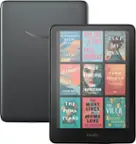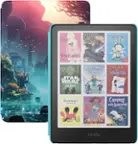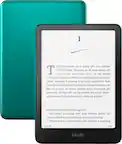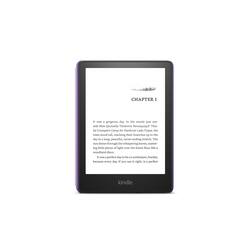
Amazon - Kindle Paperwhite Kids E-Reader 6.8" display with kid-friendly cover - 16GB - 2022 - 2021 - Robot Dreams
- Key Specs
- Screen Size: 6.8 inches (Size of the screen, measured diagonally from corner to corner.)
- Total Storage Capacity: 16 gigabytes
- Battery Chemistry: Lithium-ion
- General
- Brand: Amazon
- Model Number: B0BLB7Y8K9
- Product Name: Kindle Paperwhite Kids E-Reader 6.8" display with kid-friendly cover - 16GB - 2022
- Color: Robot Dreams
- Year of Release: 2021
- Display
- Screen Size: 6.8 inches (Size of the screen, measured diagonally from corner to corner.)
- Screen Display: Black and white
- Storage
- Total Storage Capacity: 16 gigabytes
- Power
- Charging Interface(s): USB-C (The connection for transmitting power to charge the device.)
- Battery Chemistry: Lithium-ion
- Dimensions
- Product Height: 6.85 inches (The out of box height of the item. Height is measured as the vertical distance from the bottom of the item to the top as it would be primarily used or placed.)
- Product Width: 4.9 inches (The out of box width of the item. Width is measured as the horizontal distance from one side of the item to the other as it would be primarily used or placed.)
- Product Depth: 0.32 inches (The out of box depth of the item. Depth is measured as the distance from the front of the item to the back as it would be primarily used or placed.)
- Product Weight: 7.23 ounces (The out of box weight of the item.)
- Certifications Listings & Approvals
- ENERGY STAR Certified: false (Devices carrying the ENERGY STAR service mark, such as computer products and peripherals, kitchen appliances, and other products, generally use 20% to 30% less energy than required by federal standards.)
- Warranty
- Warranty - Parts: 2-year worry-free guarantee.
- Warranty - Labor: Not applicable
- Other
- UPC: 840268987299
Great value – Includes a Kindle Paperwhite (11th generation), 1 year of Amazon Kids+, a kid-friendly cover, and a 2-year worry-free guarantee.
- Great value: Includes a Kindle Paperwhite (11th generation), 1 year of Amazon Kids+, a kid-friendly cover, and a 2-year worry-free guarantee
- Reading done right: Kindle Paperwhite Kids is purpose-built for reading (not a toy), with a black & white 6.8” 300 ppi glare-free display, and up to 10 weeks of battery life.
- Includes a 1 year subscription of Amazon Kids+: After 1 year, your subscription will automatically renew every month starting at just $4.99/month plus applicable tax. You may cancel any time by visiting the Amazon Parent Dashboard or contacting Customer Service.
- No distractions: Kindle Paperwhite Kids is designed for reading—no apps, videos, or games. It also offers OpenDyslexic, a font preferred by some readers with dyslexia.
- Waterproof and worry-free: Kids can take their Kindle Paperwhite Kids on the go to read by the pool or the beach. Kindle Paperwhite Kids has been tested to withstand accidental immersion in water. And with a 2-year worry-free guarantee, if it breaks, return it and we'll replace it for free.
- Anytime reading: Adjustable warm light lets kids read indoors and outdoors, day and night.
- Tools for readers: Kindle Paperwhite Kids includes Vocabulary Builder and Word Wise to help young readers build their skills.
- Great value: Includes a Kindle Paperwhite (11th generation), 1 year of Amazon Kids+, a kid-friendly cover, and a 2-year worry-free guarantee
- Reading done right: Kindle Paperwhite Kids is purpose-built for reading (not a toy), with a black & white 6.8” 300 ppi glare-free display, and up to 10 weeks of battery life.
- Includes a 1 year subscription of Amazon Kids+: After 1 year, your subscription will automatically renew every month starting at just $4.99/month plus applicable tax. You may cancel any time by visiting the Amazon Parent Dashboard or contacting Customer Service.
- No distractions: Kindle Paperwhite Kids is designed for reading—no apps, videos, or games. It also offers OpenDyslexic, a font preferred by some readers with dyslexia.
- Waterproof and worry-free: Kids can take their Kindle Paperwhite Kids on the go to read by the pool or the beach. Kindle Paperwhite Kids has been tested to withstand accidental immersion in water. And with a 2-year worry-free guarantee, if it breaks, return it and we'll replace it for free.
- Anytime reading: Adjustable warm light lets kids read indoors and outdoors, day and night.
- Tools for readers: Kindle Paperwhite Kids includes Vocabulary Builder and Word Wise to help young readers build their skills.
Whats Included
- Kindle Paperwhite (11th Generation) - 2021 release.
- Kindle Paperwhite (11th Generation) - 2021 release.
Q: What comes in the box? Is there an adapter?
A: Hi Kellz! The Kindle Paperwhite Kids comes with the Kindle Paperwhite itself, an attached case, and a USB-A to USB-C charging cord. It does not come with a USB power adapter. Any USB-A (rectangular slot) style power adapter will work just fine. I hope that helps, have a great rest of your day!
A: "Hello Lens! Only difference is size and Kindle Kids is attached to Kids e-reader. If you have forgotten your Parental Controls password, you will have to reset your device. Resetting your device removes all your personal information including lock screen passcode, parental controls settings, and downloaded content. All contact that you have purchased, will be saved to your Amazon account, you would just need to download any books or content to read them on your device. To reset the device, follow these steps: 1. Tap the passcode field. 2. Type 111222777, and then tap OK. This should reset your device and then allow you to log back in and download your content back to the Kindle. Have a great day! "
Q: With adjustable word size??
A: Hello! Yes, with all Kindle reading experiences, customers can adjust the font type, size, screen brightness, margins, and line spacing. I hope this helps, have a great day!
A: Sandy, Yes, most Kindle Content does have Text To Speech Capability. Before you purchase content from the Kindle Store you can see if it is on the detail page of the title. "Text To Speech:Enabled" Will be listed in the content details. Here are the steps to activate this capability: 1. While reading, tap the center of the screen, and then tap the menu icon "Aa" in the upper right corner. 2. Tap More, and then tap the switch next to Text-to-Speech to turn it on. In your Kindle book, tap the screen to show the progress bar, and then tap the Play button next to the progress bar to hear the text read aloud. To increase or decrease the reading speed of the Text-to-Speech voice, tap the Narration Speed icon. You can listen to the Text-to-Speech voice through the external speakers on your device or through your earphones plugged into the headphone jack. Tip: If you're reading a book in another language, you can download a Text-to-Speech voice for that language without leaving the book. Tap the download prompt at the bottom of the progress bar to install the Text-to-Speech voice. Have a Great Day!
Q: How many books will fit in 16 gb
A: Hello, the Amazon Kindle Paperwhite 16GB can hold thousands of books. You can also store your unused books on your Amazon account to keep space free. Have a great day!
A: Hello, the Amazon Kindle does come with ads on the lock screen. You can have them removed via your Amazon Account for a small fee. Have a great day!
A: Hello PPI! That acronym stands for Points or Pixels Per Inch which describes the quality of the text and image on screen. Thanks so much for your question and I hope you have a phenomenal day!

![BOOK ONE: The First Navigator of Europe
Cook was a captain of the Admiralty
When sea-captains were more like warlocks
...[and] drove their ships
By their own blood, no laws of schoolbook steam,
Till yards were sprung, and masts went overboard-
Daemons in periwigs, doling magic out,
Who read fair alphabets in stars
Where humbler men found but a mess of sparks -
KENNETH SLESSOR, "FIVE VISIONS OF CAPTAIN COOK"
Learning reading speed... 22% kindle](https://pisces.bbystatic.com/image2/BestBuy_US/images/products/31c64192-ffde-447c-97f6-b1b399f1dfdf.jpg;maxHeight=144;maxWidth=200?format=webp)