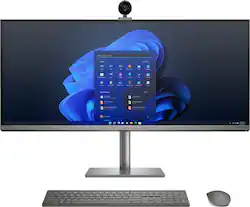
HP - ENVY 34" WUHD All-In-One - Intel Core i7 - 16GB Memory - NVIDIA GeForce GTX 1650 - 1TB SSD - Turbo Silver Aluminum
- Key Specs
- Screen Size: 34 inches (Size of the screen, measured diagonally from corner to corner.)
- Processor Model: Intel 11th Generation Core i7 (Your computer's processor is like its brain. Working in combination with system memory, the power of the processor determines the complexity of software you can run, how many programs you can have open at the same time, and how fast those programs will run. Most computers feature an AMD, Intel or Snapdragon processor.)
- CPU Base Clock Frequency: 2.5 gigahertz (Actual central processing unit (CPU) speed may vary by device configuration and design. The average rate at which the processor is able to execute tasks under normal operating conditions as asserted by the manufacturer.)
- Storage Type: SSD
- Total Storage Capacity: 1000 gigabytes
- System Memory (RAM): 16 gigabytes (Random-access memory (RAM) is a computing device's short-term data storage, which allows active information to be accessed quickly. The size and type of RAM determines how efficiently the device can handle large amounts of information at one time. For example, gaming or video editing requires more RAM for optimal performance.)
- Graphics: NVIDIA GeForce GTX 1650 (Often referred to as a "graphics processing unit" (GPU), this device is responsible for displaying image content and decoding/encoding video content in programs and games.)
- General
- Brand: HP
- Model Number: 34-c0154
- Product Name: ENVY 34" WUHD All-In-One - Intel Core i7 - 16GB Memory - NVIDIA GeForce GTX 1650 - 1TB SSD
- Color: Turbo Silver Aluminum
- Year of Release: 2021
- Display
- Display Type: LED
- Screen Size: 34 inches (Size of the screen, measured diagonally from corner to corner.)
- Screen Resolution: 5120 x 2160 (WUHD) (Screens come in a range of resolutions (measured in pixels, horizontal x vertical). The higher the resolution, the greater the picture quality.)
- Touch Screen: false (Touch-screen devices make navigating more intuitive. Using a touch-screen display, you can do things such as tap to select, hold and drag to move items, swipe to scroll, and pinch to zoom.)
- Processor
- Processor Brand: Intel
- Processor Model: Intel 11th Generation Core i7 (Your computer's processor is like its brain. Working in combination with system memory, the power of the processor determines the complexity of software you can run, how many programs you can have open at the same time, and how fast those programs will run. Most computers feature an AMD, Intel or Snapdragon processor.)
- Processor Model Number: 11700
- CPU Base Clock Frequency: 2.5 gigahertz (Actual central processing unit (CPU) speed may vary by device configuration and design. The average rate at which the processor is able to execute tasks under normal operating conditions as asserted by the manufacturer.)
- CPU Boost Clock Frequency: 4.9 gigahertz (Actual central processing unit (CPU) speed may vary by device configuration and design. The maximum rate at which the processor is able to execute tasks, typically only used for a short period of time as needed. This rate may temporarily boost the processor's performance, but may result in overheating, shutdown, or damage to equipment if sustained.)
- Number of CPU Cores: 8-core (A core, or "brain" of a CPU, allows it to receive and execute instructions. Each core can work independently or together to perform parallel operations.)
- CPU Cache Memory Level: L3
- L3 Cache: 16 megabytes (Cache memory, also called CPU memory, is random-access memory (RAM) that a computer microprocessor can access more quickly than it can access regular RAM. This memory is typically integrated directly with the CPU chip or placed on a separate chip that has a separate bus interconnect with the CPU.)
- Storage
- Storage Type: SSD
- Total Storage Capacity: 1000 gigabytes
- Solid State Drive Capacity: 1000 gigabytes (The amount of data that can be stored on the device's solid state drive (SSD). SSD is a flash-based storage with faster speeds than a hard disk drive (HDD).)
- Memory
- System Memory (RAM): 16 gigabytes (Random-access memory (RAM) is a computing device's short-term data storage, which allows active information to be accessed quickly. The size and type of RAM determines how efficiently the device can handle large amounts of information at one time. For example, gaming or video editing requires more RAM for optimal performance.)
- Type of Memory (RAM): DDR4 (Each type of RAM delivers a different level of speed, bandwidth, energy efficiency and performance.)
- System Memory RAM Speed: 2400 megahertz (How fast the information-storing hardware operates. The faster the RAM, the faster memory can be transferred to other system components. Ultimately, faster RAM improves operational efficiency.)
- Number Of Memory Slots: 4
- Number of Memory Sticks Included: 2
- System Memory RAM Expandable To: 128 gigabytes (Adding more random-access memory (RAM) to a computer speeds up performance and improves efficiency. Upgrades to memory are limited by the number of expansion slots for additional RAM and existing RAM installed on the device.)
- Graphics
- Graphics Type: Dedicated (Dedicated graphics uses a separate graphics card for processing video images. Because it does not use memory from the system's RAM, there is no extra burden on the CPU and graphics are processed more efficiently. Integrated graphics shares system RAM to process video images.)
- GPU Brand: NVIDIA
- Graphics: NVIDIA GeForce GTX 1650 (Often referred to as a "graphics processing unit" (GPU), this device is responsible for displaying image content and decoding/encoding video content in programs and games.)
- Compatibility
- Operating System: Windows 11 Home (The operating system manages all software and hardware, including files, memory and connected devices. Most importantly, it lets you interact with your device and your programs in a visual way; otherwise, you'd be typing computer code to get anything done.)
- Voice Assistant Built-in: No (A digital assistant built into the device that uses voice commands to answer questions and control smart devices.)
- Connectivity
- Display Connector(s): 2 x Thunderbolt 4 (The number and type of connectors used to connect to an external display.)
- Number of HDMI Outputs (Total): 1
- Number of DisplayPort Outputs (Total): 0
- Number of Thunderbolt Ports (Total): 2
- Number of VGA Ports: 0 (VGA (Video Graphics Adapter or Video Graphics Array) is a display standard that transmits via analog signals. This type of interface is typically used to connect a computer to a display device such as a monitor, projector, or TV.)
- Number Of DVI Ports: 0
- USB Ports: 4 x USB-A 3.1, 2 x USB-A 3.0, 1 x USB-C 3.0 (The number and type of USB ports the product has.)
- Number of USB Ports (Total): 7
- Wireless Connectivity: Bluetooth, Wi-Fi (The manner in which a device sends data to another device over a short distance without the use of wires or cables.)
- Wireless Standard: AC (The wireless networking protocol used by the device. Each iteration of the protocol is based on the 802.11 standard developed by the Institute of Electrical and Electronics Engineers (IEEE) Standards Association. Denoted by letters following 802.11 (802.11a, 802.11ac, etc.), each version, published in alphabetical order, encompasses all previous versions.)
- Number Of Ethernet Ports: 1
- Network Connectivity: None (The manner in which a device sends data to another device over a long distance using a cellular network.)
- Expansion
- Number of M.2 Slots: 2 (This interface is most commonly used for high-speed solid state drives (SSDs), and is often used in laptops due to its small size.)
- Camera
- Built-In Webcam: true
- Front-Facing Camera: true
- Front Facing Camera Megapixels: 16 megapixels (The more megapixels, the more detail that the camera facing the user can capture.)
- Built-In Microphone: true
- Features
- Media Card Reader: true (A hardware device that allows for access to data on a memory card and enables the transfer of its files to a computer. These devices may have one or multiple slots for various types of memory cards, and may be integrated into the computer or available as an external device.)
- Audio Technology: Audio by Bang & Olufsen
- Dimensions
- Product Height: 14.5 inches (The out of box height of the item. Height is measured as the vertical distance from the bottom of the item to the top as it would be primarily used or placed.)
- Product Width: 32.17 inches (The out of box width of the item. Width is measured as the horizontal distance from one side of the item to the other as it would be primarily used or placed.)
- Product Depth: 8.78 inches (The out of box depth of the item. Depth is measured as the distance from the front of the item to the back as it would be primarily used or placed.)
- Product Weight: 24.36 pounds (The out of box weight of the item.)
- Certifications Listings & Approvals
- ENERGY STAR Certified: true (Devices carrying the ENERGY STAR service mark, such as computer products and peripherals, kitchen appliances, and other products, generally use 20% to 30% less energy than required by federal standards.)
- EPEAT Qualified: false (The Electronic Product Environmental Assessment Tool (EPEAT) was designed to provide an environmental assessment tool for purchasers. In order to qualify for EPEAT, a product must meet all 23 required criteria.)
- Included
- Included Software: Windows 11 Home
- Optical Drive Type: None (An optical disk drive (ODD) uses a laser light to read data from or write data to an optical disc. These discs include CDs, DVDs, and Blu-ray Discs. This allows you to play music or watch movies using prerecorded discs.)
- Wireless Keyboard: true
- Wireless Mouse: true
- Speaker(s) Included: true
- Stylus Included: false
- Warranty
- Warranty - Parts: 1 year
- Warranty - Labor: 1 year
- Other
- UPC: 196548094714
All hail the creators. The HP ENVY 34 inch All-in-One is the perfect expression of creativity. It combines an amazing display that delivers true to life color with the power and performance to run creative software without slowing you down. Not to mention the sleek design matched only by the innovative, moveable camera that allows you to be creative with how you share your coolest ideas. Everything displayed perfectly: With more viewing area you can fit more of your creative work on screen. Show them everything: The detachable, magnetic camera makes it easy to move it for better angles or sharing sketches on your workspace. Stay in your zone: With an Intel® processor and NVIDIA® graphics you get the power you need. All at your fingertips: Height adjustable for comfort. Built-in phone fast charge and cord management help keep your space clutter-free.
- Operating system: Windows 11 Home: Windows 11 has all the power and security of Windows 10 with a redesigned and refreshed look. It also comes with new tools, sounds, and apps. Every detail has been considered. All of it comes together to bring you a refreshing experience on your PC.
- Integrated display: 34" (86.36 cm) diagonal, non-touch, WUHD (5120 x 2160), IPS, three-sided micro-edge, anti-reflection, 500 nits, 98% DCI-P3: See true-to-life visuals in vibrant 5120x2160 resolution with a wide viewing area so you can see more of your screen.
- Processor: 11th Generation Intel® Core™ i7-11700 processor: 11th Gen Intel® Core™ desktop processors feature innovative new architecture that reimagines intelligent performance (AI), immersive display and graphics, and enhanced tuning and expandability.
- Memory: 16 GB DDR4-2400 SDRAM memory(3) (2 x 8 GB): With higher bandwidth, you get more of a boost in performance for improved multi-tasking.
- Graphics: NVIDIA® GeForce® GTX 1650 graphics with 4 GB GDDR6 dedicated memory: With the all-new NVIDIA Turing™ architecture, gaming and streaming will never be the same. Get all the power you need for fast, smooth, power-efficient performance
- Internal Storage: 1 TB PCIe® NVMe™ M.2 Solid State Drive: Get up to 15x faster performance than a traditional hard drive.
- WUHD IPS resolution: See true-to-life visuals in vibrant 5120x2160 resolution with a wide viewing area so you can see more of your screen.
- SuperSpeed USB Type-C® 5Gbps signaling data rate: Plug in your external storage with this Superspeed USB Type-C® port, featuring 5Gbps signaling data rate. And it’s reversible, so you never have to worry about plugging in upside down.
- SuperSpeed USB Type-A 5Gbps signaling data rate: Plug in your external storage with this Superspeed USB Type-A port, featuring 5Gbps signaling data rate
- SuperSpeed USB Type-A 10Gbps signaling data rate: Plug in your external storage with this Superspeed USB Type-A port, featuring 10Gbps signaling data rate
- Thunderbolt™ 4 with USB4™ Type-C: Power your device or connect up to two 4K displays with a single cable and blazing 40Gbps signaling rate.
- Effortlessly connected: Enjoy a smooth wireless experience with a Wi-Fi 6 (2x2) and Bluetooth® combo
- Look good in low-light: Better contrast and resolution with the 16MP camera with binning technology that combines four pixels into one for amazing video clarity.
- Wireless charging: Experience a new level of convenience with wireless charging built right into the base. Just place any compatible smartphone onto the base for completely cord-free charging.
- Cable management clip: The adjustable magnetic clip helps keep cables organized and within reach.
- Upgrading is easy: Upgrading memory and storage is easy with our tool-less door design.
- An exceptionally rich audio experience: HP Dual Speakers, custom-tuned by experts at Bang & Olufsen, awaken your senses with PC audio perfection.
- Adjust your view: Adjust your screen’s height for comfortable viewing with pivot and tilt capabilities.
- Designed with the planet in mind: HP is dedicated to driving progress toward a more sustainable future and making responsible choices for the environment and our customers.
Whats Included
- HP 915 black wireless keyboard and mouse combo
Product Manuals
Q: Can you add a second screen?
A: Under the Specifications and Connectivity on the Best Buy website, it does show that it has one HDMI out port, so you can use an external display if you would like to use a second screen.
A: No, the screen is 14.5 inches tall and the stand is additional height adjusted to personal preference.
A: I honestly wouldn't buy this all in one. We have had problems from the start. Only had it for little over month and having bars across the screen. Not worth the headache. I didn't plan to get another HP because I have had issues in the past with their products. But for my work, looked like the best setup for me. Please do so more research and choose a different brand
Q: Is there a model just like this one that comes with touchscreen?
A: Thank you for the question. Apologies, the Envy 34" all-in-one PC is not available with a touch screen.
A: Thank you for the question. Yes, 11th generation i7 processor and 16GB of RAM should ensure that you have the power you need for the tasks you've described, and more.
A: The HP ENVY 34" WUHD All-in-One is a computer rather than a monitor, making the ports designed as output ports rather than input ports. As such, it cannot be used as a monitor in the manner you've described.
Q: what is the sound card in the computer?
A: Thank you for the question. The audio is by Bang and Olufsen and the audio codec is Realtek ALC3274.
Q: Can I also use this as a monitor to connect my switch/gaming console?
A: None of the video ports on the back of this all-in-one computer are inputs, so you won't be able to use it as a monitor for your gaming console.
People also viewed
 $2,049.00The price was $2,119.99
 $1,799.99The price was $2,099.99
 $1,499.00The price was $1,549.99
 $499.00The price was $729.99
 $1,129.00The price was $1,169.99
 $1,559.99The price was $1,619.99
 $1,268.99The price was $1,329.99
 Top Deal$449.99The price was $659.99
 Top Deal$749.99The price was $949.99
 $469.00The price was $559.99
 $430.99The price was $469.99
 Top Deal$579.99The price was $679.99
 Top Deal$1,399.99The price was $1,919.99
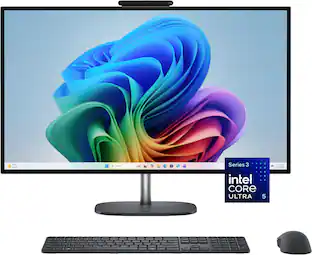 Top Deal$1,219.99The price was $1,389.99
Today's top picks
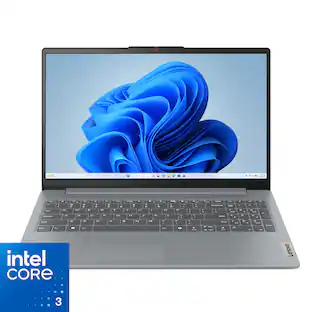 $299.99The price was $499.99
 $699.99The price was $999.99
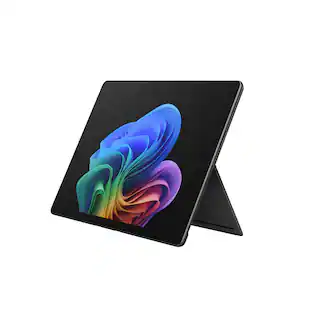 $1,099.99The price was $1,599.99
 $529.99The price was $749.99
 $999.99The price was $1,599.99
 $1,099.99The price was $1,299.99
 $1,199.99The price was $1,299.99
 $1,099.99The price was $1,649.99