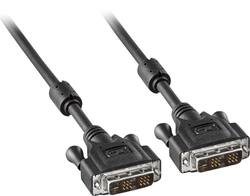
Insignia™ - 6.5’ DVI-D Single Link Cable - Black
- Key Specs
- Cable Length: 6.5 feet
- Connector Type (End 1): DVI
- Gender (End 1): Male
- Connector Type (End 2): DVI
- Gender (End 2): Male
- In-Wall Rated: false
- Connector Finish: Gold
- General
- Brand: Insignia™
- Model Number: NS-PI06501
- Product Name: 6.5’ DVI-D Single Link Cable
- Color: Black
- Connectivity
- Cable Type: DVI
- Cable Length: 6.5 feet
- Product Type: Cable
- Connector Type (End 1): DVI
- Gender (End 1): Male
- Connector Type (End 2): DVI
- Gender (End 2): Male
- Environmental
- In-Wall Rated: false
- Material
- Connector Finish: Gold
- Warranty
- Warranty - Parts: 1 year
- Warranty - Labor: 1 year
- Other
- UPC: 600603166914
This 6.5' Insignia™ NS-PI06501 single-link male-to-male DVI cable makes it easy to connect your compatible flat-panel LCD monitor to your PC. The gold-plated connectors help ensure a clean, reliable signal.
- Connects compatible flat-panel LCD monitors to a PC: So you can enjoy content stored on your computer through an external display.
- Gold-plated connectors: Promote optimal signal transfer.
- 6.5' length: Allows flexible placement options.
Whats Included
- Insignia™ 6.5' DVI Cable
Product Manuals
Q: Will this cable fit a hp-pc an asamsung moniter
A: If each have DVI ports, yes.
A: There are up to 3 types of connections that might be available on the rear of your computer (or side, if it's a laptop). One is VGA (old school), the other two are HDMI (like the cable for your home DVD player/HDTV) and DVI. Look for these plugs on the computer. If you only have one plug in on back and you want to connect an addtional monitor, you'll probably need to install a new graphics card. There are inexpensive ones available, but be careful not to exceed the power supply's (inside your computer) capabilities. If you look up graphics cards, under specifications, they will list power requirements. Also, since this card will be installed inside the computer, you will need to make sure you have an open PCI slot.
Q: Will this work with an Alienware monitor at 3440 x 1440 resolution @ 100 Hz?
A: No, the maximum resolution this cable supports is 1920x1080p @ 60Hz.
Q: Will this fit my dell tower to my LG monitor
A: Yes, if both your tower and monitor have DVI ports...
A: Your connection is a DVI-D Dual Link, this is product is a DVI-D Single Link. My monitor and motherboard have the same setup as you, and I just bought this and it worked fine. However I should note that Im not trying for Max settings, I just wanted something that works well. If you don't want that, I recommend going somewhere else and looking for a DVI-D Dual Channel cable
Q: Will this cable fit a HP to a Dell monitor they have dvi slots.
A: Check your connections on the back for your DVI, take a picture of it and go online and look up DVI Connections. 1 Example: If you look at the connection and it has eight pins across, and three down That's a "Dual Link" 2 Example: If it has 3 {space} 3 Across, and 3 pins down that's a "Single Link" Also look at the blade, that's on the left side that looks like a minus symbol -If it's a "DVI-I" It will have the blade plus four additional pins, two on the above and two below the blade, also the same rule applies as above with the number of pins 8 across or 3 {space} 3 bc -If it's a "DVI-D" It will have just a blade on the left side, no pins above and below, also look to the examples of both about Dual and Single link. Sorry you just said HP and Dell, don't know what models you're working with, but this should cover most. Also one more thing if they don't look like any above, you might have a DVI-A, and if all else fails go online and look up "what do different types of DVI connections look like" Hope this helps I'll try to include a photo but I don't know if it will upload. Good luck
A: The video resolution of the product is 1,920x1,200.
Today's top picks
 $479.99The price was $729.99
 $69.99The price was $129.99
 $199.99The price was $249.99
 $49.99The price was $62.99