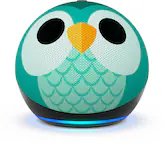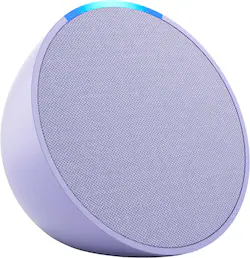
Amazon - Echo Pop (1st Generation) Smart Speaker with Alexa - Lavender Bloom
- Key Specs
- Built-In Speakers: true
- General
- Brand: Amazon
- Model Number: B09ZXJDSL5
- Product Name: Echo Pop (1st Generation) Smart Speaker with Alexa
- Color: Lavender Bloom
- Audio
- Built-In Speakers: true
- Voice
- Voice Assistant Built-in: Amazon Alexa (A digital assistant built into the device that uses voice commands to answer questions and control smart devices.)
- Connectivity
- Wireless Connectivity: Wi-Fi, Bluetooth (The manner in which a device sends data to another device over a short distance without the use of wires or cables.)
- Operating System Compatibility: Linux
- Power
- Power Source: Plug-in
- Display
- Display Screen: false
- Dimensions
- Product Height: 3.58 inches (The out of box height of the item. Height is measured as the vertical distance from the bottom of the item to the top as it would be primarily used or placed.)
- Product Width: 3.91 inches (The out of box width of the item. Width is measured as the horizontal distance from one side of the item to the other as it would be primarily used or placed.)
- Product Depth: 3.26 inches (The out of box depth of the item. Depth is measured as the distance from the front of the item to the back as it would be primarily used or placed.)
- Product Weight: 0.4387 pounds (The out of box weight of the item.)
- Warranty
- Warranty - Parts: 90-day limited warranty and service included.
- Warranty - Labor: Not applicable
- Other
- UPC: 840080594804
Music and Alexa. The perfect fit. Find a color that fits your style, find a spot that fits your small space, and play a track that hits just right, totally hands-free with Alexa.
- Compact design: This compact smart speaker with Alexa features full sound that's great for bedrooms and small spaces. Small enough to blend in and mighty enough to stand out.
- Alexa+ Early Access is now on the Echo Pop: Get access to a smarter, more useful Alexa when you set up this device.
- Control your music: Control your favorite music and content with your voice from Amazon Music, Apple Music, Spotify and more or via Bluetooth.
- Control your smarthome: Make any space a space a smart space. Easily control compatible smart home devices like smart plugs or smart lights with your voice or the Alexa App.
- Alexa integrated: Have Alexa set timers, check the weather, read the news, re-order paper towels, make calls, answer questions, and more.
- Thousands of features: With tens of thousands of skills and counting, Alexa can help you do more or do less - like playing relaxing sounds and testing your music knowledge.
- About the light bar: Alexa doesn’t begin listening until your device hears you say “Alexa” and the light bar turns blue.
- Designed to protect your privacy: Amazon is not in the business of selling your personal information to others. Built with multiple layers of privacy controls, including a mic off button.
- Designed for sustainability: This device’s fabric is made from 100% post-consumer recycled polyester yarn and aluminum is made from 80% recycled aluminum. The device packaging is 100% recyclable.
- Disclaimer: After Early Access, Alexa+ will be free with your Prime membership or available to non-Prime customers for $19.99/month. The original Alexa continues to be included with all Alexa enabled devices. Alexa+ Early Access requires a personal, US-based Amazon account with US English language set on all compatible Alexa+ devices. Access to Alexa+ when you purchase this device will be granted on the Amazon account you use to set up this device (certified refurbished or used devices excluded).
- Compact design: This compact smart speaker with Alexa features full sound that's great for bedrooms and small spaces. Small enough to blend in and mighty enough to stand out.
- Alexa+ Early Access is now on the Echo Pop: Get access to a smarter, more useful Alexa when you set up this device.
- Control your music: Control your favorite music and content with your voice from Amazon Music, Apple Music, Spotify and more or via Bluetooth.
- Control your smarthome: Make any space a space a smart space. Easily control compatible smart home devices like smart plugs or smart lights with your voice or the Alexa App.
- Alexa integrated: Have Alexa set timers, check the weather, read the news, re-order paper towels, make calls, answer questions, and more.
- Thousands of features: With tens of thousands of skills and counting, Alexa can help you do more or do less - like playing relaxing sounds and testing your music knowledge.
- About the light bar: Alexa doesn’t begin listening until your device hears you say “Alexa” and the light bar turns blue.
- Designed to protect your privacy: Amazon is not in the business of selling your personal information to others. Built with multiple layers of privacy controls, including a mic off button.
- Designed for sustainability: This device’s fabric is made from 100% post-consumer recycled polyester yarn and aluminum is made from 80% recycled aluminum. The device packaging is 100% recyclable.
- Disclaimer: After Early Access, Alexa+ will be free with your Prime membership or available to non-Prime customers for $19.99/month. The original Alexa continues to be included with all Alexa enabled devices. Alexa+ Early Access requires a personal, US-based Amazon account with US English language set on all compatible Alexa+ devices. Access to Alexa+ when you purchase this device will be granted on the Amazon account you use to set up this device (certified refurbished or used devices excluded).
Q: How does the Echo Pop connect to the internet?
A: The Echo Pop connects to the internet using Wi-Fi.
Q: Does the Echo Pop have a display screen?
A: The Echo Pop does not have a display screen.
Q: What operating system does the Echo Pop use?
A: The Echo Pop is compatible with the Linux operating system.
Q: What is the weight of the Echo Pop?
A: The Echo Pop weighs 0.4387 pounds.
Q: Can I use the Echo Pop without a mobile device? I have WiFi but no smartphone.
A: Hi zeta25, I hope you have a great day today. The initial setup of the Echo Pop requires a smart device to connect the Echo Pop to Wifi. Once connected the Echo Pop does not need a supplemental device to function other than WiFi.
Q: Can this also be used as a wifi extender like the Echo Dot?
A: Hi AdrianeS! Yes! The Echo Pop does have the eero Built-In feature just like the 5th Gen Echo Dot! Extend your wifi coverage and say goodbye to drop-offs and buffering with eero Built-in on a compatible eero wifi network. Hope that helps, have a great rest of your day!
Q: How does it differ from the Echo Dot?
A: Hi Dannika! The main difference between Echo Pop and Echo Dot are some of the advanced features of the Dot. Specifically the Pop lacks the Motion Detection and Temperature sensors of the Echo Dot 5th gen. Otherwise you'll have access to all the same great Alexa features with either device! Hope that helps, have a great rest of your day!
Q: Can I use the echo dot with wireless wi-fi or do I have to have my own internet?
A: Wireless WiFi just have to have the app on your phone or tablet to complete set up