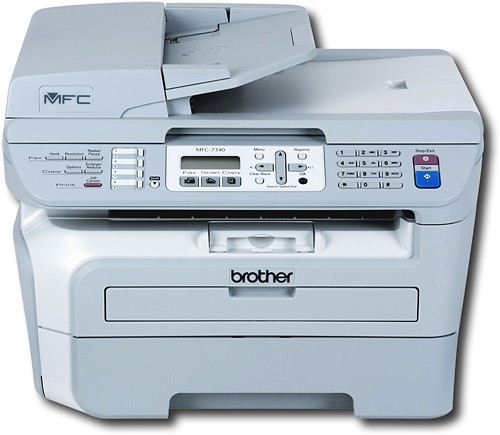

Brother - MFC-7340 Black-and-White All-in-One Laser Printer
This item is no longer available in new condition.
See similar items below.
Description
Features
Prints up to 21 ppm* in black
To generate documents quickly.
4-in-1 functionality
Prints, copies, scans and faxes via phone line and PC for added convenience.
Up to 2400 x 600 dpi black resolution
For crisp images.
Print sizes
Include letter, legal, executive, envelope, A4, A5, A6, B5, B6 and custom 3" - 8.5" x 4.6" - 14".
Copies up to 21 cpm* in black
To generate copies quickly.
Flatbed scanner with 48-bit color
Plus a scan resolution up to 19,200 x 19,200 dpi (600 x 2400 dpi optical) to reproduce exact colors and large documents.
High-speed 14.4 Kbps fax with 208 speed dials and up to 500-page fax memory
To meet all your office needs.
Flatbed design
Lets you fax, scan or copy books and magazines. A legal-size scanning area enables you to scan any document.
Automatic 35-page document feeder
For unattended faxing, scanning and copying of multiple-page documents.
USB 2.0 connectivity
For simple connection to your computer.
*Print speeds vary with use. See manufacturer for info on print speeds.
What's Included
Brother Black-and-White Multifunction Printer/ Copier/ Scanner/ Fax
1 starter toner cartridge, 1 drum kit
Software CD-ROM
Owner's manual
Other
- Energy Star CompatibleNo
- <a href="javascript:winopengld('1087340571468','pcmcat38200050027','cat12080')">Print Speed (B&W)</a>Up to 21 ppm (Print speeds vary with use. See manufacturer for info on print speeds.)
- <a href="javascript:winopengld('1087340571541','pcmcat38200050027','cat12080')">Print Speed (Color)</a>Black-and-white only
- <a href="javascript:winopengld('1087340571577','pcmcat38200050027','cat12080')">Black Printer Resolution</a>Up to 2400 x 600 dpi
- <a href="javascript:winopengld('1087340571611','pcmcat38200050027','cat12080')">Color Printer Resolution</a>Black-and-white only
- <a href="javascript:winopengld('1087340571658','pcmcat38200050027','cat12080')">Media Types</a>Plain, bond, envelopes, labels, transparencies
- <a href="javascript:winopengld('1087340571708','pcmcat38200050027','cat12080')">Media Sizes</a>Letter, legal, executive, envelope, A4, A5, A6, B5, B6 and custom 3" - 8.5" x 4.6" - 14"
- <a href="javascript:winopengld('1087340571783','pcmcat38200050027','cat12080')">Output Paper Capacity</a>Up to 100 sheets
- <a href="javascript:winopengld('1087340571817','pcmcat38200050027','cat12080')">Memory</a>16MB
- <a href="javascript:winopengld('1087340571851','pcmcat38200050027','cat12080')">Type of Interface</a>USB 2.0
- <a href="javascript:winopengld('1087340572115','pcmcat38200050027','cat12080')">Total Ink Tanks/Cartridge</a>1 toner cartridge, 1 drum kit (included)
- <a href="javascript:winopengld('1087340572271','pcmcat38200050027','cat12080')">Print Quality</a>For documents
- PC-Free PrintingNo
- <a href="javascript:winopengld('1087340809619','pcmcat38200050027','cat12080')">Scanner Resolution (dpi)</a>Up to 19,200 x 19,200 dpi (600 x 2400 optical)
- <a href="javascript:winopengld('1087340809653','pcmcat38200050027','cat12080')">Bit Depth</a>48
- Scanner TypeFlatbed
- <a href="javascript:winopengld('1087340809696','pcmcat38200050027','cat12080')">Scan Method</a>Flatbed
- <a href="javascript:winopengld('1087340809772','pcmcat38200050027','cat12080')">Copier Speed (B&W)</a>Up to 21 cpm (Copier speeds vary with use. See manufacturer for info on copier speeds.)
- <a href="javascript:winopengld('1087340809806','pcmcat38200050027','cat12080')">Copier Speed (Color)</a>Black-and-white only
- <a href="javascript:winopengld('1087340809918','pcmcat38200050027','cat12080')">Reduction/ Enlargement</a>25-400%
- <a href="javascript:winopengld('1087340809999','pcmcat38200050027','cat12080')">Automatic Document Feeder</a>Up to 35 pages
- <a href="javascript:winopengld('1087340810077','pcmcat38200050027','cat12080')">Fax Transmission Speed</a>14.4 Kbps
- <a href="javascript:winopengld('1087340810112','pcmcat38200050027','cat12080')">Fax Memory</a>Up to 500 pages
- Fax TypeBlack-and-white
- Document Feed Type and CapacityAutomatic; 35 pages
- <a href="javascript:winopengld('1087340810204','pcmcat38200050027','cat12080')">Number of Speed Dials</a>208
- Automatic RedialYes
- Software IncludedScansoft PaperPort SE with OCR for Windows; Presto! PageManager for Mac
- Minimum System RequirementsPC: Intel® Pentium® II processor; Windows 2000, XP or Vista; 256MB RAM; 500MB free hard drive space; Mac: PowerPC G3/G4 or PowerPC G5; 350MHz processor; Mac OS X 10.2.4 - 10.4.3; 256MB RAM; 400MB free hard drive space
- Wireless NetworkingNo
- <a href="javascript:winopengld('1218870374819','pcmcat38200050027','cat12080')">ENERGY STAR Certified</a>No
- UPC012502620624
Customer reviews
Rating 4.2 out of 5 stars with 18 reviews
(18 customer reviews)to a friend
Customers are saying
Customers value the print quality, describing it as suitable for everyday, school, or small office tasks and highlighting its speed. The product is also appreciated for its ease of use, with customers noting its simple setup process and straightforward functionality.
This summary was generated by AI based on customer reviews.
- Pros mentioned:Print quality
Rated 4 out of 5 stars
Excellent Bargain
Posted .This reviewer received promo considerations or sweepstakes entry for writing a review.I would recommend this for any home office or small office. The price is right and the features allow for easy set up, quick and quality printing, and great scanning. It ability to scan a stack of documents is key. This is my second Brother printer and would definitely recommend Brother to anyone.
I would recommend this to a friend - Pros mentioned:Print quality
Rated 5 out of 5 stars
Excellent
Posted .This reviewer received promo considerations or sweepstakes entry for writing a review.I mostly use the unit as a scanner and 1-4 page printer (more than that and I use my Brother 5250DN, double sided). Before this, I had an Inkjet Brother unit, whose paper feeder and interface I simply loved. No paper jams, 40 page feed throughs with no jams, etc., etc. Alas, the printing head died, so I went looking for a replacement, and I made the mistake of replacing it with an Epson 520. HUGE MISTAKE, it is now sitting off the home network somewhere, forgotten, a waste of $90 bucks, thanks for nothin Epson, sit down if you're waiting for ANY money from me. So I went ahead and bought this unit. LOVE it, same paper feed mechanism, quick printing, Laser toner production. I paid $129 delivered, GREAT! I made the mistake of replacing my inkjet Brother multi-function with an Epson 520.
I would recommend this to a friend - Pros mentioned:Ease of use
Rated 4 out of 5 stars
Great Price
Posted .This reviewer received promo considerations or sweepstakes entry for writing a review.I wanted to get a laser to replace my Epson inkjet multifunction. I print mostly B&W and was tired of replacing color cartridges because they dry up. This unit is easy to use and was easy to setup except for one minor glitch. I have a MAC running Snow Leopard 10.6.1. When I followed the setup instructions and installed the drivers from brother, the printer would not print. After visiting the Brother web site, I found the drivers on the CD would not support Snow Leopard. I went to the Apple site and reinstalled the correct drivers. Now all is well and machine prints, scans, and copies fine.
I would recommend this to a friend Rated 5 out of 5 stars
A very good deal
Posted .This reviewer received promo considerations or sweepstakes entry for writing a review.My heavily used seven year old tank-like Brother All-in-One gave up the ghost after a power outage. I was a bit leery of the new machines because they were so much cheaper in inflation-adjusted terms and so much lighter; the girl behind the counter could even pick it up. No way she could have picked up the old one. But, to my surprise, the new one is faster and works better with Adobe Acrobat under Windows 7 than the old one. Also, an extra tray for legal size paper does not cost a fortune. I'm still skeptical that it will last seven years like the old one, but at less than one third the cost, it doesn't need to.
I would recommend this to a friendRated 5 out of 5 stars
I decided to give this printer the old college try
Posted .This reviewer received promo considerations or sweepstakes entry for writing a review.I bought this printer because also i was sick of changing color cartridges for such a high price. You could basically buy the printer all over again for the amount of the cartridge refills. (That is if you buy genuine parts of course) If you really wanted to print photos why not take it to somewhere that develops photos for a very small price. You just take your memory card with you that has the photos you want to print and they will always be better than any home or office printer you can buy anywhere. The features on this printer are great. It has the auto loading scanner and has the glass top scanner for photos you want to scan. It also has the front paper load if you are putting envelopes into the printer. It also gives you the option to fax which some of the new brother printers dont offer unless they are higher end ones. I went to the brother website and downloaded the newest software for windows vista 64 bit and it works perfectly. I also plugged it into my macbook pro with snow leopard and it loaded the drivers without me even doing anything at all! Overall this is a great printer. It is my first monochrome printer and it has no failed me yet and i have had it for 4 months now! If you are looking for a multifunction printer that only does black and white....this is a great one to try out.
I would recommend this to a friend- Pros mentioned:Print quality
Rated 5 out of 5 stars
Excellent value in All In One.
Posted .This reviewer received promo considerations or sweepstakes entry for writing a review.Straight through for envelopes works well, although you need to have space behind the printer. Warms up quickly from sleep mode. Took me a couple times to make sure I had it set to manual answer for fax. The menu choices take a while to cycle through. Quality of print is fine for everyday/school/small office work.
I would recommend this to a friend - Pros mentioned:Print quality
Rated 5 out of 5 stars
Brother Black-and-White Multifunction Printer
Posted .This reviewer received promo considerations or sweepstakes entry for writing a review.This printer prints & copies better than any printer/multi-function printer I've had so far. It scans & faxes quickly. It came with a starter toner, so I had some time to get another toner. My husband has had a brother printer forever & he's never had any problems with his either. The toners last forever & the printers never need service. I'll never buy any other brand of printer or multi-function unit.
I would recommend this to a friend Rated 5 out of 5 stars
Great copier/printer/scanner/fax.
Posted .This reviewer received promo considerations or sweepstakes entry for writing a review.I have had this product for about a month, and it has worked great. There is flexibility as of what resolution you use for scanning, faxing, and copying. It has a very high dpi resolution offering, but it does take a long time to scan the document (around five minutes). The lower dpi (300-600) doesn't take that long. It scans great for color and black and white. The program it comes with is pretty user friendly. You get four options of how to use the document you are scanning into the computer (file, into a text document, picture file, or straight to email). You can choose what type of file you want to scan the document to (jpg, bmp, etc.). It takes patience to get the fax to work with the Magic Jack. It did require me to turn off the error correction on the fax, and it has worked once so far (out of six or so attempts). This most likely has nothing to do with the fax.
I would recommend this to a friend
Be the first to ask a question.
We’ll try to get your question answered within 24 hours by a Best Buy customer or brand representative.
Ask a Question