• Visit our Support Center
  • Check your Order Status
  • Shipping, Delivery & Store Pickup
  • Returns & Exchanges
  • Price Match Guarantee

Order & Purchases

  • Check Order Status
  • Shipping, Delivery & Pickup
  • Returns & Exchanges
  • Price Match Guarantee
  • Product Recalls
  • Trade-In Program
  • Gift Cards

Payment Options

  • My Best Buy® Credit Card
  • Pay Your Bill at Citibank
  • Lease to Own
  • Buy Now, Pay Later
  • Best Buy Business Financing

Support & Services

  • Visit our Support Center
  • Shop with an Expert
  • Schedule a Service
  • Manage an Appointment
  • Protection & Support Plans
  • Haul Away & Recycling
  • Contact Us

Rewards & Membership

  • My Best Buy Memberships
  • View Points & Certificates
  • Member Offers

Partnerships

  • Sell on Best Buy Marketplace
  • Advertise with Us
  • Affiliates: Creators & Publishers
  • Best Buy Health
  • Best Buy Education
  • Best Buy Business
  • Partner+

About Best Buy

  • Corporate Information
  • Careers
  • Corporate Responsibility
  • Sustainability
Sign in or Create Account

Get the latest deals and more.


Best Buy appLearn more ›

Share on YouTubeShare on InstagramShare on TikTokShare on FacebookShare on PinterestShare on X

Best Buy Canada

AccessibilityTerms & ConditionsPrivacyInterest-Based AdsState Privacy RightsHealth Data PrivacyDo Not Sell/Share My Personal InformationLimit Use of My Sensitive Personal InformationTargeted Advertising Opt OutCA Supply Chain Transparency Act
In-store pricing may vary. Prices and offers are subject to change. © 2026 Best Buy. All rights reserved. BEST BUY, the BEST BUY logo, the tag design, and MY BEST BUY are trademarks of Best Buy and its affiliated companies.
$(csi.user.businessName)
Skip to contentGo to Product Search
Fall Football
Top Deals
Deal of the Day
Gift Ideas
My Best Buy Memberships
Credit Cards
Gift Cards
Trade-In
Best Buy Business
Main Content

Mice, Keyboards & Accessories

Filters

Skip To Results

Get it fast

Select Store
55423

Brand

Color

Current Deals

Price

to
Best Buy

/

Computers & Tablets

/

Computer Accessories & Peripherals

/

Mice, Keyboards & Accessories

Mice, Keyboards & Accessories (1)

Sort by:
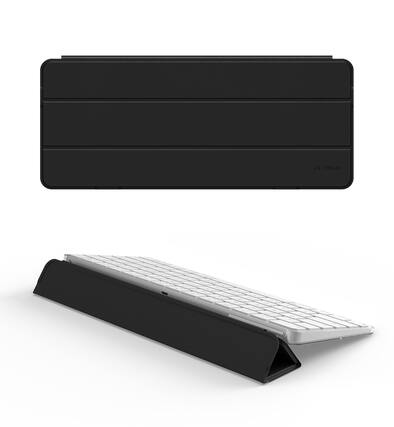
  • Front. Dexnor - Case for Apple Magic Keyboard with Touch ID/Lock Key 2021/2024, Dust-Proof Protective Slim Leather Keyboard Cover - Black.

    Dexnor - Case for Apple Magic Keyboard with Touch ID/Lock Key 2021/2024, Dust-Proof Protective Slim Leather Keyboard Cover - Black

    Not yet reviewed

    Not yet reviewed
    $29.99$2999
    Save $10
    The comparable value is Comp. Value: $39.99

    Get it by Tue, Sep 29 • FREE

Sponsored
Sponsored
Sponsored
  • Wireless and Bluetooth mice
  • Keyboards
  • Gaming mice and keyboards
  • Keyboard and mouse combos
  • Wired mice
  • Mice and keyboard deals

Outfitting your computer with a keyboard and mouse

Types of computer keyboards

Whether you are choosing a new keyboard for a desktop computer or for a laptop, you will want to consider the type of keyboard that will serve you best.

Think about uses and placement preferences when narrowing down your options. If comfort is your priority, look for an ergonomic keyboard that will provide long-term support while you are typing. When selecting an ergonomic keyboard and mouse, you will want to think about the size of your hands, which can influence what models suit you best. Sometimes, reviews offer good information about this element of fit.

If you need truly rapid responsiveness and a decisive, clicky feel for PC gaming, look at gaming keyboards. Many of these also offer a nice splash of color with RGB lighting. If you want lots of flexibility in terms of where you can place your keyboard, a wireless keyboard will serve you best. Wireless is also a good option for a keyboard you plan on transporting. If you want the most portable keyword in terms of size, look at getting a 60% keyboard.

Choosing a computer mouse

When it comes to choosing computer mice, keep in mind that you won’t be using your mouse in isolation. One of the elements that can make a mouse easier or harder to use is the mouse pad on which you put it. If you have enough space, choose a larger mouse pad so that you can move more freely without having to reset your hand. Some gaming desks even have a mousepad surface to them. For comfort, you may also enjoy using a wrist pad with your mouse.

In terms of the specific computer mouse you choose, the selection process is like choosing a keyboard: consider your activities and what will best serve them. A gaming mouse prioritizes both signal response time and physical responsivity. A wireless mouse is great for its portability and flexibility. Meanwhile, you'll find ergonomic mice with an arc shape, sculpted shape or soft rubber grips can keep your hand and wrist more supported.

If you are already looking at mice and keyboards, it might also be time to consider a stylus. Or, you can always pair a drawing tablet with any computer.