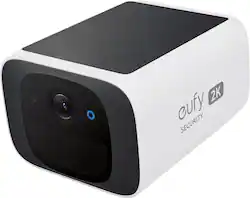
eufy - SoloCam S220 Outdoor Battery Powered Security Camera with Solar Charging - White
- Key Specs
- Video Camera Resolution: 2K (1440p) (Refers to the number of pixels, both horizontally and vertically, used to capture video/images. The higher the resolution the finer the detail that can be seen.)
- Field Of View: 135 degrees (The area of a target, measured as an angle from the location of viewing, that can be observed.)
- Night Vision: true
- Number Of Cameras Included: 1
- Camera Power Source: Battery-powered, Solar powered
- Works With: Amazon Alexa, Google Home (Compatible with or able to be connected to other smart devices or applications.)
- Wireless Connectivity: Wi-Fi (The manner in which a device sends data to another device over a short distance without the use of wires or cables.)
- Maximum Operating Temperature: 122 degrees fahrenheit (The highest recommended ambient (surrounding) temperature in which the product can ideally operate stated by the manufacturer. Generally long-term exposure of the product to temperatures more than the maximum can result in ineffective operation.)
- Storage Type: NVR
- Indoor Or Outdoor Use: Indoor and outdoor (Indicates the appropriate environment product was designed to be used in.)
- Minimum Operating Temperature: -4.0 degrees fahrenheit (The lowest recommended ambient (surrounding) temperature in which the product can ideally operate stated by the manufacturer. Generally long-term exposure of the product to temperatures less than the minimum can result in ineffective operation.)
- Audio Communication: 2-way (1-way communication devices allow a user to hear detected audio, while 2-way communication adds the ability for a user to talk back through the device.)
- General
- Brand: eufy
- Model Number: T8134121
- Product Name: SoloCam S220 Outdoor Battery Powered Security Camera with Solar Charging
- Color: White
- Camera
- Video Camera Resolution: 2K (1440p) (Refers to the number of pixels, both horizontally and vertically, used to capture video/images. The higher the resolution the finer the detail that can be seen.)
- Camera Resolution: 2304 x 1296 (Refers to the number of pixels, both horizontally and vertically, used to capture video/images. The higher the resolution the finer the detail that can be seen.)
- Effective Pixels: 3 megapixels (The actual number of pixels which make up the viewable image.)
- Field Of View: 135 degrees (The area of a target, measured as an angle from the location of viewing, that can be observed.)
- Night Vision: true
- Night Vision Distance: 32.8 feet
- Night Vision Image: Black and white
- Camera Movement: Fixed
- Zoom Mode: Digital
- Number Of Cameras Included: 1
- Day/Night Mode: true (Captures images/video with optimal clarity by automatically adjusting settings to various light levels.)
- IP Camera: true (An Internet Protocol (IP) camera is able to record and display image/video data via the internet, without need for a local recording device.)
- Image Sensor Type: CMOS (CCD and CMOS are the two main technologies used in image sensors. CCD, the older of the two types, turns analog light signals into digital pixels. This conversion happens without distortion, resulting in high-quality images. Newer CMOS sensors use transistors at each pixel to move electrical charges. CMOS sensors are typically less expensive, but also require more light to create distortion-free images.)
- Power
- Camera Power Source: Battery-powered, Solar powered
- Rechargeable Battery: true
- Battery Chemistry: Lithium-ion
- Charging Interface: USB-C
- Compatibility
- App Compatible: true (The product can be connected to a program or software application on a mobile device, which then receives collected data from the product.)
- App Features: Customize zones for recording, Filter through previously recorded events, Mounting guide, Share Device with Family members
- Compatibility: eufy Security S380 HomeBase 3
- Operating System Compatibility: Apple iOS, Android
- Works With: Amazon Alexa, Google Home (Compatible with or able to be connected to other smart devices or applications.)
- Connectivity
- Camera Connectivity: Wireless (Security system cameras can be set up in several ways. Wired cameras require cables for power and footage transmission, while wire-free cameras don't need cables for either. Wireless cameras still require cables for receiving power but are able to transmit footage via a wireless network.)
- Wireless Connectivity: Wi-Fi (The manner in which a device sends data to another device over a short distance without the use of wires or cables.)
- Network Connectivity: 2G (The manner in which a device sends data to another device over a long distance using a cellular network.)
- Maximum Wireless Range: 656 feet
- Wireless Networking Standard: Wi-Fi 4 (The wireless networking standard used by the device. Each iteration of the standard developed by the Wi-Fi Alliance corresponds to an existing IEEE 802.11 protocol; for example, standard 802.11ac (or AC) is termed Wi-Fi 5. Refers specifically to the standard the device is designed to use, but ultimately determines product interoperability and backward compatibility including previous versions.)
- Frequency Band: 2.4 GHz (Bands may be grouped into categories such as low- and high-band VHF (Very High Frequency), low- and high-band UHF (Ultra High Frequency), or certain frequency channels (measured in MHz or GHz). Generally, higher frequencies transmit information faster but have shorter range than lower frequencies.)
- Recording & Playback
- Streaming Video: true (The ability to transmit a live video feed from the product.)
- Video Recording Capability: true
- Video Recording Features: Minimize false notifications with Facial Recognition, 2K Resolution, and Night Vision
- Records Audio: true
- Subscription: Optional but not included
- Video Recording Prompt: Motion detection
- Performance
- Maximum Operating Temperature: 122 degrees fahrenheit (The highest recommended ambient (surrounding) temperature in which the product can ideally operate stated by the manufacturer. Generally long-term exposure of the product to temperatures more than the maximum can result in ineffective operation.)
- Indoor Or Outdoor Use: Indoor and outdoor (Indicates the appropriate environment product was designed to be used in.)
- Protective Qualities: Weather resistant, Water resistant
- Minimum Operating Temperature: -4.0 degrees fahrenheit (The lowest recommended ambient (surrounding) temperature in which the product can ideally operate stated by the manufacturer. Generally long-term exposure of the product to temperatures less than the minimum can result in ineffective operation.)
- Storage
- Storage Type: NVR
- Lighting
- Lighting Type: None
- Features
- Audio Communication: 2-way (1-way communication devices allow a user to hear detected audio, while 2-way communication adds the ability for a user to talk back through the device.)
- Auto-On Detection: Motion
- Mount Type: Wall mount, Ceiling mount
- Alarm Type: Audible
- Alarm Location: On camera, Separate device (not included)
- Geo-fencing: true (Indicates whether the product has a location-based capability used to determine when a device(s) being tracked is inside or outside a geographic boundary. Programmed events can be set by a user for when the tracked device is inside or outside the boundary.)
- Dimensions
- Product Height: 2.26 inches (The out of box height of the item. Height is measured as the vertical distance from the bottom of the item to the top as it would be primarily used or placed.)
- Product Width: 3.82 inches (The out of box width of the item. Width is measured as the horizontal distance from one side of the item to the other as it would be primarily used or placed.)
- Product Depth: 3.17 inches (The out of box depth of the item. Depth is measured as the distance from the front of the item to the back as it would be primarily used or placed.)
- Product Weight: 0.69 pounds (The out of box weight of the item.)
- Sensor
- Sensors: Motion sensor (Detects stimuli such as heat, light, sound, motion, or pressure and responds accordingly by operating a control or initiating a function of the device.)
- Included
- Cable(s) Included: true
- Warranty
- Warranty - Parts: 1 year
- Warranty - Labor: 1 year
- Other
- UPC: 194644131586
Upgrade your home protection and keep an eye on what is going on around your property with the 2K outdoor S220 SoloCam. Featuring built-in human detection AI, it differentiates between humans and inanimate objects allowing you to gain relevant alerts when someone is at your home and giving you detailed views of them in stellar 2K clarity. Wireless design and slim profile provide flexible installation around the hidden areas of your home such as a side door, driveway, or alley. SoloCam features an integrated solar panel for continuous battery power throughout the year. Enjoy 8GB high-speed local storage with no monthly cloud storage fees.
- Vivid 2K Resolution: Crisp, clear views in perfect detail with 2K clarity so you see highly detailed views of what's happening outside your home.
- Wireless Solar Charging: Integrated solar panel keeps the battery charged 365-days a year for a maintenance-free security experience. Requires only 3 hours of sunlight daily to keep running.
- Image Clarity During Day and Night: Infrared LEDs and an f/1.6 aperture allow you to see friends, family or unwanted guests with excellent night vision.
- Easy to Install: Compact, unobtrusive camera design can be installed in key areas around your home in just 5 minutes. Simply attach the mount anywhere thanks to the wireless design then click the camera in place for “set it and forget it” DIY installation.
- Built-in Intelligence: Smart AI identifies if a detected person is around your home - whether family, a courier, or a stranger - then alerts you. With continued learning the camera will know who's there from any angle.
- Vivid 2K Resolution: Crisp, clear views in perfect detail with 2K clarity so you see highly detailed views of what's happening outside your home.
- Wireless Solar Charging: Integrated solar panel keeps the battery charged 365-days a year for a maintenance-free security experience. Requires only 3 hours of sunlight daily to keep running.
- Image Clarity During Day and Night: Infrared LEDs and an f/1.6 aperture allow you to see friends, family or unwanted guests with excellent night vision.
- Easy to Install: Compact, unobtrusive camera design can be installed in key areas around your home in just 5 minutes. Simply attach the mount anywhere thanks to the wireless design then click the camera in place for “set it and forget it” DIY installation.
- Built-in Intelligence: Smart AI identifies if a detected person is around your home - whether family, a courier, or a stranger - then alerts you. With continued learning the camera will know who's there from any angle.
Whats Included
- 1 x eufy S220 Solar Solocam
- 1 x USB-C Cable
- 1 x Screw Mounting Base and Positioning Stickers
- 1 x Mounting Screw Set
- 2 x Quick Start Guide
- 1 x eufy S220 Solar Solocam
- 1 x USB-C Cable
- 1 x Screw Mounting Base and Positioning Stickers
- 1 x Mounting Screw Set
- 2 x Quick Start Guide
Q: What is the field of view for this camera?
A: This security camera has a 135-degree field of view.
Q: How is this camera powered?
A: This camera is powered by an integrated solar panel that keeps the battery charged year-round.
Q: Does this camera have night vision?
A: Yes, the camera has infrared LEDs and an f/1.6 aperture that allows you to see up to 32.8 feet at night.
Q: How long does it take to install this camera?
A: The manufacturer states that this camera can be installed in about 5 minutes.
Q: Can I use this camera indoors and outdoors?
A: Yes, this camera is suitable for both indoor and outdoor use.
Q: What is the video resolution of this camera?
A: The camera records video in 2K resolution (2304 x 1296).
Q: Does the SoloCam S220 connect to home LAN Wifi? PC app? Phone app? Thanks
A: The SoloCam S220 Outdoor Battery Powered Security Camera connects to a 2.4GHz WiFi network. Make sure the network SSID is not hidden, and the security protocol is set to either WPA or WPA2. It does not support connection to a 5GHz WiFi network. For app connectivity, you need to use the eufy Security app on your phone for setup and management. Currently, there isn't a PC app mentioned in the documentation for this device. To set up the camera: Fully charge the device. Use the eufy Security app, go to “Devices” > “Add Device” > select “S220 SoloCam.” Select your 2.4GHz WiFi network and enter the WiFi password. Follow the instructions to sync the camera by pressing the SYNC button and scanning the QR code on your phone screen using the SoloCam. You can then use the phone app to control and monitor the camera.
Q: What's the difference between this S220 and the C20 solocam?
A: Thank you. eufy answer totally contradicts Bestbuys description (see screenshot) I'm looking for an outdoor cam that records in a continuous loop, 8 or 12 hours like the Alfred cam app that uses old cell phones. I will cancel the c20 order. PS I am happy with my eufy video doorbell.