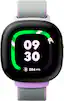
Fitbit - Ace LTE - Kids Smartwatch with In-App Calling, Messaging, GPS - Spicy - (2024)
Color
SpicyFREE shipping to
More Buying Options
Specifications
- Screen Size41 millimetersTouch ScreenYesOperating System CompatibilityAndroid, Apple iOSOperating SystemOtherApp CompatibleYesBuilt-in Storage0 gigabytes
- Key Specs
- Screen Size: 41 millimeters (Size of the screen, measured diagonally from corner to corner.)
- Touch Screen: true (Touch-screen devices make navigating more intuitive. Using a touch-screen display, you can do things such as tap to select, hold and drag to move items, swipe to scroll, and pinch to zoom.)
- Operating System Compatibility: Android, Apple iOS
- Operating System: Other (The operating system manages all software and hardware, including files, memory and connected devices. Most importantly, it lets you interact with your device and your programs in a visual way; otherwise, you'd be typing computer code to get anything done.)
- App Compatible: true (The product can be connected to a program or software application on a mobile device, which then receives collected data from the product.)
- Built-in Storage: 0 gigabytes
- Global Positioning: GPS (A system of satellites which enables a mobile receiver to determine its precise location based on signals received from satellites such as the US Global Positioning System (GPS), the Russian Global Navigation Satellite System (GLONASS), the European Global Navigation Satellite System (Galileo), or the Japanese Quasi-Zenith Satellite System (QZSS).)
- Usage Time: 16 hours (All battery claims depend on network configuration and many other factors; actual results will vary. Battery has limited recharge cycles and may eventually need to be replaced. Battery life and charge cycles vary by use and settings.)
- Metrics Measured: Activity vs. inactivity, Steps taken, Duration of exercise, Distance traveled, Stairs climbed, Other
- Protective Qualities: Water resistant, Dust resistant
- Maximum Depth of Water Resistance: 164 feet (Measurement of the maximum depth of water in which the product is able to resist some degree of water penetration.)
- Band Material: Woven
- Series: Ace (Part of a group of the same product type with similar features.)
- General
- Brand: Fitbit
- Model Number: GA05577-NA
- Product Name: Ace LTE - Kids Smartwatch with In-App Calling, Messaging, GPS
- Color: Spicy
- Product Type: Activity tracker
- Form Factor: Wristwatch (The size, arrangement, and physical configuration of the product.)
- Model Family: Fitbit Ace
- Series: Ace (Part of a group of the same product type with similar features.)
- Year of Release: 2024
- Design
- Band Color: Purple
- Display
- Display Screen: true
- Screen Size: 41 millimeters (Size of the screen, measured diagonally from corner to corner.)
- Touch Screen: true (Touch-screen devices make navigating more intuitive. Using a touch-screen display, you can do things such as tap to select, hold and drag to move items, swipe to scroll, and pinch to zoom.)
- Display Type: OLED
- Color Display: true
- Backlit Display: true (Integrated lights allow for visibility of the display in low-light conditions.)
- Screen Material: Corning® Gorilla® Glass 3
- Compatibility
- Operating System Compatibility: Android, Apple iOS
- Operating System: Other (The operating system manages all software and hardware, including files, memory and connected devices. Most importantly, it lets you interact with your device and your programs in a visual way; otherwise, you'd be typing computer code to get anything done.)
- App Compatible: true (The product can be connected to a program or software application on a mobile device, which then receives collected data from the product.)
- Connectivity
- Network Connectivity: 4G (The manner in which a device sends data to another device over a long distance using a cellular network.)
- Bluetooth Version: 5.0 (The Bluetooth specification formalized by the Bluetooth Special Interest Group. All versions of the Bluetooth standard are backwards compatible with previous versions.)
- Wireless Connectivity: Bluetooth, Wi-Fi, NFC (The manner in which a device sends data to another device over a short distance without the use of wires or cables.)
- Wireless Standard: N (The wireless networking protocol used by the device. Each iteration of the protocol is based on the 802.11 standard developed by the Institute of Electrical and Electronics Engineers (IEEE) Standards Association. Denoted by letters following 802.11 (802.11a, 802.11ac, etc.), each version, published in alphabetical order, encompasses all previous versions.)
- Features
- Built-in Storage: 0 gigabytes
- GPS Enabled: true
- Global Positioning: GPS (A system of satellites which enables a mobile receiver to determine its precise location based on signals received from satellites such as the US Global Positioning System (GPS), the Russian Global Navigation Satellite System (GLONASS), the European Global Navigation Satellite System (Galileo), or the Japanese Quasi-Zenith Satellite System (QZSS).)
- Usage Time: 16 hours (All battery claims depend on network configuration and many other factors; actual results will vary. Battery has limited recharge cycles and may eventually need to be replaced. Battery life and charge cycles vary by use and settings.)
- Mobile Notifications: true
- Alert Type: Audible, Vibration, Visual
- Mobile Payment Service Supported: Google Pay
- Silent Alarm: true
- Built-In Microphone: true
- Activity
- Metrics Measured: Activity vs. inactivity, Steps taken, Duration of exercise, Distance traveled, Stairs climbed, Other
- Sensors: Accelerometer, Altimeter, Magnetometer, Ambient light sensor, Optical heart rate (PPG) sensor, Gyro sensor (Detects stimuli such as heat, light, sound, motion, or pressure and responds accordingly by operating a control or initiating a function of the device.)
- Performance
- Protective Qualities: Water resistant, Dust resistant
- Maximum Depth of Water Resistance: 164 feet (Measurement of the maximum depth of water in which the product is able to resist some degree of water penetration.)
- Dimensions
- Product Height: 1.61 inches (The out of box height of the item. Height is measured as the vertical distance from the bottom of the item to the top as it would be primarily used or placed.)
- Product Width: 1.61 inches (The out of box width of the item. Width is measured as the horizontal distance from one side of the item to the other as it would be primarily used or placed.)
- Product Weight: 0.06 ounces (The out of box weight of the item.)
- Product Length: 1.61 inches (The out of box length of the item. Length is measured as the longest dimension of the item.)
- Minimum Wrist Size: 120 millimeters
- Maximum Wrist Size: 200 millimeters
- Size: Adjustable
- Power
- Rechargeable: true
- Charging Time: 70 minutes
- Charging Interface(s): USB-C (The connection for transmitting power to charge the device.)
- Battery Chemistry: Lithium-ion
- Material
- Band Material: Woven
- Warranty
- Warranty - Parts: 1 year limited
- Warranty - Labor: 1 year limited
- Other
- UPC: 840353907119
Know where your wild things are. Fitbit Ace LTE is the first-of-its-kind kids smartwatch designed to move the next generation of gamers.¹ Keep them active with fun games and daily goals that reward different types of movement. Collect new bands to unlock more rewards.² And with secure in-app calling, messaging, and location sharing, they’re never out of reach.³
- Independence for them. Peace of mind for you.: With advanced location technology powered by Google, you’ll know where your child is, and that they got there safe and sound.⁴,⁵
- Now they can call home, without the smartphone.: With in-app calling and messaging for up to 20 adults,³,⁶ you can contact your kids anytime using the Fitbit Ace app.⁷
- Fitbit Ace Pass. LTE data. Unlimited fun.⁸,⁹: The Fitbit Ace Pass is a data plan that gives kids access to calling, messaging, and location sharing,³ plus every game title in the Fitbit Arcade.⁸
- One app to keep everyone connected.: The Fitbit Ace app⁷ is your home base. It’s where you go to call or message your kids,³ manage and approve their contacts,⁶ see their location, and more.
- School Time. For when class is in session.¹⁰: Use this mode to limit gameplay on their watch during the day, while still letting them get in touch if they need to.
- Every move counts.: Kids do more than take steps. They jump and spin through the day. The Move Goal captures the different ways kids play in one easy-to-read snapshot.¹¹
- Move the Noodle.: Meet the Noodle, the weirdest activity ring your kids will ever close. It records movement, and celebrates with a fun animation when they reach their Move Goal.¹¹
- Active games, powered by Fitbit.: The Fitbit Arcade is full of movement-based games for every level.¹² The more they move, the farther they get through the game.
- Meet the eejie.: The eejie is the center of Fitbit Ace LTE. The more your kids move, the more goals they hit and the happier they make the eejie.¹²
- Welcome to Bit Valley.: Bit Valley is where the eejie lives, and where it can meet up with other players’ eejies.¹² Keep the eejie happy by meeting Move Goals and earning cool items for its room.¹¹
- Band together.: Every Fitbit Ace LTE Band has technology that unlocks a new haul. Keep their eejie’s house looking fresh, and help them stay active with a new Noodle and activity challenges.²
- Bump and scratch resistant. Because kids happen.: It’s made with Corning Gorilla Glass 3 and comes with a protective bumper case.¹³ So it resists dust, scratches, and endless bounces.
- Help is one tap away.: If there’s an emergency and your child needs to reach you, they can quickly access emergency contacts and Fitbit Ace LTE will automatically call you.³,⁶
- A battery that keeps on going. Just like them.: With 16+ hours of battery life, Fitbit Ace LTE keeps up with kids all day long.¹⁴ And fast charging provides 11 hours of battery life in just 30 minutes.¹⁵
Whats Included
- (1) Fitbit Ace LTE
- (1) Protective bumper
- (1) Fitbit Ace LTE Band
- (1) USB-C Fast Charging Cable
- Quick Start Guide
- Fitbit Ace Sticker Pack
Disclaimers
- ¹ Google Account and Ace Pass data plan required. Works with most phones running Android 11.0 or newer or iOS 16 or newer. Requires parent’s help and Wi-Fi access for initial setup and periodic software updates. Setup for users under 13 requires parent and child Google Accounts and parent’s use of Fitbit Ace app on parent’s compatible phone. See g.co/fitbitace/info for more information.
- ² Additional bands sold separately and may be included with some Ace Pass data plans.
- ³ Calling, messaging, and location sharing are dependent upon network connectivity and other factors or available in all areas. Ace Pass data plan required. Airplane mode disables calling, messaging and location sharing. Device is not capable of calling emergency services, another Fitbit Ace LTE device, or a phone without the Fitbit Ace app installed. Calls to landlines not available. Location sharing is available only for users with a supervised Google Account.
- ⁴ Ace Pass data plan required. Works with most phones running Android 11.0 or newer or iOS 15 or newer. Requires Wi-Fi access for initial setup and periodic software updates. Setup for users under 13 requires parent and child Google Accounts, and parent’s use of Fitbit Ace app on parent’s compatible phone. Older users require Google Account and Fitbit Ace app on user’s compatible phone. See g.co/fitbitace/info for more information.
- ⁵ Location sharing is dependent on network connectivity and other factors and may not be reliable in an emergency or available in all areas. Airplane mode disables location sharing. Location sharing is available only for users with a supervised Google Account and Ace Pass.
- ⁶ Parent must set up contacts for users with supervised Google Accounts. Contacts must have a Google Account and the Fitbit Ace app on a compatible phone.
- ⁷ Fitbit Ace app works with most phones running Android 11.0 or newer or iOS 15 or newer.
- ⁸ Fitbit Ace Pass is a paid data plan that is required to access most features. Ace Pass LTE services are not available in Alaska or US territories.
- ⁹ Compatible LTE service (included with paid data plan) not available on all carrier networks or in all areas. LTE service, speed and performance depend on many factors including, but not limited to, carrier network capabilities, device configuration, network traffic, data use, location, signal strength and signal obstruction. Roaming not included. Actual results may vary.
- ¹⁰ Supervised Google Account required.
- ¹¹ Accuracy of movement tracking may be affected by physiology, location of device and your movements and activity.
- ¹² Ace Pass data plan required.
- ¹³ Corning® and Gorilla® are registered trademarks of Corning Incorporated.
- ¹⁴ Maximum battery life is approximate and is based on testing conducted in California in 2023 on pre-production hardware and software, using default settings across a mix of talk, data, standby, and use of other features. Battery life depends on features enabled, usage, environment and many other factors. Use of certain features will decrease battery life. Actual battery life may be lower.
- ¹⁵ Based on use of in-box USB-C® Fast Charging Cable with 30W adapter (sold separately) plugged into a wall outlet. Actual results may be slower. Charging speed based on testing with fully drained device batteries. Charging testing in 2023 on pre-production hardware and software using default settings with the device powered on. Charging speed depends upon many factors including battery age and ambient temperature.
A: Hi, there. When you schedule "School Time" on a Fitbit Ace LTE to disable calls during school hours, access to games is also disabled. For more information, please visit this: https://support.google.com/fitbitacelte/answer/14963183 For any additional questions and concerns, reach us at: https://goo.gle/contactfitbit
Q: Does this watch have the capability to alert parents if the child is having a seizure in bed?
A: Hi there, Noni. Unfortunately, the Ace LTE is not able to detect seizures — it provides communication, location, and basic fitness tracking. Here’s a guide with more information: https://support.google.com/fitbitacelte/answer/14949595
Q: Does this watch offer fall detection with emergency services?
A: Thanks for asking, Marco. Unfortunately, the Ace LTE doesn’t have any kind of fall detection. Although, if a child activates the Call for help feature on their Fitbit Ace LTE, the watch contacts parents. If parents are unreachable, they receive a notification. Here’s a link with more details: https://support.google.com/fitbitacelte/answer/14956246?hl=en
A: Great questions, Lgor. You cannot turn off the games completely, but can use School time to minimize distractions by restricting access to games and Bit Valley and silencing notifications. The Ace Pass data plan enables an LTE connection that powers calling, messaging and location sharing, without needing your child to have their own phone or additional data plan. A fully charged Fitbit Ace LTE is designed to last for more than 16 hours, but may differ based on usage, network coverage, or signal strength. Check out this link with more details: https://support.google.com/fitbitacelte/answer/14949595?
Q: Can this watch be used for kids swimming ? Splash pads? is it safe to swim in?
A: Great question, SAM. The Fitbit Ace LTE is water resistant up to 50 meters (5 ATM) of water. So, you can enjoy swimming with the watch. Here’s a link with more information: https://support.google.com/fitbitacelte/answer/14965274?hl=en
Q: Do you need to insert a sim card to make calls?
A: No you do not.
Q: Can you track an activity, like a run, for distance and speed?
A: Hi, Jlb543. Fitbit Ace LTE measures a range of movement and different activities as you move throughout the day. Active Minutes are rewarded during moderate to vigorous exercise (eg. running, dancing, swimming, etc). Your Fitbit Ace LTE also records time spent in lighter exercise. This feature requires an Active Ace Pass subscription. To get more information you can verify the following link: https://support.google.com/fitbitacelte/answer/14949610
A: No video calling, just voice. It runs through an app on your phone that the watch connects to. They have a LTE service on the watch.
Compare similar products

Know where your wild things are. Fitbit Ace LTE is the first-of-its-kind kids smartwatch designed to move the next generation of gamers.¹ Keep them active with fun games and daily goals that reward different types of movement. Collect new bands to unlock more rewards.² And with secure in-app calling, messaging, and location sharing, they’re never out of reach.³

Your kiddos can explore their world with the vívofit jr. 3 fitness tracker for kids. Featuring a swim-friendly colorful display with multiple watch face options, this kid-tough tracker has a parent-replaceable battery that gets up to 1 year of battery life. With it, kids can uncover educational, globe-trotting app adventures (requires Garmin Jr. app loaded on parent’s compatible smartphone paired to vívofit jr. 3) and mini games by completing 60 minutes of daily activity. Parents can use the app on their compatible smartphone to monitor steps, estimated sleep and active minutes, manage and assign chores, set timers and even give rewards to positively reinforce good behavior. Motivate kids to keep moving with new timed activities that track estimated steps and distance. And for a little peace of mind, quickly see your child’s emergency contact phone number right on vívofit jr. 3.
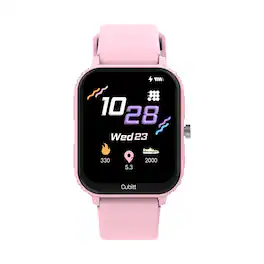

Give your routine a boost with Fitbit Charge 6 [1] the only fitness tracker with Google built in. Charge 6 has your essentials—like YouTube Music, Google Maps and Google Wallet [2]—plus the fitness tools you need to crush your goals. From staying motivated and tracking your daily progress to tuning in and taking care, running your day and your routine has never been easier.
Specs
Reviews
- Rated 4 out of 5 stars
Great child-friendly, secure smartwatch for calls
Quick Overview ================================= Smartwatches have come a long way, but what about ones for kids? They've either been relegated to fitness trackers or full-on smartwatches that parents have to lock down. The ones that were focused on kids, more often than not, had some kind of security failure that defeated the purpose of having a kid-focused smartwatch. Google (with their acquisition of Fitbit) has now entered the fray with the Fitbit Ace LTE focused on ages 7 to 11 and requiring a subscription for connectivity. You can message and call with the watch itself, so let's see how it performs. Overall build ================================= This is definitely built for kids, but don't confuse it with the earlier Fitbit Ace models that were fitness trackers. This is a more full-featured smartwatch with a great color screen, GPS, LTE, and games to keep kids entertained and engaged. The watch itself looks similar to Fitbit's adult smartwatch offerings with rounded corners and a large screen. The screen is Corning Gorilla Glass 3 and there's an included bumper (green) that came with it to help further protect the face of the watch. The sides are plastic and sensor-wise there's an array of sensors (accelerometer, altimeter, gyroscope, heart rate sensor, and more) for tracking fitness and for games. The Fitbit Ace LTE is also rated at 5ATM of water resistance, so they can certainly swim and splash around in it without fear. The band is a looped Velcro mechanism that's easy to take on and off for charging purposes, but I wish they had made it a bit harder to fully unloop the strap. More than once, we've had to catch the watch before it dropped onto the ground as they took it off to change wrists or charge it. Fitbit will sell you different colored bands with different associated digital goodies. Initial setup ================================= Yes, this Fitbit Ace LTE will require a subscription, but until the end of 8/2024, the price is half off. I think it's fair at that point since you'd expect to pay for connectivity if you need this device to make calls, communicate location, and do some messaging. The watch also has WiFi so presumably this will be used inside the house. You'll first need to download the Fitbit Ace app on your phone (parent) and start setting up the watch. Soon you'll be asked if this is for you or a child. If you already have a Google family account (I did), then you can just select a child to associate your watch with. If you don't have a Google family account setup yet, you'll be prompted to create one, then you can associate that child with the watch. After that, you can hand the watch to your child and let them set up their Eejie (a play on emoji?) which is like a Tamagotchi. Performance ================================= Each day, there are Daily Quests to keep moving and keep the Eejie happy. For kids that like virtual pets or virtual friends (ours love Tamagotchis), this should keep them entertained! There are also miscellaneous games in the Fitbit Arcade and each has a good explanation and movement involved. To unlock, your kid will have to walk around for a required amount of steps first, so if they're anything like mine, they zoomed around the house immediately to unlock them. The games are nice and movement-based. For example, Kaiju Golf and Smokey Lake (fishing) requires swinging a virtual club or casting a virtual fishing rod which helps keep your kids moving. Google says there will be new games every few months so let's see if that holds true! There is a School Time mode which you can enable to lock games. Bit Valley lets your kids design and decorate a house and earn more items to put into it. The more your child moves, the more points they'll earn, and the more things they can buy at the store. With the current variety of games, I think there's something for every child. Surprisingly, there were some text-heavy, Q&A style games that may not have been the best idea on a small screen. Battery-wise, don't expect this to last more than a day. I suppose that's why there's no sleep tracking in it. Depending on activity, gaming, and other usage, our watch is usually on its last legs by 8pm or so. Charging is fairly simple, but I think it could have been made foolproof. Yes, there is a bit of a diagram attached to the cord, but why not make it impossible to connect incorrectly? Calling and messaging work fine but with a caveat: You'll both need the Fitbit Ace app installed on your devices (my phone and my child's phone that I set the watch to pair to). Why? Because that's where approved contacts are listed. No adding from contacts on the phone or Google contacts. You'll need to add contacts and confirm them so you can connect safely. We've tested this while out and about and I'm honestly a bit impressed that the phone functionality is as good as it is on a child's device. Messaging works as you'd expect (through the Fitbit Ace app) via speech to text or swiping on the tiny keyboard. You can also send a pre-recorded voice message directly from the watch itself. Location works well also after a brief delay. Your parent's app will show their location data on a map view but there are no geofencing alerts to notify you if/when they enter/leave certain areas. Google Wallet payment is supposedly coming soon (so there's NFC) and I suppose there's a chance that sleep tracking could be added in the future. I don't mind that they don't have it currently since they sleep well enough and it's one less temptation for them at bedtime. Conclusion ================================= Overall, this may be the best kids' smartwatch offering out there now. Instead of using an adult's smartwatch, having a purpose-built device with an app to match may be superior. I certainly think it is. I wish I did have a bit more fitness stats and tracking of activity (like in my current Fitbit), but I suppose as our children, we already know a lot about what they're doing. This is more for communications in an emergency or other scenario and for that, this performs really well. Price-wise, this is up there with an older "proper" smartwatch, but Google is committing to a 3+ year support program on software and new games every 3 months. Let's hope that's true! With a cellular-connected smartwatch, you'll need to typically pay for coverage anyway, so I think at this price, it's a fair deal for a kid-focused smartwatch. If your child falls into the 7-11 age range that this is focused on, I think they'll really enjoy it and you'll feel secure knowing you have connectivity options that can't be easily bypassed. Perhaps it's still new, but the kids really do love the watch, playing the games, and exploring new things so perhaps that's a bit more screentime than I'd prefer, but overall it's a great, child-friendly smartwatch.
This review is from Fitbit - Ace LTE - Kids Smartwatch with In-App Calling, Messaging, GPS - Spicy - (2024)
Posted by Kaizoku
- Rated 5 out of 5 stars
Fun Fitness Tracker for Kids
This is my first FitBit product and first kid’s wearable. I got the colorful ‘Spicy’ version with the green and purple band (Moovin’), green bumper watch face guard, white trim, and green home button. The watch face is slightly smaller than a men’s watch face but could easily be used by an adult if desired. It’s a bit heavy for a kid though, and I was surprised at how warm it gets while charging though not while wearing it. The hook and loop adjustable watch band snaps into the bottom of the watch face and loops through a bracket at the top. Just be sure that the band is tight enough so that the back of the watch has constant skin contact with the wrist for accurate biometric measurements. You’ll need to purchase an Ace plan (monthly or yearly) which includes Fitbit Arcade and a 4G LTE data plan with unlimited calls and texts as well as GPS positioning. The watch comes with a proprietary magnetic charger that has a USB-C connector but does not come with a wall adapter. The charger has four contact points which are oriented with a ‘+’ and ‘-,’ so the watch can only be charged in one specific direction. It does, however, charge quickly in just over an hour. A full charge will last around 16 hours depending on usage habits, so I recommend charging the watch every night. Spec-wise it runs on a Snapdragon W5 chip, 2 GB RAM, with 32 GB of storage and for tracking data has an optical heart rate sensor, accelerometer, gyroscope, altimeter, and ambient light sensor Setting up the watch was pretty straightforward. You’ll need the FitBit Ace app on a mobile device and a Google account. I created a new supervised child account linked to mine for the watch. After that I was able to set up parental controls like “school time” hours, location sharing, and manage trusted contacts. You can set up any contact as a parent by assigning parental permissions in Family Link, but be aware that you can only have two parents at a time per supervisory account. However, the FitBit Ace can have up to 20 contacts, and you can swap parental control at any time. Note that contacts must use the FitBit Ace mobile app and have a Google email address to call or message the watch. As a watch, it’ll show you the time but not the date; the font for the watch time is customizable. There's a built-in microphone for calls and sending voice messages, and it also supports voice-to-text typing. I find this useful as the on-screen keyboard can feel a tad cramped, even for kid fingers. You can also send pre-set quick messages and emojis but not photos, and there are sent/delivered/read receipts. For accessibility, the text on the screen can be enlarged or you can enable a magnification mode via a triple-tap. The screen can be locked via a PIN or a swipe pattern. If your child forgets their passcode, you can unlock the watch with a parental PIN from the mobile app. The watch is waterproof to 50 meters deep and our 8-year-old had no issues with using it in the diving well of the pool. The bumper works well for protecting the edges of the watch face but can feel a little bulky and provides no extra protection for the OLED screen. It is Gorilla Glass 3 though so should be resistant to short drops and scratches. The Moovin' watch band is made of nylon fabric and dries kind of slowly after getting wet which I found slightly uncomfortable. The hook and loops can also catch easily on fluffy fabrics when the band is undone. When setting up the watch, your child will create an ‘eejie,’ a digital avatar, whose physical features can be customized including clothing, and accessories. This eejie will represent your child in BitValley, the arcade section on the watch. Your child can change the ‘points’ goal for each day based on the amount of physical activity they expect to complete: 45, 60 or 75 active minutes. The goal is tracked on-screen via the ‘noodle,’ which is an animated progress bar, customizable with different skins like a snake, robot arm, or hot dog. Meeting your goal will earn a certain amount of tickets, the in-game currency used in BitValley, with higher goals earning more tickets. Attaching a new band will also reward the user with new digital items. Games in the arcade are only available after completing activity goals like learning about the watch and movement goals like completing a certain number of steps. The games are also physically engaging and consist of interactive 3D environments that require your child to move around in order to navigate them. For example, the fishing game requires you to throw out your arm while wearing the watch in order to ‘cast’ the line, then bring your arm back in quickly to reel in your catch. Haptic feedback vibrates the watch for notifications and in-game prompts. To progress in games, your child will need to continue to complete activity goals to reach higher levels. Ticket can be used to purchase digital items used to furnish and decorate their eejie’s rooms. I appreciate that the games have no ad breaks or any sort of advertising. Some parental controls are available like real-time GPS location tracking which has pinpoint accuracy within a few yards when you enable the ‘location accuracy’ setting, ‘Find my device’ which plays an audible tone through the watch’s speaker, and setting up a ‘school schedule,’ even on weekends, for controlled screentime; note that the watch will also not ring, receive incoming calls, or notify your child when a message is received during 'school hours.' They will still be able to call and message emergency contacts, if needed, but not emergency services directly. Parents can view and monitor their child’s physical activity recorded by the watch categorized as steps, light, and active. As for personal privacy, the watch does not send health data to Google and it gets purged after a month. Location history is deleted after one day, and you are not able to download and install 3rd-party apps from the Google Play store to the watch. One feature that is not yet available, but ‘coming soon’ is the ability to connect Google Wallet and give your child an allowance for spending since the watch has NFC. That will allow your child to make purchases with the watch using ‘tap to pay’ with real-time spending notifications for parents. One thing I felt was missing from the watch is a calendar, if only for your child to see what day it is, as the date doesn’t appear anywhere on the watch. I also think this feature would be useful for parents for setting up reminders and pop-up notifications allowing your child to stay on top of activities, events, and daily tasks. You can, however, set up a timer and alarm (one-time or daily) as well as use a stopwatch feature on the watch. Overall, I think the FitBit Ace LTE is a great kid-focused device that’s part smart watch, part fitness tracker. The goals and games are a great way to motivate and get kids excited about physical activity and our 8-year-old is really enjoying wearing and using it. For parents, it lets you stay connected to your child so you can view their physical activity history, call or message them away from home, and see their location giving you peace of mind as your child starts to explore their independence.
This review is from Fitbit - Ace LTE - Kids Smartwatch with In-App Calling, Messaging, GPS - Spicy - (2024)
Posted by ReviewedByPhil
- Rated 5 out of 5 stars
Fun features, great tech and parent piece of mind
For several years we have had children’s LTE smart watches for our little ones, starting at around 4 years old, that provided us means to contact each other while apart as well as track their location in case they got separated. However, we experienced several issues with the ones we were using including depleting battery life and our children losing interest in wearing them as they grow older and it was time to consider other options. We didn’t think they were old enough yet to jump straight into the adult smart watch market and wanted something that still sparked our children’s interest since they are only a couple years older now. Fortunately, the latest Google Fitbit Ace LTE smart watch released just in time and had everything we were looking for in a children’s smart watch and even more than we could imagine. As soon as we caught wind of the new Fitbit Ace watch, it immediately had my interest as I have been a fan of Google’s innovation for years and couldn’t wait to see how they reinvented the smart watch with a specific focus on children’s interests as well as keeping in mind what parents might want for their children. I immediately noticed they had a couple of color options including the “Spicy” color which appears to be a neat blend of teal and light purple which I knew both our girls would want because they are both spicy. The Ace watch bezel measures approximately 41mm x 44mm, weighs approximately 28 grams without the band and comes with a 120mm-200mm round comfort stretch recycled yarn hook and loop band. Not only is the Ace made with Corning Gorilla Glass 3 providing screen scratch protection, but it also conveniently comes with a matching soft bumper style bezel protector since we all know children like to play rough and can imagine what toll this could take on any type of fragile technology. The watch is also IP68 water resistance rated so you have piece of mind when your child decided to get in the shower or jump in the pool with it on. Because of its size, the battery only lasts about 16 hours with use meaning you’ll have to get in the routine of charging it overnight. After a quick initial charge with the included magnetic charger, we were all chomping at the bit to see what fun the Ace had to offer. After booting the watch up for the first time, I was taken back by the vibrant colors and brightness of the screen with colorful animations already giving us a sense of what fun the watch had in store. The Ace had simple walk-through steps for set up including downloading the Fitbit Ace smart phone application to the parent’s or care taker’s phone(s). Once the watch is activated and paired to the parent app, it takes you through a tour of what the watch can do, what the buttons are for and other features. The parent app allows you to add up to 20 contacts for calling and messaging specific, parent approved, contacts, GPS location, activity tracking and the option to add “school time” restricting access during specific times of the day. The initial tour provides the parent and child simple and easy to understand features including required milestones such as steps taken, button pushes, etc. before you are able to get into the more advanced features such as the fun games. This had my daughter bouncing around the house to meet those initial milestones while the watch was tracking her movements and steps which was already fun in itself. We could see her look of accomplishment as the watch congratulated her on succeeding each achievement including the main screen “Noodle” that wraps around the bezel while actively moving to her goal of closing the activity ring. After the initial milestones were met, which didn’t take long, the watch introduced us to the numerous games it had to offer including fishing, golfing, dancing and racing through space. The games can be accessed by simply pushing the lower green button on the watch which takes you right to the games page. During the games, the watch is able to identify specific user movements such as casting a fishing line or swinging a golf club while providing very vibrant and colorful animations. Each game had different activities, movements and goals to achieve which gave her digital rewards and accolades. There are already six games offered in the watch and you can track their movements in the parent app. The Ace also sent push notifications, if allowed, to our phones when she met certain goals such as their step count, activities, heart rate, etc. As she met specific goals throughout the day, it provided her virtual points she could redeem to style and decorate her virtual room and “eejie” which is their digital customizable avatar. For even more creativity, if you decide to switch out the watch band, it will unlock a themed “Bit Valley” mini store that can level up the eejie’s house. All-in-all, everything about the new Fitbit Ace watch has sparked and sustained our daughter’s interest in being active as well as giving us the piece of mind she will wear and use the watch while we are also able to remain in contact with her during her summer activities away from home and track her GPS location in the event of an emergency. We would recommend it to anyone in the market for a fun, easy to use smart watch at an affordable price and easy for children to understand.
This review is from Fitbit - Ace LTE - Kids Smartwatch with In-App Calling, Messaging, GPS - Spicy - (2024)
Posted by Grouticus