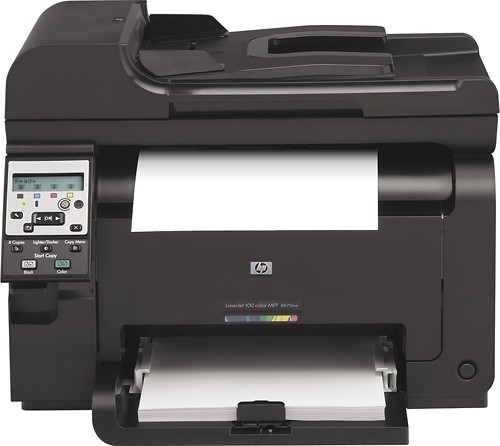
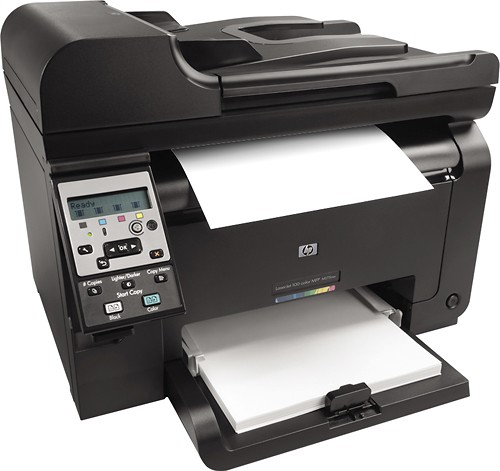
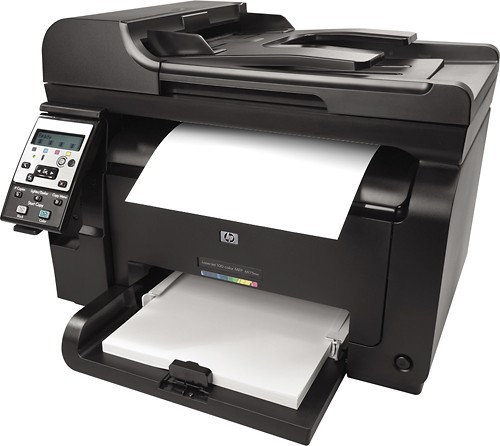
HP - Laserjet Pro 100 MFP M175nw Network-Ready Wireless Color All-In-One Printer
This item is no longer available in new condition.
See similar items below.
Description
Features
From our expanded online assortment; not available in all Best Buy stores
Prints up to 17 ppm* in black, up to 4 ppm* in color
To generate documents quickly.
3-in-1 functionality
Prints, copies and scans for all-in-one convenience.
HP ImageREt 2400 resolution technology
Delivers impressive color accuracy and precise detail.
Network-ready with built-in 10/100Base-TX Ethernet interface
Plus wireless 802.11b/g/n for simple Internet connections.
600MHz processor and 128MB memory
For improved performance when printing complex documents.
Up to 600 x 600 dpi color and black resolution
For crisp images.
Produces 4" x 6", 5" x 8", 8.5" x 13", letter, legal, executive and envelope sizes
To suit your business and personal printing needs.
Supports ePrint technology
For direct printing from most mobile devices.
Copies up to 17 cpm* in black, up to 4 cpm* in color
To generate copies quickly.
Copy resolution up to 300 x 300 dpi in color and black
For clear, clean copies.
Flatbed scanner with 30-bit color
Plus a scan resolution up to 1200 dpi to reproduce exact colors and large documents.
LCD-backlit display
Lets you adjust settings and select operations.
35-page automatic document feeder
Prints documents without reloading for unattended use.
Auto-off technology
Along with instant-on and instant-copy technology for eco-friendly use.
High-speed USB 2.0 interface
For flexible connectivity with PC and Mac.
*Print speeds vary with use. See manufacturer for info on print speeds.
What's Included
HP Laserjet Pro 100 MFP M175nw Network-Ready Wireless Color All-In-One Printer
HP Laserjet introductory black, cyan, yellow and magenta ink cartridges
Power cord, USB cable
Software CD-ROM
Owner's manual
Other
- Assembly RequiredNo
- Energy Star CompatibleNo
- <a href="javascript:winopengld('1087340571468','pcmcat38200050027','cat12080')">Print Speed (B&W)</a>Up to 17 ppm (Print speeds vary with use. See manufacturer for info on print speeds.)
- <a href="javascript:winopengld('1087340571541','pcmcat38200050027','cat12080')">Print Speed (Color)</a>4 ppm
- <a href="javascript:winopengld('1087340571577','pcmcat38200050027','cat12080')">Black Printer Resolution</a>Up to 600 x 600 dpi
- <a href="javascript:winopengld('1087340571611','pcmcat38200050027','cat12080')">Color Printer Resolution</a>Up to 600 x 600 dpi
- <a href="javascript:winopengld('1087340571658','pcmcat38200050027','cat12080')">Media Types</a>Bond, brochure, color, glossy, letterhead, photo, plain, preprinted, prepunched, recycled and rough paper, transparencies, labels, envelopes and cardstock
- <a href="javascript:winopengld('1087340571708','pcmcat38200050027','cat12080')">Media Sizes</a>4" x 6", 5" x 8", 8.5" x 13", letter, legal, executive and envelope
- <a href="javascript:winopengld('1087340571743','pcmcat38200050027','cat12080')">Input Paper Capacity</a>Up to 150 sheets
- <a href="javascript:winopengld('1087340571783','pcmcat38200050027','cat12080')">Output Paper Capacity</a>Up to 50 sheets, up to 50 transparencies, up to 10 envelopes
- <a href="javascript:winopengld('1087340571817','pcmcat38200050027','cat12080')">Memory</a>128MB
- <a href="javascript:winopengld('1087340571851','pcmcat38200050027','cat12080')">Type of Interface</a>USB 2.0
- <a href="javascript:winopengld('1087340572011','pcmcat38200050027','cat12080')">Fonts/Typefaces</a>80 TrueType internal scalable HP PCL 6, 79 internal scalable postscript
- <a href="javascript:winopengld('1087340572115','pcmcat38200050027','cat12080')">Total Ink Tanks/Cartridge</a>1 black, 1 cyan, 1 magenta, 1 yellow (included)
- <a href="javascript:winopengld('1087340572271','pcmcat38200050027','cat12080')">Print Quality</a>For documents
- PC-Free PrintingYes
- <a href="javascript:winopengld('1087340809469','pcmcat38200050027','cat12080')">Duty Cycle</a>Up to 20,000 pages/mo.
- Paper FeederTray loader
- <a href="javascript:winopengld('1087340809515','pcmcat38200050027','cat12080')">Networking Capabilities</a>Wireless LAN (802.11b/g/n); Ethernet
- <a href="javascript:winopengld('1087340809619','pcmcat38200050027','cat12080')">Scanner Resolution (dpi)</a>Up to 1200 dpi optical
- <a href="javascript:winopengld('1087340809653','pcmcat38200050027','cat12080')">Bit Depth</a>30
- Scanner TypeFlatbed
- <a href="javascript:winopengld('1087340809696','pcmcat38200050027','cat12080')">Scan Method</a>Flatbed
- <a href="javascript:winopengld('1087340809730','pcmcat38200050027','cat12080')">Copier Resolution (dpi)</a>Up to 300 x 300 dpi in black and color
- <a href="javascript:winopengld('1087340809772','pcmcat38200050027','cat12080')">Copier Speed (B&W)</a>Up to 17 cpm (Copier speeds vary with use. See manufacturer for info on copier speeds.)
- <a href="javascript:winopengld('1087340809806','pcmcat38200050027','cat12080')">Copier Speed (Color)</a>Up to 4 cpm (Copy speeds vary with use. See manufacturer for info on copier speeds.)
- <a href="javascript:winopengld('1087340809851','pcmcat38200050027','cat12080')">Multiple Copies</a>Up to 99
- <a href="javascript:winopengld('1087340809918','pcmcat38200050027','cat12080')">Reduction/ Enlargement</a>25-400%
- <a href="javascript:winopengld('1087340809999','pcmcat38200050027','cat12080')">Automatic Document Feeder</a>Yes
- Document Feed Type and CapacityAutomatic; 35 pages
- Minimum System RequirementsPC: 233MHz Intel® Pentium® processor; Windows XP, Vista or 7; 500MB hard drive space; 512KB RAM; Mac: PowerPC G4, G5 or Intel® Core™ processor; OS X 10.5.8 or 10.6; 300MB hard drive space; 256MB RAM; USB port; CD/DVD-ROM drive
- Wireless NetworkingYes
- <a href="javascript:winopengld('1218870374819','pcmcat38200050027','cat12080')">ENERGY STAR Certified</a>Yes
- UPC885631718063
Customer reviews
Rating 4.2 out of 5 stars with 25 reviews
(25 customer reviews)to a friend
Customers are saying
Customers are pleased with the print quality, noting crisp, sharp prints and rich colors, especially for photos. The ease of setup and wireless functionality are also frequently praised. However, some users experienced difficulties with the scanning feature, particularly when connecting to a Mac. Overall, the positive feedback on printing capabilities outweighs the negative comments regarding scanning.
This summary was generated by AI based on customer reviews.
- Pros mentioned:Print quality, Wireless
Rated 5 out of 5 stars
Great for personal or small office
||Posted .This reviewer received promo considerations or sweepstakes entry for writing a review.Purchased this for personal use and for my home business. It replaces an old inkjet that I just kept going through ink cartridges every time I would print. Have printed over 200 pages of B/W and the toner level still has not moved. Nice crisp print quality for printing and faxing. Also love the wireless blue tooth printing and use the hp-eprint quite often with my iPad
I would recommend this to a friend - Pros mentioned:Print quality
Rated 4 out of 5 stars
An easy to setup and use printer that prints great
||Posted .This reviewer received promo considerations or sweepstakes entry for writing a review.Very fast setup and prep, connect to USB to get software installed, then easy setup for wired or wireless networking. OCR works great and auto document feeder works flawlessly. Color prints look very good with rich color.
I would recommend this to a friend - Pros mentioned:Print quality
Rated 4 out of 5 stars
Good Multipurpose that prints and scans great
||Posted .This reviewer received promo considerations or sweepstakes entry for writing a review.We had a HP color laser before that lasted three years on its included cartridges, but adding a scanner would have met our needs better. This MFP does just that! I spent a little more than i wanted, but the value is still good. Haven't tried the Fax, and probably won't. The scanner works well, and seems to take clean images. Prints come out sharp too. Colors may not be a perfect match to the screen, but i don't notice enough of a difference to worry about it. This printer also seems to use a lot less power than the last one did. Startups don't knock out the breaker any more.
I would recommend this to a friend - Pros mentioned:WirelessCons mentioned:Scanning
Rated 5 out of 5 stars
Nice printer
||Posted .This reviewer received promo considerations or sweepstakes entry for writing a review.I've been very pleased with this printer except for trying to set up a wireless network (on an iMac) The wifi setup recognizes the printer but will not recognize the document scanner. With ethernet everything is wonderful. I had a number of ink jet printers from different manufacturers and despite the fact that I generally have extremely low volume printing needs, either the cartridges were dried out or empty several times a year (just when I needed to print something really important) for yet another $60 buck or so. I will never go back to ink jet printers.
I would recommend this to a friend Rated 3 out of 5 stars
HP is NOT helping Best Buy
||Posted .This reviewer received promo considerations or sweepstakes entry for writing a review.IF you can buy a printer with similar features from a STORE that you can return defective merchandise to … instead of having to deal with a ‘farmed out’ support department … do it! The printer I purchased was defective out of the carton (frequent paper jams) and dealing with their support team is about the most frustrating thing I’ve had to do in my life … and I deal with sales people and emergency situations ALL day at my job! I have no intention of learning a foreign language for each product I buy! After multiple calls they finally decided to ‘replace’ the unit …but with a REFURBISHED printer even though I paid for a NEW one that NEVER worked When I received the ‘replacement’ it never was recognized by my PC … even though the original one loaded fine on the first try! After MANY calls to HP … frustrated … I decided to return the ‘replacement’ unit and simply put up with the paper jams with the original unit. Next time I will call a company’s support team BEFORE purchasing their product to see if they are capable of understanding the same language I use! While the process with Best Buy was fairly uncomplicated … it left me very discouraged to purchase ANYTHING off line that cannot be returned to a local store.
No, I would not recommend this to a friendRated 3 out of 5 stars
Nice quality in a compact printer
||Posted .This reviewer received promo considerations or sweepstakes entry for writing a review.I was running out of room in my small home office and looking for ways to reduce clutter and organize the space for better functionality. The HP Laser Jet color MFP M175nw fits the bill for that purpose. I was disappointed though at the paper tray. My previous printer paper tray stored paper and had a lid to feed envelopes and other types of paper (letterhead, for example) without having to remove the paper. This printer doesn't have that ability--you have to take all the paper out, reset the width, insert the printing media, then reset everything. it's kind of a pain, but not a huge problem for me. The printer is also a lot slower than the HPLJ 2605dn; not a huge downside for me, but the difference is noticeable. The trade-off for less clutter in my home office and more space for working on projects makes this an acceptable choice.
I would recommend this to a friend- Pros mentioned:Print quality
Rated 5 out of 5 stars
Best printer I've owned
||Posted .This reviewer received promo considerations or sweepstakes entry for writing a review.This printer is nice as it has the document feeder so you can scan multiple pages quickly and efficiently. Love the print quality and the speed. For the price its not bad and I recommend it to anyone with a home network or small business.
I would recommend this to a friend - Pros mentioned:Ease of use, Print quality
Rated 5 out of 5 stars
Great printer for the home
||Posted .This reviewer received promo considerations or sweepstakes entry for writing a review.Great product at a reasonable price. Easy to set up and prints high quality color pictures at a snap. Highly recommend this product for everyone.
I would recommend this to a friend
Q: QuestionDoes this printer come with toner?
Asked by Anonymous.
- A:Answer Yes it does come with ink cartridge already installed. All you do is remove the protective strips.
Answered by HPMPPrinter
Q: QuestionIs this a real laser printer, it says It comes with ink not toner?
Asked by BK.
- A:Answer This is a LaserJet printer and comes with 1 black, 1 cyan, 1 magenta, and 1 yellow toner cartridge.
Answered by HP Team

Q: QuestionDoes it have auto duplex and booklet printing?
Asked by GreatUncleGuy.
- A:Answer Unfortunately, this printer does not support auto duplexing or booklet printing.
Answered by HP Team
Q: QuestionWhat are the model numbers for replacement toner cartridges?
Asked by Anonymous.
- A:Answer This printer uses the following toner cartridges: HP 126A Black LaserJet Toner Cartridge (CE310A) HP 126A Cyan LaserJet Toner Cartridge (CE311A) HP 126A Yellow LaserJet Toner Cartridge (CE312A) HP 126A Magenta LaserJet Toner Cartridge (CE313A)
Answered by HP Team
Q: QuestionHow long will a set of new toner cartridges last?Based on normal conditions/use.
Asked by Sebastian.
- A:Answer The HP 126A Black LaserJet Toner Cartridge will yield apprximately 1200 pages and the HP 126A Cyan, Yellow, and Magenta LaserJet toner Cartridges will yield approximately 1000 pages each.
Answered by HP Team
Q: QuestionIs This Printer Limited By CPU Architecture?Our current (3-year-old) HP multi-function printer scan software supports 32-bit Vista but not 64-bit? Is this one similarly limited? Also, does it scan to a computer via wireless?
Asked by Anonymous.
- A:Answer This printer is fully compatible with 32-bit and 64-bit Windows 7 and Windows Vista as well as 32-bit Windows XP for all of its features. It can also scan wirelessly to a PC.
Answered by HP Team
Q: QuestionWireless printing?Does this printer print wirelessly?
Asked by Anonymous.
- A:Answer Yes, this printer includes built-in wireless connectivity.
Answered by HP Team